
1. Pengenalan
This manual provides essential information for the safe and effective operation of your DJI Mavic 3 drone. The DJI Mavic 3 is a high-performance camera drone featuring a dual-camera system, including a 20MP wide-angle Hasselblad camera with a 4/3" CMOS sensor and a 12MP telephoto camera with a 1/2" CMOS sensor. It is designed for professional-quality aerial imaging, offering 5.1K video capabilities, omnidirectional obstacle sensing, and extended flight times.
Please read this manual thoroughly before operating the aircraft to ensure proper usage and to prevent damage or injury. Keep this manual for future reference.
2. Maklumat Keselamatan
Operating the DJI Mavic 3 requires adherence to safety guidelines to prevent accidents and ensure legal compliance. Always prioritize safety during flight operations.
- Semakan Pra-Penerbangan: Before each flight, inspect the drone, propellers, battery, and remote controller for any damage or abnormalities. Ensure all components are securely attached.
- Persekitaran Penerbangan: Fly in open areas, away from people, buildings, and obstacles. Avoid flying near airports, power lines, or in restricted airspace. Check local regulations before flying.
- Keadaan Cuaca: Do not fly in strong winds, rain, snow, or fog. Optimal flight conditions are clear and calm.
- Keselamatan Bateri: Use only genuine DJI batteries and chargers. Do not overcharge or discharge batteries. Store batteries in a cool, dry place.
- Kekalkan Garis Penglihatan: Sentiasa pastikan dron dalam jarak penglihatan visual anda semasa penerbangan.
- Hormati Privasi: Be mindful of privacy concerns when operating the drone, especially when recording video or taking photos.
- Prosedur Kecemasan: Familiarize yourself with the Return to Home (RTH) function and emergency stop procedures.
3. Kandungan Pakej
Verify that all items are present in your package. If any items are missing or damaged, contact your retailer or DJI support.

Image: DJI Mavic 3 drone and included accessories.

Imej: Terperinci view of various accessories.
Item Termasuk Pengeluar:
- DJI Mavic 3 Aircraft
- Alat Kawalan Jauh RC-N1
- Bateri Penerbangan Pintar
- 3 x Pair of Low-Noise Propellers
- Pengecas Mudah Alih 65W
- Penutup Penyimpanan
- RC-N1 Remote Controller Sticks (Pair)
- RC-N1 Remote Controller USB Type-C Cable
- RC-N1 Remote Controller Micro-USB Cable
- RC-N1 Remote Controller Lightning Cable
- Kabel Jenis-C USB
Bundle Items (if applicable):
- Sandisk Extreme Pro 64GB Micro SDXC Card
- Pro Sling Backpack
- Pembaca Kad Memori
- Kit Pembersihan
- Dompet Kad Memori
4. Produk Lebihview
The DJI Mavic 3 integrates advanced technology for superior aerial photography and videography. Key components and features are outlined below.
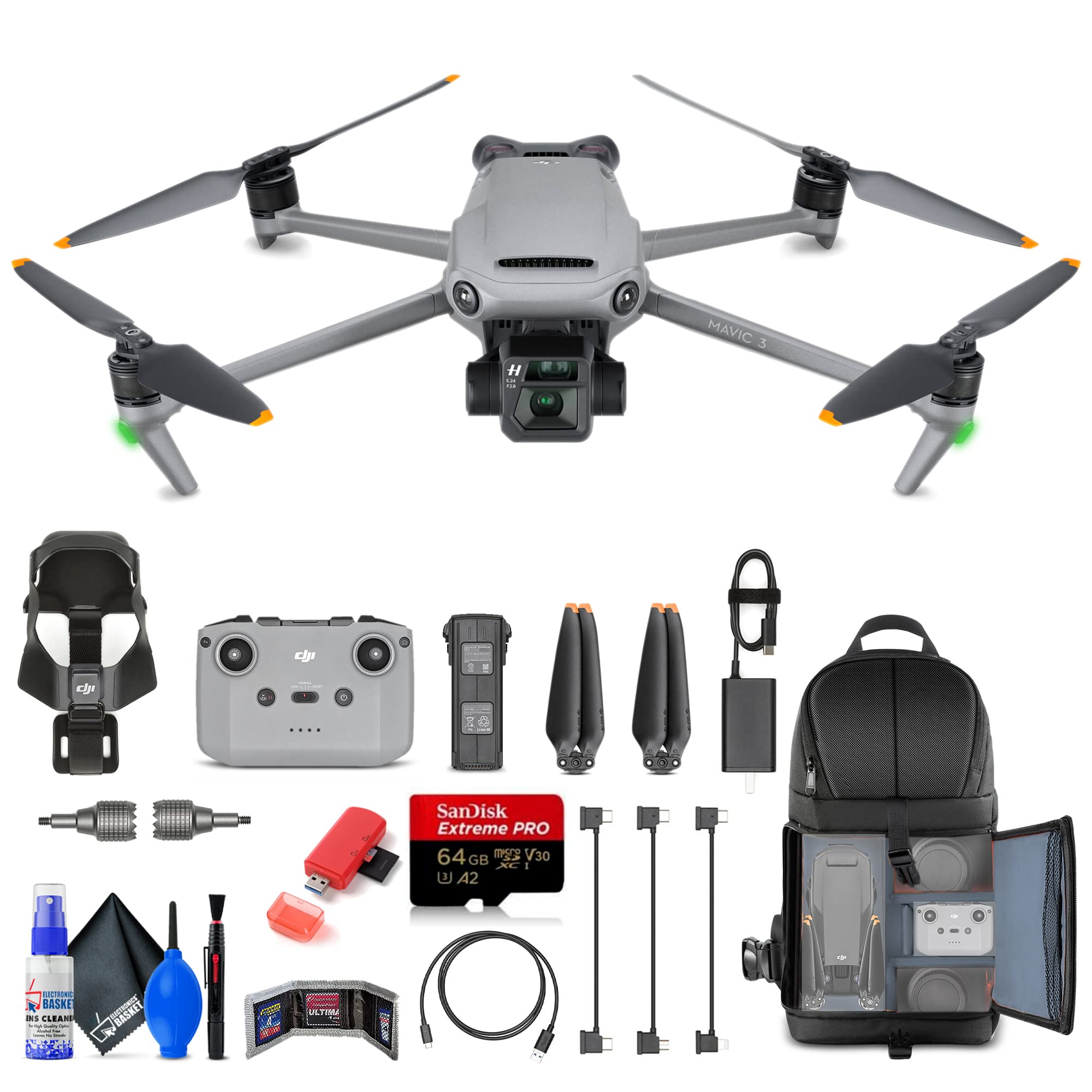
Image: DJI Mavic 3 unfolded, ready for flight.

Image: DJI Mavic 3 in its folded, compact state.
Aircraft Features:
- Sistem Kamera Dwi: Features a 20MP 4/3" CMOS Hasselblad wide-angle camera capable of 5.1K video, and a 12MP 1/2" CMOS telephoto camera with 28x hybrid zoom.
- Gimbal 3-Axis: Provides stable footage and precise camera control.
- Penderiaan Halangan Omnidirectional: Multiple wide-angle vision sensors detect obstacles in all directions, enabling the drone to plan safe flight routes.
- Masa Penerbangan Lanjutan: Up to 46 minutes of flight on a single charge.
- Advanced Auto Return (RTH): Automatically plans the optimal route back to its home point, considering wind speed and power consumption.
- OcuSync 2.0 Transmission: Offers a transmission range of up to 9.3 miles (15 km) for reliable video feed.
- 10-Bit D-Log Color Profile & HNCS: For professional-grade color grading and natural color reproduction.
- Storan Dalaman: 8GB of internal storage space.
Remote Controller (RC-N1):
The RC-N1 remote controller provides intuitive control over the aircraft and camera. It connects to your smartphone for live video feed and advanced settings via the DJI Fly app.
Image: RC-N1 Remote Controller.
5. Persediaan
Follow these steps to prepare your DJI Mavic 3 for its first flight.
5.1 Mengecas Bateri
- Connect the 65W Portable Charger to a power outlet.
- Connect the Intelligent Flight Battery to the charger using the provided USB Type-C cable.
- Charge the RC-N1 Remote Controller using its respective USB cable.
- Ensure both the flight battery and remote controller are fully charged before flight.
5.2 Memasang Baling-baling
- Buka lipatan lengan dron.
- Match the propellers with the corresponding motor mounts. Propellers with orange marks should be attached to motors with orange marks. Propellers without marks attach to motors without marks.
- Press the propeller down onto the motor mount and rotate in the lock direction until it is secure.
- Verify that all propellers are securely attached and free from damage.
Image: DJI Mavic 3 with propellers correctly installed.
5.3 Installing the Flight Battery
- Pastikan Bateri Penerbangan Pintar dicas sepenuhnya.
- Slide the battery into the battery compartment on the rear of the aircraft until it clicks into place.
- Gently pull on the battery to ensure it is securely locked.
5.4 Persediaan Alat Kawalan Jauh
- Pasang kayu kawalan pada alat kawalan jauh.
- Pull out the mobile device holder and attach your smartphone.
- Connect your smartphone to the remote controller using the appropriate RC cable (USB Type-C, Micro-USB, or Lightning).
- Download and install the DJI Fly app on your smartphone.
6. Operating the DJI Mavic 3
This section covers basic flight operations and camera controls.
6.1 Menghidupkan/Mematikan
- Untuk Menghidupkan: Press the power button once, then press and hold for two seconds. The battery level indicators will light up.
- Untuk Mematikan: Press the power button once, then press and hold for two seconds.
6.2 Berlepas dan Mendarat
- Pelepasan Automatik: In the DJI Fly app, tap the auto takeoff icon and confirm. The drone will take off and hover at a safe altitude.
- Berlepas Manual: Push both control sticks to the bottom inner or outer corners to start the motors. Slowly push the left stick (throttle) up to ascend.
- Pendaratan Automatik: In the DJI Fly app, tap the auto landing icon and confirm. The drone will land automatically.
- Pendaratan Manual: Slowly pull the left stick (throttle) down to descend. Once landed, push both sticks to the bottom inner or outer corners to stop the motors.
6.3 Flight Controls (Mode 2)
| Tongkat kawalan | Pergerakan | Fungsi |
|---|---|---|
| Tongkat Kiri | Atas/Bawah | Ascend/Descend (Throttle) |
| Tongkat Kiri | Kiri/Kanan | Putar Kiri/Kanan (Yaw) |
| Tongkat Kanan | Atas/Bawah | Forward/Backward (Pitch) |
| Tongkat Kanan | Kiri/Kanan | Left/Right (Roll) |
6.4 Operasi Kamera
- Menukar Kamera: Use the DJI Fly app to switch between the Hasselblad wide-angle camera and the telephoto camera.
- Foto/Video: Use the dedicated buttons on the remote controller or the app interface to capture photos or start/stop video recording.
- Kawalan Gimbal: Use the gimbal dial on the remote controller to adjust the camera's tilt angle.
- Zum: The telephoto camera offers 28x hybrid zoom, controllable via the DJI Fly app.
6.5 Obstacle Sensing and Avoidance
The Mavic 3 features omnidirectional obstacle sensing. The drone will automatically detect and attempt to avoid obstacles in its flight path. This system enhances flight safety, but it is not a substitute for pilot vigilance. Always monitor your surroundings.
6.6 Kembali ke Rumah (RTH)
The RTH function allows the aircraft to return to its recorded home point automatically. This can be initiated manually via the remote controller or the app, or it can be triggered automatically in cases of low battery or loss of signal.
- Ensure the home point is recorded before takeoff.
- Clear the flight path around the home point for safe landing.
7. Penyelenggaraan
Proper maintenance ensures the longevity and optimal performance of your DJI Mavic 3.
7.1 Pembersihan
- Wipe the aircraft body with a soft, dry cloth.
- Use a lens cleaning cloth for the camera and vision sensors. Avoid harsh chemicals.
- Remove any debris from motors and propeller mounts.
7.2 Penyimpanan
- Store the drone in a cool, dry place, away from direct sunlight.
- Remove the Intelligent Flight Battery from the aircraft if storing for extended periods.
- Store batteries at approximately 50-60% charge for optimal longevity.
- Use the provided storage cover to protect the gimbal and camera.
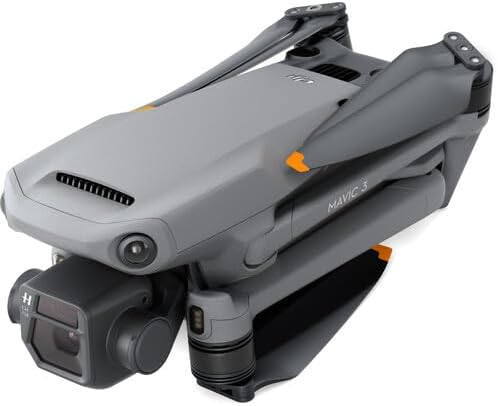
Image: DJI Mavic 3 folded with its storage cover.
8. Penyelesaian masalah
This section addresses common issues you might encounter with your DJI Mavic 3.
| Masalah | Kemungkinan Punca | Penyelesaian |
|---|---|---|
| Drone tidak dihidupkan | Low battery; incorrect power-on procedure | Charge the Intelligent Flight Battery; press power button once, then press and hold for two seconds. |
| No video feed in DJI Fly app | Loose cable connection; app not running; remote controller not linked | Ensure smartphone is securely connected to RC; restart app; link remote controller to aircraft. |
| Drone hanyut semasa penerbangan | IMU calibration needed; strong winds | Perform IMU calibration via DJI Fly app; avoid flying in strong winds. |
| Penghindaran halangan tidak berkesan | Sensors obstructed; low light conditions; system disabled | Clean sensors; fly in adequate lighting; ensure obstacle avoidance is enabled in app. |
| Kualiti imej/video yang lemah | Dirty lens; incorrect camera settings; insufficient lighting | Clean camera lens; adjust camera settings (ISO, shutter speed, white balance); ensure adequate lighting. |
9. Spesifikasi
Detailed technical specifications for the DJI Mavic 3 drone.
| Ciri | Spesifikasi |
|---|---|
| Jenama | DJI |
| Nama Model | CP.MA.00000439.01 |
| Kamera | 20MP 4/3" CMOS Hasselblad (Wide-Angle), 12MP 1/2" CMOS (Telephoto) |
| Resolusi Video | Up to 5.1K (Hasselblad), 4K (Telephoto) |
| Masa Penerbangan Maks | 46 Minit |
| Julat Penghantaran | Sehingga 9.3 batu (15 km) |
| Penderiaan Halangan | Omnidirectional |
| Berat Barang | 6.92 Paun (lebih kurang 3.14 kg) |
| Dimensi (L x W x H) | 13.7"L x 4.2"W x 11.1"H (folded, approximate) |
| Storan Dalaman | 8GB |
| Ketersambungan | USB, Wi-Fi (for remote controller) |
| Jenis Kawalan | Alat Kawalan Jauh |
| Teknologi Penderia Optik | CMOS |
| Jenis Media | SDXC (for external storage) |
10. Waranti dan Sokongan
The DJI Mavic 3 is covered by a manufacturer's warranty. For detailed warranty terms and conditions, please refer to the official DJI webtapak atau kad jaminan yang disertakan dengan produk anda.
For technical support, troubleshooting assistance, or service requests, please contact DJI Customer Support through their official channels. You can typically find contact information on the DJI webtapak:
Always provide your product model number (CP.MA.00000439.01) and proof of purchase when seeking support.