
CMTOOL DY29
CMTOOL OBD2 Breakout Box (Model DY29) Instruction Manual
Professional 16-Pin OBD Breakout Box with LED Light Indicator
1. Pengenalan
The CMTOOL OBD2 Breakout Box (Model DY29) is a professional automotive tool designed for convenient and safe access to the OBDII diagnostic link connector. It allows for monitoring of protocol signals, power, and grounds, and facilitates connection to external diagnostic equipment like multimeters or oscilloscopes for advanced testing. This manual provides detailed instructions for its setup, operation, and maintenance.

Image 1: CMTOOL OBD2 Breakout Box (Model DY29) overview.
2. Ciri-ciri Produk
- Communication Protocol Detection: Provides easy access to the OBDII connector for monitoring signals of protocol, power, and grounds.
- Penunjuk LED: Integrated LED lights quickly indicate the status of power, grounding, and communication protocols.
- 16-Pin OBD Interface: The input jack layout simulates the standard 16-pin OBDII interface, allowing for quick and intuitive testing and connection with diagnostic tools.
- 90CM Extension Cord: Features a durable, elastic thermoplastic TPU material cable for high elasticity, flexibility, and strength, ensuring reliable data connection.
- Standard 4MM Rubber Sockets: Equipped with safe banana sockets compatible with any type of 4mm banana plug, facilitating connections to multimeters or oscilloscopes.

Image 2: Key features of the CMTOOL OBD2 Breakout Box, including ground circuit detection, protocol detection, power supply detection, 90cm extension cable, LED indicators, and 16-pin OBD interface.
3. Spesifikasi
| Spesifikasi | Nilai |
|---|---|
| Pelabuhan Diagnostik | OBD II |
| Bekerja Voltage | DC 8V~30V |
| Muatkan | 2.0A |
| Suhu Operasi | -20°C~70°C (-4°F~158°F) |
| OBD II Extension Cable Length | 90cm |
| Dimensi Produk | 18.01 x 8 x 3.51 cm |
| Berat Barang | 372 g |
| Jenis Mentol | LED |
| Nombor Model | DY29 |
| UPC | 728990660041 |
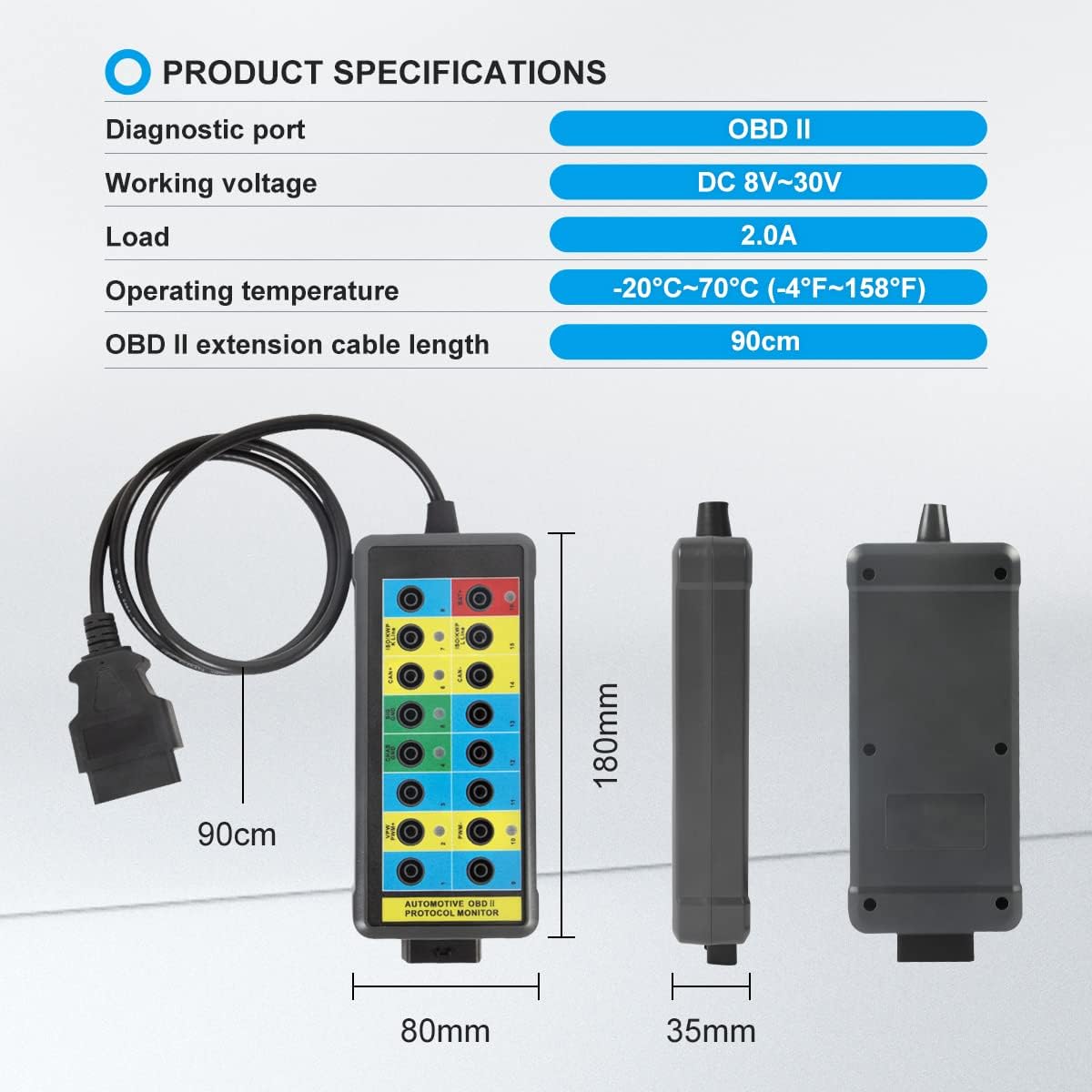
Image 3: Visual representation of the product dimensions and key specifications.
4. Persediaan dan Sambungan
To begin using your CMTOOL OBD2 Breakout Box, follow these steps:
- Cari Port OBDII Kenderaan: Port OBDII biasanya terletak di bawah papan pemuka di sebelah pemandu.
- Connect the Breakout Box: Plug the 16-pin male connector of the CMTOOL OBD2 Breakout Box into your vehicle's OBDII port. Ensure a secure connection.
- Perhatikan Penunjuk LED: Once connected, the LED indicators on the breakout box will illuminate, providing immediate feedback on power and ground status.
- Connect Diagnostic Tools (Optional): For further testing, connect your scan tool, multimeter, or oscilloscope to the appropriate 4mm banana sockets on the breakout box.
Video 1: Demonstration of connecting the OBD2 Breakout Box to a vehicle and using it with a diagnostic instrument.

Image 4: Illustrates connecting a diagnostic instrument to the 16-pin OBD interface of the breakout box.
5. Arahan Operasi
5.1 Maksud Penunjuk LED
The CMTOOL OBD2 Breakout Box features LED indicators for quick status checks:
- Red LED (Pin 16): Lights up to indicate the presence of power (Battery +).
- Green LED (Pin 4/5): Lights up to indicate good ground (Chassis Ground / Signal Ground).
- Yellow LED (Pin 2/6/7/10/14/15): Lights up to show communication with a scan tool and protocol identification.

Image 5: Detailed explanation of the LED indicators on the OBD2 Breakout Box and their corresponding pin functions.
5.2 Using the 16-Pin Interface
The breakout box provides direct access to all 16 pins of the OBDII interface. This allows for:
- Monitoring specific data lines.
- Connecting external measurement devices (multimeter, oscilloscope) to individual pins using 4mm banana plugs.
- Bypassing certain pins or creating custom connections for advanced diagnostics.

Image 6: Close-up of the 16-pin input jacks, compatible with 4mm banana plugs for versatile connections.

Image 7: Diagram illustrating the standard 16-pin OBDII interface layout and pin definitions.
Video 2: Detailed demonstration of the OBD2 Breakout Box in action, showing its use for protocol detection and connection with a multimeter for voltage bacaan.
Video 3: Selesai ringkasview of the OBD2 Breakout Box, highlighting its features and practical application in automotive diagnostics.
6. Penyelenggaraan
- Pembersihan: Lap peranti dengan kain lembut dan kering. Elakkan menggunakan bahan kimia yang keras atau pembersih yang kasar.
- Storan: Store the breakout box in a cool, dry place away from direct sunlight and extreme temperatures.
- Penjagaan Kabel: Avoid sharp bends or kinks in the extension cable to prevent damage to the internal wiring.
7. Penyelesaian masalah
- No Power LED (Red):
- Ensure the breakout box is securely connected to the vehicle's OBDII port.
- Verify the vehicle's battery has sufficient charge.
- Periksa fius kenderaan untuk port OBDII.
- No Ground LED (Green):
- Confirm the connection to the vehicle's OBDII port is solid.
- Use a multimeter to test the ground pins (4 and 5) directly at the vehicle's OBDII port.
- No Communication LED (Yellow):
- Ensure your diagnostic scan tool is properly connected and powered on.
- Verify the vehicle's ignition is in the ON position (engine off or running, as required by the diagnostic procedure).
- Check for any vehicle-specific issues that might prevent OBDII communication.
8. Waranti dan Sokongan
For warranty information, technical support, or service inquiries, please refer to the contact information provided with your product packaging or visit the official CMTOOL webtapak. Simpan resit pembelian anda sebagai bukti pembelian.