pengenalan
This manual provides essential instructions for the setup, operation, and maintenance of your Hotsmtbang Replacement Voice Remote Control. This remote is designed to be compatible with various Chiq 4K UHD LED Android HDTV models, including U65G7H, U43G7U, U50G7U, U55G7U, U58G7U, and U65G7U. It is pre-programmed and requires no additional setup beyond battery installation.
Persediaan
1. Pemasangan Bateri
The remote control requires two AAA batteries (not included). Please follow these steps to install the batteries:
- Cari petak bateri di belakang alat kawalan jauh.
- Luncurkan penutup petak bateri ke bawah untuk membukanya.
- Masukkan dua bateri AAA, pastikan terminal positif (+) dan negatif (-) sejajar dengan tanda di dalam petak.
- Luncurkan penutup petak bateri kembali ke tempatnya sehingga ia berbunyi dengan selamat.

Image 1: Back of the remote control with the battery cover closed.
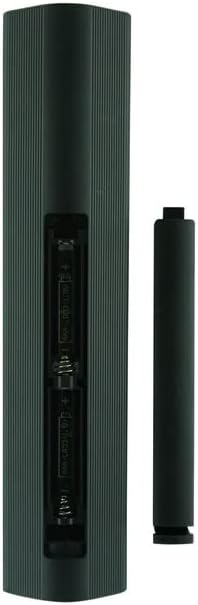
Image 2: Back of the remote control with the battery cover removed, showing battery placement.
2. Penggunaan Awal
Once batteries are installed, the remote control is ready for immediate use. No programming or pairing is required for basic functions. For voice control features, ensure your Chiq TV's Bluetooth is enabled and the remote is paired if prompted by the TV.
Arahan Operasi
This remote control provides full functionality for your compatible Chiq 4K UHD LED Android HDTV. Below are common functions:
- Butang Kuasa: Menghidupkan atau mematikan TV.
- Kelantangan Naik/Turun: Adjusts the TV's audio level.
- Saluran Atas/Bawah: Menukar saluran TV.
- Butang Navigasi (Atas, Bawah, Kiri, Kanan, OK): Used to navigate menus and select options on the TV screen.
- Butang Belakang: Kembali ke skrin atau menu sebelumnya.
- Butang rumah: Mengakses skrin utama utama TV atau antara muka TV pintar.
- Butang Kawalan Suara: Activates the voice assistant feature. Press and hold the button, then speak your command into the remote. Ensure your TV's voice assistant is configured.
- Butang Pintasan Apl: Dedicated buttons for quick access to popular streaming applications (if present on your remote model).
For specific advanced features or TV settings, refer to your Chiq TV's user manual.
Penyelenggaraan
Penggantian Bateri
Replace batteries when the remote's performance degrades or it stops responding. Always replace both AAA batteries simultaneously with new ones. Do not mix old and new batteries, or different types of batteries.
Pembersihan
Untuk membersihkan alat kawalan jauh, gunakan kain lembut dan kering. Jangan gunakan pembersih cecair, semburan atau bahan yang melelas, kerana ini boleh merosakkan permukaan alat kawalan jauh atau komponen dalaman.
Menyelesaikan masalah
| Masalah | Kemungkinan Punca | Penyelesaian |
|---|---|---|
| Jauh tidak bertindak balas. | Bateri mati atau salah dimasukkan. | Gantikan bateri dengan bateri AAA baharu, memastikan kekutuban yang betul. |
| Kawalan suara tidak berfungsi. | TV's Bluetooth is off or remote is not paired for voice. | Check your Chiq TV's settings to ensure Bluetooth is enabled and the remote is paired for voice commands. Refer to your TV's manual for pairing instructions. |
| Butang melekit atau tidak bertindak balas. | Kotoran atau serpihan di bawah butang. | Clean the remote with a soft, dry cloth. Avoid liquids. |
Spesifikasi
- Jenama: Generic (Hotsmtbang)
- Peranti Serasi: Chiq 4K UHD LED Android HDTVs (Models: U65G7H, U43G7U, U50G7U, U55G7U, U58G7U, U65G7U)
- Teknologi Ketersambungan: Bluetooth
- Jenis Pengawal: Kawalan Butang, Kawalan Suara
- Ciri Khas: No Programming Required (for basic functions)
- Bateri: 2 x bateri AAA (tidak termasuk)
- Tarikh Mula-mula Tersedia: 18 Mei 2022
Waranti dan Sokongan
This product is a replacement remote control. For specific warranty information, please refer to the retailer or the original manufacturer of the remote control. For technical support or further assistance, please contact the seller directly through your purchase platform.
Please note that this remote is designed to be compatible with the listed Chiq TV models. For issues related to your television's functionality, please consult your Chiq TV's user manual or contact Chiq customer support.
