
1. Pengenalan
The UMLIFE STC-1000 is a versatile digital temperature controller designed for precise temperature management in various applications. This device features a clear LED display, NTC 10K thermistor sensor, and dual relay outputs for both heating and cooling control. This manual provides detailed instructions for installation, operation, and maintenance to ensure optimal performance and longevity of your temperature controller.
2. Produk Lebihview
2.1 Ciri-ciri Utama
- Digital LED display for clear temperature readings.
- Wide temperature measurement and control range: -50°C to 99°C.
- High control accuracy of 0.1°C.
- Dual relay output for simultaneous heating and cooling control.
- Waterproof NTC 10K thermistor sensor for reliable measurements in various environments.
- Fungsi penentukuran suhu.
- Delay start protection for cooling control.
- ABS flame-retardant shell for enhanced safety.
2.2 Komponen dan Paparan
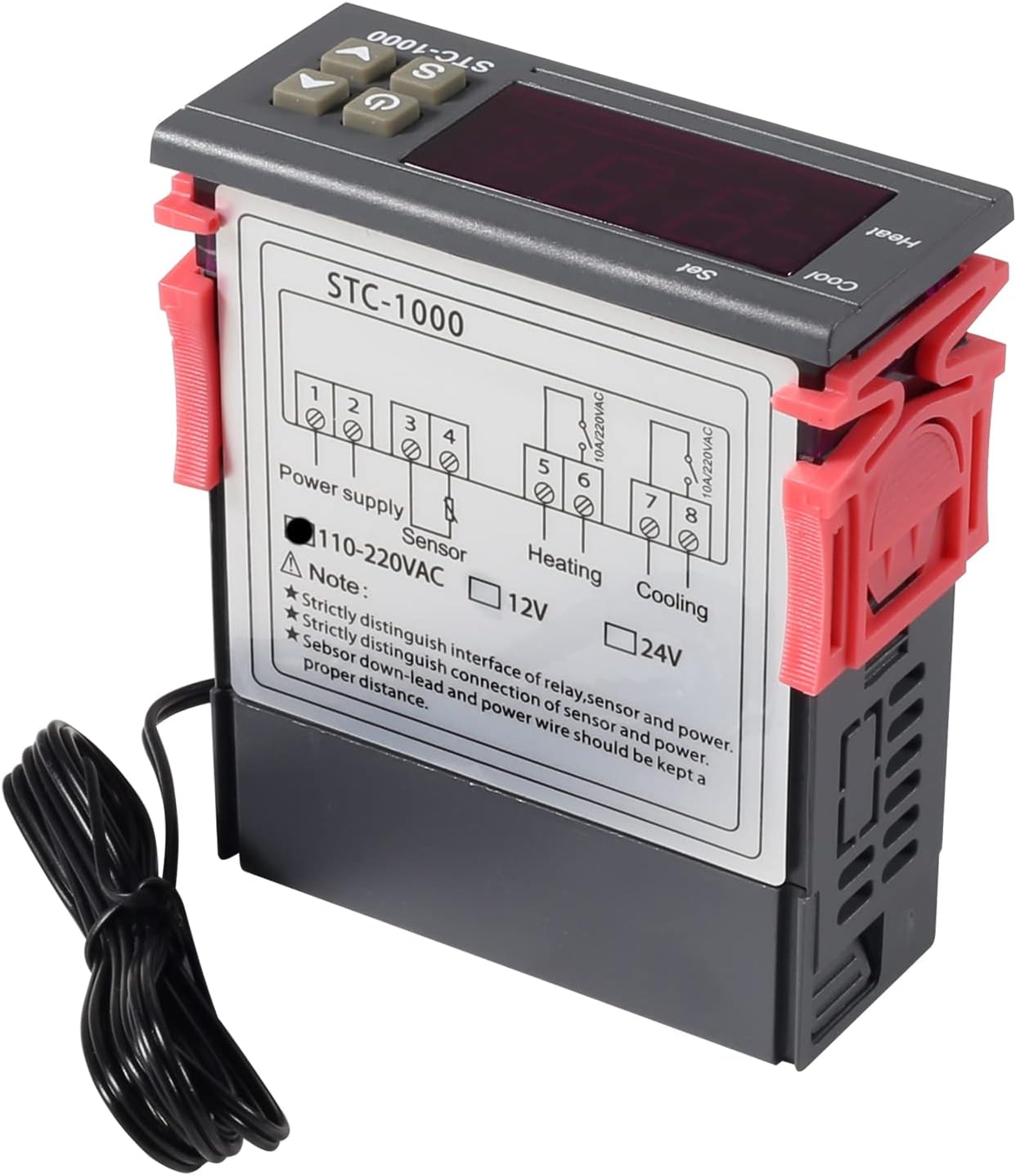
Familiarize yourself with the main components and display interface of the STC-1000 controller.

Rajah 1: Front panel of the STC-1000 controller showing the digital display, power switch, UP button, Setting button, and DOWN button.
- Tetingkap Paparan Digital: Shows current temperature and parameter settings.
- Suis kuasa: Menghidupkan atau mematikan peranti.
- UP Button (▲): Increases values or navigates menus.
- DOWN Button (▼): Decreases values or navigates menus.
- Setting Button (S): Enters parameter setting mode.
- Cool Indicator: Illuminates when cooling relay is active.
- Penunjuk Haba: Illuminates when heating relay is active.

Rajah 2: Physical dimensions of the STC-1000 controller and the included 1-meter NTC 10K waterproof sensor probe.
3. Spesifikasi
| Parameter | Nilai |
|---|---|
| Model | STC-1000 |
| Julat Pengukuran Suhu | -50°C hingga 99°C |
| Julat Kawalan Suhu | -50°C hingga 110°C |
| Ketepatan Pengukuran | ±0.2°C |
| Resolusi | 0.1°C |
| Ketepatan Kawalan | ±0.1°C |
| Sensor | NTC 10K L=1M waterproof probe |
| Bekalan Kuasa | DC 12V |
| Penggunaan Kuasa | <3W |
| Kapasiti Kenalan Relay | Cool (10A/220VAC), Heat (10A/220VAC) |
| Suhu Ambien | 0°C hingga 60°C |
| Suhu Penyimpanan | -30°C hingga 75°C |
| Kelembapan Relatif | 20-84% |
| Saiz Pemasangan | 71mm x 29mm |
| Dimensi Produk | 75mm x 34.5mm x 85mm |
| Berat Barang | 7 auns (lebih kurang 198g) |
| bahan | Akrilonitril Butadiena Stirena (ABS) |
4. Persediaan dan Pemasangan
Notis Keselamatan Penting: Installation should be performed by qualified personnel. Ensure power is disconnected before wiring to prevent electric shock. Strictly distinguish between power supply, sensor, and relay interfaces. Maintain proper distance between sensor down-lead and power wires to avoid interference.
4.1 Gambarajah Pendawaian
Refer to the following diagram for correct wiring connections. This model operates on DC 12V power supply.
Rajah 3: Wiring diagram for the STC-1000 12V temperature controller. Connections are for power supply, NTC sensor, heating relay, and cooling relay.
- Terminal 1 & 2: Power Supply (DC 12V).
- Terminal 3 & 4: NTC Sensor connection.
- Terminal 5 & 6: Heating Relay Output (Connect to heating device).
- Terminal 7 & 8: Cooling Relay Output (Connect to cooling device).
Ensure all connections are secure and insulated. Verify the power supply voltage matches the controller's requirement (DC 12V for this model).
4.2 Pemasangan
The STC-1000 is designed for panel mounting. Cut an opening of 71mm x 29mm in your panel. Insert the controller and secure it using the provided clips or mounting brackets.
5. Arahan Operasi
The STC-1000 operates in Celsius only. It cannot be switched to Fahrenheit.
5.1 Hidupkan/Mati Kuasa
- Tekan ke Suis Kuasa button (marked with ⏻) to turn the controller on or off.
5.2 Menetapkan Parameter Suhu
The controller has two main temperature settings: the Set Temperature (ST) dan Difference Temperature (DT), also known as hysteresis.
- Kepada view the Set Temperature (ST): Tekan sebentar Setting (S) button. The display will show the current set temperature.
- To modify the Set Temperature (ST):
- Tekan dan tahan butang Setting (S) button for approximately 3 seconds until the display flashes.
- Gunakan ATAS (▲) or TURUN (▼) buttons to adjust the desired set temperature.
- Tekan ke Suis Kuasa button to save the setting and exit, or wait for 10 seconds for it to save automatically.
5.3 Advanced Parameter Settings (F1-F4)
To access and modify advanced parameters:
- Tekan dan tahan butang Setting (S) button for approximately 3 seconds until the display flashes.
- Semasa paparan berkelip, tekan butang Setting (S) button again (do not hold) to cycle through parameters F1, F2, F3, F4.
- Gunakan ATAS (▲) or TURUN (▼) buttons to adjust the value of the selected parameter.
- Tekan ke Suis Kuasa button to save the setting and exit, or wait for 10 seconds for it to save automatically.
| Parameter | Penerangan | Julat | Lalai |
|---|---|---|---|
| F1 | Difference Temperature (Hysteresis): The difference between the set temperature and the temperature at which the relay switches off. | 0.3°C hingga 10°C | 2.0°C |
| F2 | Highest Set Point Limit: Limits the maximum adjustable set temperature. | Set Temp to 110°C | 110°C |
| F3 | Lowest Set Point Limit: Limits the minimum adjustable set temperature. | -50°C to Set Temp | -50°C |
| F4 | Penentukuran Suhu: Adjusts the temperature reading to match a known accurate thermometer. | -10°C hingga 10°C | 0.0°C |
5.4 Mod Pemanasan dan Penyejukan
The STC-1000 automatically switches between heating and cooling based on the set temperature (ST) and difference temperature (DT).
- Mod Penyejukan: If the current temperature is higher than (ST + DT), the cooling relay activates. It deactivates when the temperature drops to ST.
- Mod Pemanasan: If the current temperature is lower than (ST - DT), the heating relay activates. It deactivates when the temperature rises to ST.
6. Penyelenggaraan
- Pembersihan: Wipe the controller's surface with a soft, dry cloth. Do not use abrasive cleaners or solvents.
- Penjagaan Sensor: Ensure the NTC sensor probe is clean and free from debris. While waterproof, avoid unnecessary physical damage to the probe or cable.
- Sambungan: Periodically check wiring connections for tightness and signs of corrosion.
- Persekitaran: Operate the controller within the specified ambient temperature and humidity ranges to ensure optimal performance and lifespan.
7. Penyelesaian masalah
| Masalah | Kemungkinan Punca | Penyelesaian |
|---|---|---|
| Display shows "EE" | Sensor error or open circuit. | Check sensor connection. Replace sensor if damaged. |
| Display shows "HHH" | Temperature exceeds upper limit of measurement range. | Ensure the environment temperature is within the sensor's range (-50°C to 99°C). |
| Display shows "LLL" | Temperature falls below lower limit of measurement range. | Ensure the environment temperature is within the sensor's range (-50°C to 99°C). |
| Pengawal tidak dihidupkan | Tiada bekalan kuasa atau vol tidak betultage. | Check power connections and ensure DC 12V is supplied. |
| Heating/Cooling not activating | Incorrect temperature settings (ST, DT), wiring error, or device malfunction. | Verify ST and DT settings. Check heating/cooling device wiring. Ensure the device is within operating parameters. |
8. Waranti dan Sokongan
UMLIFE products are manufactured to high-quality standards. For warranty information or technical support, please contact UMLIFE customer service through your purchase platform or visit the official UMLIFE website. Please have your product model (STC-1000 12V) and purchase details ready when contacting support.
Untuk bantuan lanjut, anda juga boleh merujuk kepada UMLIFE Store on Amazon.