
1. Pengenalan
Thank you for choosing the ILIFE V3s Max Robot Vacuum and Mop Combo. This device is designed to provide efficient and convenient cleaning for your home, combining powerful vacuuming with intelligent mopping capabilities. This manual provides essential information for the safe operation, maintenance, and troubleshooting of your robot vacuum. Please read it thoroughly before use and retain it for future reference.
2. Arahan Keselamatan
Untuk mengurangkan risiko kecederaan atau kerosakan, baca dan patuhi semua langkah berjaga-jaga keselamatan. Perkakas ini hanya untuk kegunaan rumah sahaja.
- Do not operate the robot near open flames or fragile objects.
- Jauhkan rambut, pakaian longgar, jari dan semua bahagian badan daripada bukaan dan bahagian yang bergerak.
- Jangan benarkan kanak-kanak mengendalikan robot. Awasi kanak-kanak dan haiwan peliharaan semasa robot beroperasi.
- Gunakan hanya penyesuai kuasa dan dok pengecasan asal yang disediakan oleh pengilang.
- Pastikan robot dicas sepenuhnya sebelum penggunaan pertama.
- Jangan gunakan robot untuk mengutip serpihan besar, cecair atau objek terbakar.
- Remove power cords, small objects, and curtains from the cleaning path to prevent entanglement.
- Do not use the mopping function on carpets or rugs.
3. Kandungan Pakej
Pastikan semua komponen berada dalam keadaan baik dan lengkap:
- 1x ILIFE V3s Max Robot Vacuum
- 1x Alat Kawalan Jauh
- 1x Filter (pre-installed)
- 1x AC Adapter
- 1x Dok Pengecasan
- 1x Berus Pembersih
- 2x Side Brushes (spare)
- 1x Mop Cloth
- 1x Tangki Air
- 1x Manual Pengguna
- 3x Dust Bags
4. Produk Lebihview
Familiarize yourself with the main components of your ILIFE V3s Max.

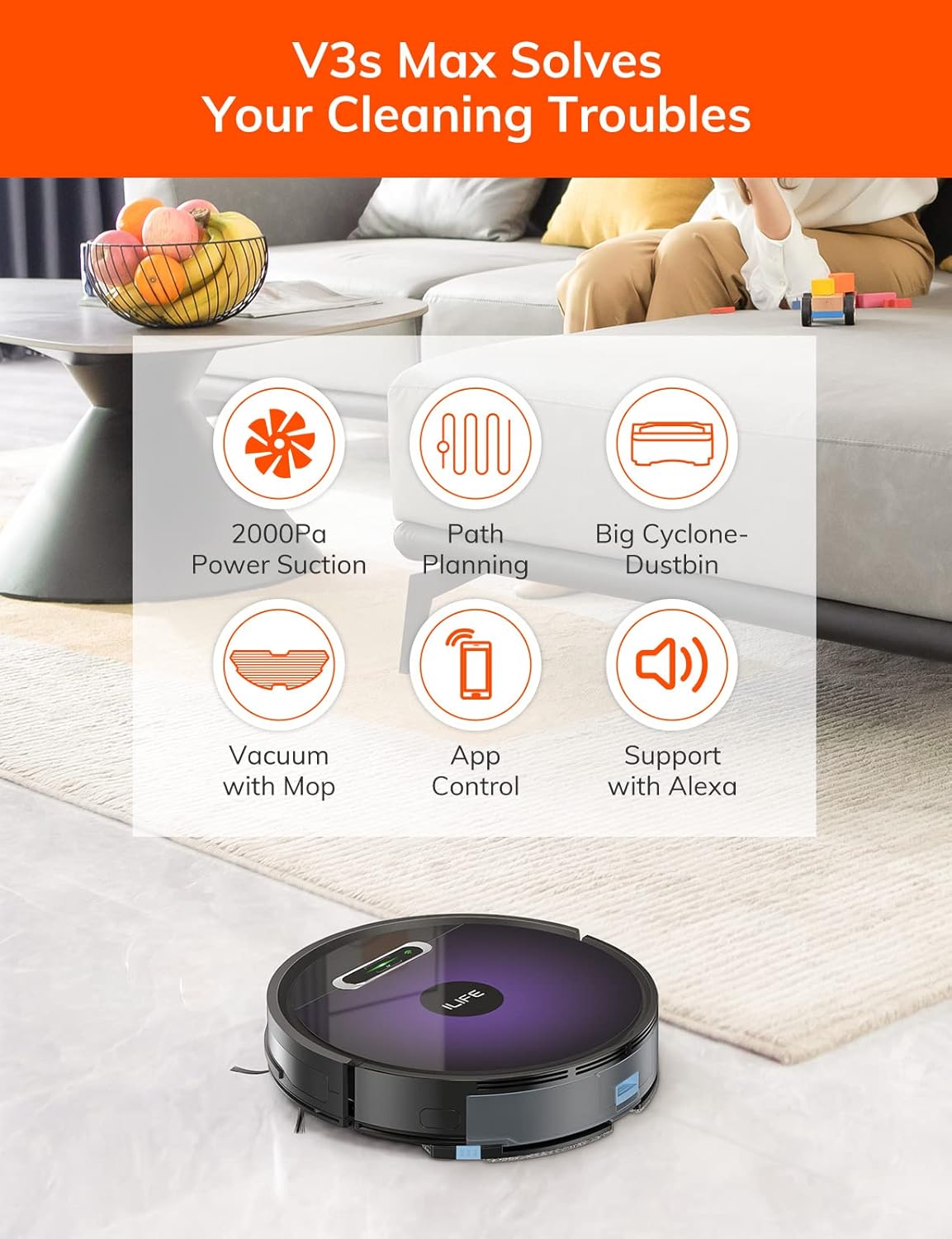
Rajah 4.1: Atas view of the ILIFE V3s Max robot vacuum, illustrating its 2000Pa suction, path planning, large dustbin, vacuum with mop function, app control, and Alexa support.

Rajah 4.2: Bahagian bawah view of the robot vacuum, highlighting the deep edge cleaning brush, powerful suction inlet, and the mop attachment for combined cleaning.
Komponen Utama:
- Badan Utama: Contains the motor, dustbin, water tank, and navigation sensors.
- Berus Sisi: Sweep debris into the suction path.
- Roda Memandu: Allow the robot to move across various surfaces.
- Roda Universal: Provides directional movement.
- Mengecas Kenalan: Connects with the charging dock.
- Tong sampah: Mengumpul serpihan kering.
- Tangki Air: Menampung air untuk mengemop.
- Mop Cloth: Melekat pada tangki air untuk pembersihan basah.
- Butang Kuasa: Turns the robot on/off and starts/pauses cleaning.
- Penderia: Anti-drop, anti-collision, and wall-following sensors.
5. Persediaan
5.1 Pengecasan Awal
- Place the charging dock against a wall in an open area, ensuring there are no obstacles within 1 meter to the sides and 2 meters in front.
- Sambungkan penyesuai AC ke dok pengecasan dan pasangkannya ke soket kuasa.
- Place the robot onto the charging dock, ensuring the charging contacts align. The indicator light will show charging status.
- Allow the robot to charge completely before first use (approximately 5-6 hours).
Rajah 5.1: The robot vacuum returning to its charging dock. Ensure the dock is placed in an accessible area.
5.2 App and Wi-Fi Connection
The ILIFE V3s Max supports app control via 2.4G Wi-Fi (5G Wi-Fi is not supported).
- Download the "ILIFEHOME" app from your smartphone's app store (iOS or Android).
- Daftar akaun dan log masuk.
- Ensure your phone is connected to a 2.4G Wi-Fi network.
- Follow the in-app instructions to add your device. This typically involves pressing and holding the robot's power button until it enters pairing mode, then entering your Wi-Fi password in the app.

Rajah 5.2: The ILIFEHOME app interface, demonstrating features like scheduling, cleaning history, suction settings, and cleaning modes. The robot also supports Amazon Alexa integration.
6. Arahan Operasi
6.1 Memulakan/Menjeda Pembersihan
- Daripada Robot: Press the power button once to start or pause cleaning.
- Dari Kawalan Jauh: Press the "Clean" button.
- Daripada Apl: Tap "Start" or "Pause" in the ILIFEHOME app.
6.2 Mod Pembersihan
The V3s Max offers multiple cleaning modes for different needs:

Rajah 6.1: Illustration of the robot's multiple cleaning modes: Random, Spot, Edge, and Path (zigzag) cleaning.
- Path Cleaning (Zigzag): The robot cleans in an efficient zigzag pattern, covering the entire area systematically. This is the default mode for general cleaning.
- Pembersihan Tempat: The robot focuses on a specific dirty area, cleaning in a spiral pattern. Activate this mode for concentrated cleaning of spills or heavily soiled spots.
- Pembersihan Tepi: The robot cleans along walls and furniture edges. Useful for thorough cleaning of room perimeters.
- Random Cleaning: The robot cleans randomly, suitable for small, uncluttered spaces.
6.3 Memvakum dan Mengemop
The V3s Max can vacuum and mop simultaneously or separately.

Rajah 6.2: The robot vacuum demonstrating its 2000Pa suction power, effectively picking up food crumbs and pet hair from hard floors.

Rajah 6.3: The robot vacuum illustrating three types of water adjustment for mopping, catering to various floor cleaning needs.
- Memvakum: Ensure the dustbin is installed. The robot will use its 2000Pa suction to clean dry debris.
- Mengemop: Fill the 200ml water tank with clean water and attach the mop cloth. Insert the water tank into the robot. The robot will then perform wet mopping. Do not use cleaning solutions other than water in the tank.
- Combined Cleaning: With both the dustbin and water tank installed, the robot will vacuum and mop simultaneously.
6.4 Penjadualan
Use the ILIFEHOME app to set cleaning schedules for automated cleaning sessions.
- Open the ILIFEHOME app.
- Navigasi ke bahagian penjadualan.
- Tetapkan waktu dan hari pembersihan yang diingini.
- Confirm the schedule. The robot will automatically start cleaning at the programmed times.
7. Penyelenggaraan
Penyelenggaraan tetap memastikan prestasi optimum dan memanjangkan jangka hayat vakum robot anda.
7.1 Pembersihan Tong Sampah dan Penapis
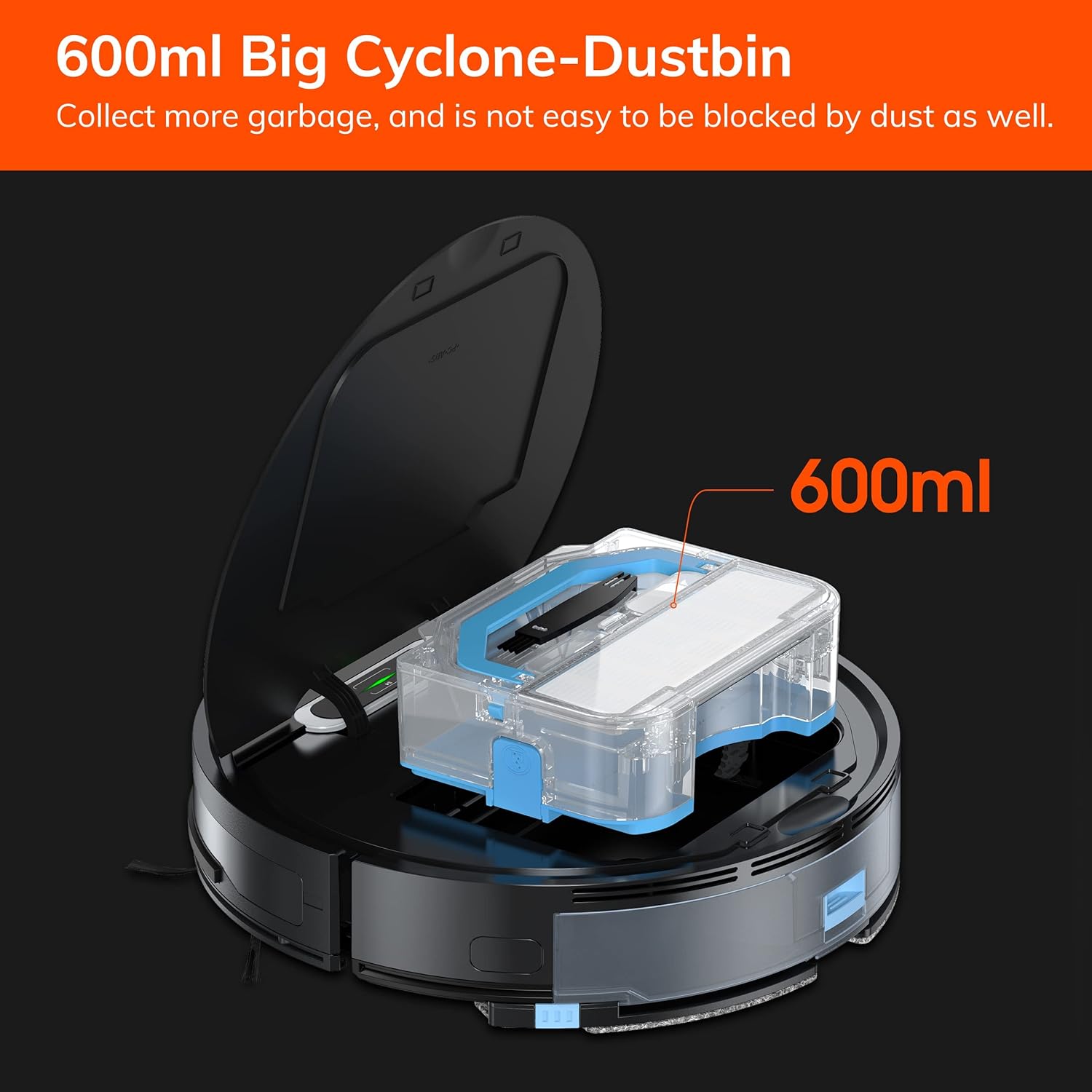
Rajah 7.1: The 600ml cyclone dustbin, designed to collect more debris and resist clogging.
- Press the "PUSH" button on the robot's top cover to open it.
- Keluarkan tong sampah dengan menariknya ke atas.
- Buka penutup tong sampah dan buang isinya ke dalam tong sampah.
- Remove the filter assembly (pre-filter, sponge filter, high-performance filter).
- Clean the filters with the provided cleaning brush. Do not wash the high-performance filter with water.
- Bilas tong sampah dengan air jika perlu, pastikan ia benar-benar kering sebelum dipasang semula.
- Reassemble the filters and dustbin, then reinsert into the robot.
7.2 Pembersihan Berus Sisi
- Regularly check side brushes for tangled hair or debris.
- Tarik perlahan-lahan berus sisi ke atas untuk mengeluarkannya.
- Use the cleaning brush or scissors to remove any tangled hair or debris.
- Reinstall the side brushes, ensuring they click into place.
7.3 Water Tank and Mop Cloth Maintenance
- After each mopping session, remove the water tank.
- Kosongkan baki air dari tangki.
- Detach the mop cloth and wash it by hand or machine. Allow it to air dry completely.
- Rinse the water tank with clean water and allow it to air dry.
7.4 Pembersihan Sensor
- Use a clean, dry cloth to wipe the anti-drop sensors (located on the bottom of the robot) and the anti-collision sensors (located on the front bumper).
- Clean the charging contacts on both the robot and the charging dock.
8. Penyelesaian masalah
If you encounter issues with your ILIFE V3s Max, refer to the following common problems and solutions:
| Masalah | Kemungkinan Punca | Penyelesaian |
|---|---|---|
| Robot tidak bermula atau bertindak balas. | Bateri lemah; Suis kuasa dimatikan; Robot tersekat. | Cas robot; Hidupkan suis kuasa; Kosongkan halangan. |
| Robot tidak boleh kembali ke dok pengecasan. | Charging dock obstructed; Robot too far from dock; Dock not powered. | Ensure clear path to dock; Manually place robot near dock; Check power connection. |
| Prestasi pembersihan yang lemah. | Dustbin full; Filters clogged; Side brushes worn or tangled. | Kosongkan tong sampah; Bersihkan/ganti penapis; Bersihkan/ganti berus sisi. |
| Robot kerap tersangkut. | Obstacles (cables, rugs); Cliff sensors dirty. | Clear cleaning area; Clean cliff sensors. |
| Isu sambungan apl. | Incorrect Wi-Fi (5G); Incorrect password; Router issues. | Ensure 2.4G Wi-Fi; Re-enter password; Restart router and robot. |
If the problem persists, please contact ILIFE customer support.
9. Spesifikasi
| Ciri | Perincian |
|---|---|
| Jenama | ILIFE |
| Nama Model | V3s Maks |
| Kuasa Sedutan | Up to 2000Pa (Spot Mode) |
| Kapasiti tong sampah | 600ml |
| Kapasiti Tangki Air | 200ml |
| Hayat Bateri | Sehingga 100 minit |
| Jenis Bateri | Ion Litium (14.4 Volt) |
| Navigasi | Gyroscopic Path Planning |
| Kaedah Kawalan | App Control, Remote Control, Amazon Alexa |
| Sokongan Wi-Fi | 2.4G Wi-Fi only |
| Dimensi Produk | 12.4"L x 11.81"W x 2.99"H |
| Berat Barang | 5.4 paun |
| Tahap Kebisingan | 65 Desibel |
| Syor Permukaan | Lantai Keras, Permaidani Rendah Cerucuk |
10. Waranti dan Sokongan
ILIFE provides a limited warranty for this product. For detailed warranty information, please refer to the warranty card included in your package or visit the official ILIFE website. For technical support, troubleshooting assistance, or replacement parts, please contact ILIFE customer service through the contact information provided on their website or within the ILIFEHOME app.
Sokongan dalam talian: www.iliferobot.com/support