
Haloview BT7
Haloview BT7 Wireless RV Backup Camera System User Manual
1. Pengenalan
This manual provides comprehensive instructions for the Haloview BT7 Wireless RV Backup Camera System. This system is designed to enhance safety and convenience for various vehicles, including RVs, travel trailers, trucks, campers, vans, and pickups. It features a 7-inch monitor, a 1080P Full HD camera with DVR recording capabilities, and full-color night vision.

Figure 1.1: Haloview BT7 Wireless RV Backup Camera System components.
2. Produk Lebihview
2.1 Kandungan Pakej
Haloview BT7 system typically includes the following items:
- BT7 Monitor (7-inch LCD digital monitor)
- BTC128 Camera (Wireless FHD 1080P camera)
- Gasket
- Center mount bracket
- Camera conversion cable
- BMW connector adaptor
- Kabel Berpasangan
- Cigarette Lighter power adapter
- Sun Shield for monitor

Figure 2.1: Included components of the Haloview BT7 system.
2.2 Ciri-ciri Utama
- 7-inch LCD Digital Monitor: High-resolution display with built-in DVR for real-time recording and video playback.
- 1080P FHD Video Recording: Seamless recording at 30fps.
- Lebar Voltage Input: Supports 10-32V power supply.
- Sokongan Berbilang Kamera: Capable of supporting up to 4 wireless cameras.
- lebar Viewsudut: 120° camera lens for broad coverage.
- Julat Wayarles Lanjutan: Line of sight range up to 984 feet (300 meters).
- Latensi Rendah: New-generation wireless technology minimizes lag and interference.
- Keserasian Kenderaan: Suitable for vehicles up to 65ft, including RVs, travel trailers, trucks, campers, vans, pickups, tractors, fifth wheels, and motorhomes.
- Format Rakaman: Supports 4-channel composite and single-channel recording in AVI format.
- Full-Color Dim-Light Night Vision: Powerful image sensors provide full-color images in low-light conditions.
- Night Vision Fill Lights: Can be activated/deactivated remotely via the monitor.
- IP69K Waterproof Camera: Durable and resistant to high-pressure, high-temperature water jets.
- Ultra-High Brightness Display: Ensures clear visibility even in bright daylight.
- 6-Layer Optical Lenses: High-definition optical lenses for superior image clarity.

Figure 2.2: The camera features an IP69K waterproof rating for durability.

Figure 2.3: The camera provides full-color images in dim-light conditions.

Figure 2.4: The camera utilizes 6-layer ultra high definition optical lenses.
3. Persediaan
3.1 Pemasangan Kamera
- Lokasi Pemasangan: Choose a central location at the rear of your vehicle for optimal viewing. For Furrion pre-wired RVs, utilize the existing wiring and mounting points with the provided adapter cable.
- Pemasangan selamat: Use the gasket and mounting bracket to securely attach the camera. Ensure the camera is angled correctly for your desired field of view.
- Sambungan Kuasa: Connect the camera to a 10-32V power source. For pre-wired systems, connect the camera conversion cable to the existing Furrion cable connector. Ensure proper polarity.
3.2 Pemasangan Monitor
- Pemasangan: Attach the monitor to a suitable location in your vehicle's cabin using the center mount bracket. Ensure it does not obstruct your view semasa memandu.
- Sambungan Kuasa: Plug the cigarette lighter power adapter into your vehicle's 12V accessory outlet and connect it to the monitor.
3.3 Penggandingan Sistem
The camera and monitor are typically pre-paired from the factory. If pairing is lost or you are adding additional cameras, follow these steps:
- Power on the monitor and camera.
- Access the monitor's menu and navigate to the pairing option.
- Follow the on-screen prompts to initiate pairing. You may need to use the provided pairing cable or press a button on the camera (refer to specific camera instructions if available).
- Once paired, the camera's video feed will appear on the monitor.

Figure 3.1: Wireless transmission range and compatible vehicle types.
4. Arahan Operasi
4.1 Kawalan Monitor
The monitor features several buttons for navigation and control:
- Butang 'S': Selects channels or confirms selections.
- Butang '+' / '-': Adjusts settings, navigates menus, or zooms.
- Butang 'M': Masuk ke menu utama.
- Butang Kuasa: Menghidupkan/mematikan monitor.
4.2 Video Recording (DVR)
The monitor has a built-in DVR function. Insert a Micro-SD/TF card (not included) into the designated slot on the monitor to enable recording.
- Resolusi Rakaman: Records in 1080P at 30fps.
- Mod Rakaman: Supports 4-channel composite and single-channel recording.
- Main balik: Access recorded videos through the monitor's menu.

Figure 4.1: Monitor with Micro-SD/TF card slot for DVR functionality.
4.3 Penglihatan Malam
The camera is equipped with Full-Color Dim-Light Night Vision, providing clear, colored images even in low-light conditions. Integrated fill lights can be remotely controlled via the monitor to enhance visibility in extremely dark environments.
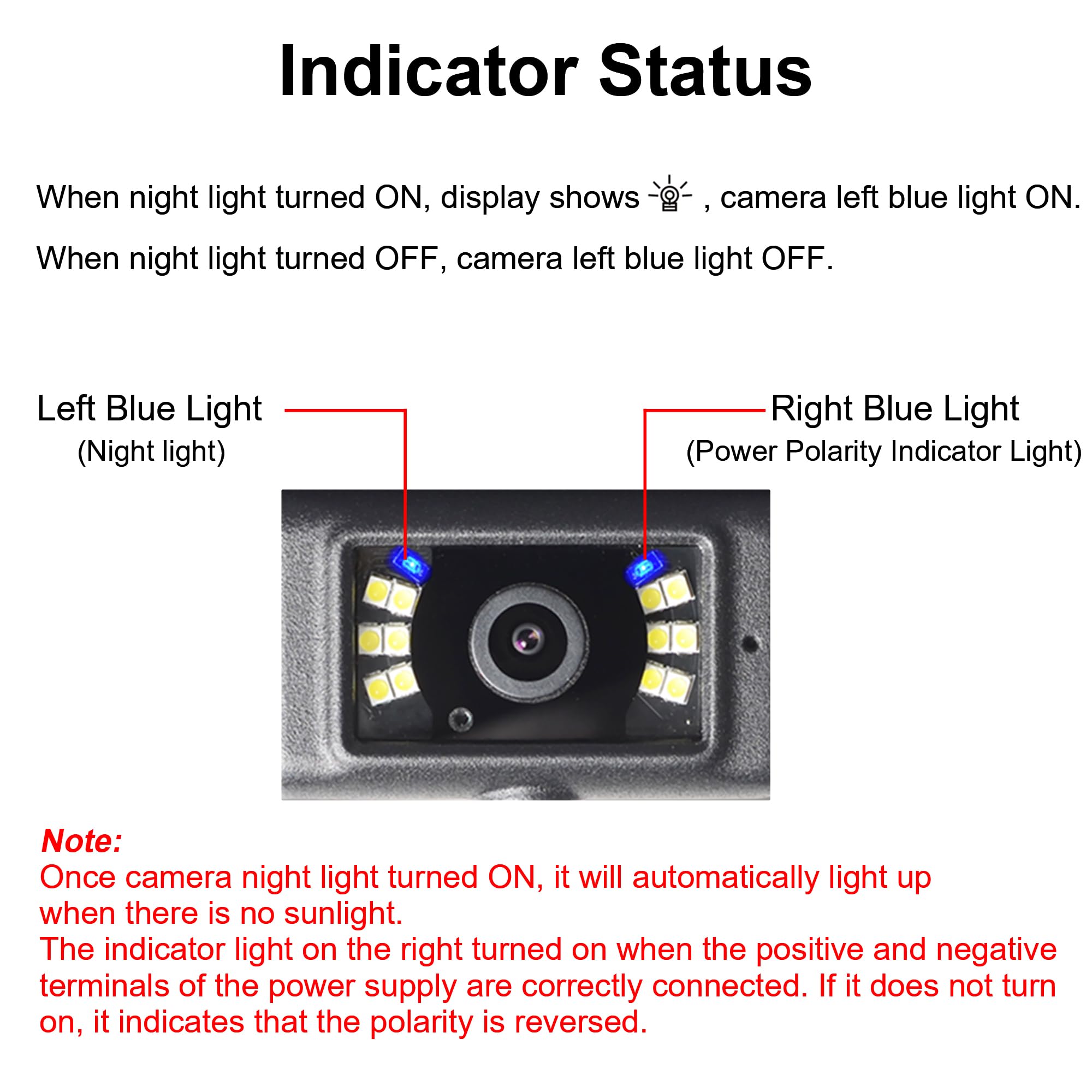
Figure 4.2: Camera indicator status for night light and power polarity.
4.4 Tetapan Paparan
- Flip Imej: Adjust the image orientation (horizontal/vertical flip) through the monitor settings to match your mounting preference.
- Garisan Tempat Letak Kereta: Enable and customize parking assist lines for easier maneuvering.
- Mod Pisah: If multiple cameras are connected, the monitor supports various split-screen views to display feeds simultaneously.

Figure 4.3: Monitor image flip options.

Figure 4.4: Adjustable parking assist lines on the monitor.

Figure 4.5: Split mode options for multi-camera viewing.
5. Penyelenggaraan
- Pembersihan: Bersihkan kanta kamera dan skrin monitor secara berkala dengan kain lembutamp kain. Elakkan pembersih yang kasar.
- Pemeriksaan Kabel: Periodically check all cables and connections for wear, damage, or loose fittings.
- Kemas kini Firmware: Check the Haloview website for any available firmware updates for optimal performance.
- Storan: Apabila tidak digunakan untuk tempoh yang lama, simpan sistem di tempat yang sejuk dan kering.
6. Penyelesaian masalah
| Masalah | Kemungkinan Punca | Penyelesaian |
|---|---|---|
| Tiada isyarat pada monitor | Camera not powered, camera not paired, signal interference, damaged cable. | Check power connections to camera and monitor. Re-pair the camera (refer to Section 3.3). Ensure no large metallic objects are blocking the signal path. Inspect cables for damage. |
| Kualiti imej yang lemah | Dirty lens, low light, signal interference. | Clean the camera lens. Ensure adequate lighting or activate night vision fill lights. Reduce sources of wireless interference. |
| Monitor tidak dihidupkan | No power, faulty power adapter. | Check the cigarette lighter connection. Ensure the vehicle's accessory outlet is active. Try a different power source if available. |
| Rakaman tidak berfungsi | No Micro-SD/TF card, card full, card error. | Insert a compatible Micro-SD/TF card. Format the card via the monitor menu. Replace the card if it is faulty. |
7. Spesifikasi
| Ciri | Perincian |
|---|---|
| Dimensi Produk | 11.02 x 9.06 x 4.33 inci |
| Berat Barang | 3.41 paun |
| Teknologi Paparan | LCD |
| Ciri Paparan Lain | Tanpa wayar |
| Apa yang ada dalam Kotak | A camera and a monitor (and accessories listed in Section 2.1) |
| Pengeluar | Haloview |
| Saiz Skrin | 7 Inci |
| Peranti Serasi | Haloview sistem |
| Jenis Pemasangan | Lekapan Permukaan |
| Voltage | 10-32 Volt |
| Teknologi Penderia Optik | CMOS |
| Jenis Kanta | lebar viewsudut ingatan |
| Sudut Sebenar daripada View | 120 Darjah |
| Jenis Penyambung | DC |
8. Waranti dan Sokongan
For warranty information, technical support, or service inquiries, please contact Haloview customer support directly. Refer to the official Haloview weblaman web atau dokumentasi pembelian anda untuk butiran hubungan dan terma jaminan terkini.
Haloview Kedai Rasmi: Visit the Haloview Kedai di Amazon
Ask a question about this manual
Ask about setup, troubleshooting, compatibility, parts, safety, or missing instructions. Manuals+ will review the question and use this page’s manual context to help answer it.