
pengenalan
This manual provides essential information for the proper installation, operation, and maintenance of your TELE System TS6105 DVB-T2 HEVC Digital Terrestrial Decoder. Please read these instructions carefully before using the device to ensure optimal performance and safety.
The TS6105 decoder is designed to receive DVB-T2 HEVC 10-bit digital terrestrial television broadcasts, offering Full HD resolution up to 1080p@60Hz. It includes features such as automatic channel scanning (AUTOSCAN), an Electronic Program Guide (EPG), and multimedia playback capabilities via USB.
Kandungan Pakej
Pastikan semua item ada dalam pakej:
- TELE System TS6105 DVB-T2 HEVC Digital Terrestrial Decoder
- Alat Kawalan Jauh
- Penyesuai Kuasa
- Manual Pengguna (dokumen ini)

This image shows the compact design of the TS6105 decoder, highlighting the TELE System logo, model number TS6105 DVB-T2 HEVC, Dolby Audio, and HDMI branding on the front, with ventilation on the side.
Persediaan
1. Menyambungkan Dekoder
Before connecting, ensure your television and the decoder are turned off.

This image displays the rear panel of the TS6105 decoder, featuring the ANT IN, ANT OUT, COAXIAL, HD OUT (HDMI), SCART, and DC IN ports for power and signal connections.
- Sambungan Antena: Sambungkan kabel antena terestrial anda ke SEMUT DALAM port on the rear of the decoder. If you wish to loop the signal to another device, connect a coaxial cable from the LUAR BIASA port to the next device.
- Sambungan TV (HDMI): For the best picture quality, connect an HDMI cable from the HD KELUAR port on the decoder to an available HDMI input on your television. Select the corresponding HDMI input on your TV.
- Sambungan TV (SCART): If your TV does not have an HDMI input, connect a SCART cable from the SCART port on the decoder to the SCART input on your television.
- Sambungan Kuasa: Sambungkan penyesuai kuasa ke DC IN port on the decoder, then plug the adapter into a wall outlet.
2. First-Time Installation and Channel Scan
After connecting the decoder and turning on your TV, switch on the decoder. The first time you use it, an installation wizard will guide you through the initial setup.
- Pemilihan Bahasa: Choose your preferred language using the remote control's navigation buttons and press OK.
- Pilihan Negara: Select your country. This helps the decoder apply the correct regional settings for channel scanning.
- AUTOSCAN: The decoder will automatically initiate the AUTOSCAN function. This process searches for all available digital terrestrial channels and organizes them logically using the LCN (Logical Channel Number) system. This may take several minutes.
- penyiapan: Once the scan is complete, the decoder will save the channels and display the first available channel.
Operating the Decoder
Kawalan Jauh Lebihview
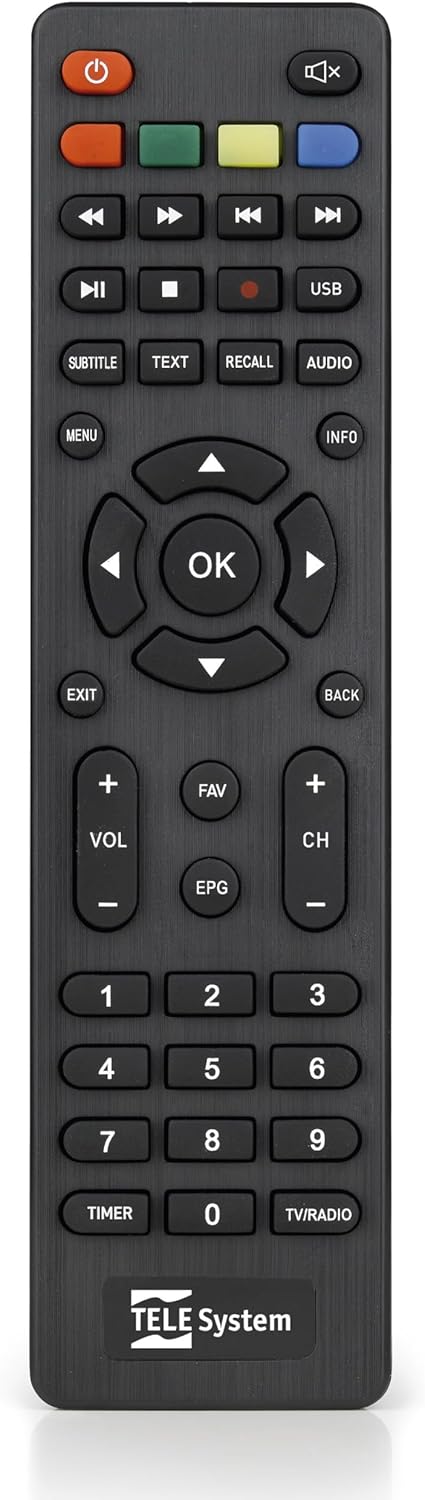
This image presents the remote control for the TS6105 decoder, featuring power, mute, channel, volume, navigation, EPG, media playback, and numeric buttons for comprehensive control.
- Butang kuasa (U): Turns the decoder on or off (standby).
- CH +/-: Menukar saluran ke atas atau ke bawah.
- VOL +/-: Melaraskan tahap kelantangan.
- OK: Confirms selections in menus or displays channel information.
- MENU: Mengakses menu utama untuk tetapan dan ciri.
- KELUAR/KEMBALI: Keluar dari menu semasa atau kembali ke skrin sebelumnya.
- EPG: Membuka Panduan Program Elektronik.
- TEKS: Activates Teletext.
- SARIKATA: Toggles subtitles on/off or selects subtitle language.
- USB: Accesses the multimedia player.
- Butang Berwarna (Merah, Hijau, Kuning, Biru): Functionality varies depending on the current menu or EPG.
Panduan Program Elektronik (EPG)
Tekan ke EPG butang pada alat kawalan jauh ke view the Electronic Program Guide. The EPG provides information about current and upcoming programs for all channels. You can navigate through channels and time slots to see program details.
Multimedia Player (USB)
The TS6105 can play multimedia files daripada peranti storan USB.
- Insert a USB drive into the USB port on the decoder.
- Tekan ke USB button on the remote control or navigate to the multimedia section via the MENU.
- Select the type of media you wish to play (Music, Photo, Video).
- Semak imbas anda files dan tekan OK untuk bermain.
Pause TV / Timeshift
The Pause TV / Timeshift function allows you to pause live television and resume viewing later. This feature requires a USB storage device connected to the decoder.
- Semasa menonton rancangan, tekan butang JEDA button (usually represented by two vertical bars) on the remote control.
- Untuk menyambung semula main semula, tekan butang BERMAIN button (usually represented by a right-pointing triangle).
- You can also fast-forward or rewind using the respective buttons.
Penyelenggaraan
Pembersihan
To clean the decoder, ensure it is unplugged from the power outlet.
- Gunakan kain lembut dan kering untuk mengelap permukaan luar.
- Do not use liquid cleaners, aerosols, or abrasive materials, as these can damage the device.
- Pastikan bukaan pengudaraan bersih daripada habuk dan halangan.
Kemas Kini Perisian
Periksa pengeluar secara berkala website for available software updates. Updates can improve performance, add new features, or resolve issues. Follow the instructions provided with the update file berhati-hati.
Menyelesaikan masalah
If you encounter problems with your decoder, refer to the following common issues and solutions:
- Tiada Gambar/Bunyi:
- Ensure all cables (antenna, HDMI/SCART, power) are securely connected.
- Sahkan bahawa TV anda ditetapkan kepada sumber input yang betul (cth, HDMI 1, AV).
- Check if the decoder is powered on and not in standby mode.
- Tiada Saluran Ditemui:
- Perform an AUTOSCAN again from the menu.
- Check your antenna connection and ensure the antenna is properly positioned and functional.
- Verify that your region has DVB-T2 HEVC broadcasts.
- Alat Kawalan Jauh Tidak Menjawab:
- Gantikan bateri dalam alat kawalan jauh.
- Ensure there are no obstructions between the remote control and the decoder's IR sensor.
- Picture Freezing or Pixelation:
- This often indicates a weak or unstable signal. Check your antenna connection and position.
- Try rescanning channels.
Spesifikasi
- model: TS6105
- Jenama: Sistem TELE
- warna: Hitam
- Jenis Penala: DVB-T2 HEVC 10-bit
- Resolusi Video: Up to 1080p@60Hz (Full HD)
- Ketersambungan: HDMI, USB, SCART, Coaxial (ANT IN/OUT)
- ciri-ciri: AUTOSCAN, LCN, EPG, Pause TV/Timeshift, Multimedia Player (USB), Teletext, Subtitle Support
- Nombor Model: 21005353
Waranti dan Sokongan
Maklumat Waranti
This product comes with a manufacturer's warranty of 2 years. Please retain your proof of purchase for warranty claims. The warranty covers defects in materials and workmanship under normal use. It does not cover damage caused by misuse, accidents, unauthorized modifications, or improper installation.
Sokongan Pelanggan
For technical assistance, troubleshooting beyond this manual, or warranty inquiries, please contact TELE System customer support. Refer to the official TELE System website or product packaging for the most up-to-date contact information.