1. Pengenalan
The sprtoybat Q35 Wireless Sport Earbuds are designed for active lifestyles, offering a secure fit, high-fidelity audio, and robust features. These earbuds utilize Bluetooth 5.3 for stable connectivity, feature an LED digital display for battery status, and are IPX7 waterproof, making them suitable for various sports and outdoor activities.

Image: sprtoybat Q35 Wireless Sport Earbuds in their charging case, showcasing the sleek design and LED display.
2. Apa yang ada di dalam Kotak
Pastikan semua komponen ada semasa membuka kotak:
- 2 x Fon Telinga (Kiri dan Kanan)
- 1 x Kes Pengecasan
- 1 x Kabel Mini USB Jenis-C
- 1 x Manual Pengguna
- 3 x Pairs of Ear Caps (S/M/L)
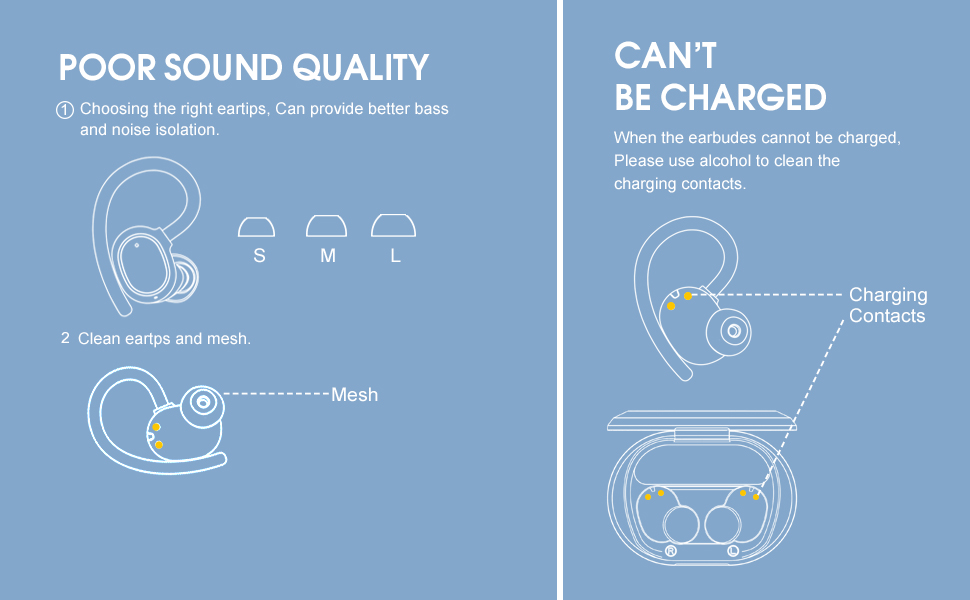
Image: All items included in the sprtoybat Q35 Earbuds package, neatly arranged.
3. Produk Lebihview
The Q35 earbuds are engineered for comfort and performance:
- Flexible Earhooks: Designed for a secure and comfortable fit during intense activities.
- Reka bentuk Ultralight: Each earphone weighs only 6 grams, and the entire product with the charging case weighs 50 grams.
- Paparan Digital LED: Shows the remaining charge level of the charging case and individual earbuds.
- Bluetooth 5.3: Menyediakan sambungan tanpa wayar yang stabil dan cekap.
- Kalis Air IPX7: Resistant to splashes and rain, ideal for workouts.
- High-fidelity Audio: Features 10mm speakers and a volume-optimized active equalizer for clear HD stereo sound and powerful bass.
- Kosongkan Panggilan: Built-in noise-canceling microphone enhances call clarity.

Image: The charging case with its LED digital display, indicating the battery percentage of the case and the charge status of each earbud.

Image: Illustration of the earbud's lightweight design (6g earphone, 50g charging case) and the three included eartip sizes (S, M, L), with a person demonstrating the secure fit during exercise.
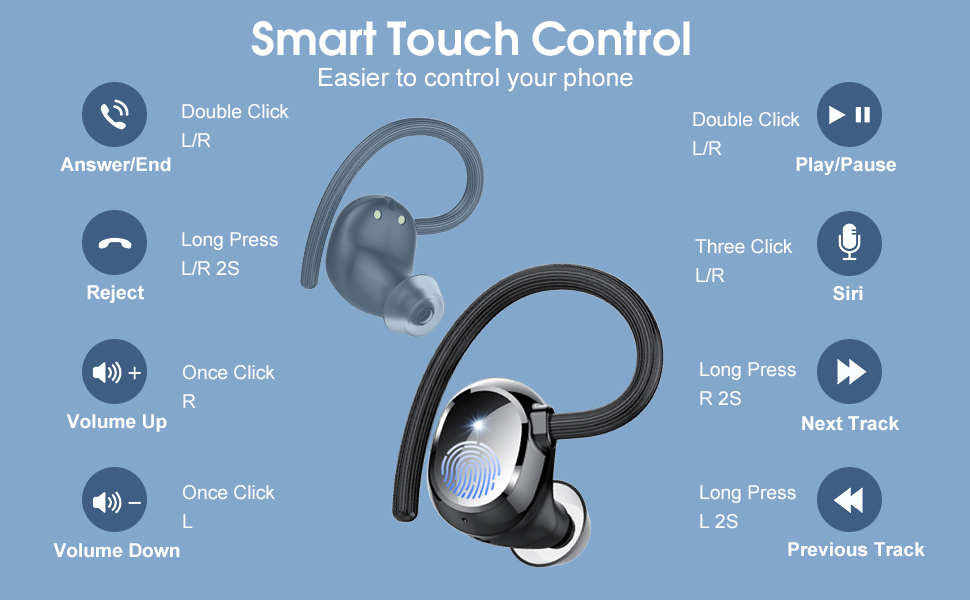
Image: Diagram illustrating the 10mm dynamic drivers and Bluetooth 5.3 technology responsible for the immersive sound quality.
4. Persediaan
4.1. Mengecas Fon Telinga dan Sarung
Before first use, fully charge the earbuds and charging case. Connect the provided Type-C cable to the charging port on the case and a compatible USB power source. The LED display on the case will show the charging progress. The earbuds will charge automatically when placed inside the case.
- Earbuds provide up to 5 hours of music playback per charge.
- The charging case provides an additional 25 hours of playback, allowing for 5 full recharges of the earbuds.
- The charging case supports Type-C fast charging.

Image: The earbuds and charging case connected to a Type-C cable, illustrating the battery life: 5 hours per earbud charge, 25 hours from the charging case, and 1.5 hours to fully charge the case.
4.2. Hidupkan/Mati Kuasa
- Hidupkan kuasa: Open the charging case. The earbuds will automatically power on and connect to the last paired device.
- Matikan: Letakkan fon telinga kembali ke dalam bekas pengecasan dan tutup penutupnya. Mereka akan memutuskan sambungan dan mematikan kuasa secara automatik.
4.3. Berpasangan Bluetooth
Follow these steps to pair your earbuds with a new device:
- Buka bekas pengecas. Fon telinga akan memasuki mod berpasangan.
- Dayakan Bluetooth pada peranti anda (telefon pintar, tablet, dll.).
- Cari untuk "Q35" in the list of available Bluetooth devices.
- Select "Q35" to connect. Once connected, the earbuds will automatically connect to this device in the future when removed from the case.
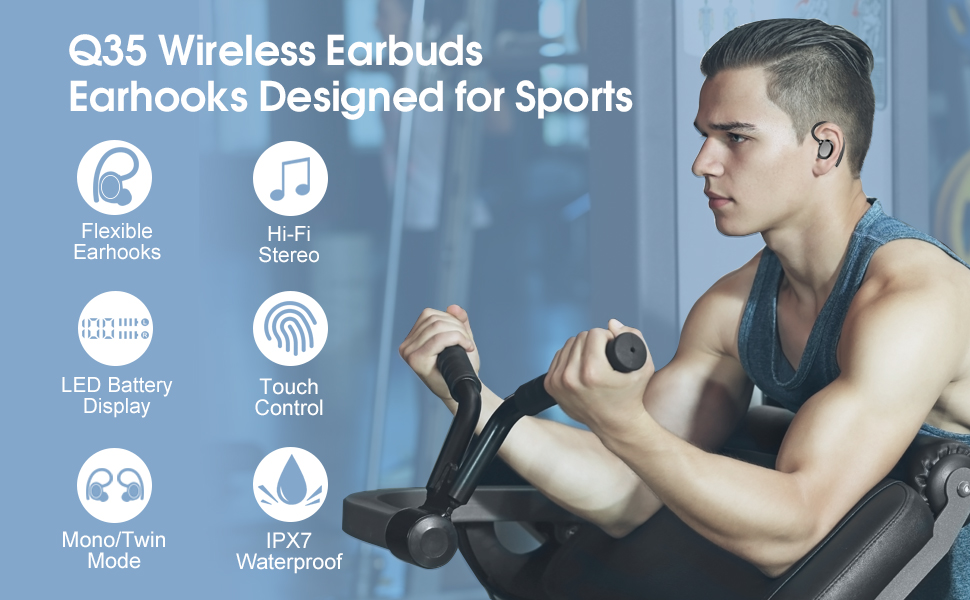
Image: Visual guide demonstrating the one-step pairing process: open the case to auto power on and connect, close to auto disconnect and power off.
Video: A demonstration of how to connect the sprtoybat Q35 Earbuds to a phone via Bluetooth, showing the pairing process from opening the case to successful connection.
5. Arahan Pemakaian
For optimal sound quality and a secure fit, follow these steps:
- Put the earhook over the back of your ear.
- Insert the ear cap into your ear canal.
- Adjust the earbud by twisting it for comfort and a secure seal.
Image: Step-by-step visual guide on how to properly wear the earbuds with earhooks for stability and comfort, including selecting the correct eartip size.
6. Arahan Operasi
6.1. Kawalan Sentuh
The earbuds feature intuitive touch controls for managing audio and calls:
- Main/Jeda: Double-click on either the Left (L) or Right (R) earbud.
- Kelantangan: Single-click on the Right (R) earbud.
- Perlahankan suara: Single-click on the Left (L) earbud.
- Lagu Seterusnya: Tekan lama fon telinga Kanan (R) selama 2 saat.
- Trek Sebelumnya: Tekan lama fon telinga Kiri (L) selama 2 saat.
- Jawab/Tamatkan Panggilan: Double-click on either the Left (L) or Right (R) earbud.
- Tolak Panggilan: Long press either the Left (L) or Right (R) earbud for 2 seconds.
- Pembantu Suara (Pembantu Siri/Google): Triple-click on either the Left (L) or Right (R) earbud.
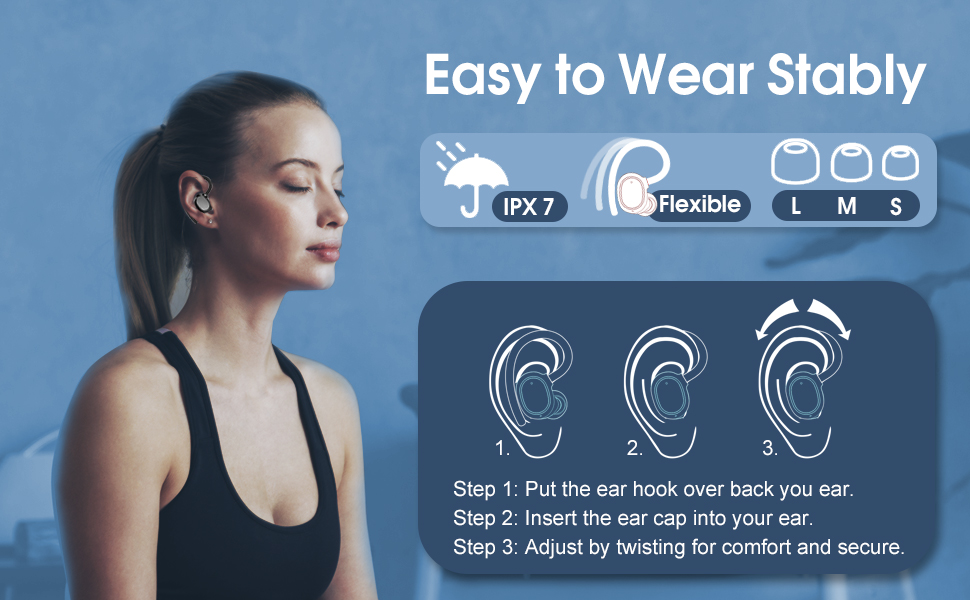
Image: A detailed diagram showing the various smart touch controls on the earbuds for managing calls, music playback, and activating voice assistants.
7. Penyelenggaraan
7.1. Pembersihan
Regular cleaning helps maintain sound quality and charging efficiency:
- Clean the silicone eartips regularly with a soft, dry cloth.
- Gently clean the mesh area of the earbuds to prevent wax buildup, which can affect sound quality.
- If charging issues occur, use a cotton swab with a small amount of alcohol to clean the charging contacts on both the earbuds and inside the charging case.

Image: A person splashing water on their face while wearing the earbuds, illustrating the IPX7 waterproof feature, making them suitable for use during rain or sweat.
8. Penyelesaian masalah
8.1. Kualiti Bunyi Lemah
If you experience poor sound quality:
- Ensure you are using the correct size eartips for a proper seal in your ear canal. A good seal is crucial for optimal bass and noise isolation.
- Clean the eartips and the earbud mesh to remove any debris or earwax buildup.
8.2. Earbuds Cannot Be Charged
Jika fon telinga anda tidak dicas:
- Clean the charging contacts on both the earbuds and inside the charging case using a soft cloth or cotton swab with a small amount of alcohol.
- Pastikan kabel pengecasan disambungkan dengan selamat pada kedua-dua bekas dan sumber kuasa.

Image: Visual troubleshooting tips for common issues such as poor sound quality (suggesting eartip adjustment and cleaning) and earbuds not charging (suggesting cleaning charging contacts).
9. Spesifikasi
| Ciri | Spesifikasi |
|---|---|
| Nama Model | Q35 |
| Teknologi Ketersambungan | Wayarles (Bluetooth 5.3) |
| Penempatan Telinga | Atas Telinga |
| Tahap Ketahanan Air | IPX7 Kalis Air |
| Saiz Pemacu Audio | 10 Milimeter |
| Hayat Bateri (Earbud) | Sehingga 5 Jam |
| Hayat Bateri (dengan Sarung Pengecasan) | Sehingga 30 Jam |
| Port Pengecasan | Jenis-C |
| Kaedah Kawalan | Sentuh |
| Berat Item (Earbud) | 6 Gram (setiap satu) |
| Item Weight (Total with Case) | 50 Gram |
| Julat Bluetooth | 15 Meter |
10. Waranti dan Sokongan
Your satisfaction is important to us. The sprtoybat Q35 Wireless Sport Earbuds come with a comprehensive warranty and dedicated support.
10.1. 2-Year Guarantee
If the product does not work within 2 years due to its own quality problems, it will be replaced for free or refunded in full.

Image: A graphic indicating a 2-year guarantee for the product, promising replacement or full refund for quality issues within this period.
10.2. Sokongan Pelanggan
- Our support team is available 24/7 to assist with any product issues. Please contact us through the official sprtoybat seller page.
- For questions, leave a query on the product page in the customer questions & answers section, and our team will respond within one day.
- All products are eligible for a full, hassle-free return within 30 days of purchase if you are dissatisfied or if an issue cannot be resolved through support.