
1. Pengenalan
Terima kasih kerana membeliasing the Blaupunkt PB10DB Bluetooth Karaoke Speaker. This manual provides essential information for the safe and efficient operation of your device. Please read it thoroughly before use and keep it for future reference. The PB10DB is a portable party speaker designed for high-quality audio playback and karaoke, featuring Bluetooth connectivity, USB, and AUX inputs.
2. Maklumat Keselamatan
Untuk memastikan operasi yang selamat dan mengelakkan kerosakan, sila patuhi langkah berjaga-jaga berikut:
- Jangan dedahkan peranti kepada suhu yang melampau, cahaya matahari langsung atau kelembapan yang tinggi.
- Keep the speaker away from water and other liquids. The product is indicated as waterproof, but avoid submerging it.
- Do not attempt to disassemble or modify the speaker. Repairs should only be performed by qualified personnel.
- Gunakan hanya aksesori pengecasan yang dinyatakan.
- Pastikan pengudaraan yang betul di sekitar pembesar suara semasa penggunaan.
- Elakkan mendengar pada kelantangan yang terlalu tinggi untuk tempoh yang lama bagi mengelakkan kerosakan pendengaran.
3. Kandungan Pakej
Sila pastikan semua item ada dalam pakej:
- Blaupunkt PB10DB Bluetooth Karaoke Speaker
- Penyesuai Kuasa/Kabel Pengecasan
- Manual Pengguna (dokumen ini)
- Microphone (if included in your specific package)
4. Produk Lebihview
Familiarize yourself with the various parts of your Blaupunkt PB10DB speaker.
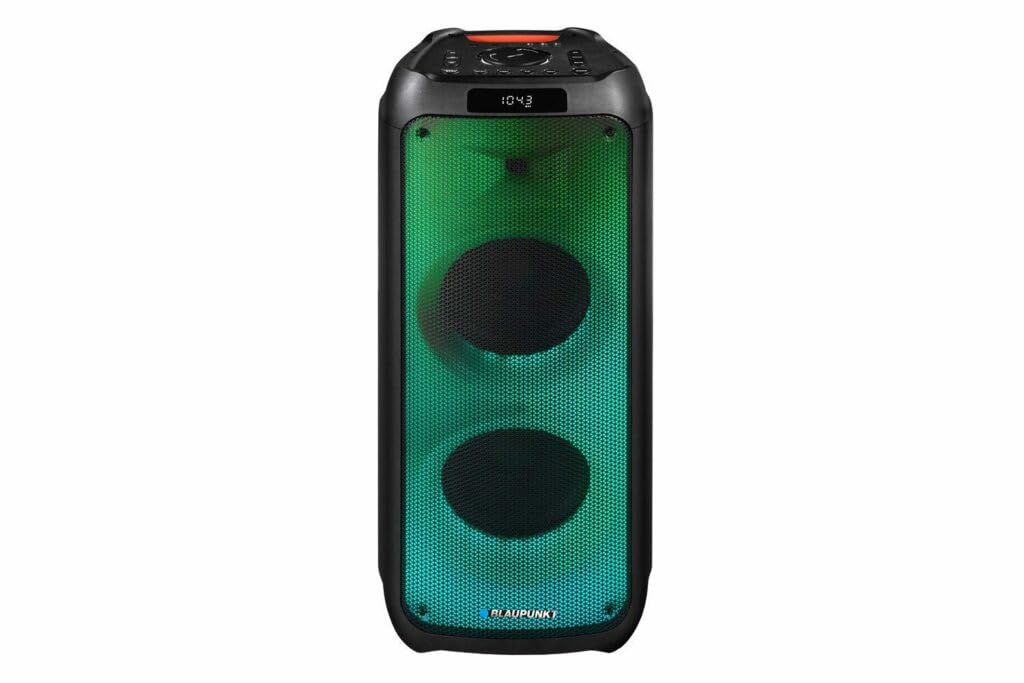
Rajah 1: Depan view of the Blaupunkt PB10DB speaker, showcasing the dual speaker grilles and dynamic LED lighting. The top panel features a display and control buttons.

Rajah 2: bersudut view of the Blaupunkt PB10DB speaker, highlighting its portable design and the side profile.
Kawalan dan Port (Tata Letak Biasa)
- Butang Kuasa: Menghidupkan/mematikan pembesar suara.
- Butang Mod: Switches between Bluetooth, USB, AUX, and FM radio modes.
- Kawalan Kelantangan: Melaraskan kelantangan induk.
- Butang Main/Jeda: Mengawal main balik media.
- Butang Trek Sebelumnya/Seterusnya: Menavigasi melalui trek.
- Input Mikrofon (MIC IN): For connecting a wired microphone for karaoke.
- Port USB: For playing music from a USB drive or charging external devices.
- Input AUX (3.5mm): Untuk menyambungkan peranti audio luaran melalui kabel audio.
- Port Pengecasan: Untuk menyambungkan penyesuai kuasa bagi mengecas pembesar suara.
5. Persediaan
5.1 Mengecas Speaker
- Connect the provided power adapter to the charging port on the speaker.
- Palamkan penyesuai ke salur keluar kuasa yang sesuai.
- Lampu penunjuk pengecasan akan menyala (warna mungkin berbeza) untuk menunjukkan bahawa pembesar suara sedang dicas.
- Once fully charged, the indicator light may change color or turn off. Disconnect the charger.
A full charge typically takes several hours and provides approximately 8 hours of playback time.
5.2 Menghidupkan/Mematikan
- Untuk Menghidupkan: Press and hold the Power button for a few seconds until the display lights up and you hear an audible prompt.
- Untuk Mematikan: Press and hold the Power button again for a few seconds until the display turns off and you hear an audible prompt.
6. Arahan Operasi
6.1 Berpasangan Bluetooth
- Ensure the speaker is powered on and in Bluetooth mode. If not, press the Mode button until "Bluetooth" or a similar indicator appears on the display. The speaker will enter pairing mode, indicated by a flashing Bluetooth icon or LED.
- Pada peranti mudah alih anda (telefon pintar, tablet, dll.), dayakan Bluetooth dan cari peranti yang tersedia.
- Select "Blaupunkt PB10DB" from the list of found devices.
- Once paired, the speaker will emit an audible confirmation, and the Bluetooth indicator will stop flashing.
- Anda kini boleh memainkan audio daripada peranti anda melalui pembesar suara.
Pembesar suara secara automatik akan cuba menyambung semula ke peranti pasangan terakhir apabila dihidupkan.
6.2 Fungsi Karaoke
- Connect a wired microphone (not always included) to the MIC IN port on the speaker.
- Ensure the microphone is switched on (if it has a power switch).
- Play your desired karaoke track via Bluetooth, USB, or AUX.
- Adjust the microphone volume and echo effects (if available on the speaker) using the dedicated controls.
6.3 Main Semula USB
- Masukkan pemacu kilat USB yang mengandungi audio MP3 files ke dalam port USB.
- Press the Mode button to switch to USB mode. The speaker will automatically begin playing music from the USB drive.
- Gunakan butang Main/Jeda dan Trek Sebelumnya/Seterusnya untuk mengawal main balik.
6.4 Input AUX
- Sambungkan satu hujung kabel audio 3.5mm (tidak disertakan) ke port AUX IN pada pembesar suara.
- Sambungkan hujung kabel yang satu lagi ke bicu fon kepala atau output audio peranti audio luaran anda.
- Press the Mode button to switch to AUX mode.
- Kawal main balik dan kelantangan daripada peranti audio luaran anda.
7. Penyelenggaraan
7.1 Pembersihan
- Always power off the speaker and disconnect it from the power source before cleaning.
- Use a soft, dry cloth to wipe the exterior of the speaker.
- Jangan gunakan pembersih, lilin atau pelarut yang kasar, kerana ini boleh merosakkan kemasan.
7.2 Penyimpanan
- Simpan pembesar suara di tempat yang sejuk dan kering jauh dari cahaya matahari langsung dan suhu yang melampau.
- Jika menyimpan untuk tempoh yang lama, cas bateri secara berkala (cth., setiap 3 bulan) untuk mengekalkan kesihatan bateri.
8. Penyelesaian masalah
| Masalah | Kemungkinan Punca | Penyelesaian |
|---|---|---|
| Speaker tidak dihidupkan. | Bateri habis. | Charge the speaker using the provided power adapter. |
| Tiada bunyi dari pembesar suara. | Kelantangan terlalu rendah atau diredamkan. Mod input salah. | Increase volume. Press the Mode button to select the correct input (Bluetooth, USB, AUX). |
| Gandingan Bluetooth gagal. | Pembesar suara tidak dalam mod berpasangan. Peranti terlalu jauh. Gangguan. | Ensure speaker is in Bluetooth pairing mode. Move device closer to speaker. Turn off other Bluetooth devices. |
| Mikrofon tidak berfungsi. | Microphone not connected properly or switched off. Microphone volume too low. | Check microphone connection. Ensure microphone is powered on. Adjust microphone volume. |
| Main balik USB tidak berfungsi. | Pemacu USB tidak diformat dengan betul atau tidak disokong file jenis. | Ensure USB drive is formatted to FAT32 and contains MP3 files. Cuba pemacu USB yang lain. |
9. Spesifikasi
| Nama Model: | PB10DB |
| Jenama: | BLAUPUNKT |
| Teknologi Ketersambungan: | Tambahan, Bluetooth, USB |
| Kuasa Output Pembesar Suara Maksimum: | 1000 Watt |
| Mod Output Audio: | Stereo |
| Jenis Pemasangan: | Lekap Meja |
| Bahan: | Logam dan Plastik |
| Jenis pembesar suara: | Tweeter |
| Ciri Khas: | Muzik |
| Penggunaan yang Disyorkan: | For music player |
| warna: | Biru |
| kalis air: | betul |
| Kaedah Kawalan: | Sentuh |
| Diameter Tweeter: | 4 Sentimeter |
| Purata Hayat Bateri: | 8 jam |
| Peranti Serasi: | Komputer riba, telefon pintar |
| Sumber Kuasa: | Dikuasakan Bateri |
| Berat Barang: | 105 Gram |
| Dimensi Produk (L x W x H): | 24 x 69 x 2.5 cm |
10. Waranti dan Sokongan
Blaupunkt products are designed and manufactured to the highest quality standards. For detailed warranty information, please refer to the warranty card included with your product or visit the official Blaupunkt webtapak.
For technical support, troubleshooting assistance, or service inquiries, please contact Blaupunkt customer support through their official channels.
- rasmi Webtapak: www.blaupunkt.com
- Perkhidmatan Pelanggan: Refer to your regional Blaupunkt weblaman web untuk maklumat hubungan.