
pengenalan
Thank you for choosing the BOBLOV W3 WiFi Body Camera. This manual provides detailed instructions for the proper setup, operation, and maintenance of your device. Please read this manual thoroughly before using the camera to ensure optimal performance and to prevent damage.
Kandungan Pakej
Sahkan bahawa semua item yang disenaraikan di bawah disertakan dalam pakej anda:
- 1x BOBLOV W3 Body Camera
- 1x 64GB Micro SD Card (pre-installed in camera)
- 1x Kabel Pengecas USB-C
- 1x Pemandu Skru
- 1x Manual Pengguna (dokumen ini)
- 1x Back Magnets Clip
- 1x Brooch
Produk Selesaiview
Biasakan diri anda dengan komponen dan kawalan kamera:

Imej: BOBLOV W3 Body Camera with labels indicating the Power/Video Button, Audio/WiFi Button, Microphone, Reset button, Brooch attachment point, Back Magnetic Clip, and USB-C Charging Interface. The image also shows the dimensions of the camera.
- Power/Video Button: Used to power on/off the device and start/stop video recording.
- Audio/WiFi Button: Used to start/stop audio recording and activate/deactivate WiFi function.
- Mic: Mikrofon untuk menangkap audio.
- Tetapkan semula: Small button to reset the device (requires a pin).
- Brooch: Attachment point for the included brooch clip.
- Back Magnetic Clip: Removable clip for magnetic attachment.
- Antara Muka Pengecasan: Port USB-C untuk pengecasan dan pemindahan data.
Persediaan
1. Mengecas Kamera
Before initial use, fully charge the camera. The built-in 1450mAh battery takes approximately 3 hours to fully charge.
- Connect the provided USB-C charging cable to the camera's charging interface.
- Sambungkan hujung kabel yang satu lagi ke penyesuai kuasa USB (tidak disertakan) atau port USB komputer.
- Lampu penunjuk pengecasan akan menyala semasa pengecasan dan padam apabila dicas sepenuhnya.
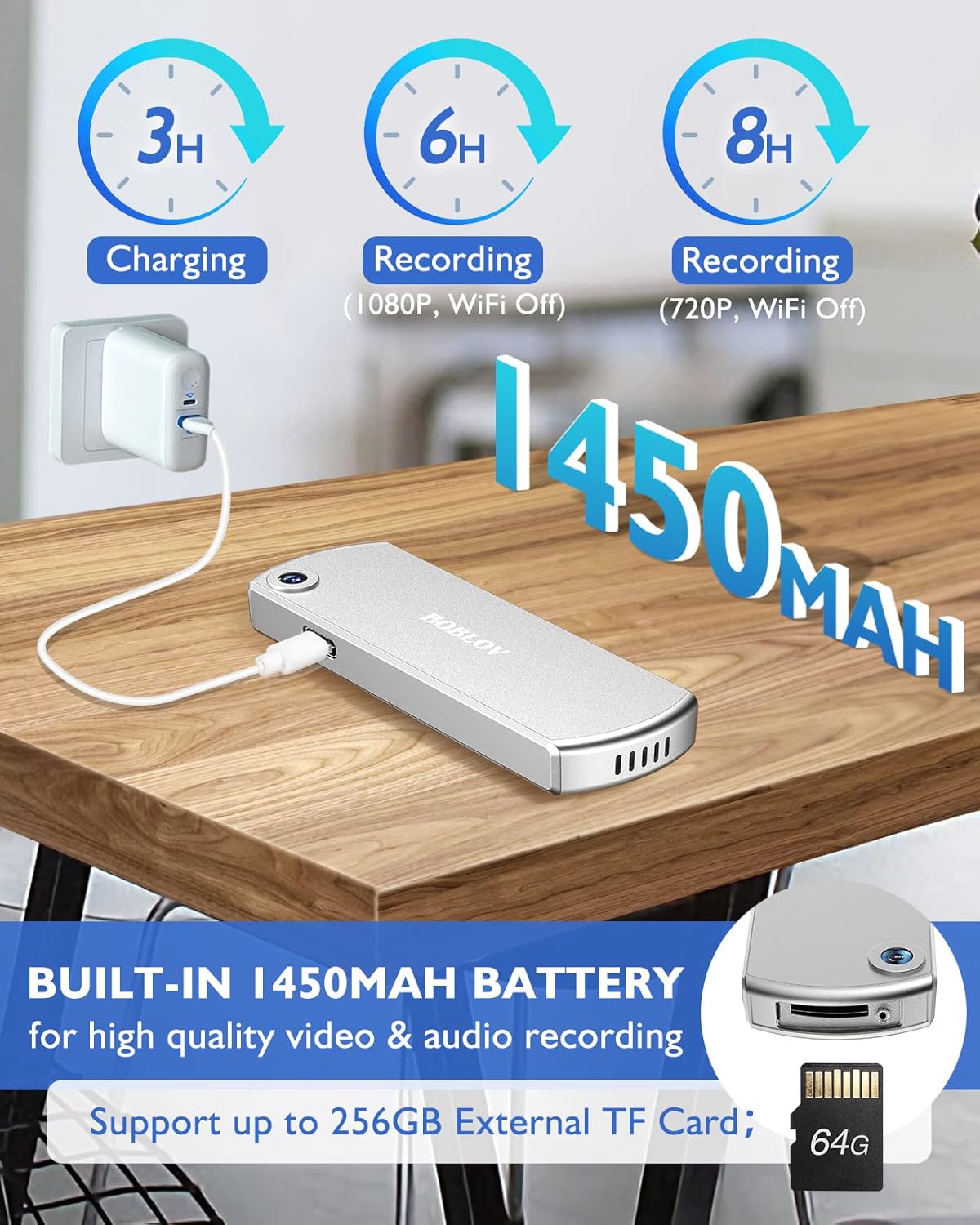
Imej: The BOBLOV W3 Body Camera being charged via a USB-C cable, highlighting the 1450mAh battery and charging times: 3 hours for full charge, 6 hours recording (1080P, WiFi Off), and 8 hours recording (720P, WiFi Off).
2. Inserting/Expanding Memory Card
The W3 Body Camera uses an external Micro SD card. A 64GB card is included and pre-installed.
- Cari slot kad memori pada kamera.
- Use the included screwdriver to carefully unscrew the cover of the card slot.
- Insert or replace the Micro SD card (up to 256GB) into the slot with the contacts facing down.
- Securely fasten the card slot cover with the screwdriver.
3. Attaching the Camera
The camera offers two attachment options: a back magnetic clip and a brooch.
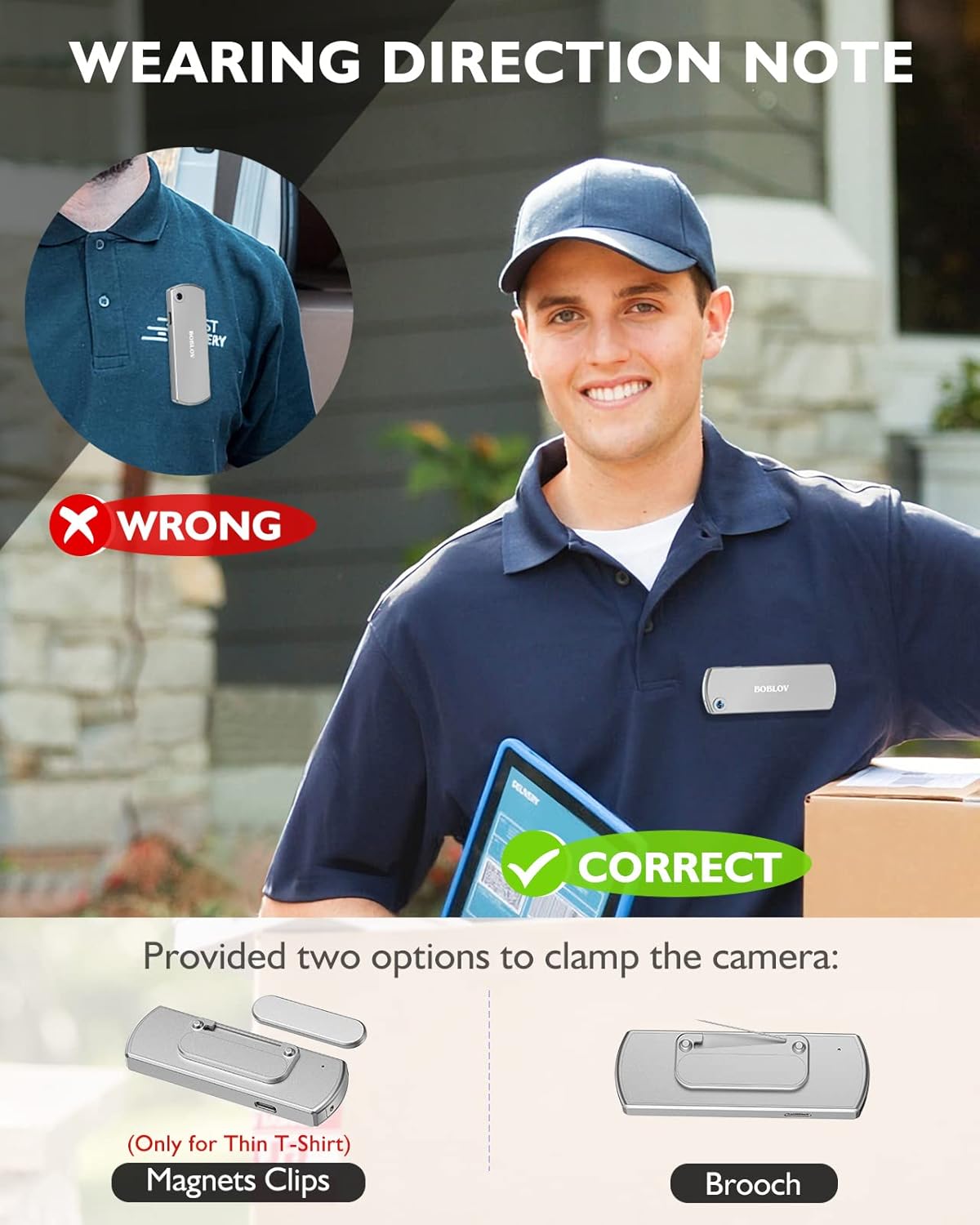
Imej: Illustration demonstrating correct and incorrect ways to wear the BOBLOV W3 Body Camera. It shows that magnetic clips are suitable for thin T-shirts, while a brooch provides a more secure attachment for other clothing types.
- Klip magnet: Attach the magnetic clip to the back of the camera. This is suitable for thin fabrics like T-shirts. Ensure the camera is securely held.
- Brooch: For more secure attachment or thicker clothing, use the provided brooch. Attach it to the camera's designated brooch point and then pin it to your clothing.
Arahan Operasi
1. Hidupkan/Mati Kuasa
- Hidupkan kuasa: Tekan dan tahan butang Power/Video Button for a few seconds until the indicator light illuminates.
- Matikan: Tekan dan tahan butang Power/Video Button again for a few seconds until the indicator light turns off.
2. Rakaman Video
- While the camera is powered on, press the Power/Video Button once to start video recording. The indicator light will flash to indicate recording is in progress.
- Tekan ke Power/Video Button again to stop video recording. The indicator light will return to a steady state.
- The camera supports 1080P and 720P video recording. With WiFi off, it can record for approximately 6 hours at 1080P or 8 hours at 720P on a full charge.
- Videos are saved in 5-minute fragments by default. The camera supports loop recording, overwriting older files apabila kad memori penuh.
3. Rakaman Audio
- While the camera is powered on, press the Audio/WiFi Button once to start audio recording.
- Tekan ke Audio/WiFi Button sekali lagi untuk menghentikan rakaman audio.
4. WiFi Function and App Connectivity
The BOBLOV W3 features WiFi connectivity, allowing you to manage files and change settings via a smartphone app.
- Activate WiFi: Tekan dan tahan butang Audio/WiFi Button for a few seconds to turn on the WiFi function. The WiFi indicator light will flash.
- Muat turun Aplikasi:
- For Android devices, download the DHiHZ apl.
- Untuk peranti iOS, muat turun Mini-XRcam apl.
- Sambung ke Kamera: On your smartphone, go to WiFi settings and connect to the camera's WiFi network (usually named "BOBLOV_W3_XXXX"). The default password is typically "12345678".
- Gunakan Aplikasi: Open the downloaded app to view hidup footage, playback recordings, download files, and adjust camera settings.
- Deactivate WiFi: Tekan dan tahan butang Audio/WiFi Button sekali lagi untuk mematikan WiFi.

Imej: The BOBLOV W3 Body Camera wirelessly connected to a smartphone, illustrating the WiFi function for managing files, changing settings, and accessing features like video, audio, preview, playback, and download through the dedicated Android (DHiHZ) and iOS (Mini-XRcam) applications.
5. Menyambung ke PC
You can connect the camera to a computer to manage recorded files dan tukar tetapan.
- Ensure the camera is powered ON before connecting to the PC.
- Connect the camera to your computer using the provided USB-C cable.
- Kamera akan muncul sebagai pemacu cakera boleh tanggal pada komputer anda.
- You can then access, copy, delete, or upload recorded files. Some settings may also be configurable via a configuration file on the camera's storage.

Imej: The BOBLOV W3 Body Camera connected to a laptop via a USB-C cable, demonstrating how to manage recorded files and change settings. Icons for Playback, Delete, Upload, and Settings are shown, with a note to ensure the camera is powered ON for connection.
Penyelenggaraan
- Pembersihan: Use a soft, dry cloth to clean the camera body. Do not use liquid cleaners or solvents.
- Storan: Simpan kamera di tempat yang sejuk dan kering jauh dari cahaya matahari langsung dan suhu yang melampau.
- Penjagaan Bateri: Untuk memanjangkan hayat bateri, elakkan daripada menyahcas sepenuhnya bateri dengan kerap. Cas kamera dengan kerap, walaupun tidak digunakan untuk tempoh yang lama.
- Kad Memori: Periodically back up important recordings from the Micro SD card to a computer. Format the Micro SD card regularly (e.g., once a month) to maintain optimal performance and prevent data corruption.
- Tahan Air: The camera has an IP65 waterproof rating, meaning it is protected against dust and low-pressure water jets. It is not designed for submersion.
Menyelesaikan masalah
| Masalah | Kemungkinan Punca / Penyelesaian |
|---|---|
| Kamera tidak dihidupkan. | Battery may be depleted. Charge the camera for at least 3 hours. If the issue persists, try resetting the camera using a pin in the reset hole. |
| Camera gets hot when WiFi is on. | This is normal behavior for the camera when the WiFi function is active due to increased power consumption. |
| Cannot connect to WiFi via smartphone app. | Ensure WiFi is enabled on the camera. Check if you have downloaded the correct app (DHiHZ for Android, Mini-XRcam for iOS). Verify the WiFi password (default is "12345678"). Try restarting both the camera and your phone. |
| Camera stops recording unexpectedly. | The memory card may be full. The camera supports loop recording, but if the card is corrupted or too slow, it might cause issues. Try formatting the card or using a different high-speed Micro SD card. Battery may be low. |
| Tidak boleh akses files pada PC. | Ensure the camera is powered ON before connecting to the PC. Try a different USB-C cable or USB port. |
Spesifikasi
| Ciri | Perincian |
|---|---|
| Jenama | BOBLOV |
| Nama Model | W3 |
| Nombor Model | B-W3 |
| Teknologi Ketersambungan | Wi-Fi |
| Ciri Khas | Ringan |
| Peranti Serasi | Android/iOS Phone |
| Sumber Kuasa | Dikuasakan Bateri |
| Resolusi Tangkapan Video | 1080p |
| warna | Perak |
| Jenis Pemasangan | Lekapan Permukaan |
| Faktor Bentuk | Padat |
| Bahan Kepungan | logam |
| Jenis Makluman | Gerak Sahaja |
| Sumber Cahaya | Inframerah |
| Penilaian Kalis Air | IP65 |
| Kaedah Kawalan | Apl |
| Wattage | 3.7 Watt-jam |
| Penglihatan Malam | Warna Malam |
| Dimensi Item | 9 x 3 x 1.5 sentimeter |
| Kapasiti Bateri | 1450mAh (Terbina dalam) |
| Recording Time (1080P, WiFi Off) | lebih kurang 6 jam |
| Recording Time (720P, WiFi Off) | lebih kurang 8 jam |
| Masa Mengecas | lebih kurang 3 jam |
| Memori Luaran | Micro SD Card, up to 256GB (64GB included) |
| Berat Bersih | 60g / 2oz |
Waranti dan Sokongan
BOBLOV provides a two-year warranty for high-value products, including the W3 Body Camera. For any technical assistance, troubleshooting, or warranty claims, please contact BOBLOV customer service.
Please refer to the official BOBLOV weblaman web atau dokumentasi pembelian anda untuk maklumat hubungan dan butiran waranti terkini.