
pengenalan
Thank you for choosing the iJoy Ultra Wireless Over-Ear Bluetooth Headphones. These headphones are designed to provide a versatile audio experience with multiple connectivity options and comfortable wear. This manual will guide you through the features, setup, and operation of your new headphones.

Image: iJoy Ultra Wireless Over-Ear Bluetooth Headphones, showcasing the sleek design and over-ear cushions.
Apa yang ada dalam Kotak
Sila pastikan semua item ada dalam pakej anda:
- iJoy Ultra Wireless Over-Ear Bluetooth Headphones
- Kabel Pengecasan USB Jenis C
- Kabel AUX (3.5mm)
Produk Selesaiview
Biasakan diri anda dengan kawalan dan port fon kepala:

Imej: Sisi view of the headphone ear cup, highlighting the control buttons for volume, track skipping, and power/play/pause/call management.
- Volume + / Skip Song: Hold for Volume Up, Press for Next Song.
- Power / Play / Pause / Answer/Reject Calls: Press to Play/Pause or Answer/Reject Calls. Hold to Power On/Off.
- Jilid - / Lagu Sebelumnya: Hold for Volume Down, Press for Previous Song.
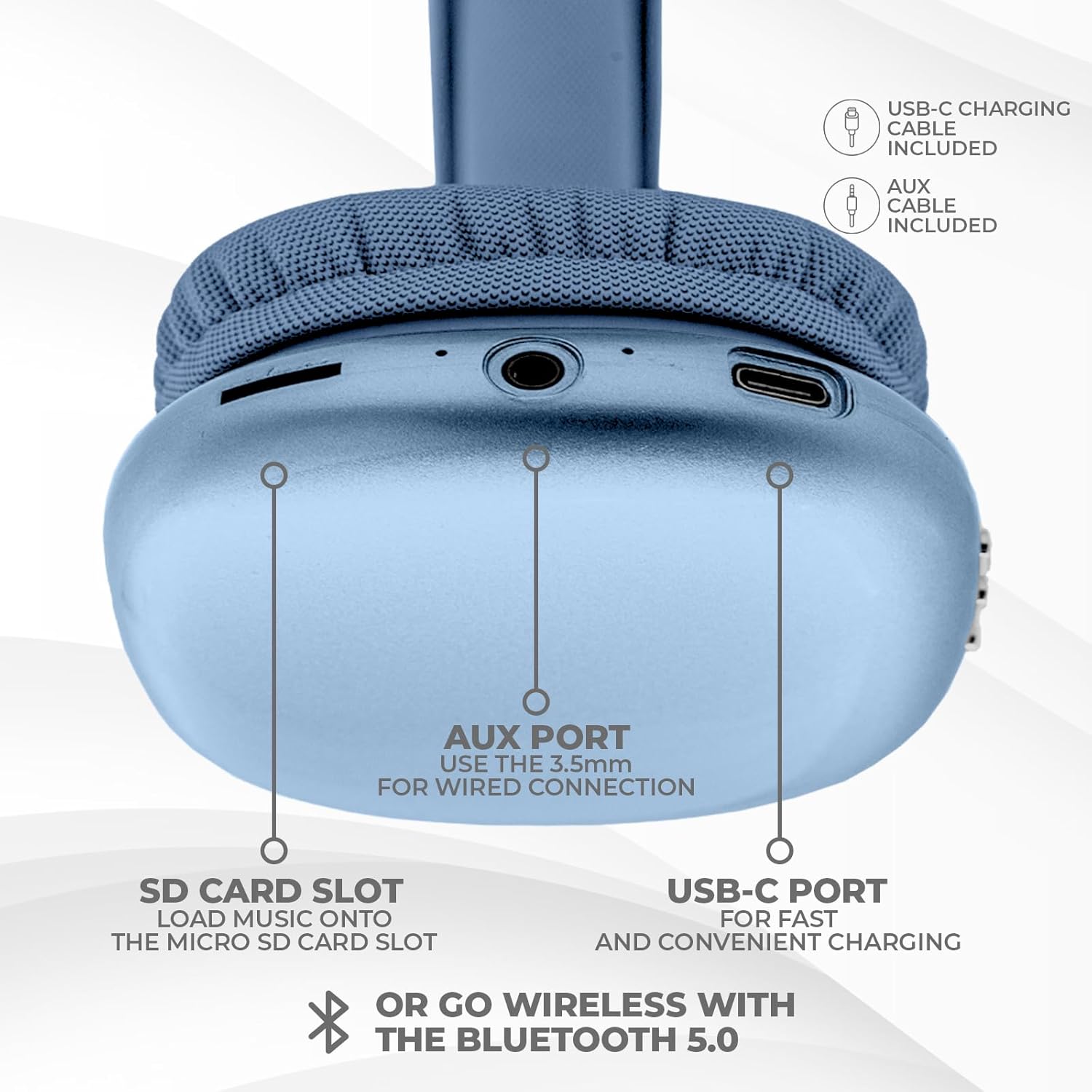
Imej: Bawah view of the headphone ear cup, showing the USB-C charging port, AUX port, and SD card slot.
- Port USB-C: Untuk mengecas fon kepala.
- AUX Port (3.5mm): Untuk sambungan audio berwayar.
- Slot Kad SD: For direct audio playback from a Micro SD card.
Persediaan
1. Mengecas Fon Kepala
Sebelum penggunaan pertama, cas sepenuhnya fon kepala anda. Cas penuh mengambil masa kira-kira 2 jam.
- Connect the provided USB Type C charging cable to the USB-C port on the headphone.
- Sambungkan hujung kabel USB yang satu lagi ke sumber kuasa USB yang serasi (cth, penyesuai dinding, port USB komputer).
- Penunjuk LED akan menunjukkan status pengecasan dan akan mati atau berubah warna apabila dicas sepenuhnya.
2. Berpasangan Bluetooth
To connect your headphones wirelessly:
- Pastikan fon kepala dicas dan dimatikan.
- Tekan dan tahan butang Kuasa sehingga penunjuk LED berkelip, menunjukkan mod berpasangan.
- Pada peranti anda (telefon pintar, tablet, komputer riba), dayakan Bluetooth dan cari peranti yang tersedia.
- Select "iJoy Ultra" from the list of devices.
- Once connected, the LED indicator will typically show a solid light or slow flash.
Note: The Bluetooth range is approximately 10 meters (33 feet).
3. Sambungan Berwayar (AUX)
For a non-wireless connection or when the battery is low:
- Connect one end of the provided 3.5mm AUX cable to the AUX port on the headphone.
- Sambungkan hujung kabel AUX yang satu lagi ke bicu audio 3.5mm pada peranti anda.
- Fon kepala akan bertukar secara automatik kepada mod berwayar.
4. Main Semula Kad SD
Untuk memainkan muzik terus daripada kad Micro SD:
- Insert a Micro SD card (with music files) into the SD card slot on the headphone.
- The headphones will automatically detect the card and begin playing music.
- Use the track control buttons to navigate your music.
Arahan Operasi
Hidupkan/Mati Kuasa
- Hidupkan kuasa: Tekan dan tahan butang Kuasa selama lebih kurang 3 saat.
- Matikan: Tekan dan tahan butang Kuasa selama lebih kurang 3 saat.
Main balik Muzik
- Main/Jeda: Tekan butang Kuasa sekali.
- Lagu Seterusnya: Tekan butang Kelantangan + sekali.
- Trek Sebelumnya: Tekan butang Kelantangan - sekali.
- Kelantangan: Hold the Volume + button.
- Perlahankan suara: Hold the Volume - button.
Pengurusan Panggilan
Apabila disambungkan melalui Bluetooth:
- Jawab Panggilan: Tekan butang Kuasa sekali.
- Tamatkan Panggilan: Tekan butang Kuasa sekali semasa panggilan.
- Tolak Panggilan: Tekan dan tahan butang Kuasa selama lebih kurang 2 saat.
Hayat Bateri
The headphones offer up to 10 hours of wireless playtime on a single charge.

Image: Visual representation of the headphones' battery life, indicating up to 10 hours of wireless playtime.
Penyelenggaraan
To ensure the longevity and optimal performance of your iJoy Ultra headphones:
- Bersihkan fon kepala dengan kerap menggunakan kain lembut dan kering.
- Elakkan dedahkan fon kepala kepada suhu yang melampau, kelembapan atau cahaya matahari langsung.
- Jangan gunakan pembersih atau pelarut yang melelas.
- Simpan fon kepala di tempat yang sejuk dan kering apabila tidak digunakan.
- Elakkan daripada menjatuhkan atau meletakkan fon kepala kepada kesan yang kuat.
Menyelesaikan masalah
Jika anda menghadapi masalah dengan fon kepala anda, rujuk kepada penyelesaian biasa berikut:
| Masalah | Penyelesaian |
|---|---|
| Fon kepala tidak dihidupkan. | Pastikan fon kepala dicas sepenuhnya. Sambungkan ke sumber kuasa menggunakan kabel USB-C. |
| Tidak boleh berpasangan melalui Bluetooth. | Make sure the headphones are in pairing mode (flashing LED). Turn off and on Bluetooth on your device. Ensure no other devices are currently connected to the headphones. Try 'forgetting' the device on your phone and re-pairing. |
| No sound or choppy audio. | Check volume levels on both headphones and your device. Ensure Bluetooth connection is stable or try a wired AUX connection. If using an SD card, ensure it is properly inserted and the files adalah serasi. |
| Headphones are uncomfortable or too tight. | Adjust the headband for a better fit. The over-ear cushions are designed for comfort, but individual fit may vary. |
| Cannot connect to multiple devices simultaneously. | These headphones typically support connection to one device at a time. Disconnect from the current device before attempting to connect to another. |
Spesifikasi
| Ciri | Perincian |
|---|---|
| Nama Model | Ultra |
| Nombor Model Item | IJHP21 |
| Teknologi Ketersambungan | Tanpa Wayar (Bluetooth), Berwayar (AUX 3.5mm) |
| Teknologi Komunikasi Tanpa Wayar | Bluetooth |
| Julat Bluetooth | 10 Meter (33 Kaki) |
| Jack Fon Kepala | Jack 3.5 mm |
| Ciri Khas | SD Card Slot, Soft Cushion Padding, USB Type C |
| Hayat Bateri | Sehingga 10 Jam |
| Masa Mengecas | 2 Jam |
| Jenis Kawalan | Volume Control, Track Management, Call Management |
| Penempatan Telinga | Atas Telinga |
| bahan | plastik |
| Berat Barang | 8 Auns |
| Dimensi Produk | 7 x 3 x 8 inci |
| UPC | 842700193053 |
Video Produk Rasmi
Video: Video produk rasmi daripada pameran iJoy Electronicsasing the features and design of the iJoy Ultra Bluetooth Over-Ear Headphones.
Waranti dan Sokongan
For warranty information or technical support, please refer to the documentation included with your product or contact iJoy customer service directly. Keep your proof of purchase for any warranty claims.