
1. Pengenalan
The V8 Live Sound Card is a versatile audio mixer and external sound card designed for live broadcasting, KTV, and voice chat. It offers multiple sound effects, adjustable audio controls, and broad compatibility with various devices, enhancing your audio experience for entertainment and professional use.
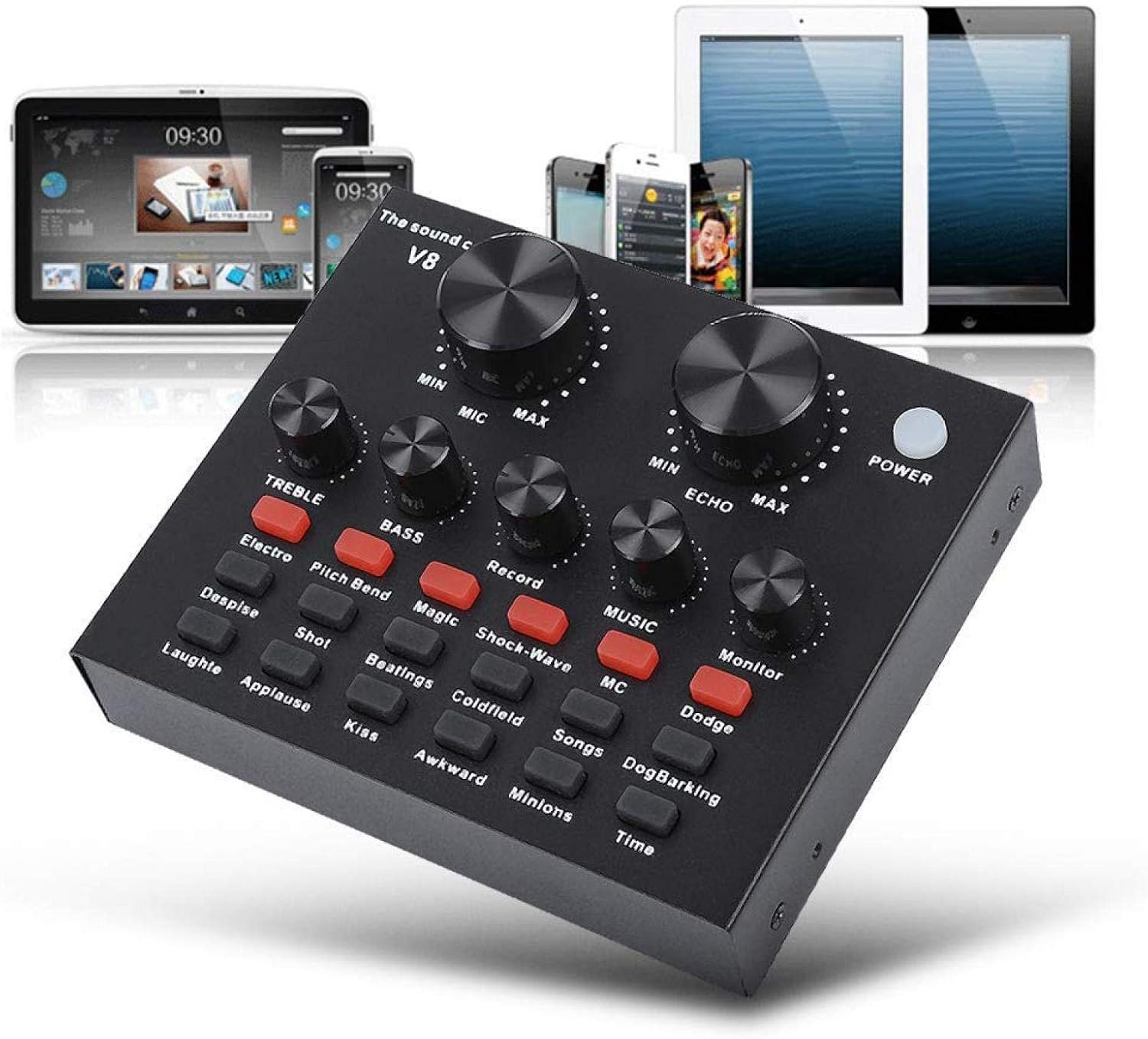
Figure 1: V8 Live Sound Card connected to various devices.
2. Ciri-ciri
- Sokongan Berbilang Peranti: Compatible with mobile phones, computers (laptops, desktops), and single headsets. Supports dual cell phone live, mobile phone computer synchronous live, one computer live, computer accompaniment cell phone live, and instrument input cell phone live.
- Professional Noise Reduction Technology: Features adjustable volume controls for various needs, including reverberation size, microphone volume, high/bass, recording volume, music volume, and monitoring volume (earphone function).
- Multiple Effects, Modes, and Gameplay: Includes 12 kinds of electric sound, 12 kinds of sound effects, and 10 kinds of effect modes. Silicone buttons allow for real-time volume adjustments without software.
- Mudah Alih dan Ringan: Designed for portability, allowing users to enjoy singing or speech anywhere.
- Aplikasi luas: Suitable for Home KTV, Voice Chat, Live streaming (Facebook, Periscope, Livestream, Wechat, Smule), and more. Plug and Play functionality, no driver downloads required.
3. Kandungan Pakej
Selepas membuka bungkusan, sila sahkan bahawa semua komponen ada dan dalam keadaan baik:
- 1 x V8 Live Sound Card Unit
- 2 x Kabel Audio
- 1 x Kabel USB
- 1 x Manual Pengguna Bahasa Inggeris

Figure 2: V8 Live Sound Card and its included accessories.
4. Produk Lebihview
Familiarize yourself with the V8 Live Sound Card's layout and ports:
Kawalan Panel Depan:

Figure 3: Front panel of the V8 Live Sound Card.

Rajah 4: Terperinci view of control panel labels.
- MIC (Microphone Volume): Adjusts the input volume of the microphone.
- ECHO (Echo Effect): Controls the intensity of the echo effect.
- TREBLE (Treble Adjustment): Adjusts the high-frequency sound.
- BASS (Bass Adjustment): Adjusts the low-frequency sound.
- RECORD (Recording Volume): Controls the volume of the recorded output.
- MUSIC (Music Volume): Adjusts the volume of the background music.
- MONITOR (Monitoring Volume): Controls the volume heard through connected headphones/earphones.
- Butang kuasa: Menghidupkan/mematikan peranti.
- Sound Effect Buttons: Various buttons for specific sound effects (e.g., Electro, Pitch Bend, Magic, Shock-Wave, MC, Dodge, Despise, Shot, Beatings, Coldfield, Songs, Dog Barking, Laughter, Applause, Kiss, Awkward, Minions, Time, Reverb Delay, Voice Change, Elimination, Crack, 9277, Yell, Slash, PUBG).
Port Panel Belakang:

Figure 5: Rear panel ports of the V8 Live Sound Card.
- Charging / Computer Interface: USB port for charging and connecting to a computer.
- Live 1 / Live 2: Ports for connecting mobile phones for live broadcasting.
- Antara Muka Iringan: For connecting an external audio source for background music.
- Pembesar Suara fon telinga: Output for connecting external speakers or headphones.
- Antara Muka Alat dengar: For connecting a headset with a combined microphone and headphone jack.
- Mikrofon Pemeluwap: Input untuk mikrofon pemeluwap.
- Dynamic Mic: Input for dynamic microphones.
5. Persediaan
Follow these steps to set up your V8 Live Sound Card:
Kuasa Awal Hidup:
- Ensure the sound card is charged or connected to a power source via the USB cable.
- Tekan ke KUASA button on the front panel to turn on the device.
Kaedah Penyambungan:

Figure 6: Computer Live/Accompaniment connection method.
- For Computer Live/Accompaniment:
- Connect the USB cable from the sound card's Charging / Computer Interface to your computer. The sound card should be automatically recognized.
- Sambungkan mikrofon anda ke Mic Condenser or Mik dinamik input.
- Connect your headphones or speakers to the Pembesar suara fon telinga or Antara Muka Alat Dengar.
- If using an accompaniment device (e.g., another phone for music), connect it to the Accompaniment Interface using an audio cable.
- For Single Mobile Phone Live Broadcast:
- Connect one audio cable from the sound card's Hidup 1 or Hidup 2 port to your mobile phone's audio jack. If your phone does not have a 3.5mm audio jack, use an audio adapter cable (not included).
- Connect your microphone to the appropriate mic input.
- Sambungkan fon kepala anda ke Antara Muka Alat Dengar or Pembesar suara fon telinga.
- For Dual Mobile Phone Live Broadcast:
- Connect one audio cable from the sound card's Hidup 1 port to your first mobile phone.
- Connect a second audio cable from the sound card's Hidup 2 port to your second mobile phone.
- Connect your microphone and headphones as described above.
6. Arahan Operasi
Once connected, you can begin using your V8 Live Sound Card:
- Adjusting Volumes: Use the large knobs for MIC dan ECHO. Use the smaller knobs for TREBLE, BASS, REKOD, MUZIK, dan MONITOR to fine-tune your audio levels.
- Applying Sound Effects: Press the various sound effect buttons on the front panel to activate different effects. Experiment with each button to find the desired sound.
- Perubahan Suara: Gunakan
Documents - Xiaokeis – 16508823665168
tiada dokumen berkaitan
Ask a question about this manual
Ask about setup, troubleshooting, compatibility, parts, safety, or missing instructions. Manuals+ will review the question and use this page’s manual context to help answer it.