
1. Pengenalan
Thank you for choosing EverBrite Puck Lights. This manual provides essential information for the safe and efficient operation of your new LED puck lights. Please read it thoroughly before use and retain it for future reference.

Image: EverBrite Puck Lights with Remote, 6-Pack Multicolor. These lights offer versatile illumination for various indoor spaces.
2. Kandungan Pakej
Your EverBrite Puck Lights package includes the following items:
- 6 x LED Puck Lights (batteries included)
- 2 x Remote Controls (batteries included)
- 6 x Powerful Double-Sided Adhesive Tapes
- 1 x Manual Pengguna
3. Persediaan dan Pemasangan
Follow these steps to set up and install your EverBrite Puck Lights:
- Pemasangan Bateri: Each puck light requires 3 AA batteries. To install, twist the back cover of the puck light counter-clockwise to open. Insert the batteries according to the polarity markings (+/-), then replace the cover by twisting clockwise until secure. The remote controls also come with pre-installed batteries.
- Pemasangan: Clean the surface where you intend to install the lights. Peel off the protective film from one side of the double-sided adhesive tape and apply it firmly to the back of the puck light. Peel off the other side of the film and press the light firmly onto the desired surface for at least 30 seconds.
- Pertimbangan penempatan: The puck lights can be installed horizontally or vertically. For optimal remote control functionality, ensure the remote has a clear line of sight to the lights. Infrared signals can be blocked by objects.

Image: Rotate the backplate counter-clockwise to open the EverBrite Puck Light for battery insertion.

Image: Insert 3 AA batteries into the EverBrite Puck Light, observing correct polarity.

Image: Apply the adhesive sticker to the back of the EverBrite Puck Light for mounting.

Image: Attach the EverBrite Puck Light onto any desired surface.
Video: This video demonstrates the unboxing process and how to insert batteries into the EverBrite Puck Lights, along with a brief overview alat kawalan jauh.
4. Arahan Operasi
Your EverBrite Puck Lights can be controlled both manually and with the included remote control.
Fungsi Kawalan Jauh:
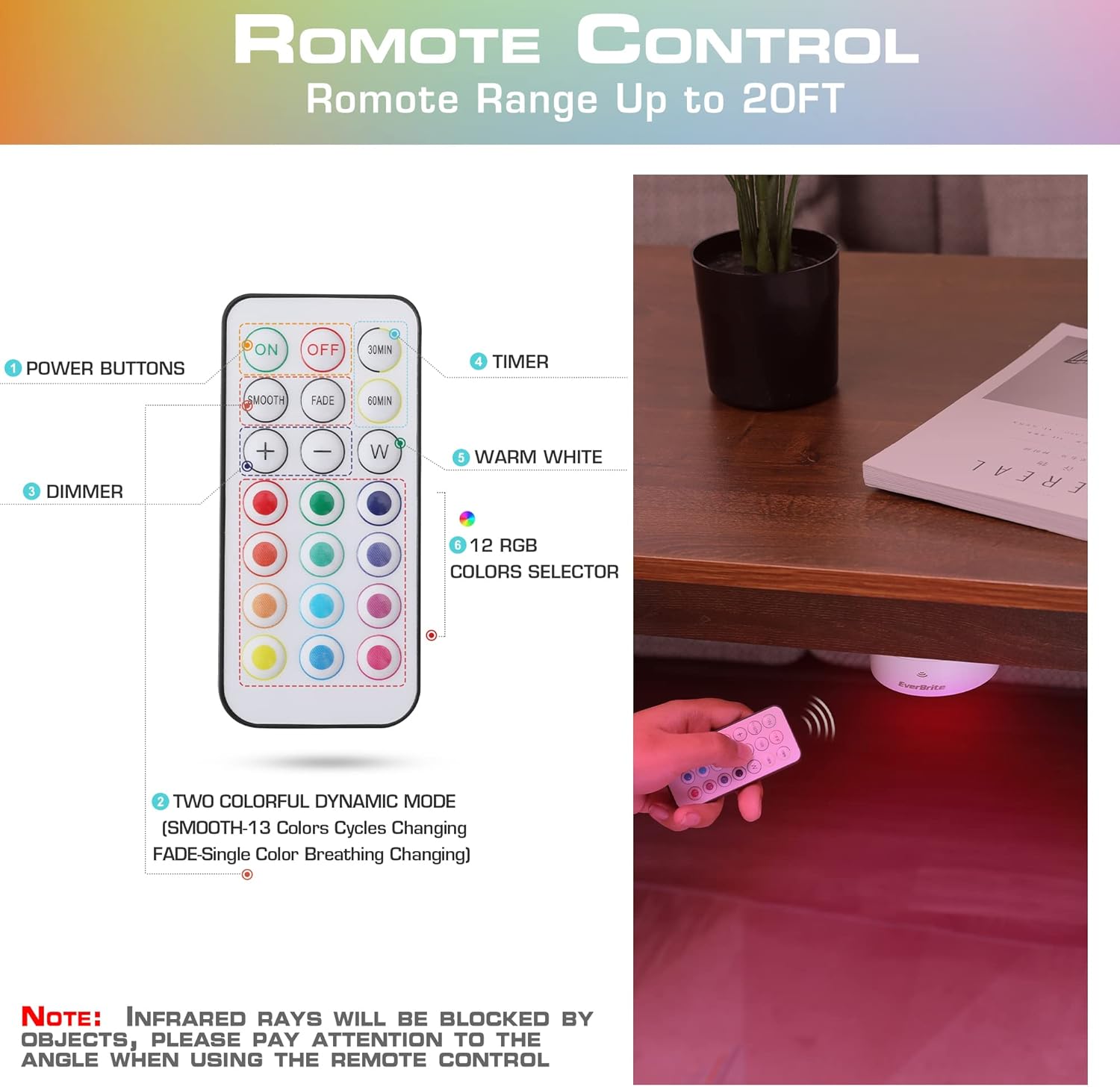
Image: Remote control for EverBrite Puck Lights showing power, dimmer, timer, warm white, and 12 RGB color selectors.
- HIDUP/MATI: Press the 'ON' button to turn the lights on, and 'OFF' to turn them off.
- Pilihan Warna: Choose from 13 distinct colors, including warm white and 12 RGB colors, by pressing the corresponding color button on the remote.
- Lebih malap: Use the '+' and '-' buttons to adjust the brightness across 10 levels (10%-100%).
- Pemasa: Set the lights to automatically turn off after 30 or 60 minutes using the '30MIN' or '60MIN' buttons.
- Mod Dinamik: Select 'FADE' for a gradual breathing light effect with your chosen color, or 'SMOOTH' for a continuous cycle through 12 different colors.
Kawalan manual:
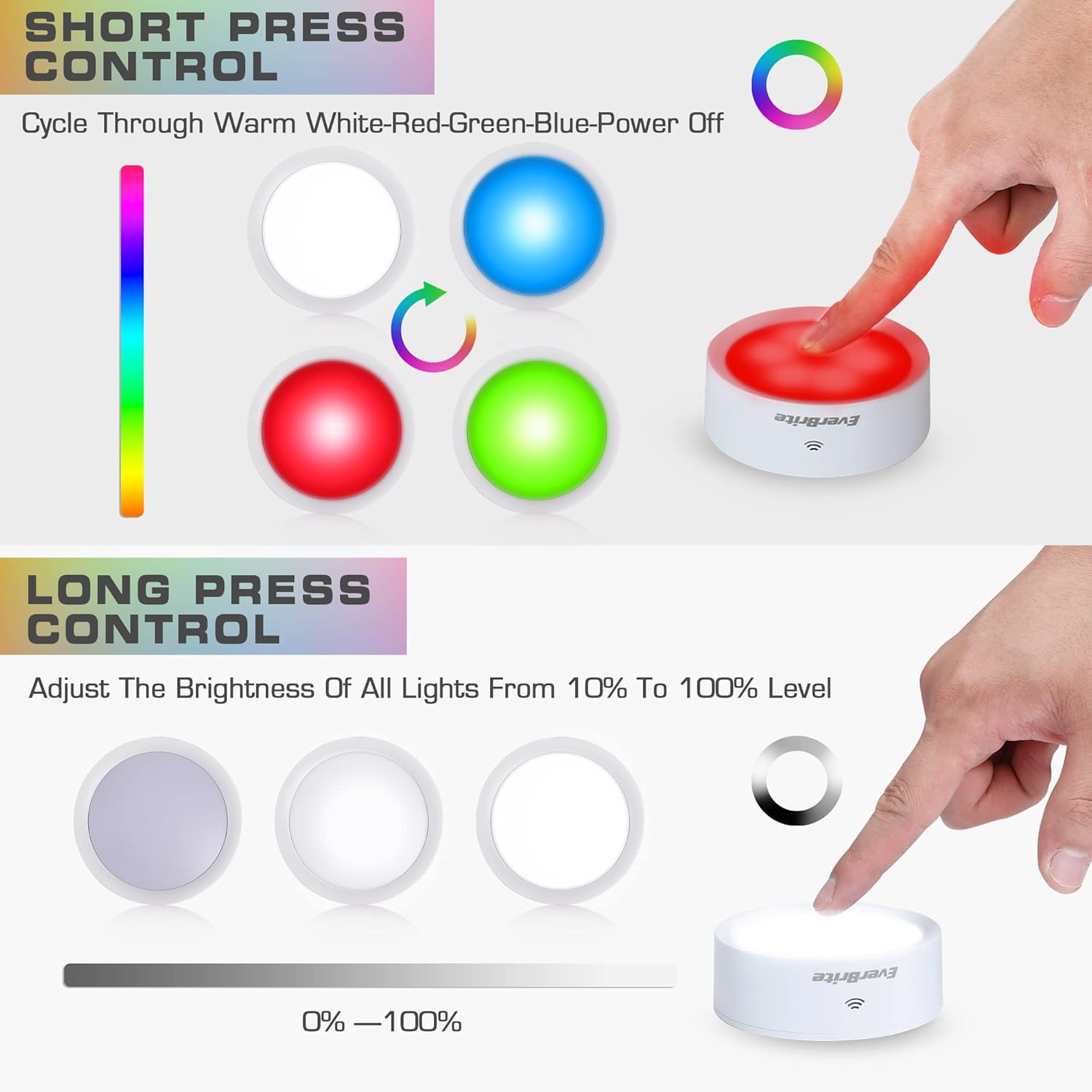
Image: Diagram illustrating short press control for color cycling and long press control for brightness adjustment on EverBrite Puck Lights.
- Akhbar Ringkas: Ketik lampshade to cycle through warm white, red, green, blue, and then off.
- Tekan lama: Tekan dan tahan lampshade to adjust the brightness from 10% to 100%.
Video: This video showcases the various lighting modes and colors of the EverBrite Puck Lights, demonstrating both remote and manual control.
5. Ciri-ciri
- Pencahayaan Serbaguna: Offers 13 color schemes, including warm white and 12 RGB colors, to suit any mood or occasion.
- Mod Dinamik: Features 'FADE' mode for a single color breathing effect and 'SMOOTH' mode for a continuous cycle of 12 colors.
- Kawalan Jauh Wayarles: Control all lights from up to 20 feet away, even in hard-to-reach areas.
- Kecerahan boleh laras: 10-level dimming (10%-100%) via remote or long press on the lampteduh.
- Pemasa yang Mudah: Set lights to turn off automatically after 30 or 60 minutes.
- Pemasangan Mudah: No wiring required, simply use the included double-sided adhesive tape.
- Aplikasi luas: Ideal for under cabinets, closets, counters, hallways, stairs, bookshelves, wardrobes, and more.

Image: EverBrite Puck Lights are suitable for various indoor applications, from accent lighting to functional illumination.
Video: This video demonstrates how EverBrite Puck Lights can be used to create festive Halloween pumpkin lights, showcasing their color-changing capabilities.
6. Penyelenggaraan
- Penggantian Bateri: When the lights dim significantly or stop responding, it's time to replace the batteries. Follow the battery installation steps in Section 3.
- Pembersihan: Use a soft, dry cloth to clean the surface of the puck lights. Do not use abrasive cleaners or immerse the lights in water.
- Storan: If storing the lights for an extended period, remove the batteries to prevent leakage and damage.
7. Penyelesaian masalah
If you encounter issues with your EverBrite Puck Lights, refer to the following common solutions:
- Lampu tidak menyala: Check if batteries are inserted correctly and are not depleted. Replace batteries if necessary.
- Jauh tidak berfungsi: Ensure the remote's battery is functional. Point the remote directly at the lights and ensure no obstructions are blocking the infrared signal.
- Lights dim or flicker: This usually indicates low battery power. Replace all batteries in the affected puck light.
- Lights not responding to specific commands: Try resetting the lights by removing and reinserting the batteries.
8. Spesifikasi
| Nombor Model | E007085 |
| Jenama | EverBrite |
| Jenis Sumber Cahaya | LED |
| Sumber Kuasa | Battery Powered (3 x AA per light) |
| Voltage | 4.5 Volt |
| Kaedah Kawalan | Remote Control, Manual Press |
| Teknologi Ketersambungan | IR (Inframerah) |
| Bilangan Sumber Cahaya | 6 setiap pek |
| Dimensi Produk | 8"D x 4"W x 8"H |
| Berat Barang | 1.94 paun |
| Jenis Bahan | Akrilonitril Butadiena Stirena (ABS) |
| Tahap Ketahanan Air | Bukan Tahan Air |
| Penggunaan Dalaman/Luar | Dalaman |
9. Waranti dan Sokongan
For warranty information or technical support, please refer to the contact details provided on the product packaging or visit the official EverBrite webtapak. Simpan resit pembelian anda sebagai bukti pembelian.