
1. Pengenalan
This manual provides detailed instructions for the safe and efficient use of your ACOPOWER 90W Portable Foldable Solar Panel. Please read this manual thoroughly before operation to ensure proper functionality and longevity of the product. This solar panel is designed to provide portable power for various devices, ideal for camping, RV use, and other outdoor activities.

Image 1.1: The ACOPOWER 90W Portable Foldable Solar Panel in its unfolded state, ready for use.
2. Arahan Keselamatan
- Pendedahan Air: The solar panel is IP65 water-resistant, protecting against splashing water. Do not submerge the panel in water or expose it to heavy rain.
- Pengendalian: Handle the solar panel with care. Avoid dropping or subjecting it to strong impacts.
- Suhu: Do not expose the solar panel to extreme temperatures or open flames.
- Pengubahsuaian: Do not attempt to disassemble, modify, or repair the solar panel yourself. Contact customer support for assistance.
- Kanak-kanak: Keep the solar panel out of reach of children.
- Keselamatan Elektrik: Ensure all connections are secure before use. The panel includes built-in protection against overcharging, overheating, and short circuits.
3. Kandungan Pakej
Sahkan bahawa semua item terdapat dalam pakej anda:
- 1 x ACOPOWER 90W Portable Foldable Solar Panel
- Integrated cables for DC, USB, and Type-C outputs
- Adjustable stands (integrated into the design)
4. Ciri-ciri Produk
- Berbilang Port Output: Equipped with DC, USB, and Type-C output ports for broad compatibility with various devices.
- Kecekapan Penukaran Tinggi: Monocrystalline photovoltaic cells achieve up to 25% solar conversion efficiency.
- Pembinaan Tahan Lama: Features advanced laminated technology and long-lasting ETFE material for scratch resistance and improved light transmittance.
- Keselamatan Bersepadu: Built-in smart IC chip provides protection against overcharging, overheating, and short circuits.
- Reka Bentuk Mudah Alih: Lightweight (8.1 lb) and foldable, with compact dimensions (21.4 x 13.3 x 0.79 inches folded) for easy transport.
- Pendirian Boleh Laras: Two integrated adjustable stands allow for optimal angle positioning towards the sun.
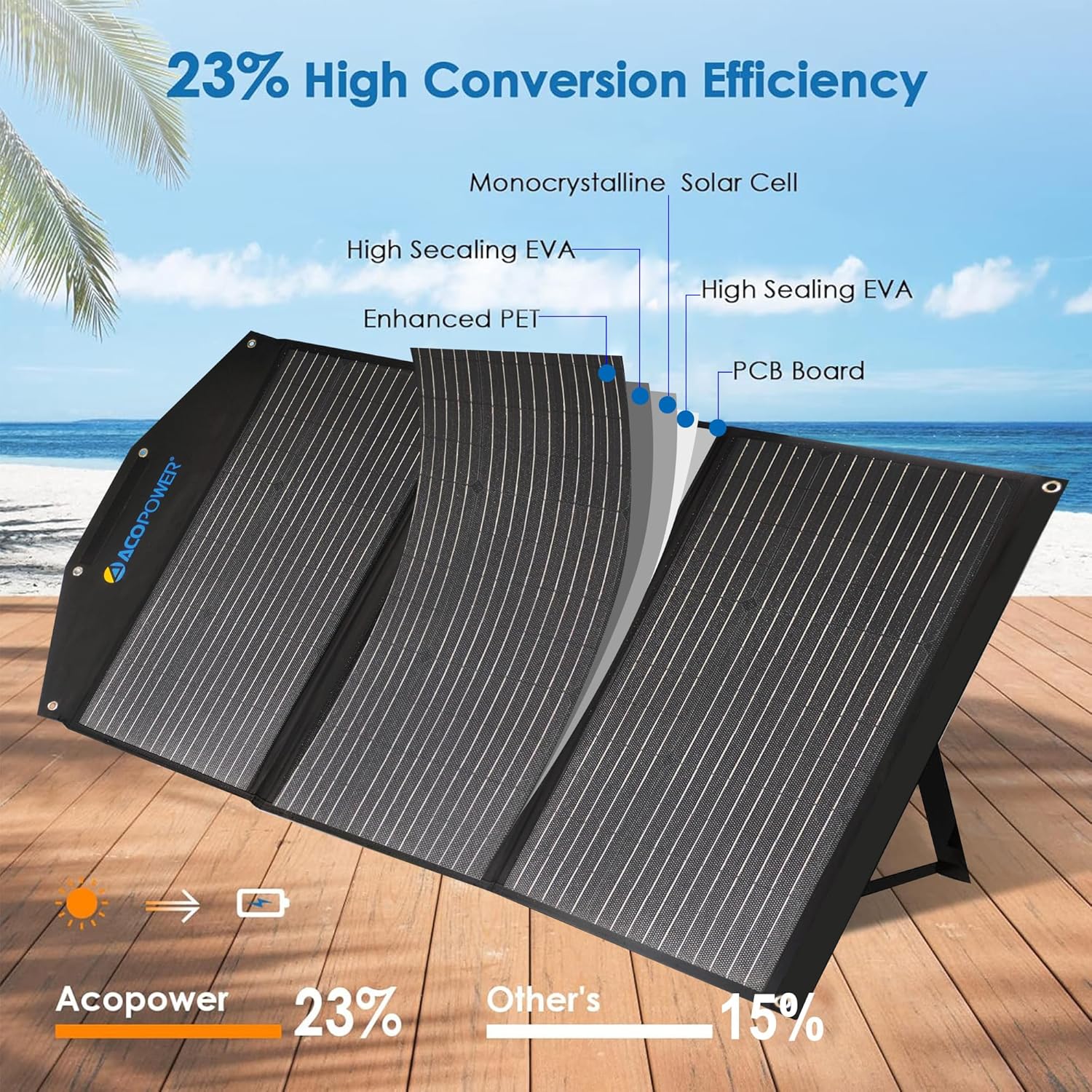
Image 4.1: Cross-section diagram illustrating the high-efficiency monocrystalline solar cell and durable ETFE material layers.

Image 4.2: The solar panel in both folded and unfolded states, highlighting its compact and portable design with dimensions.
5. Persediaan
- Buka Panel: Carefully unfold the ACOPOWER 90W solar panel from its compact, suitcase-like form.
- Position the Stands: Extend the two adjustable stands located on the back of the panel. Position them to support the panel at an angle that maximizes exposure to direct sunlight. An angle of approximately 45 degrees to the sun is often optimal.
- penempatan: Place the unfolded solar panel in an area with unobstructed sunlight. Ensure no shadows fall on the panel, as this can significantly reduce efficiency.
- Lindungi Panel: If necessary, use the integrated mounting holes to secure the panel against wind or accidental displacement.

Image 5.1: A person setting up the ACOPOWER solar panel, demonstrating the use of the adjustable kickstand for optimal positioning.
6. Arahan Operasi
Once the solar panel is set up and exposed to sunlight, you can begin charging your devices.
- Menyambung Peranti:
- Output DC: Use the DC port to connect to compatible portable power stations or other devices requiring DC input.
- Output USB: Connect smartphones, tablets, power banks, and other USB-powered devices to the USB-A ports. The smart IC chip will automatically detect your device and optimize charging speed (up to 2.4A max 5V DC per port, 6A max overall).
- Output Jenis-C: Connect compatible devices, such as modern smartphones, tablets, or laptops, to the Type-C port.
- Penunjuk Pengecasan: Some devices may have a charging indicator. Observe this to confirm power flow.
- Prestasi Optimum: For best charging results, ensure the solar panel is positioned directly facing the sun and free from any obstructions. Adjust the angle periodically as the sun moves.

Image 6.1: The ACOPOWER solar panel connected to various devices including a power station, laptop, camera, smartphone, and tablet, demonstrating its wide compatibility.

Image 6.2: The solar panel highlighting its built-in protection functions, including short circuit, surge, and overload protection, ensuring safe charging.
7. Penyelenggaraan
- Pembersihan: Bersihkan permukaan panel solar secara berkala dengan kain lembutamp kain untuk menghilangkan habuk, kotoran atau serpihan. Elakkan pembersih yang kasar atau bahan kimia yang keras.
- Pemeriksaan: Periodically inspect the panel and cables for any signs of damage, wear, or loose connections.
- Storan: Apabila tidak digunakan, lipat panel solar dan simpan di tempat yang kering dan sejuk, jauh daripada cahaya matahari langsung dan suhu yang melampau.
8. Penyelesaian masalah
| Masalah | Kemungkinan Punca | Penyelesaian |
|---|---|---|
| No power output from ports. |
|
|
| Kelajuan pengecasan perlahan. |
|
|
| Panel feels hot during operation. |
|
|
9. Spesifikasi
| Atribut | Perincian |
|---|---|
| Jenama | ACOPOWER |
| Nombor Model | Panel Suria Mudah Alih 90W |
| bahan | ETFE |
| Dimensi Produk (Tidak dilipat) | 46.9 x 21.4 inci |
| Dimensi Produk (Dilipat) | 21.4 x 13.3 x 0.79 inci |
| Berat Barang | 8.1 lb (3.67 kg) |
| Kecekapan | Up to 25% (Monocrystalline) |
| Port Output | DC, USB-A (up to 2.4A max 5V DC per port, 6A max overall), Type-C |
| Tahan Air | IP65 (kalis percikan) |
| Ciri Keselamatan | Overcharging, Overheating, Short Circuit Protection (Smart IC chip) |
| UPC | 810073750647 |
10. Waranti dan Sokongan
ACOPOWER products are designed for reliability and performance. For warranty information, technical support, or any questions regarding your 90W Portable Foldable Solar Panel, please contact ACOPOWER customer service directly.
You can find contact information on the official ACOPOWER webtapak atau melalui platform pembelian anda.