
DOOGEE V20
Manual Pengguna Telefon Pintar Lasak DOOGEE V20 5G
Model: V20
pengenalan
This manual provides essential information for the proper use and maintenance of your DOOGEE V20 5G Rugged Smartphone. Please read it carefully to ensure optimal performance and longevity of your device. The DOOGEE V20 is designed for durability and high performance, featuring a 6.43-inch AMOLED DotDisplay, a powerful camera system, and robust construction.

Imej: Depan dan belakang view of the DOOGEE V20 5G Rugged Smartphone, highlighting its robust design and camera module.
Persediaan
1. Kandungan Pakej
Sebelum memulakan, pastikan semua barang ada di dalam bungkusan:
- Telefon Pintar DOOGEE V20
- Kabel USB
- Penyesuai Kuasa (jika disertakan)
- Manual Pengguna (dokumen ini)

Image: Illustration of the DOOGEE V20 package contents, including the phone, USB cable, and user manual.
2. Pemasangan Kad SIM dan Kad TF
The DOOGEE V20 supports dual SIM cards or one SIM card and one TF (microSD) card for expandable storage. Locate the SIM card tray on the side of the device. Use the provided SIM ejector tool to open the tray. Insert your Nano-SIM cards and/or TF card into the designated slots, ensuring correct orientation. Close the tray securely.

Image: Diagram illustrating the 3-choose-2 SIM slot, allowing for two Nano-SIM cards or one Nano-SIM and one TF card.
3. Pengecasan Awal dan Hidupkan
Before first use, it is recommended to fully charge the device. Connect the USB cable to the phone's Type-C port and the other end to the power adapter. Plug the adapter into a power outlet. The phone supports 33W fast charging and 15W wireless charging. Once sufficiently charged, press and hold the power button until the DOOGEE logo appears to power on the device.

Image: Visual representation of the DOOGEE V20's 6000mAh battery, highlighting its 15W wireless charging and 33W Type-C fast charge capabilities.
Arahan Operasi
1. Ciri Paparan
The DOOGEE V20 features a 6.43-inch AMOLED FHD+ DotDisplay with 1080*2400 resolution, offering vibrant colors and deep blacks. It also includes a 1.05-inch mini rear display for quick access to time, incoming calls, and music controls without needing to turn on the main screen.

Image: Comparison showing the 6.4-inch FHD+ Super AMOLED Dot Display of the DOOGEE V20.

Image: The rear mini display showing clock, incall, and music control functions.
2. Sistem Kamera
The DOOGEE V20 is equipped with a versatile camera setup:
- Kamera Utama AI 64MP: Untuk foto beresolusi tinggi.
- Kamera Penglihatan Malam 20MP: Features 2 infrared night vision lights for clear images in complete darkness.
- Kamera Sudut Lebar 8MP: Captures a 130° ultra-wide field of view.
- Kamera Depan 16MP: Untuk selfie dan panggilan video.
To access the camera, tap the camera icon on the home screen or lock screen. Switch between modes (Photo, Video, Night Vision, Wide Angle) by swiping or tapping the mode selector.

Image: Visuals demonstrating the 64MP AI Triple Camera and Sony 20MP Night Vision Camera capabilities.
3. Ciri-ciri Keselamatan
Unlock your device using:
- Sensor cap jari: Integrated into the power button for quick and secure unlocking.
- ID Wajah: Uses the front camera to recognize your face for convenient unlocking.
To set up these features, navigate to Tetapan > Keselamatan > Buka Kunci Cap Jari or Buka Kunci Muka dan ikut arahan pada skrin.
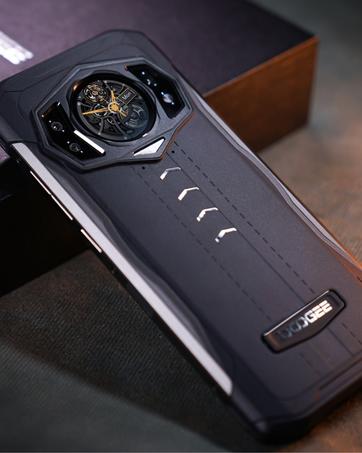
Image: Depiction of the Fingerprint and Face ID unlocking methods for the DOOGEE V20.
4. Connectivity and Performance
The DOOGEE V20 supports Dual 5G network connectivity, ensuring fast and reliable internet access. It is powered by a Dimensity 700 Octa-Core processor, providing smooth performance for applications and games. The device comes with 8GB RAM and 256GB ROM, expandable via TF card up to 512GB. NFC is also supported for convenient mobile payments and data transfer.

Image: Visual representation of the DOOGEE V20's 5G powerful performance, showing various apps and storage capabilities.
5. Sistem Pengendalian Android 11
The DOOGEE V20 runs on Android 11, offering enhanced privacy controls, improved notification management, and a more intuitive user interface. Explore the various features and customization options available in the Android 11 settings.
Penyelenggaraan
1. Kekasaran dan Ketahanan
The DOOGEE V20 is built with military-grade carbon fiber, providing high strength and resistance to wear. It is IP68/IP69K certified, making it dustproof, waterproof (up to 1.5m for 30 minutes), and shockproof. It can withstand drops from 1.5 meters and operate in extreme temperatures ranging from 70°C to -55°C.
While the phone is rugged, avoid intentional abuse. Do not expose it to high-pressure water jets or prolonged submersion beyond specified limits. Clean the device with a soft, damp kain. Jangan gunakan bahan kimia yang keras atau bahan yang melelas.
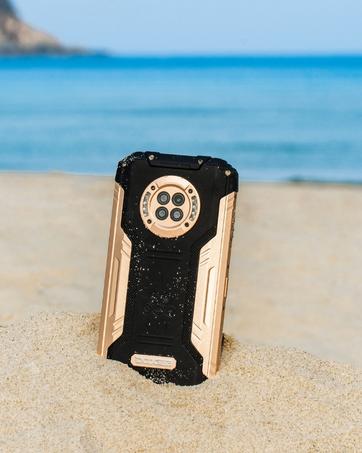
Image: Close-up of the DOOGEE V20's Kevlar Carbon Fiber back, emphasizing its harder, lighter, and more breathable material.
2. Penjagaan Bateri
Untuk memaksimumkan hayat bateri:
- Elakkan suhu yang melampau.
- Jangan nyahcas sepenuhnya bateri dengan kerap.
- Gunakan pengecas dan kabel asal untuk pengecasan optimum.
- Cabut plag pengecas setelah bateri penuh.
Menyelesaikan masalah
This section addresses common issues you might encounter with your DOOGEE V20 smartphone.
| Masalah | Kemungkinan Punca | Penyelesaian |
|---|---|---|
| Phone not powering on | Bateri lemah; perisian rosak | Cas telefon selama sekurang-kurangnya 30 minit. Tekan dan tahan butang kuasa selama 10-15 saat untuk memaksa mula semula. |
| Network connectivity issues (e.g., no signal, slow data) | Incorrect APN settings; SIM card not properly inserted; carrier incompatibility | Check SIM card insertion. Verify APN settings with your carrier. Ensure your carrier supports unlocked 5G devices. Try restarting the phone. |
| Pengimbas cap jari tidak berfungsi | Sensor dirty; software glitch; hardware issue | Clean the fingerprint sensor. Restart the phone. Re-register your fingerprints in settings. If the issue persists, contact support. |
| Skrin membeku atau tidak bertindak balas | Too many apps running; low memory; software bug | Close background apps. Restart the phone. Clear cache partition (refer to online guides for your specific Android version). |
| Bateri cepat habis | High screen brightness; background apps; poor signal strength | Adjust screen brightness. Close unused apps. Enable battery saver mode. Check for app updates. |
Spesifikasi
| Ciri | Perincian |
|---|---|
| Model | V20 |
| Paparan | 6.43 Inches AMOLED FHD+ DotDisplay, 1080 x 2400 Resolution |
| Pemproses | Dimensity 700 Octa Core / 2.2GHz / 7nm |
| RAM | 8 GB |
| Storan Dalaman | 256 GB (expandable via TF card up to 512GB) |
| Kamera Belakang | 64MP AI Main + 20MP Night Vision + 8MP Wide Angle |
| Kamera Depan | 16MP |
| Bateri | 6000 mAh, 33W Fast Charging, 15W Wireless Charging |
| Sistem Operasi | Android 11.0 |
| Ketersambungan | Dual 5G, NFC, Bluetooth, Wi-Fi |
| Ketahanan | IP68/IP69K, MIL-STD-810G (Rugged, Dustproof, Waterproof, Shockproof) |
| Dimensi | 3.21 x 0.55 x 6.71 inci |
| Berat badan | 10.4 auns (296 Gram) |
Waranti dan Sokongan
DOOGEE offers a 30-day no-reason return policy and a 2-year warranty for the V20 smartphone. For any questions or support, please contact DOOGEE official customer service. They are available 24 hours online to assist you.
For more detailed information and the latest user manual, you can visit the official DOOGEE webtapak:
Ask a question about this manual
Ask about setup, troubleshooting, compatibility, parts, safety, or missing instructions. Manuals+ will review the question and use this page’s manual context to help answer it.