
1. Persediaan
1.1 Membuka Kotak dan Kandungan Pakej
Keluarkan semua barang dari pembungkusan dengan berhati-hati. Pastikan komponen berikut ada:
- Pinell Supersound 301 Internet Radio
- Penyesuai Kuasa
- Kawalan Jauh dengan Bateri
- Manual Pengguna

Rajah 1.1: The Pinell Supersound 301 product packaging, showing the radio and its branding.
1.2 Kuasa Penyambung
Connect the supplied power adapter to the DC IN port on the rear of the radio. Plug the other end of the adapter into a suitable wall outlet. The radio will enter standby mode or power on automatically.
1.3 Sambungan Antena
For optimal DAB+ and FM radio reception, extend the telescopic antenna located on the rear of the unit. Adjust its position for the best signal quality.

Rajah 1.2: The Pinell Supersound 301 with its telescopic antenna fully extended for improved radio reception.
1.4 Persediaan Awal dan Sambungan Wi-Fi
Upon first power-on, the radio will guide you through an initial setup wizard. This typically includes:
- Pemilihan Bahasa: Use the 'scroll' knob to select your preferred language and press to confirm.
- Tetapan Masa / Tarikh: Set the current time and date. This can often be synchronized automatically via the internet.
- Persediaan Rangkaian Wi-Fi: The radio will scan for available Wi-Fi networks. Select your network from the list, then use the 'scroll' knob to enter the password. Press to confirm. A successful connection is required for Internet Radio and Spotify Connect functionalities.

Rajah 1.3: The Wi-Fi logo, indicating wireless network connectivity for the radio.
2. Arahan Operasi
2.1 Kawalan Asas
The Pinell Supersound 301 features intuitive controls on its front panel and a remote control for convenient operation.
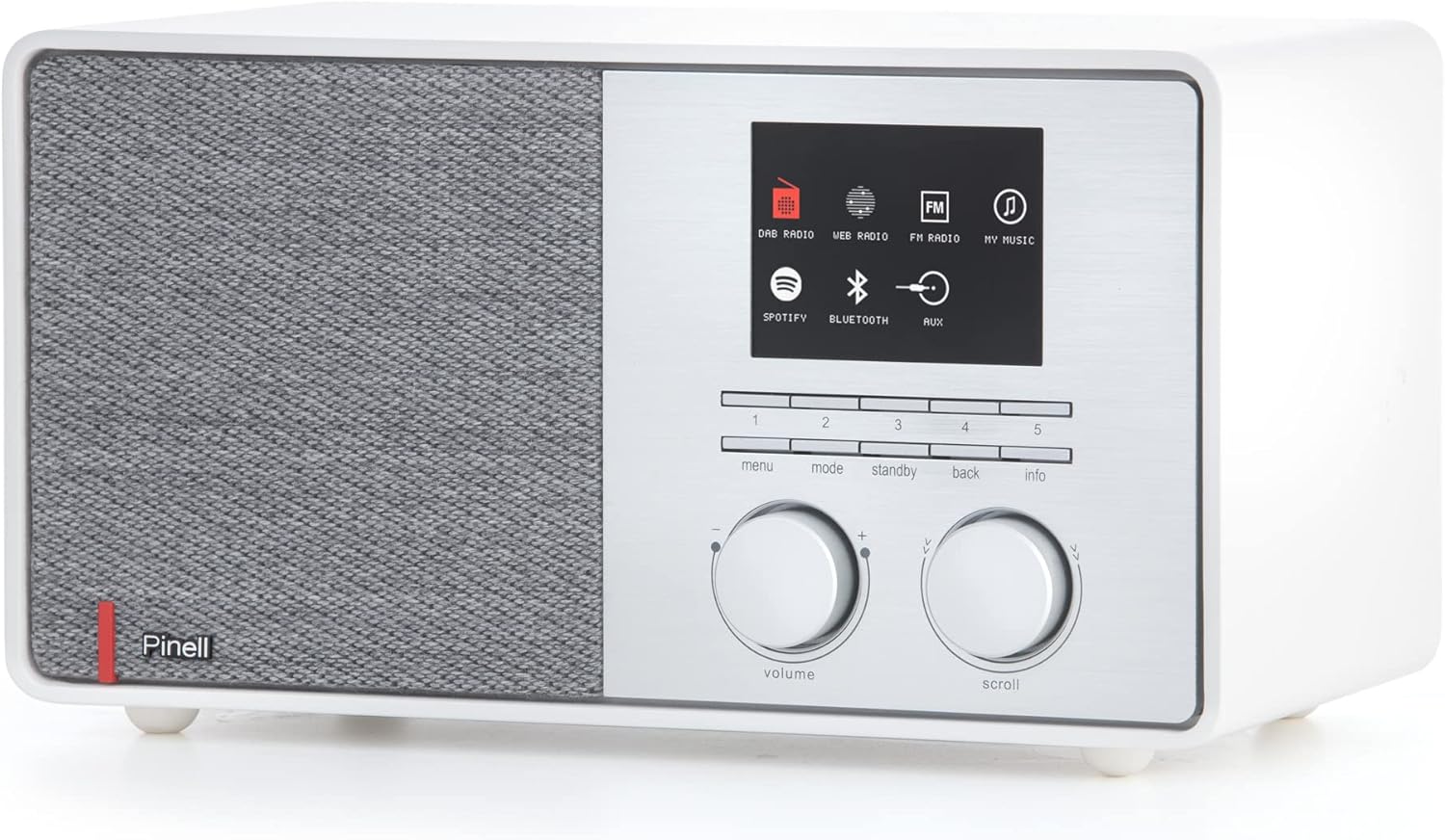
Rajah 2.1: Front panel of the Pinell Supersound 301, showing the display, control knobs, and buttons.
- Tombol Kelantangan: Rotate to adjust the audio output level. Press to mute/unmute.
- Scroll Knob: Rotate to navigate through menus and lists. Press to select an option or confirm an entry.
- Butang Menu: Akses menu utama untuk tetapan dan pilihan.
- Butang Mod: Switch between different audio sources (Internet Radio, DAB+, FM, Bluetooth, AUX, Spotify Connect).
- Butang Sedia: Power the unit on or off (to standby mode).
- Butang Belakang: Return to the previous menu or screen.
- Butang Maklumat: Display additional information about the current track or station.
- Butang Pratetap (1-5): Quickly access your saved favorite stations.
2.2 Menggunakan Alat Kawalan Jauh
The included remote control provides full functionality from a distance.
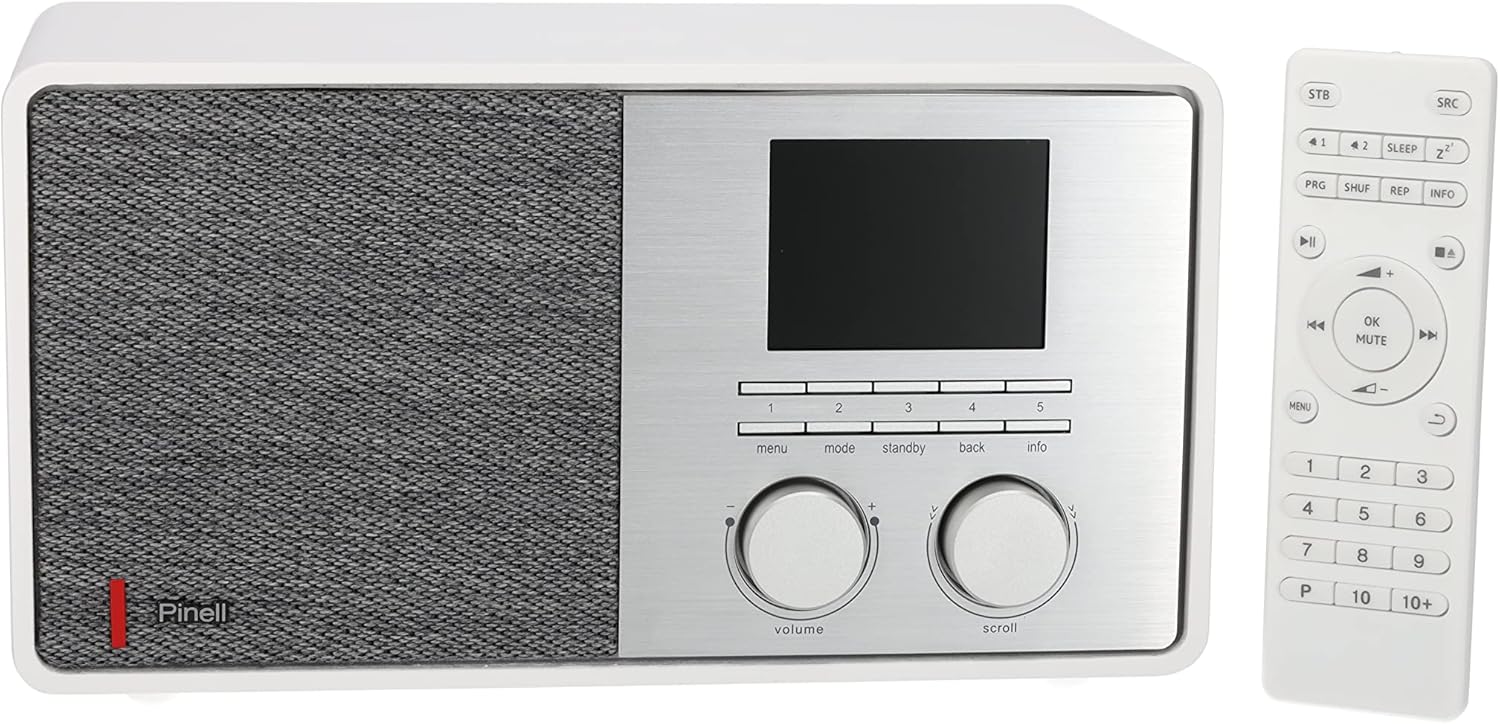
Rajah 2.2: The Pinell Supersound 301 radio shown alongside its dedicated remote control.
Refer to the remote control layout for specific button functions, which mirror most of the front panel controls and add numerical input for presets and direct access.
2.3 Radio Internet
Access thousands of internet radio stations from around the world.
- Tekan ke Mod butang sehingga "Radio Internet" dipilih.
- Gunakan Tatal knob to browse stations by location, genre, or search.
- Tekan ke Tatal knob to select a station and begin playback.
- Untuk menyimpan stesen sebagai pratetap, tekan dan tahan salah satu daripadanya Butang pratetap (1-5) sehingga paparan mengesahkan ia telah disimpan.
2.4 DAB+ and FM Radio
Enjoy digital and analog terrestrial radio broadcasts.

Rajah 2.3: The DAB+ logo, representing Digital Audio Broadcasting Plus technology.
- Tekan ke Mod button to select "DAB+" or "FM".
- For DAB+, the radio will automatically scan for available stations upon first use. For FM, use the Tatal knob to tune manually or press and hold to auto-scan.
- Gunakan Tatal knob to navigate through the list of available stations.
- Untuk menyimpan stesen sebagai pratetap, tekan dan tahan salah satu daripadanya Butang pratetap (1-5).
2.5 Sambungan Bluetooth
Strim audio secara wayarles daripada peranti anda yang didayakan Bluetooth.
- Tekan ke Mod button to select "Bluetooth". The radio will enter pairing mode, indicated on the display.
- On your external device (e.g., smartphone), enable Bluetooth and search for available devices.
- Select "Pinell Supersound 301" from the list to pair. Once connected, you can play audio from your device through the radio.
2.6 Sambungan Spotify
Control your Spotify music directly from the Spotify app on your smartphone or tablet.

Rajah 2.4: The Spotify Connect logo, indicating compatibility with Spotify's streaming service.
- Ensure your radio is connected to the same Wi-Fi network as your device running the Spotify app.
- Open the Spotify app on your device and play a song.
- Tap the "Devices Available" icon (usually a speaker or computer icon) at the bottom of the screen.
- Select "Pinell Supersound 301" from the list of available devices. Your music will now play through the radio, controlled by the Spotify app.
2.7 Input AUX
Sambungkan peranti audio luaran menggunakan kabel audio 3.5mm.
- Connect one end of a 3.5mm audio cable to the AUX IN port on the rear of the radio.
- Sambungkan hujung satu lagi ke bicu fon kepala atau output audio peranti luaran anda.
- Tekan ke Mod button to select "AUX". Audio from your external device will now play through the radio.
2.8 Output Fon Kepala
For private listening, connect headphones to the headphone jack on the rear of the unit. This will mute the main speaker output.
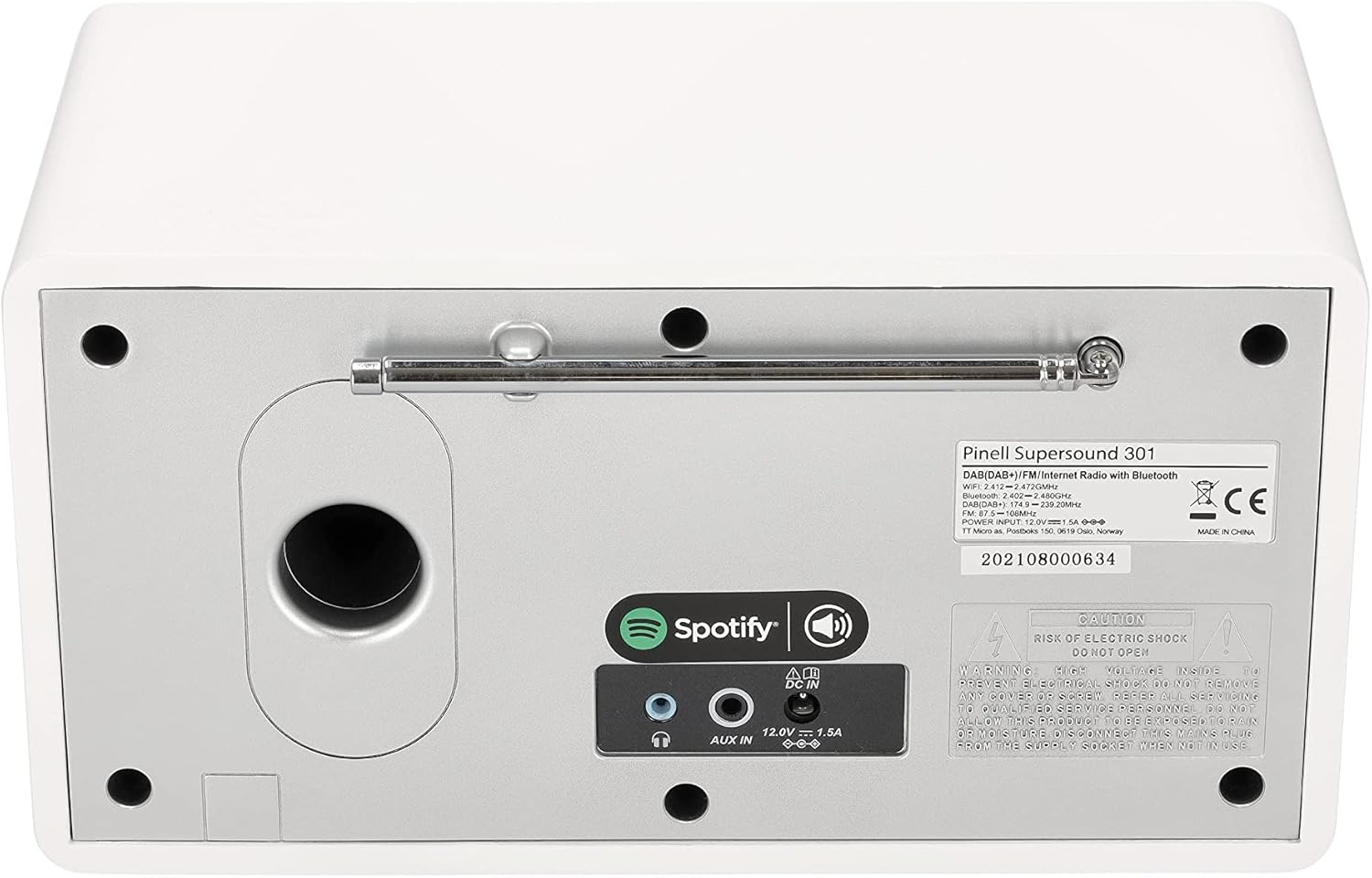
Rajah 2.5: The rear panel of the Pinell Supersound 301, highlighting the AUX IN and headphone output ports.
3. Penyelenggaraan
3.1 Arahan Pembersihan
To maintain the appearance and functionality of your radio:
- Sentiasa putuskan sambungan penyesuai kuasa sebelum membersihkan.
- Gunakan kain lembut dan kering untuk mengelap permukaan luar.
- Untuk tanda degil, ringankan dampbilas kain dengan air. Elakkan menggunakan pembersih yang kasar, pelarut atau semburan kimia, kerana ini boleh merosakkan kemasan.
- Jangan biarkan cecair memasuki unit.
3.2 Penjagaan Am
- Avoid placing the radio in direct sunlight, near heat sources, or in areas with high humidity.
- Pastikan pengudaraan yang mencukupi di sekeliling unit.
- Protect the unit from strong impacts or vibrations.
4. Penyelesaian masalah
If you encounter issues with your Pinell Supersound 301, refer to the following common problems and solutions:
| Masalah | Kemungkinan Punca | Penyelesaian |
|---|---|---|
| Tiada kuasa | Penyesuai kuasa tidak disambungkan atau alur keluar rosak. | Ensure the power adapter is securely connected to the radio and a working power outlet. Try a different outlet. |
| Tiada bunyi | Volume too low, muted, or incorrect source selected. | Increase the volume. Check if the radio is muted. Ensure the correct audio source (Internet Radio, DAB+, FM, Bluetooth, AUX) is selected. If headphones are connected, disconnect them. |
| Isu sambungan Wi-Fi | Kata laluan salah, isyarat lemah atau masalah penghala. | Re-enter the Wi-Fi password carefully. Move the radio closer to the Wi-Fi router. Restart your router. |
| Penerimaan radio yang lemah (DAB+/FM) | Antena tidak dilanjutkan atau kawasan isyarat lemah. | Fully extend and adjust the telescopic antenna. Try repositioning the radio. Perform a new station scan. |
| Kegagalan berpasangan Bluetooth | Peranti tidak berada dalam mod berpasangan atau terlalu jauh. | Ensure the radio is in Bluetooth pairing mode. Make sure your external device's Bluetooth is enabled and it's searching. Keep devices within close range. |
| Spotify Connect tidak berfungsi | Radio and device on different networks, or Spotify app issue. | Verify both the radio and your control device are connected to the same Wi-Fi network. Restart the Spotify app. |
4.1 Tetapan Semula Kilang
If problems persist, a factory reset may resolve them. This will erase all saved settings and presets.
- Navigasi ke utama Menu.
- Pilih Tetapan Sistem (atau sama).
- pilih Tetapan Semula Kilang dan sahkan pilihan anda.
- The radio will restart, and you will need to go through the initial setup process again.
5. Spesifikasi
| Ciri | Perincian |
|---|---|
| Jenama | Pinell |
| Nama Model | Supersound 301 |
| Nombor Model | BP004 |
| warna | putih |
| Teknologi Ketersambungan | Wi-Fi, Bluetooth 4.0, AUX |
| Ciri Khas | Internet Radio, Spotify Connect, DAB+, FM Tuner |
| Kuasa Output Audio | 7 W (1-inch tweeter) |
| Kumpulan Radio yang Disokong | DAB+, FM |
| Sumber Kuasa | Corded Electric (Power Adapter) |
| Peranti Serasi | Fon kepala |
| Dimensi Produk | 25L x 14.5W x 13.8H sentimeter |
| Komponen Termasuk | Internet Radio, Power Adapter, Remote Control with Batteries, User Manual |
| Kemas Kini Perisian Dijamin Sehingga | Maklumat tidak tersedia |
| Ketersediaan Alat Ganti | Maklumat tidak tersedia |
6. Maklumat Waranti
The Pinell Supersound 301 comes with a standard manufacturer's warranty. Please refer to the warranty card included in your product packaging or your purchase documentation for specific terms, conditions, and duration of the warranty.
Simpan bukti pembelian anda (resit atau invois) kerana ia akan diperlukan untuk sebarang tuntutan jaminan.
7. Sokongan Pelanggan
For further assistance, technical support, or service inquiries regarding your Pinell Supersound 301, please contact:
- Pinell Official Webtapak: Visit the official Pinell webtapak untuk Soalan Lazim, sumber sokongan dan maklumat hubungan.
- Sokongan Peruncit: Contact the retailer from whom you purchased the product for local support and service options.