
1. Pengenalan
This manual provides detailed instructions for the installation, operation, and maintenance of your MACROM M-AN700 2-DIN 6.75-inch car stereo. This unit features the Android 10 operating system, offering a wide range of multimedia functionalities and smart connectivity options. Please read this manual thoroughly before using the product to ensure proper operation and to prevent damage.
2. Produk Lebihview
The MACROM M-AN700 is a versatile 2-DIN car stereo designed to enhance your in-car entertainment and navigation experience. Its compact design, with a reduced depth of only 4 cm, allows for installation in various vehicle types.
Ciri-ciri Utama:
- Sistem Operasi Android 10
- 6.75-inch Capacitive Display (1024x600 resolution)
- Integrated Bluetooth for hands-free calls and A2DP music streaming
- Built-in GPS receiver for online navigation
- Wi-Fi and Hotspot functionality
- Pre-installed Netflix
- Smartphone mirroring via EasyConnection application
- Rear USB memory reader (2 ports)
- Multilingual system
- RGB lighting with 7 selectable GUI colors
- Customizable welcome logo
- Integrated resistive steering wheel controls
- Rear camera input and front camera input
- FM/AM tuner with RDS (DAB+ optional, M-AN.DAB sold separately)
- 4x45W Mosfet ampoutput yang lebih hidup
- 4 sebelumamplified audio outputs, 1 pre-amplified subwoofer output
- Penyama grafik 9-jalur
- 1 audio/video input, 2 video outputs
Komponen Produk:
The package includes the main unit, various wiring harnesses, and accessories for installation and connectivity.


3. Persediaan & Pemasangan
Professional installation is recommended. Ensure the vehicle's power is disconnected before beginning installation. Refer to your vehicle's specific wiring diagram for accurate connections.
3.1 Sambungan Pendawaian
Connect the main power harness, speaker wires, and other accessory cables according to the provided wiring diagram. Ensure all connections are secure to prevent electrical issues.
3.2 Sambungan Kamera
The unit supports both rear and front cameras. Connect the camera video output to the corresponding input on the stereo. Ensure the reverse trigger wire is connected to the vehicle's reverse light circuit for automatic camera activation.
3.3 Antena GPS
Connect the GPS antenna to the dedicated port on the rear of the unit. Mount the antenna in a location with a clear view langit, biasanya pada papan pemuka atau di bawah cermin depan, untuk memastikan penerimaan isyarat yang optimum.
4. Arahan Operasi
4.1 Kuasa Awal Hidup
After installation, turn on the vehicle's ignition. The unit will boot up, displaying the customizable welcome logo. Follow any on-screen prompts for initial setup.
4.2 Berpasangan Bluetooth
Untuk memasangkan telefon pintar anda:
- Go to the 'Phone' or 'Bluetooth' application on the car stereo.
- Dayakan Bluetooth pada telefon pintar anda dan cari peranti yang tersedia.
- Select 'M-AN700' (or similar device name) from your phone's Bluetooth list.
- Sahkan kod gandingan pada kedua-dua peranti.
Once paired, you can make hands-free calls and stream music (A2DP) from your phone.
4.3 Smartphone Mirroring (EasyConnection)
The unit supports smartphone mirroring via the EasyConnection app. Download and install the EasyConnection app on your smartphone. Connect your phone to the unit via USB. Follow the on-screen instructions to enable mirroring. This allows you to display your phone's screen on the car stereo's display.
4.4 Navigasi
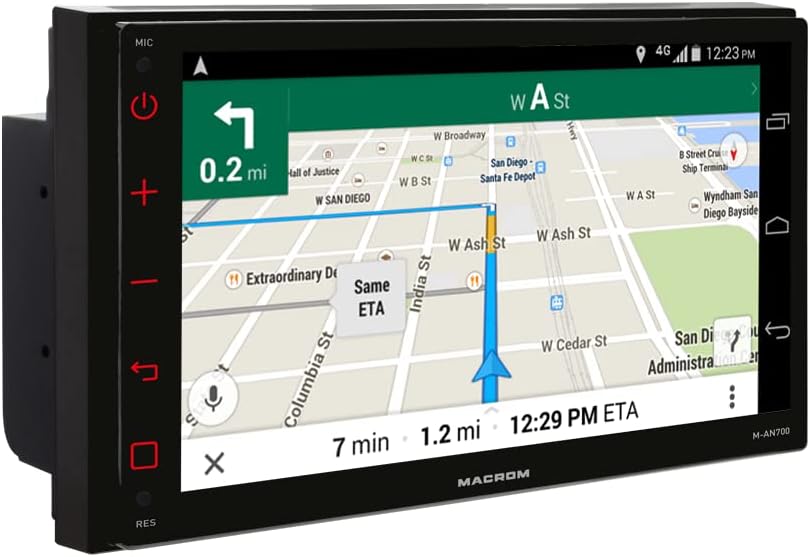
The built-in GPS receiver allows for online navigation. Ensure the unit is connected to Wi-Fi or a mobile hotspot for real-time map data and traffic updates. Offline navigation software (M-NV.AN19FEU or M-NV.AN19FEC camper version) can be purchased separately.
4.5 Main Semula Multimedia
The unit supports various audio and video formats from USB memory. Insert a USB drive into one of the two rear USB ports. Use the 'Music' or 'Video' application to browse and play your media files.
5. Penyelenggaraan
Untuk memastikan jangka hayat dan prestasi optimum stereo kereta anda, ikut garis panduan penyelenggaraan ini:
- Membersihkan Skrin: Use a soft, lint-free cloth to gently wipe the display. Do not use abrasive cleaners or solvents, as they may damage the screen.
- Pembersihan Am: Pastikan unit bebas daripada habuk dan serpihan. Gunakan berus lembut atau udara termampat untuk membersihkan bolong dan kawasan butang.
- Kemas Kini Perisian: Periodically check for software updates to ensure the best performance and access to new features. Follow the instructions provided with the update.
- Elakkan Suhu Melampau: Jangan dedahkan unit kepada haba atau sejuk yang melampau, kerana ini boleh menjejaskan komponen elektroniknya.
6. Penyelesaian masalah
If you encounter issues with your MACROM M-AN700, refer to the following common problems and solutions:
| Masalah | Kemungkinan Punca | Penyelesaian |
|---|---|---|
| Unit tidak dihidupkan | Incorrect wiring, blown fuse, insufficient power supply. | Check power connections, inspect the fuse, ensure proper voltage from the vehicle's electrical system. |
| Tiada keluaran bunyi | Speaker wires disconnected, volume too low, mute activated, incorrect audio source. | Verify speaker connections, increase volume, check mute status, select the correct audio source. |
| Bluetooth tidak bersambung | Bluetooth off on phone/unit, device not discoverable, incorrect pairing process. | Ensure Bluetooth is active on both devices, make the unit discoverable, re-attempt pairing. |
| GPS signal weak or lost | Antenna obstruction, poor antenna placement, environmental interference. | Relocate the GPS antenna to a clearer spot, ensure no obstructions, check antenna connection. |
| Smartphone mirroring not working | EasyConnection app not installed/updated, USB cable issue, phone settings. | Install/update EasyConnection, use a high-quality USB cable, check phone's USB debugging/mirroring settings. |
Jika masalah berterusan selepas mencuba penyelesaian ini, sila hubungi sokongan pelanggan.
7. Spesifikasi
| Ciri | Spesifikasi |
|---|---|
| Jenama | MACROM |
| Model | M-AN700 |
| Sistem Operasi | Android 10 |
| CPU | Quad Core ARM A7 4*1.2 GHz |
| RAM | 2 GB DDR3 |
| Memori Kilat | 16 GB |
| Saiz Paparan | 6.75 inci |
| Jenis Paparan | Capacitive LCD |
| Resolusi Skrin | 1024x600 piksel |
| AmpKeluaran yang lebih hidup | 4*45 W Mosfet |
| Output Audio | 4 sebelumamplified, 1 subwoofer pre-ampdihidupkan |
| Penyamaan | Penyama grafik 9-jalur |
| Ketersambungan | Bluetooth, Wi-Fi, USB (2 rear ports) |
| Peranti Serasi | Telefon bimbit |
| Jenis Media | SD (via USB reader), USB |
| Format Muzik yang Disokong | MP3, WMA, AAC, RM, FALC, etc. |
| Format Video yang Disokong | MPEG-1/2/4, H264, H263, VC1, RV, RMVB, DivX, Sorenson SparK, Spark, VP8, AVS |
| Format Gambar yang Disokong | JPG/BMP/JEPG/GIF/PNG |
8. Waranti & Sokongan
Your MACROM M-AN700 car stereo comes with a manufacturer's warranty. Please refer to the warranty card included in your product packaging for specific terms and conditions. For technical support, troubleshooting assistance, or service inquiries, please contact your authorized MACROM dealer or visit the official MACROM webtapak.