
pengenalan
This manual provides detailed instructions for the setup, operation, maintenance, and troubleshooting of your Audioengine A2 HD (HD3) Walnut Computer Speakers and DS1M Metal Stands. Please read this manual thoroughly before using your product to ensure optimal performance and longevity.
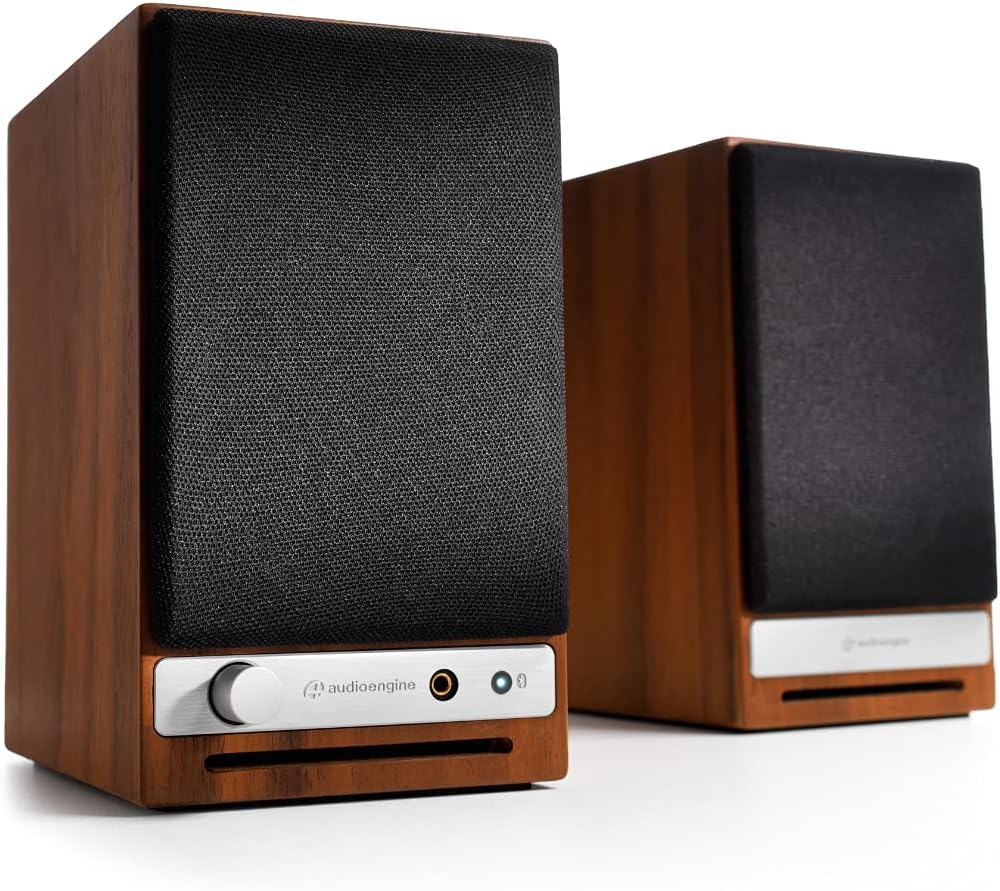
Depan view of the Audioengine A2 HD speakers in walnut finish with grilles on. The left speaker features a volume knob, headphone jack, and Bluetooth pairing button.
Apa yang ada dalam Kotak
Your Audioengine A2 HD (HD3) package includes the following items:
- Panduan Mula Pantas
- Kabel Kuasa
- Kad Waranti
Persediaan
Penempatan Pembesar suara
For optimal sound quality, position the speakers on a stable surface, such as a desk or bookshelf. The included DS1M Metal Stands are designed to elevate and angle the speakers towards your listening position, which can significantly enhance audio performance by directing sound more accurately. Place the left speaker (with controls) on the left side and the right speaker on the right side of your listening area.

An Audioengine A2 HD speaker is shown placed on a DS1M metal stand, positioned next to a laptop, illustrating a typical desktop setup.

This image displays the dimensions of the DS1M speaker stands, indicating a length of 6 inches (15.2 cm) and a width of 4 inches (10.2 cm).
Sambungan
The A2 HD speakers offer multiple connectivity options:
- Input/Output RCA: Connect audio sources using RCA cables. The RCA output can be used to connect a subwoofer.
- Input Bantu: Use a 3.5mm stereo mini-jack cable for connecting devices like smartphones or tablets.
- Input USB: Connect directly to your computer for high-quality digital audio playback.
- Bluetooth: Untuk penstriman audio tanpa wayar.
Connect the left (active) speaker to the right (passive) speaker using the provided speaker wire. Ensure correct polarity (+ to + and - to -).

belakang view of the Audioengine A2 HD speakers, highlighting the various input and output ports, including RCA, USB, and speaker wire terminals for connecting the passive speaker.
Sambungan Kuasa
Connect the power cable to the left speaker and then to a power outlet. The power indicator on the front of the left speaker will illuminate.
Beroperasi
Menghidupkan/Mematikan
The speakers will power on automatically when connected to a power source. To turn them off, disconnect the power cable.
Kawalan Kelantangan
Adjust the volume using the knob on the front of the left speaker. You can also control the volume from your connected audio source.
Pemilihan Input
The A2 HD speakers automatically detect and switch to the active input. For Bluetooth, press the Bluetooth pairing button to initiate pairing mode.
Berpasangan Bluetooth
- Turn on your A2 HD speakers.
- Press and hold the Bluetooth pairing button on the front of the left speaker until the indicator light flashes.
- On your device (smartphone, tablet, computer), go to Bluetooth settings and select "Audioengine A2 HD" from the list of available devices.
- Once paired, the indicator light will turn solid.
Penyelenggaraan
Untuk mengekalkan penampilan dan prestasi pembesar suara anda:
- Wipe the cabinets with a soft, dry cloth. Avoid using harsh chemicals or abrasive cleaners.
- Jauhkan pembesar suara daripada cahaya matahari langsung, sumber haba dan kelembapan.
- Pastikan pengudaraan yang betul di sekeliling pembesar suara.
Menyelesaikan masalah
Tiada Bunyi
- Check all cable connections, including power, speaker wire, and audio input cables.
- Ensure the volume knob on the speaker and your audio source is turned up.
- Verify that the correct input source is selected (if applicable, for automatic switching, ensure only one source is active).
- If using Bluetooth, ensure the speakers are properly paired and connected to your device.
Isu Sambungan Bluetooth
- Ensure the speakers are in pairing mode (flashing Bluetooth light).
- Delete "Audioengine A2 HD" from your device's Bluetooth list and try pairing again.
- Move your device closer to the speakers to ensure it's within the 100-foot Bluetooth range.
- Restart both your device and the speakers.
Spesifikasi
| Jenama | Enjin audio |
| Nombor Model | HD3 |
| Nama Model | A2-HD |
| Jenis Pembesar Suara | Rak buku |
| Kuasa Output Maksimum Pembesar Suara | 60 Watt |
| Respons Kekerapan | 50 Hz |
| Teknologi Ketersambungan | Bantu, Bluetooth, RCA, USB |
| Mod Keluaran Audio | Stereo |
| Jenis Pemasangan | Pemasangan Atas Meja |
| Bahan Kepungan | kayu |
| Ciri-ciri Tambahan | Hi Res Audio, Lightweight, Portable |
| Jenis Pengawal | iOS, Android |
| Julat Maksimum | 30 Meter |
| Kaedah Kawalan | Sentuh |
| Saiz Pembesar Suara | 2.75 Inci |
| Julat Bluetooth | 100 Kaki |
| Total USB 2.0 Ports | 1 |
| Kegunaan Khusus Untuk Produk | Gaming, Home Theatre, Pro Audio |
| Bilangan Saluran Audio | 3.0 |
| Impedans | 10000 ohm |
| Nisbah Isyarat-ke-Bunyi | 95 dB |
| Peranti Serasi | Telefon Pintar, Tablet, Komputer riba |
| Sumber Kuasa | Elektrik Bertali |
| Input Voltage | 110 Volt |
| Kiraan Unit | 2.0 Kiraan |
| Teknologi Tanpa Wayar | Bluetooth |
| Teknologi Ketersambungan Subwufer | berwayar |
| Protokol Ketersambungan | Bluetooth |
| Jenis Pemacu Audio | Pemandu Dinamik |
Waranti dan Sokongan
Your Audioengine A2 HD (HD3) speakers come with a Waranti 3 tahun. For warranty claims or technical support, please refer to the contact information provided in your Warranty Card or visit the official Audioengine webtapak.
Video Produk Rasmi
Audioengine - Never Settle for Less
This video highlights the Audioengine philosophy of never settling for less, showcasing various life moments enhanced by music. It features different Audioengine products in diverse settings.
20th Anniversary Video
A commemorative video celebrating 20 years of Audioengine, reflecting on the company's journey and commitment to quality audio products.
Doesn't Music Deserve it? Active Wireless Bookshelf Speakers
This video emphasizes the importance of high-quality audio for music, featuring active wireless bookshelf speakers in various home environments.