
Shargeek STM2E-1
Shargeek STORM2 Slim Portable Charger User Manual
Model: STM2E-1
pengenalan
This manual provides comprehensive instructions for the safe and efficient use of your Shargeek STORM2 Slim Portable Charger. Please read this manual thoroughly before operating the device and retain it for future reference.
The Shargeek STORM2 Slim is a high-capacity portable power bank featuring a unique transparent design and an IPS display screen. It offers 130W max output with 100W USB-C and 30W USB-A ports, suitable for charging various devices including laptops, tablets, and smartphones.

Image: The Shargeek STORM2 Slim portable charger, showcasing its transparent design that reveals internal components and the included yellow USB-C to USB-C cables.
Ciri-ciri Produk
- Reka Bentuk Telus: The see-through casing reveals the internal battery and circuit layout, highlighting the device's engineering.
- IPS Display Screen: A clear screen provides real-time information on battery life, output distribution, temperature, operation hours, and active ports.
- Kapasiti Tinggi: 20000mAh battery capacity, capable of multiple charges for various devices.
- Pengecasan Cepat: Features a 100W USB-C PD port and a 30W USB-A port, supporting 130W max output for rapid charging.
- Keserasian Universal: Charges laptops, phones, tablets, and other devices with USB-C or USB ports.

Imej: A terperinci view of the Shargeek STORM2 Slim's IPS LCD screen, showing various data points such as input/output wattage, jilidtage, current, battery level, and temperatures.
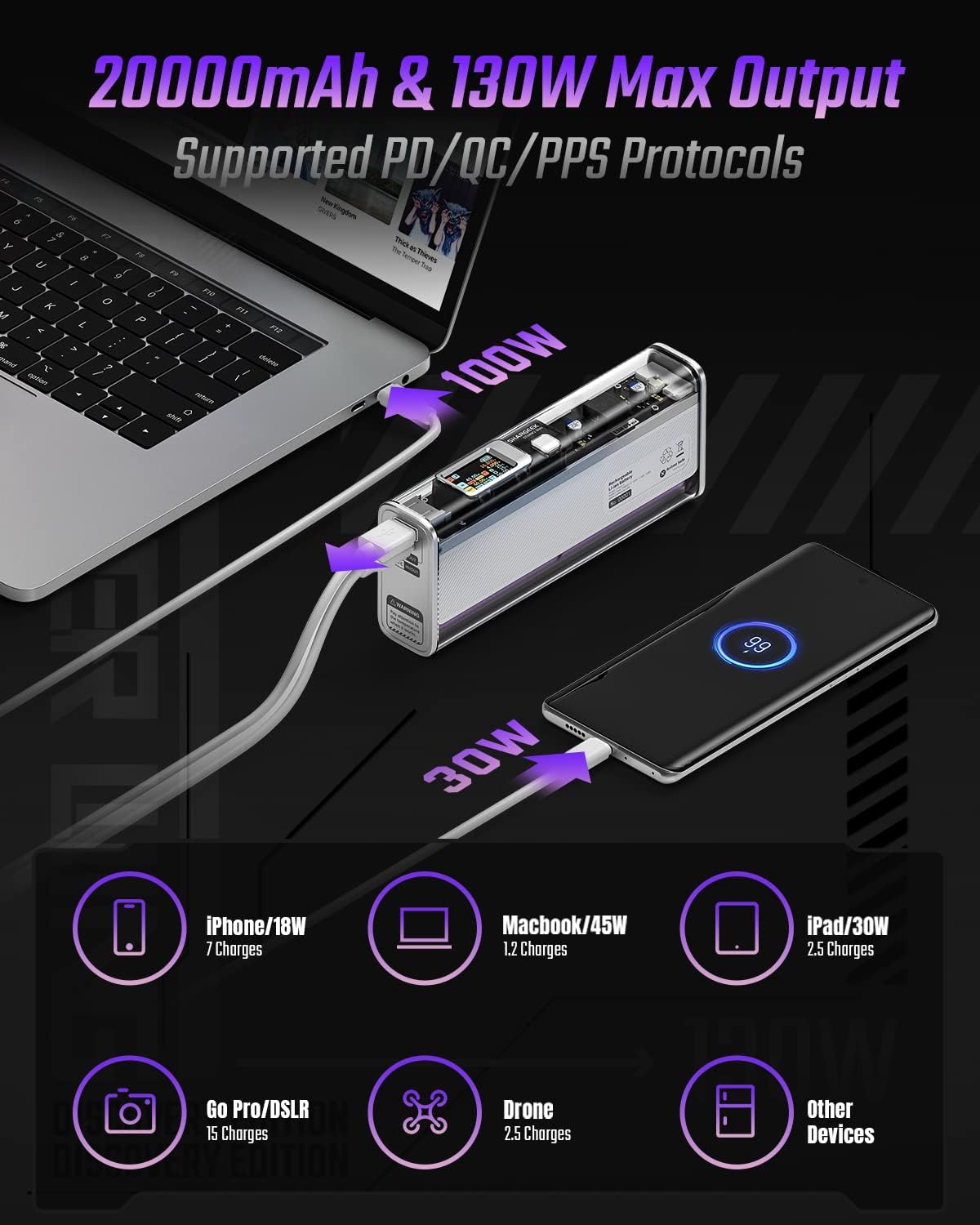
Image: The Shargeek STORM2 Slim connected via USB-C to a laptop for 100W charging and via USB-A to a smartphone for 30W charging, demonstrating its dual-port capability.
Persediaan dan Penggunaan Pertama
Kandungan Pakej:
- Shargeek STORM2 Slim Portable Charger
- Kabel USB-C ke USB-C
- Manual Pengguna (dokumen ini)
Pengecasan Awal:
- Before first use, fully charge your STORM2 Slim.
- Connect the provided USB-C to USB-C cable to the USB-C port on the STORM2 Slim.
- Connect the other end of the cable to a compatible USB-C power adapter (not included) with a minimum of 100W output for fastest charging.
- The IPS screen will display charging status and battery percentage. The device is fully charged when the screen indicates 100%.
- A full recharge typically takes approximately 90 minutes with a 100W power adapter.
Arahan Operasi
Mengecas Peranti:
- Identify the appropriate charging cable for your device (USB-C to USB-C or USB-A to device-specific cable).
- Connect one end of the cable to your device and the other end to the corresponding port (USB-C or USB-A) on the STORM2 Slim.
- The IPS screen will automatically activate and display the charging output (watts, volts, amps) for the connected device(s).
- The STORM2 Slim can charge two devices simultaneously using both the USB-C and USB-A ports.
Understanding the IPS Screen:
The IPS screen provides detailed real-time information. Use the physical button on the side of the power bank to navigate through different display modes or access settings.
- Input/Output Dashboard: Shows power input (IN) when charging the power bank and power output (OUT) when charging devices, including wattage, jilidtage, and current for each port.
- Tahap Bateri: Memaparkan peratusan bateri yang tinggaltage and a visual icon.
- Voltage & Semasa: Detailed readings for the internal battery cells.
- Suhu: Shows the internal circuit board and battery temperatures.
- Masa Berjalan: A resettable timer indicating the duration of current operation.
To access menus: Long-press the button. Untuk menavigasi: Short-press. Untuk memilih: Long-press.
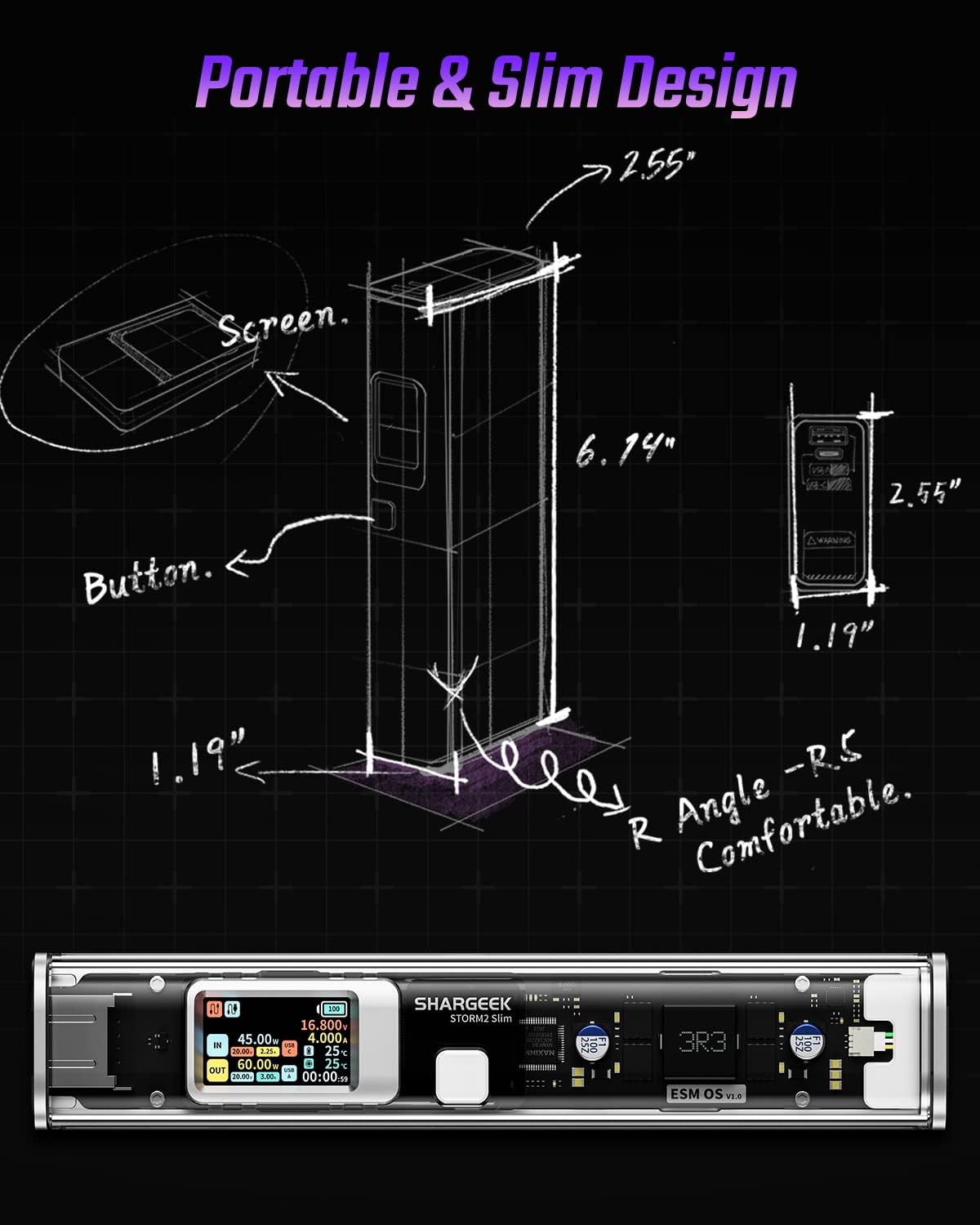
Image: A technical drawing illustrating the dimensions of the Shargeek STORM2 Slim and pointing out the screen and button locations.
Penyelenggaraan
- Pembersihan: Gunakan kain lembut dan kering untuk membersihkan bahagian luar power bank. Elakkan menggunakan bahan kimia yang keras atau bahan yang melelas.
- Storan: Simpan peranti di tempat yang sejuk dan kering, jauh daripada cahaya matahari langsung, suhu yang melampau dan kelembapan yang tinggi.
- Penjagaan Bateri: To prolong battery life, avoid fully discharging the power bank frequently. Recharge it when the battery level is low. If storing for extended periods, charge it to approximately 50-70% every 3-6 months.
- Elakkan Titisan: While designed with an aluminum alloy frame for durability, avoid dropping the device as it may damage internal components or the transparent casing.
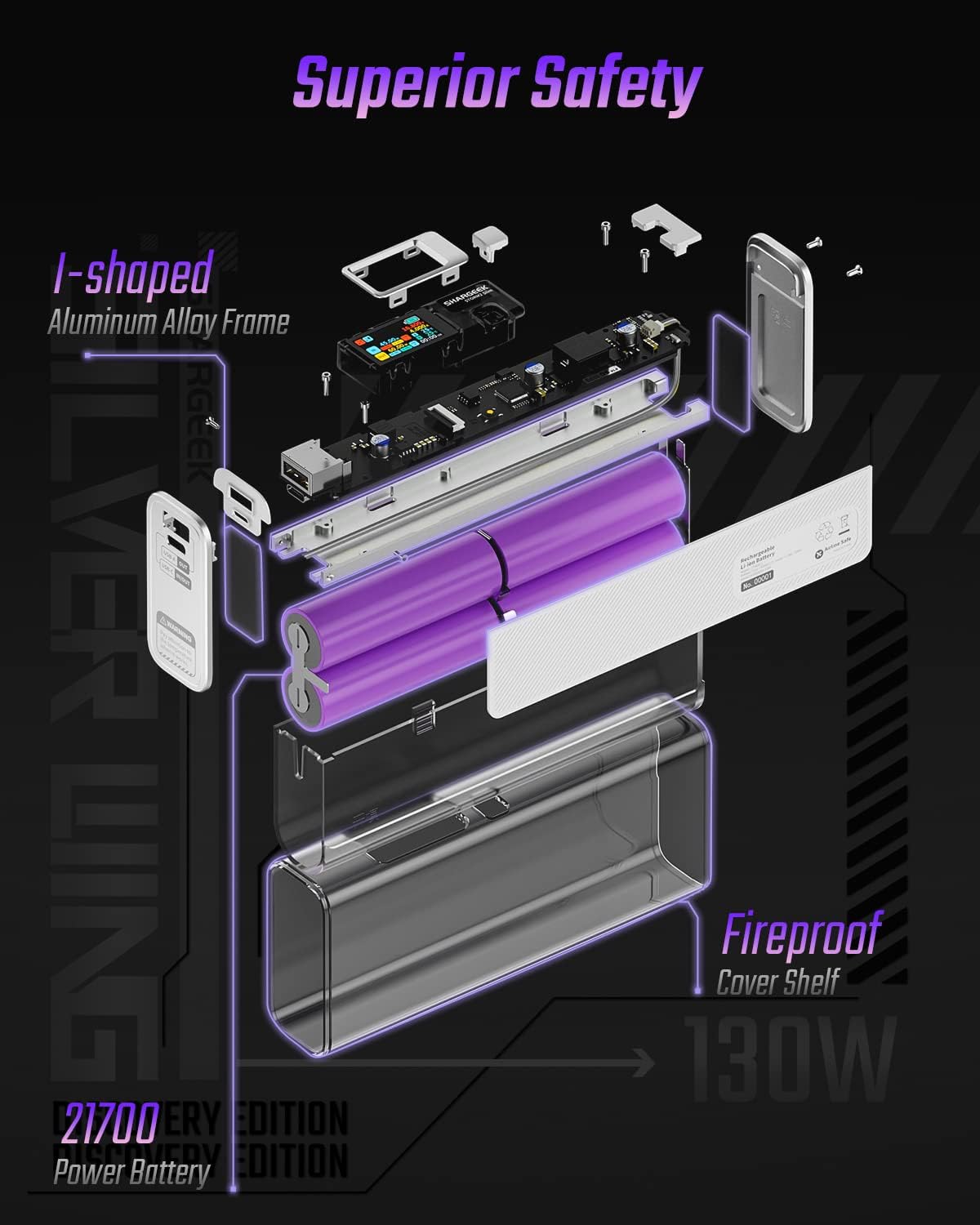
Image: An exploded diagram of the Shargeek STORM2 Slim, illustrating its internal structure including the I-shaped aluminum alloy frame, fireproof cover shelf, and 21700 power batteries, highlighting its robust construction.
Menyelesaikan masalah
| Masalah | Kemungkinan Punca | Penyelesaian |
|---|---|---|
| Peranti tidak mengecas daripada bank kuasa. | Low power bank battery; incompatible cable; device not properly connected; device requires more power than available. | Recharge the STORM2 Slim. Ensure cable is fully inserted and compatible. Check device power requirements against power bank output. Try a different cable or port. |
| Power bank tidak dicas. | Kabel atau penyesuai pengecas rosak; port bank kuasa rosak. | Try a different USB-C cable and power adapter. Ensure the adapter meets the recommended power output (e.g., 100W). If problem persists, contact support. |
| IPS screen is blank or unresponsive. | Power bank is off; temporary software glitch. | Press the button to activate the screen. If unresponsive, try connecting a device to charge or connecting the power bank to a charger to see if it activates. If problem persists, contact support. |
| Pengecasan perlahan. | Kabel tidak menyokong pengecasan pantas; peranti tidak menyokong pengecasan pantas; berbilang peranti disambungkan. | Ensure you are using a high-quality USB-C PD cable. Verify your device supports fast charging. Charging multiple devices simultaneously may reduce individual charging speeds. |
Spesifikasi
- Nombor Model: STM2E-1
- Kapasiti Bateri: 20000mAh
- Output Maks: 130W
- Output USB-C: Penghantaran Kuasa (PD) Sehingga 100W
- Keluaran USB-A: Sehingga 30W
- Input: USB-C (up to 100W PD)
- paparan: Skrin IPS
- Dimensi: 3 x 6.5 x 15.59 cm (kira-kira 1.18 x 2.56 x 6.14 inci)
- Berat: Kira-kira 689 g (1.52 paun)
- Jenis Bateri: Litium Ion
Waranti dan Sokongan
Maklumat Waranti:
Shargeek products are covered by a limited warranty against defects in materials and workmanship. Please refer to the warranty card included with your purchase or visit the official Shargeek webtapak untuk terma dan syarat jaminan terperinci.
Sokongan Pelanggan:
For technical assistance, troubleshooting, or warranty claims, please contact Shargeek customer support through their official webtapak atau maklumat hubungan yang diberikan pada pembungkusan produk anda.
Official Shargeek Store Link: Shargeek Official Store
Maklumat Keselamatan
- Jangan dedahkan peranti kepada air, lembapan atau suhu yang melampau.
- Jangan buka, ubah suai atau cuba membaiki peranti ini sendiri. Ini akan membatalkan jaminan dan boleh menyebabkan kerosakan atau kecederaan.
- Jauhkan daripada kanak-kanak.
- Gunakan hanya kabel dan penyesuai pengecas yang diperakui dan serasi.
- Elakkan daripada menjatuhkan atau meletakkan peranti kepada kesan yang kuat.
- Lupuskan peranti ini secara bertanggungjawab mengikut peraturan tempatan untuk sisa elektronik.
Ask a question about this manual
Ask about setup, troubleshooting, compatibility, parts, safety, or missing instructions. Manuals+ will review the question and use this page’s manual context to help answer it.