
RCYAGO pH-W3988
RCYAGO WiFi Smart 6-in-1 Water Quality Monitor User Manual
model: pH-W3988 | Jenama: RCYAGO
1. Pengenalan
This manual provides detailed instructions for the installation, operation, and maintenance of your RCYAGO WiFi Smart 6-in-1 Water Quality Monitor. This device is designed for continuous monitoring of pH, EC, TDS, Salt, S.G, and Temperature in various water environments. It features WiFi connectivity for remote monitoring via the Tuya Smart App.
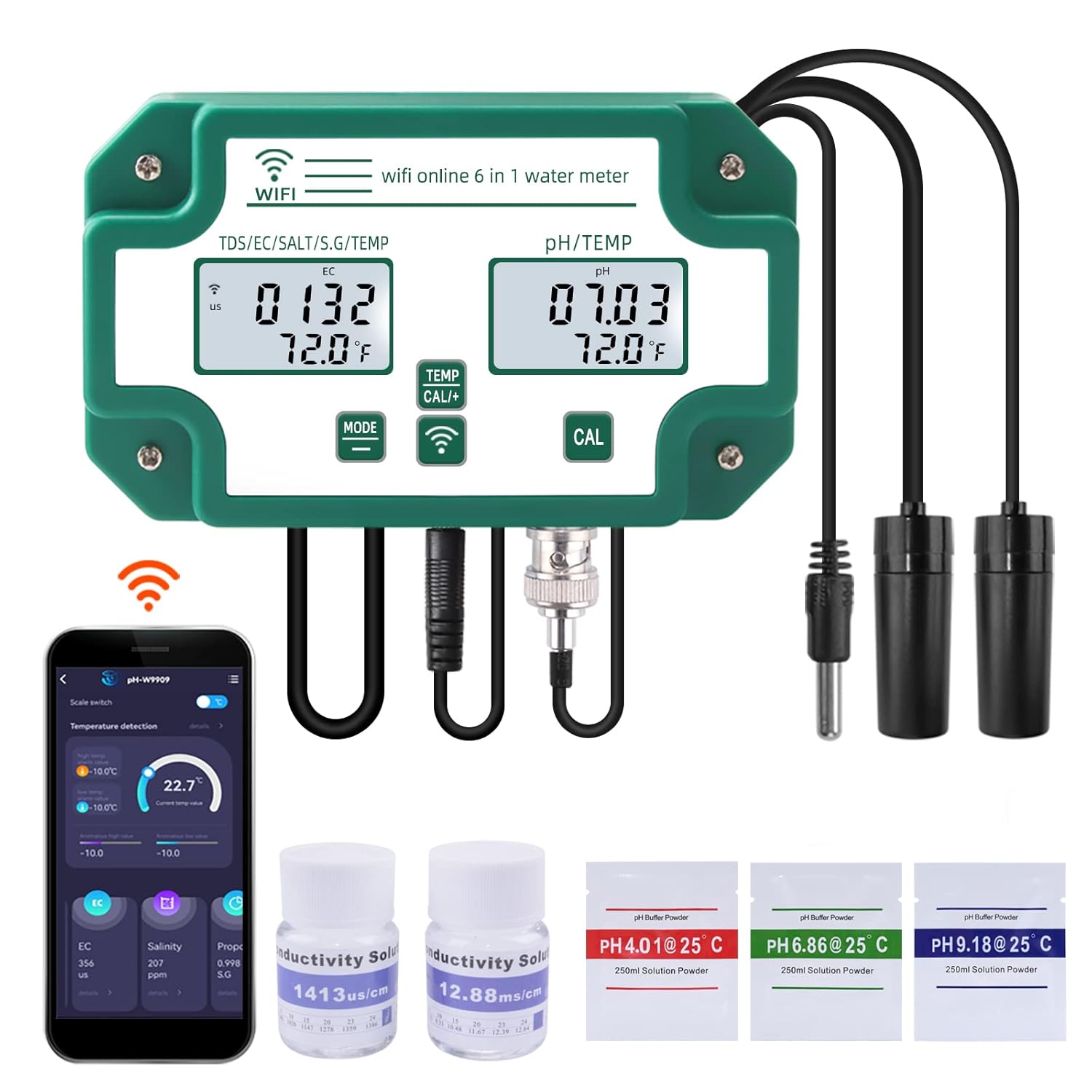
Figure 1: RCYAGO WiFi Smart 6-in-1 Water Quality Monitor with included accessories.
2. Kandungan Pakej
Sahkan bahawa semua item yang disenaraikan di bawah terdapat dalam pakej anda:
- RCYAGO WiFi Smart 6-in-1 Water Quality Monitor (Main Unit)
- Siasatan pH
- TDS/EC/Salt/S.G Probe
- Siasatan Suhu
- Penyesuai Kuasa
- Kabel Kuasa USB
- Wall-Mount Bracket and Suction Cups
- pH Buffer Powders (pH 4.01, pH 6.86, pH 9.18)
- Conductivity Calibration Solutions (1413 us/cm, 12.88 mS/cm)
- Manual Pengguna

Rajah 2: Kandungan yang disertakan dalam pakej produk.
3. Produk Lebihview
Familiarize yourself with the main components and controls of the water quality monitor.

Figure 3: Main unit with labeled parts and dimensions.
- Input Kuasa: USB port for connecting the power cable.
- TDS/EC/Salt/S.G/TEMP Display: Digital display for conductivity, salinity, specific gravity, and temperature readings.
- PH/TEMP Display: Digital display for pH and temperature readings.
- Kunci Mod: Used to cycle through display modes or settings.
- Temperature Unit Conversion/Calibration Key: Used to switch temperature units or initiate calibration.
- WiFi Signal Key: Menunjukkan status sambungan WiFi.
- PH Calibration Key: Dedicated button for pH calibration.
- TDS/EC/Salt/S.G Probe Input: Port for the multi-parameter probe.
- Temperature Probe Input: Port for the dedicated temperature probe.
- PH Probe Input: BNC connector for the pH probe.

Rajah 4: Terperinci view of the individual probes.
4. Spesifikasi
| Parameter | Julat | Butiran |
|---|---|---|
| pH | 0.00 - 14.00 pH | |
| EC | 0 - 19900 µS/cm, 0 - 199.0 mS/cm | Kekonduksian Elektrik |
| TDS | 0 - 19990 ppm, 0 - 199.0 ppt | Jumlah Pepejal Terlarut |
| garam | 0 - 199.9 ppt, 0 - 20% | kemasinan |
| SG | 0.990 - 1.400 | Graviti Tertentu |
| Suhu | 0°C - 50.0°C (32°F - 122°F) | |
| Ketersambungan | WiFi (Tuya Smart App) | |
| Nombor Model | pH-W3988 | |
| Dimensi | 10.67 x 7.2 x 2.68 inci | Main unit package dimensions |
| Berat badan | 1.62 paun |
5. Persediaan
5.1 Initial Assembly and Power-Up
- Buka semua komponen dan periksa sebarang kerosakan.
- Connect the pH probe to the BNC connector (10) on the main unit.
- Connect the TDS/EC/Salt/S.G probe to its designated input (8).
- Connect the temperature probe to its designated input (9).
- Connect the USB power cable to the power input (1) on the main unit and then to the power adapter. Plug the adapter into a suitable power outlet. The device display should illuminate.
- Mount the main unit using the provided wall-mount bracket or place it in a stable location. Use suction cups to secure the probes in the water source, ensuring they are fully submerged but not touching the bottom or sides of the container.
5.2 Tuya Smart App Installation and WiFi Connection
- Muat turun Tuya Smart aplikasi daripada gedung aplikasi peranti mudah alih anda (iOS atau Android).
- Daftar atau log masuk ke akaun Tuya Smart anda.
- Pastikan peranti mudah alih anda disambungkan ke rangkaian WiFi 2.4GHz.
- In the app, tap "Add Device" or the "+" icon. Select the appropriate device category (e.g., "Sensors" or "Water Quality Monitor").
- Follow the on-screen instructions to put the device into pairing mode. This usually involves pressing and holding a button on the monitor until the WiFi indicator (6) flashes.
- Enter your WiFi network password in the app to complete the connection. Once connected, the WiFi indicator on the monitor will become solid.

Figure 5: WiFi connection and Tuya Smart App interface.
6. Penentukuran
Regular calibration is essential for accurate readings. Use the provided buffer powders and conductivity solutions.
6.1 Penentukuran pH
- Prepare 250ml of distilled water for each pH buffer powder (pH 4.01, pH 6.86, pH 9.18). Dissolve one packet of powder into each 250ml of distilled water.
- Rinse the pH probe with distilled water and gently blot dry.
- Submerge the pH probe into the pH 6.86 buffer solution.
- Tekan dan tahan butang PH CAL key (7) until the display shows a stable reading matching 6.86. Release the button.
- Rinse the pH probe with distilled water.
- Submerge the pH probe into the pH 4.01 buffer solution.
- Tekan dan tahan butang PH CAL key (7) until the display shows a stable reading matching 4.01. Release the button.
- For high pH ranges, repeat the process with the pH 9.18 buffer solution.
- Rinse the pH probe thoroughly with distilled water after calibration.
6.2 EC/TDS/Salt Calibration
- Prepare the conductivity calibration solutions (1413 µS/cm and 12.88 mS/cm).
- Rinse the TDS/EC/Salt/S.G probe with distilled water and gently blot dry.
- Submerge the probe into the 1413 µS/cm solution.
- Tekan dan tahan butang TEMP CAL+ key (5) until the display shows a stable reading matching 1413 µS/cm. Release the button.
- Bilas kuar dengan air suling.
- Submerge the probe into the 12.88 mS/cm solution.
- Tekan dan tahan butang TEMP CAL+ key (5) until the display shows a stable reading matching 12.88 mS/cm. Release the button.
- Rinse the probe thoroughly with distilled water after calibration.
7. Arahan Operasi
7.1 Basic Device Operation
- Hidupkan/Mati Kuasa: The device powers on automatically when connected to power. Disconnect power to turn off.
- Mode Key (4): Press briefly to cycle through different display modes for TDS/EC/Salt/S.G.
- Temperature Unit Conversion (5): Press briefly to switch between Celsius (°C) and Fahrenheit (°F) for temperature display.
- Ensure probes are fully submerged in the water to be tested for accurate continuous readings.
7.2 Tuya Smart App Features
The Tuya Smart App provides enhanced monitoring and control capabilities:
- Data masa nyata: View current readings for all 6 parameters directly on your mobile device.
- Data Sejarah: Access daily, weekly, and monthly historical data to track trends and changes in water quality.
- Tetapan Penggera: Set custom high and low alarm thresholds for each parameter. Receive notifications on your phone if readings exceed or fall below these thresholds.
- Eksport Data: Some app versions may offer data export functionality for further analysis.

Figure 6: Tuya Smart App interface displaying temperature and other water quality parameters.

Figure 7: Tuya Smart App displaying historical data trends.

Figure 8: Tuya Smart App interface for setting alarm thresholds.
8. Penyelenggaraan
8.1 Probe Cleaning
To ensure accurate and consistent readings, regularly clean the probes:
- Putuskan sambungan peranti daripada kuasa sebelum membersihkan.
- Rinse all probes thoroughly with distilled or deionized water after each use or periodically during continuous monitoring.
- For stubborn deposits, gently wipe the probes with a soft cloth or cotton swab. Avoid abrasive materials that could scratch the probe surfaces.
- For pH probes, if readings become sluggish or erratic, soak the probe tip in a pH electrode storage solution or a mild cleaning solution specifically designed for pH electrodes for 15-30 minutes, then rinse.
8.2 Penyimpanan
- When not in use for extended periods, ensure probes are clean and properly stored.
- The pH probe tip should always be kept moist. Store it in a pH electrode storage solution or a small amount of pH 4.01 buffer solution. Never store dry.
- Store the main unit and probes in a cool, dry place away from direct sunlight and extreme temperatures.
9. Penyelesaian masalah
Rujuk jadual di bawah untuk isu biasa dan kemungkinan penyelesaiannya.
| Masalah | Kemungkinan Punca & Penyelesaian |
|---|---|
| Peranti tidak dihidupkan |
|
| Bacaan yang tidak tepat atau tidak stabil |
|
| Kegagalan sambungan WiFi |
|
| App not displaying real-time data |
|
| Temperature readings are inconsistent |
|
10. Maklumat Keselamatan
- Do not immerse the main unit in water. It is not waterproof.
- Keep the device and probes out of reach of children.
- Gunakan hanya penyesuai kuasa dan kabel yang disediakan.
- Elakkan mendedahkan peranti kepada suhu yang melampau, cahaya matahari langsung atau persekitaran yang menghakis.
- Handle probes with care. The glass bulb of the pH probe is fragile.
- Jangan cuba membuka atau membaiki peranti ini sendiri. Hubungi sokongan jika timbul masalah.
11. Waranti dan Sokongan
For warranty information, technical support, or service inquiries, please contact the seller or manufacturer directly through your purchase platform. Please have your model number (pH-W3988) and purchase date available when contacting support.
Ask a question about this manual
Ask about setup, troubleshooting, compatibility, parts, safety, or missing instructions. Manuals+ will review the question and use this page’s manual context to help answer it.