
pengenalan
This manual provides detailed instructions for the installation, operation, and maintenance of your Marine Audio MA112 AM/FM/USB Compact Bluetooth Stereo. Please read this manual thoroughly before using the product to ensure proper function and to prevent damage.
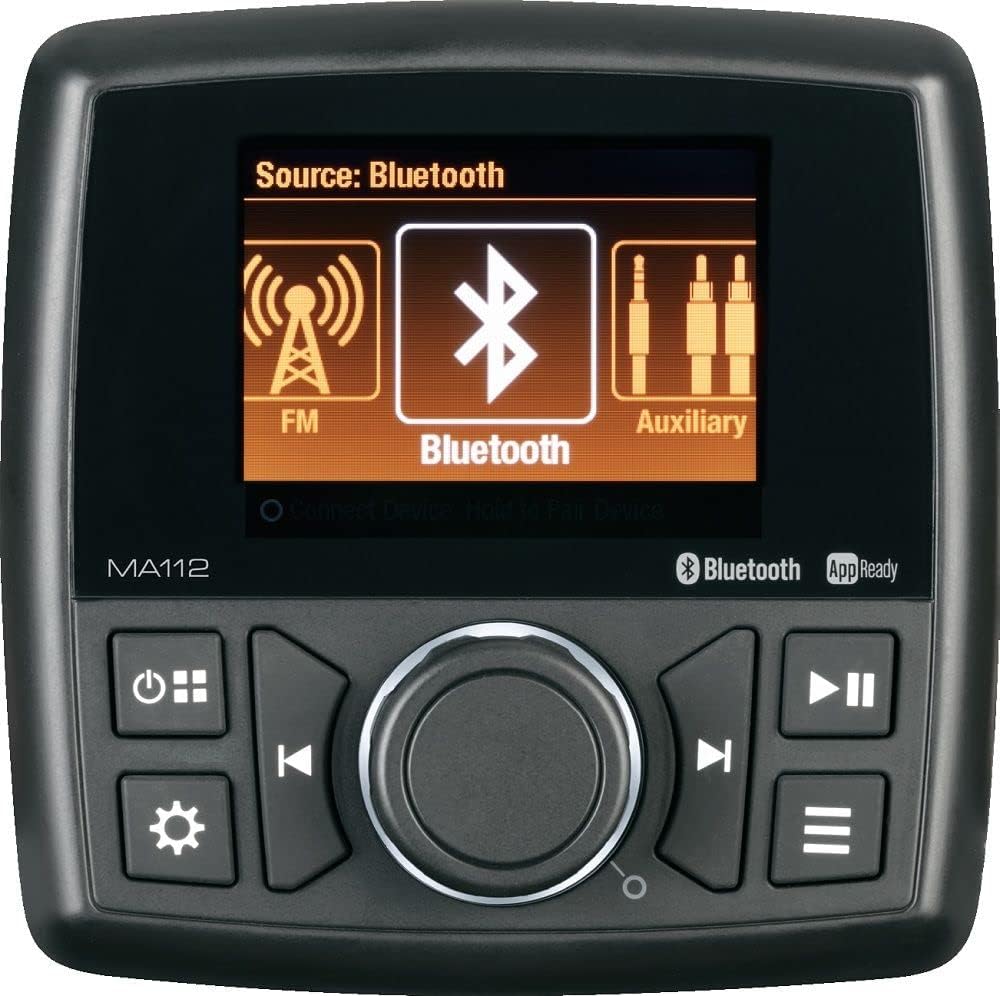
Imej: Depan view of the MA112 stereo unit, highlighting its compact design, digital display, and intuitive control layout including the central rotary knob, source selection, power, and track controls.
Maklumat Keselamatan
- Always ensure proper ventilation around the unit to prevent overheating.
- Jangan dedahkan unit kepada suhu yang melampau, cahaya matahari langsung untuk tempoh yang lama, atau kelembapan berlebihan.
- Disconnect the power supply before performing any maintenance or installation procedures.
- Use only specified power sources and wiring to avoid electrical hazards.
- Rujuk profesional yang berkelayakan untuk pemasangan jika anda tidak pasti tentang sebarang langkah.
Kandungan Pakej
Sahkan bahawa semua item yang disenaraikan di bawah disertakan dalam pakej anda:
- MA112 Stereo Unit
- Pendakap Pemasangan
- Perkakasan Pemasangan (skru, nat, pencuci)
- Pendawaian abah-abah
- Manual Pengguna (dokumen ini)

Image: Diagram illustrating the MA112 stereo unit along with its mounting bracket, two threaded studs, and four nuts and washers, representing the typical package contents.
Pemasangan & Persediaan
Melekap
Choose a suitable location for mounting the MA112 unit, ensuring it is protected from direct water exposure and has adequate ventilation. Use the provided mounting bracket and hardware to secure the unit firmly. Ensure there is enough space behind the unit for wiring connections.
Sambungan Pendawaian
Connect the wiring harness to the corresponding ports on the MA112 unit and to your vehicle's power supply, speakers, and other audio components. Pay close attention to positive and negative terminals to avoid short circuits or damage. Refer to the wiring diagram (not provided in this manual, typically found on the unit or separate sheet) for specific connections.
- Kawat Merah: +12V Accessory (Switched Power)
- Kawat kuning: +12V Constant (Battery Power)
- Kawat Hitam: tanah
- Wayar Pembesar suara: Connect to your speakers (ensure correct polarity).
- Antena: Connect your AM/FM antenna.
Kuasa Awal Hidup
Once all connections are secure, turn on your vehicle's ignition or power source. Press the power button on the MA112 unit. The display should illuminate, indicating successful power-up.
Arahan Operasi
Kawalan Asas
The MA112 features a user-friendly interface with a central rotary knob and dedicated buttons for various functions.
- Butang Kuasa: Tekan untuk menghidupkan/mematikan unit.
- Butang Sumber: Cycle through available audio sources (AM, FM, USB, Bluetooth, Auxiliary).
- Tombol Putar: Turn to adjust volume. Press to select menu options.
- Menu/Settings Button: Access audio settings and system configurations.
- Track/Tune Buttons: Navigate tracks (USB/Bluetooth) or tune radio stations (AM/FM).
- Butang Main/Jeda: Control playback for USB and Bluetooth sources.
Pemilihan Sumber
Press the 'Source' button repeatedly to cycle through the available audio modes: AM Radio, FM Radio, USB, Bluetooth, and Auxiliary Input. The current source will be displayed on the screen.
Berpasangan Bluetooth
- Select 'Bluetooth' as the audio source.
- Pada peranti mudah alih anda, cari peranti Bluetooth yang tersedia.
- Select 'MA112' from the list.
- Once paired, the unit will confirm the connection, and you can stream audio from your device.
Main Balik USB
Masukkan pemacu kilat USB yang mengandungi audio yang serasi files into the USB port. The unit will automatically switch to USB mode and begin playback. Use the track buttons to navigate through files.
Kawalan Apl
The MA112 supports app control. Download the official Marine Audio app from your device's app store. Once installed and connected via Bluetooth, the app provides an intuitive interface for controlling various functions of the stereo.
Tetapan Audio
Press the 'Menu/Settings' button to access audio adjustments such as Bass, Treble, Balance, Fader, and Equalizer presets. Use the rotary knob to navigate and adjust settings.
Penyelenggaraan
To ensure the longevity and optimal performance of your MA112 stereo, follow these maintenance guidelines:
- Pembersihan: Gunakan kain lembut dan kering untuk mengelap permukaan unit. Untuk kotoran degil, dampen the cloth slightly with water. Avoid using harsh chemicals or abrasive cleaners.
- Sambungan: Periksa semua sambungan pendawaian secara berkala untuk memastikan ia selamat dan bebas daripada kakisan.
- Storan: If storing the unit for an extended period, ensure it is in a cool, dry place, away from direct sunlight and extreme temperatures.
Menyelesaikan masalah
If you encounter issues with your MA112 stereo, refer to the table below for common problems and their solutions.
| Masalah | Kemungkinan Punca | Penyelesaian |
|---|---|---|
| Tiada Kuasa | Loose power connection; Blown fuse; Vehicle battery low. | Check wiring harness connections; Replace fuse; Charge vehicle battery. |
| Tiada Bunyi | Volume too low; Mute activated; Loose speaker wires; Incorrect source selected. | Meningkatkan volum; Nyahaktifkan senyap; Semak sambungan pembesar suara; Pilih sumber yang betul. |
| Bluetooth Tidak Bersambung | Unit not in pairing mode; Device too far; Previous connection interfering. | Ensure MA112 is in Bluetooth mode; Move device closer; Forget MA112 on device and re-pair. |
| USB Playback Error | Tidak disokong file format; Corrupt USB drive; USB drive not properly inserted. | pastikan files are compatible; Try a different USB drive; Re-insert USB drive firmly. |
Spesifikasi
Detailed technical specifications for the Marine Audio MA112 stereo unit:

Image: Technical drawing of the MA112 unit showing front, side, and top dimensions, alongside a table detailing general and performance specifications.
| Spesifikasi Umum | |
|---|---|
| Sistem Kuasa | 12 VDC |
| Vol Operasitage Julat | 10V hingga 16V |
| Current Draw @ 12V (Idle) | 145 mA |
| Current Draw @ 12V (Nominal) | 1 A |
| Current Draw @ 12V (Maximum) | 8.5 A |
| Julat Suhu Operasi | -4°F hingga 149°F (-20°C hingga 65°C) |
| Julat Suhu Penyimpanan | -22°F hingga 158°F (-30°C hingga 70°C) |
| Kelembapan Relatif Maksimum | 100% |
| Dimensi Keseluruhan | 4.5" H x 4.5" L x 4.4" D |
| Product Weight (unpackaged) | 1.4 lbs. |
| Spesifikasi Prestasi | |
|---|---|
| Sensitiviti FM | <5µV |
| Sensitiviti AM | <63µV |
| Kuasa Output (RMS) | 15 W x 4 |
| Output Power (Maximum) | 40 W x 4 |
| Herotan Harmonik Keseluruhan | 1 % |
| Applied Test Suite | ASA ES0001 |
| Pensijilan Peraturan | FCC Part 15; CE; RoHS |
Waranti dan Sokongan
The Marine Audio MA112 Compact Bluetooth Stereo is covered by a manufacturer's warranty against defects in materials and workmanship. Please refer to the warranty card included with your product for specific terms and conditions, including the warranty period and claim procedures.
For technical support, troubleshooting assistance, or warranty claims, please contact Marine Audio customer service. Contact information can typically be found on the manufacturer's official webtapak atau pada pembungkusan produk.
When contacting support, please have your product model number (MA112) and purchase information readily available.