
T-WOLF TF230
T-WOLF TF230 Keyboard and Mouse Set
Manual Pengguna
1. Pengenalan
Terima kasih kerana membeliasing the T-WOLF TF230 Wired Light-Emitting Keyboard and Mouse Set. This product is designed to provide a comfortable and responsive experience for both office work and gaming. This manual will guide you through the setup, operation, and maintenance of your new peripheral set.
2. Ciri-ciri Produk
- Mechanical Feel Design: Enjoy a responsive and tactile typing experience.
- Vibrant Backlighting: Features cool rainbow backlight effects with colorful luminescence for an immersive experience.
- Kekunci Terapung: Modern design with floating keycaps for enhanced aesthetics and ease of cleaning.
- Waterproof Keyboard: Designed with a front waterproof structure to prevent damage from spills and simplify cleaning.
- Comfortable Mouse: The mouse features a frosted texture, comfortable non-slip rollers, and cool LED breathing light effects.
- Pasang dan Main: Simple USB connectivity for quick setup.
- Kekunci Fungsi Multimedia: Integrated multimedia keys for convenient control.

Figure 2.1: The T-WOLF TF230 Keyboard and Mouse Set showcasing its vibrant rainbow backlighting.

Figure 2.2: Detail of the keyboard's waterproof design, illustrating its spill resistance.
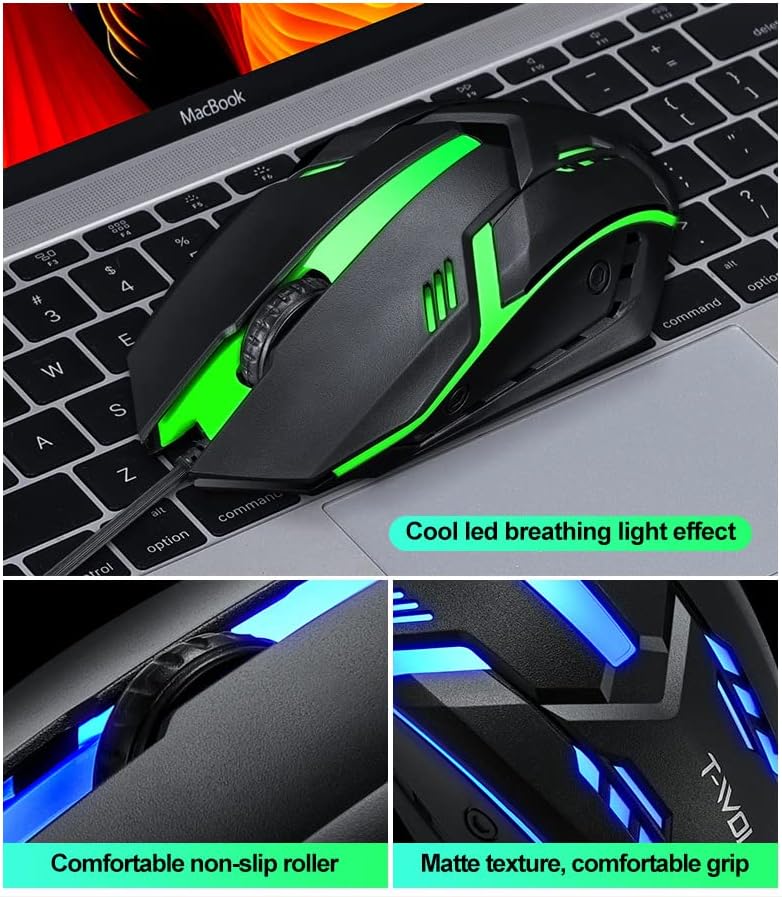
Figure 2.3: Features of the T-WOLF mouse, including its LED lighting, comfortable scroll wheel, and ergonomic grip.
3. Persediaan
The T-WOLF TF230 Keyboard and Mouse Set is designed for simple plug-and-play installation. Follow these steps to connect your devices:
- Cari port USB yang tersedia pada komputer anda.
- Pasangkan penyambung USB papan kekunci ke port USB.
- Pasangkan penyambung USB tetikus ke port USB lain yang tersedia.
- Your computer should automatically detect and install the necessary drivers. No additional software is required.
- Once installed, the keyboard and mouse will be ready for use.
4. Arahan Operasi
4.1 Operasi Papan Kekunci
- Penaipan Standard: Use the keyboard as a standard 104-key layout for typing and data entry.
- Kawalan Lampu Latar: The keyboard features a dedicated key to turn the backlight on or off. This is typically the Kunci Tatal key. Press it to toggle the lighting effect.
- Kekunci Multimedia: Utilize the function keys (F1-F12) in combination with the Fn key (if present, though not explicitly mentioned for this model, it's common for multimedia functions) for quick access to media controls, volume, and other system functions.

Figure 4.1: The Scroll Lock key on the keyboard, used to toggle the backlight effect.
4.2 Operasi Tetikus
- Navigasi Standard: Use the left and right click buttons for standard mouse functions.
- Roda Tatal: The scroll wheel allows for smooth vertical scrolling through documents and web muka surat. Ia juga berfungsi sebagai butang klik tengah.
- Pelarasan DPI: The mouse has a photoelectric resolution of 1200dpi. If there is a dedicated DPI button (not explicitly shown but common for gaming mice), press it to cycle through different sensitivity settings.
5. Penyelenggaraan
Proper maintenance will extend the lifespan of your T-WOLF TF230 Keyboard and Mouse Set.
- Membersihkan Papan Kekunci: Due to its waterproof design, the keyboard is easy to clean. You can gently wipe the surface with a damp cloth. For deeper cleaning, ensure the keyboard is unplugged and use compressed air to remove debris from between the keys. Avoid submerging the keyboard in water.
- Membersihkan Tetikus: Use a soft, dry cloth to wipe the exterior of the mouse. For the optical sensor, use a cotton swab lightly dampdicairkan dengan alkohol gosok untuk membersihkan kawasan sensor dengan lembut.
- Penjagaan Kabel: Avoid sharp bends or kinks in the USB cables to prevent internal wire damage.
- Storan: When not in use for extended periods, store the set in a clean, dry environment away from direct sunlight and extreme temperatures.
6. Penyelesaian masalah
If you encounter issues with your T-WOLF TF230 Keyboard and Mouse Set, please refer to the following common solutions:
- Peranti Tidak Memberi Respons:
- Pastikan kedua-dua penyambung USB papan kekunci dan tetikus dipasang dengan selamat ke port USB komputer anda.
- Cuba pasangkan peranti ke port USB yang berbeza pada komputer anda.
- Mulakan semula komputer anda.
- Check your computer's Device Manager (Windows) or System Information (macOS) to see if the devices are recognized.
- Lampu latar tidak berfungsi:
- Tekan ke Kunci Tatal key on the keyboard to toggle the backlight on/off.
- Ensure the keyboard is properly connected to the computer.
- Kursor Tetikus Melompat atau Tidak Menentu:
- Bersihkan penderia optik di bahagian bawah tetikus.
- Pastikan anda menggunakan tetikus pada permukaan yang bersih dan tidak memantulkan cahaya. Alas tetikus disyorkan.
Jika langkah-langkah ini tidak menyelesaikan masalah anda, sila hubungi khidmat pelanggan untuk bantuan lanjut.
7. Spesifikasi

Figure 7.1: Detailed parameter specifications for the T-WOLF TF230 Keyboard and Mouse Set.
| kategori | Spesifikasi |
|---|---|
| Jenama | T-WOLF |
| Pengeluar | Thunder Wolves |
| Model | TF230 |
| Nombor Bahagian | TF230 |
| Teknologi Ketersambungan | USB berwayar |
| Jenis Papan Kekunci | 104 Keys, Mechanical Feel, Floating Keycap |
| Ciri Papan Kekunci | Backlit (Rainbow Effect), Waterproof Design |
| Keyboard Cable Length | 1.3 meter (lebih kurang 130 cm) |
| Dimensi Papan Kekunci | Approx. 430 x 125 x 30 mm (530 x 145 x 42 mm for packing size) |
| Berat Papan Kekunci | lebih kurang 400g |
| Jenis Tetikus | Optical Engine, Built-in Counterweight |
| Resolusi Tetikus | 1200dpi |
| Bilangan Butang Tetikus | 3D (likely 3 buttons: left, right, scroll click) |
| Mouse Cord Length | 1.35 meter (lebih kurang 135 cm) |
| Dimensi Tetikus | lebih kurang 130 x 68 x 39 mm |
| Berat Tikus | Approx. 95g (bare metal) |
| OS yang serasi | Windows 98, 98Se, 2000, XP Home Edition, Advanced Server 2003, Server Enterprise Edition 2003 or later |
| Platform Perkakasan | PC |
| Bateri Diperlukan | Tidak |
8. Waranti dan Sokongan
The T-WOLF TF230 Keyboard and Mouse Set comes with a limited warranty against manufacturing defects. Please refer to the retailer's or manufacturer's webtapak untuk terma dan syarat waranti tertentu.
For technical support, troubleshooting assistance, or warranty claims, please contact the manufacturer, Thunder Wolves, or your point of purchase. Keep your purchase receipt as proof of purchase.
Dokumen Berkaitan - TF230
 |
Peraturan dan Permainan Papan Vlci Panduan komprehensif untuk permainan papan Vlci, meliputi persediaan, permainan, tindakan, pemarkahan dan varian. Ketahui cara memimpin kumpulan serigala anda ke arah kemenangan dengan memburu mangsa secara strategik, meluaskan wilayah anda dan meningkatkan kebolehan kumpulan anda. |
 |
Wolf Electric Cooktop Use & Care Guide: Features, Operation, Safety, and Maintenance Comprehensive guide for Wolf electric cooktops, detailing features, operation, safety instructions, care recommendations, troubleshooting, and warranty information for models CT15E/S, CT30E/S, CT36E/S, CT30EU, and CT36EU. |
 |
T-Wolf X4 Game Mouse User Manual User manual for the T-Wolf X4 Three-Mode Bluetooth Wireless Gaming Mouse. Includes warnings, precautions, and after-sales service information. |
 |
Dapur Gas Wolf CT15G/S: Manual Pemilik, Ciri, Penjagaan dan Penyelesaian Masalah Manual pemilik yang komprehensif untuk dapur gas Wolf CT15G/S, meliputi ciri, arahan keselamatan, pemasangan, penggunaan dan penjagaan, penyelesaian masalah dan maklumat waranti. Termasuk butiran tentang model CT15G, CT30G dan CT36G. |
 |
Wolf Home Products: Best Practices for Decking and Building Products Comprehensive guide from Wolf Home Products covering best practices, installation, and care for Wolf Serenity Decking, Wolf Perspective Decking, and Wolf Endurance Cabinetry. Learn about product features and maintenance. |
 |
T-Wolf V1 Mouse Instruction Manual User manual for the T-Wolf V1 wired optical mouse, featuring setup instructions, button functions, and care guidelines for optimal performance. |
Ask a question about this manual
Ask about setup, troubleshooting, compatibility, parts, safety, or missing instructions. Manuals+ will review the question and use this page’s manual context to help answer it.