
LFF DAB Plus Digital FM Radio
LFF DAB Plus Digital FM Radio User Manual
Model: DAB Plus Digital FM Radio
Jenama: LFF
1. Pengenalan
This manual provides detailed instructions for the LFF DAB Plus Digital FM Radio. It covers setup, operation, maintenance, and troubleshooting to ensure optimal performance and user experience. Please read this manual thoroughly before using the device.

Depan view of the LFF DAB Plus Digital FM Radio, showing the speaker grille, color display, and extended antenna.
2. Kandungan Pakej
Sila semak pakej untuk item berikut:
- 1 x LFF DAB Plus Digital FM Radio
- 1 x Penyesuai Kuasa AC
- 1 x Panduan Mula Pantas
3. Produk Lebihview
Biasakan diri anda dengan komponen dan kawalan radio.
3.1 Ciri-ciri Utama

This diagram illustrates the radio's key functions: DAB+ radio, 60 station presets, FM radio, sleep timer, headphone jack, Bluetooth connectivity, full-color screen, and dual alarm capability.
3.2 Kawalan dan Pelabuhan

Atas dan sisi view of the radio, showing control buttons and knobs on the top panel, and the 3.5mm headphone jack located on the side.
Refer to the diagram above for the location of the following:
- Butang Kuasa: Menghidupkan/mematikan radio.
- Butang Mod: Bertukar antara mod DAB+, FM dan Bluetooth.
- Tombol Tala/Pilih: Rotates to tune stations or navigate menus, press to select.
- Tombol Kelantangan: Melaraskan kelantangan audio.
- Butang Pratetap: For saving and recalling favorite stations.
- Alarm/Sleep Timer Button: Mengakses tetapan penggera dan pemasa tidur.
- Paparan Warna: Menunjukkan maklumat stesen, masa dan pilihan menu.
- Bicu Fon Kepala (3.5mm): Untuk mendengar secara peribadi.
- Pelabuhan DC IN: Untuk menyambungkan penyesuai kuasa AC.
- Antena Teleskopik: Untuk penerimaan radio yang lebih baik.
4. Persediaan
4.1 Menghidupkan
The radio can be powered by the included AC adapter or by batteries.
- Kuasa AC: Connect the AC power adapter to the DC IN port on the back of the radio and plug it into a wall outlet.
- Kuasa Bateri: Open the battery compartment on the back of the radio and insert 4 x 1.5V AA (LR6) batteries, ensuring correct polarity.
belakang view of the radio, detailing the battery compartment for 4x AA batteries, the AC adapter input (5V/1000mA), and the 360° rotatable antenna. Product dimensions are also indicated.
4.2 Pelarasan Antena
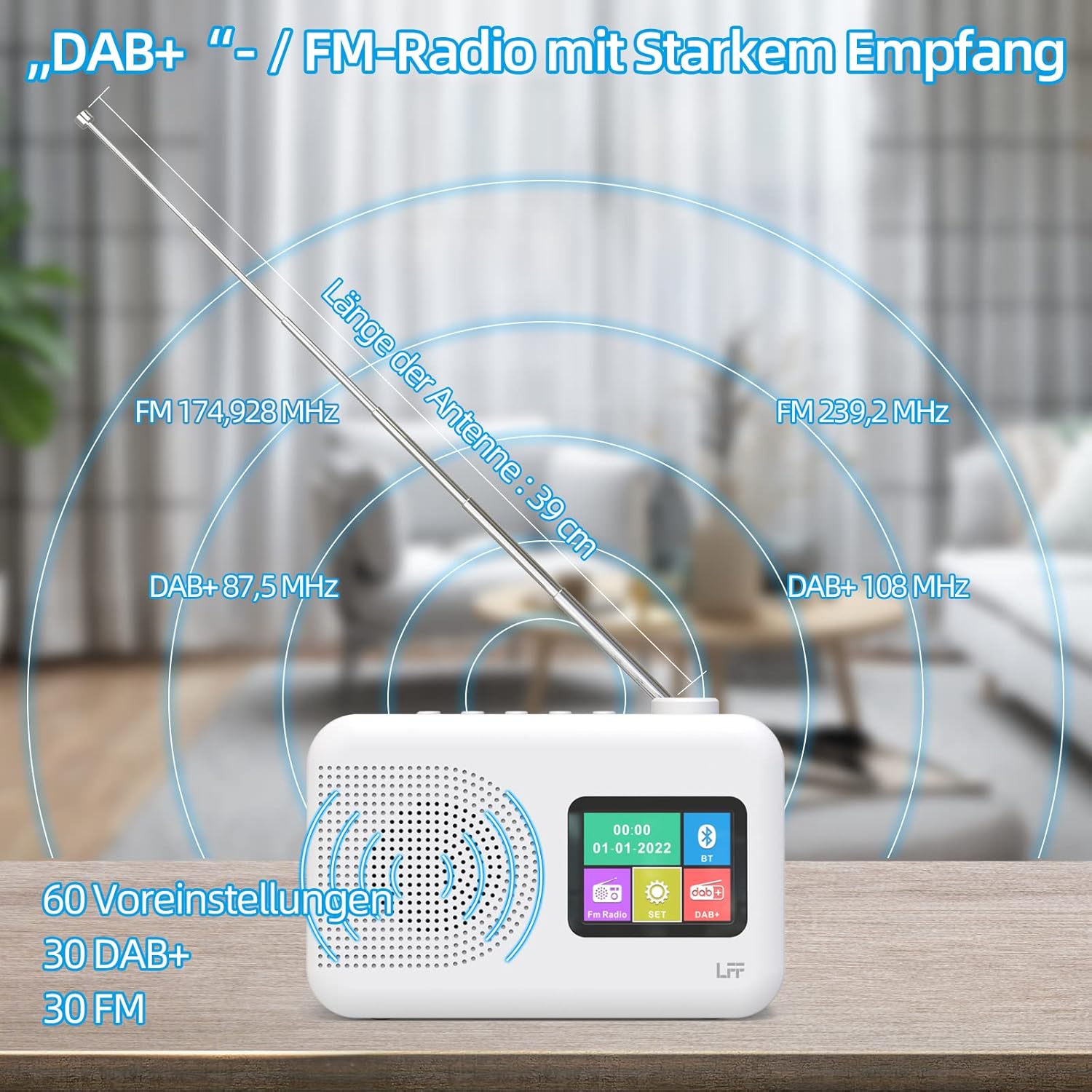
Extend the telescopic antenna fully (approximately 39 cm) and adjust its angle for optimal reception, especially for DAB+ and FM stations.

This diagram illustrates the radio's strong DAB+ and FM reception capabilities with the fully extended 39cm antenna, showing frequency ranges and the capacity for 60 total presets (30 DAB+, 30 FM).
4.3 Initial Scan (DAB+)
- Hidupkan radio.
- Ensure the mode is set to DAB+. If not, press the Mod butang untuk beralih.
- The radio will automatically perform a full scan for available DAB+ stations. This may take a few minutes.
- Once the scan is complete, the radio will display a list of found stations.
5. Arahan Operasi
5.1 DAB+ Radio Mode
- Tekan ke Mod butang untuk memilih mod DAB+.
- Putar Tala/Pilih knob to browse through the available stations.
- Tekan ke Tala/Pilih tombol untuk memilih stesen.
- Menyimpan Pratetap: To save a station, press and hold a Pratetap button until the display confirms. To recall, briefly press the corresponding Pratetap button. Up to 30 DAB+ stations can be saved.
Mod Radio 5.2 FM
- Tekan ke Mod butang untuk memilih mod FM.
- Putar Tala/Pilih tombol untuk menala frekuensi secara manual.
- Tekan dan tahan butang Tala/Pilih knob for a few seconds to auto-scan for the next available station.
- Menyimpan Pratetap: Similar to DAB+ mode, press and hold a Pratetap button to save, and briefly press to recall. Up to 30 FM stations can be saved.
5.3 Mod Bluetooth

This diagram illustrates the three primary playback options for the radio: through its internal speaker, via Bluetooth connection to an external device, or using headphones connected to the headphone jack.
- Tekan ke Mod button to select Bluetooth mode. The display will show "Bluetooth Pairing" or similar.
- On your external device (e.g., smartphone), enable Bluetooth and search for available devices.
- Select "LFF Radio" (or similar name) from the list to pair.
- Setelah dipasangkan, anda boleh memainkan audio daripada peranti anda melalui pembesar suara radio.
- Nota: This radio acts as a Bluetooth receiver. It does not support connecting to Bluetooth headphones or other Bluetooth speakers.
5.4 Pemasa Tidur
The sleep timer allows the radio to automatically turn off after a set period.

This image depicts the sleep timer function, offering selectable durations of 15, 30, 45, 60, 90, and 120 minutes before the radio automatically powers off.
- Tekan ke Alarm/Sleep Timer button repeatedly to cycle through sleep timer options (15 min, 30 min, 45 min, 60 min, 90 min, 120 min, OFF).
- Select your desired duration. The radio will turn off automatically after this time.
5.5 Jam Penggera
The radio features a dual alarm function.
- Tekan dan tahan butang Alarm/Sleep Timer button to enter alarm settings.
- Gunakan Tala/Pilih knob to set the alarm time, alarm source (DAB+, FM, or buzzer), and volume.
- Tekan ke Tala/Pilih knob to confirm each setting.
- Repeat the process for the second alarm if needed.
5.6 Penggunaan Fon Kepala
Plug 3.5mm headphones into the headphone jack on the side of the radio for private listening. The internal speaker will automatically mute.
6. Penyelenggaraan
6.1 Pembersihan
- Wipe the radio's surface with a soft, dry cloth.
- Jangan gunakan pembersih, lilin atau pelarut yang melelas kerana ia boleh merosakkan kemasan.
6.2 Penggantian Bateri
When using battery power, replace all four AA batteries when the low battery indicator appears on the display or when performance degrades.
- Ensure the radio is turned off and disconnected from AC power.
- Buka penutup petak bateri di bahagian belakang.
- Tanggalkan bateri lama dan buang dengan betul.
- Insert new 4 x 1.5V AA (LR6) batteries, observing correct polarity (+/-).
- Tutup penutup petak bateri dengan selamat.
6.3 Screen Protection Film
The radio's display comes with a transparent protective film. For optimal clarity, gently peel off this film before first use.
7. Penyelesaian masalah
Jika anda menghadapi masalah, rujuk kepada masalah dan penyelesaian biasa berikut:
| Masalah | Kemungkinan Punca | Penyelesaian |
|---|---|---|
| Tiada kuasa | AC adapter not connected, batteries depleted or incorrectly inserted. | Periksa sambungan penyesuai AC. Gantikan bateri atau pastikan kekutuban yang betul. |
| Penerimaan radio yang lemah | Antenna not extended, weak signal area, interference. | Fully extend and adjust the telescopic antenna. Move the radio to a different location. Avoid sources of interference. |
| Bluetooth tidak bersambung | Radio not in Bluetooth mode, device too far, already paired with another device. | Ensure radio is in Bluetooth mode. Keep devices within range. Disconnect from other devices. |
| Tiada bunyi | Volume too low, headphones connected, mute activated. | Increase volume. Disconnect headphones. Check if mute is active. |
8. Spesifikasi
- Jenama: LFF
- model: DAB Plus Digital FM Radio
- warna: putih
- Teknologi Ketersambungan: Bluetooth
- Dimensi (L x W x H): 16.1 cm x 5.9 cm x 10.9 cm
- Teknologi Penalaan: DAB
- Sumber Kuasa: AC Adapter (5V/1000mA) or 4 x 1.5V AA (LR6) Batteries
- Pancaragam Radio yang Disokong: DAB+, FM
- Julat Kekerapan DAB+: 174.928 - 239.2 MHz
- Julat Frekuensi FM: 87.5 - 108 MHz
- Pratetap: 30 DAB+, 30 FM
- Panjang Antena: 39 cm (extendable)
- Ciri Khas: DAB Plus Radio, Sleep Timer, Dual Alarm, Headphone Jack, Color Display
- Komponen yang Disertakan: DAB Digital Radio, AC Power Adapter, Quick Start Guide
9. Waranti dan Sokongan
For any quality-related issues or technical support, please contact the seller directly. We are committed to resolving any problems you may encounter with your LFF DAB Plus Digital FM Radio.
Ask a question about this manual
Ask about setup, troubleshooting, compatibility, parts, safety, or missing instructions. Manuals+ will review the question and use this page’s manual context to help answer it.