
1. Pengenalan
The DURGOD Taurus K320 is a Tenkeyless (TKL) 80% mechanical keyboard designed for both gaming and typing. It features an 87-key layout, USB-C wired connectivity, and durable doubleshot PBT keycaps. This manual provides instructions for setting up, operating, and maintaining your keyboard.
2. Kandungan Pakej
Sila sahkan bahawa semua item terdapat dalam pakej anda:
- DURGOD K320 Mechanical Keyboard
- Instruction Manual (English / Chinese)
- Penutup Habuk
- Type-C to Type-C USB Cable (3.3 ft / 1m)
- Type-C to Type-A USB Cable (5.9 ft / 1.8m)
- Pelekat Logo
- Penarik Kekunci
3. Ciri-ciri Produk
- Cherry MX Speed Silver Switches: Provides precise mechanical performance with a 50 million click life, suitable for fast typing and gaming.
- Reka Bentuk Tenkeyless (TKL): Compact 80% layout saves desk space and offers flexibility for mouse positioning.
- Pembinaan Tahan Lama: Sturdy case with adjustable feet for three typing angles, optimizing comfort and visibility.
- Kekunci PBT Doubleshot: Enhanced durability and resistance to wear.
- Full N-Key Rollover & Anti-Ghosting: Ensures every keystroke is registered accurately, even during rapid input.
- Kekunci Boleh Aturcara: Supports macro creation and key remapping via DURGOD Zeus Engine software.
- Detachable USB-C Cables: Includes both Type-C to Type-C and Type-C to Type-A cables for versatile connectivity.
- Pengurusan Kabel: Features 3-way cable routing options (left, center, right) on the underside of the keyboard.
- Keserasian: Works with Windows 10, 8, 7, Vista, XP, and Mac OS (some key remapping may be required for Mac via software).
4. Persediaan
Follow these steps to connect your DURGOD K320 keyboard:
- Select the appropriate USB cable (Type-C to Type-C or Type-C to Type-A) for your computer.
- Connect the Type-C end of the cable to the USB-C port on the back of the keyboard.
- Route the cable through one of the three channels on the underside of the keyboard for organized cable management.
- Connect the other end of the cable (Type-C or Type-A) to an available USB port on your computer.
- Papan kekunci ini boleh dipasang dan digunakan dan akan dikenali secara automatik oleh sistem pengendalian anda.
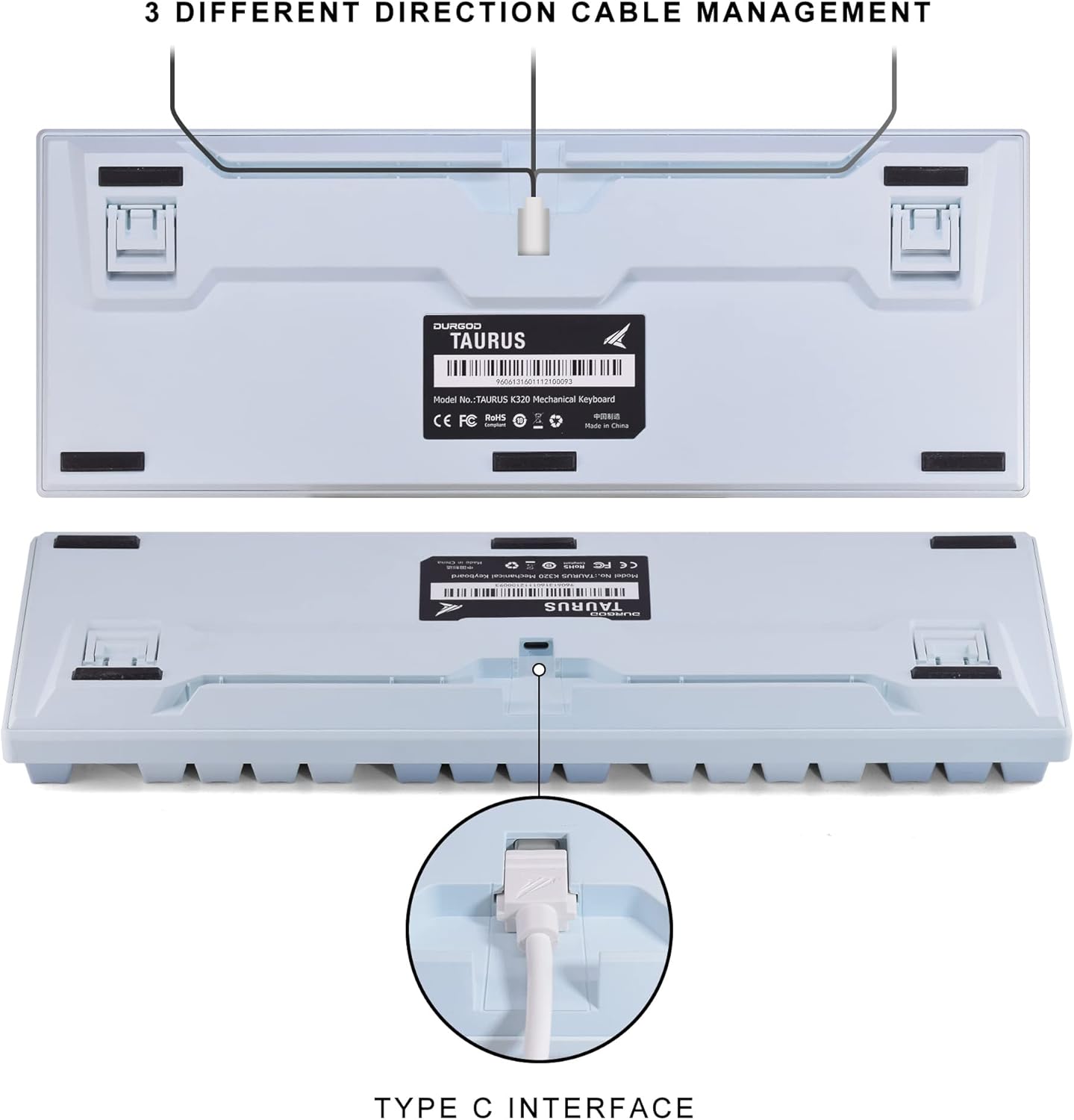
Image: The underside of the DURGOD K320 keyboard, illustrating the USB-C port and the three channels for cable management (left, center, right).
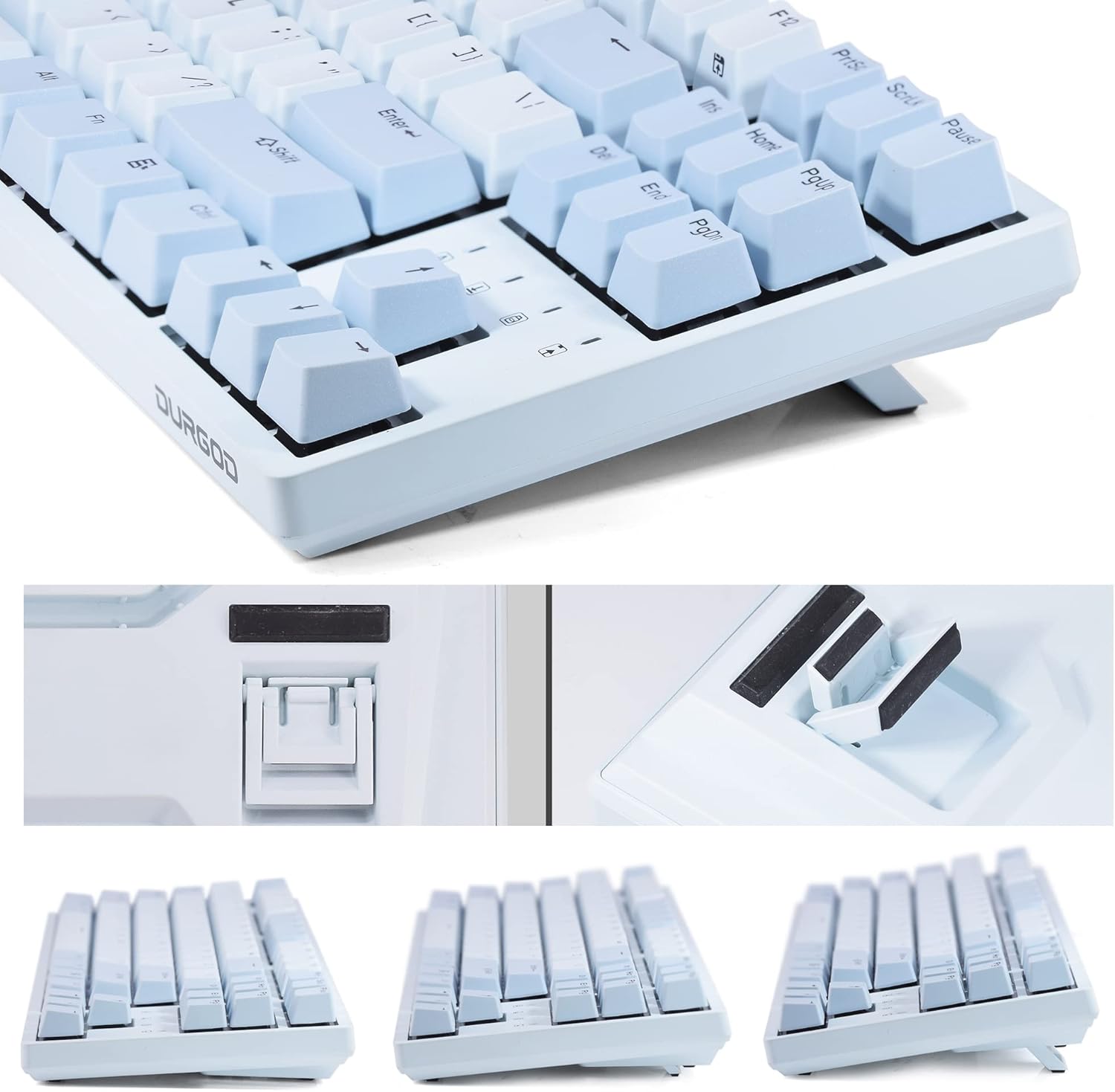
Imej: Jarak dekat view of the DURGOD K320 keyboard's adjustable feet, demonstrating the three possible typing angles for ergonomic comfort.
5. Arahan Operasi
5.1. Kombinasi Kekunci Fungsi
The DURGOD K320 features various multimedia and system control functions accessible via the FN key in combination with the F-keys. All keys except the FN key are programmable.
| Gabungan | Fungsi |
|---|---|
| FN + F1 | Main/Jeda |
| FN + F2 | Berhenti |
| FN + F3 | Trek Sebelumnya |
| FN + F4 | Trek Seterusnya |
| FN + F5 | bisu |
| FN + F6 | Kelantangan Kurang |
| FN + F7 | Kelantangan Naik |
| FN + F12 | Switch Customize Profile (MR Mode: Profiles can be customized via Durgod Zeus Engine software and swapped on the keyboard.) |
| FN + Kiri MENANG | Kunci Kekunci Windows |

Image: The ANSI/QWERTY US International layout of the DURGOD K320 keyboard, with an overlay indicating the various FN key combinations and their corresponding functions.
5.2. DURGOD Zeus Engine Software
The DURGOD Zeus Engine software allows for advanced customization of your keyboard. With this software, you can:
- Upgrade keyboard firmware.
- Set up complex macros.
- Rebind keys.
- Create and manage independent profiles.
- Program Windows key lock functions.
Please visit the official DURGOD website to download the latest version of the Zeus Engine software.
6. Penyelenggaraan
To ensure the longevity and optimal performance of your DURGOD K320 keyboard, follow these maintenance guidelines:
- Pembersihan: Use the included dust cover when the keyboard is not in use. For cleaning, disconnect the keyboard from your computer. Use a soft, dry cloth to wipe the surface. For deeper cleaning, use a keycap puller to remove keycaps and clean underneath with compressed air or a small brush.
- Elakkan Cecair: Jangan dedahkan papan kekunci kepada cecair. Sekiranya berlaku tumpahan secara tidak sengaja, putuskan sambungan papan kekunci dengan segera dan biarkan ia kering sepenuhnya sebelum menyambung semula.
- Storan: Simpan papan kekunci di tempat yang sejuk dan kering jauh dari cahaya matahari langsung dan suhu yang melampau.
- Penjagaan Kabel: Avoid bending or twisting the USB cables excessively to prevent damage.
7. Penyelesaian masalah
If you encounter issues with your DURGOD K320 keyboard, refer to the following common problems and solutions:
- Papan Kekunci Tidak Membalas:
- Pastikan kabel USB disambungkan dengan selamat ke kedua-dua papan kekunci dan komputer.
- Cuba sambungkan papan kekunci ke port USB lain pada komputer anda.
- Test with the alternative USB cable provided.
- Mulakan semula komputer anda.
- Keys Not Registering / Ghosting:
- The keyboard features N-key rollover and anti-ghosting. If issues persist, ensure no debris is under the keycaps.
- Update keyboard firmware using the DURGOD Zeus Engine software.
- FN Key Functions Not Working:
- Pastikan anda menekan kekunci FN serentak dengan kekunci F yang dikehendaki.
- Check if any software conflicts are present.
- Windows Key Locked:
- Tekan FN + Kiri MENANG to toggle the Windows key lock on or off.
- Software Issues (DURGOD Zeus Engine):
- Ensure you have the latest version of the software installed from the official DURGOD webtapak.
- Jalankan perisian sebagai pentadbir.
8. Spesifikasi
| Ciri | Perincian |
|---|---|
| Nombor Model | K320 |
| Susun atur | 87 Keys, Tenkeyless (TKL), ANSI - US International |
| Suis | Cherry MX Speed Silver |
| Kekunci Kekunci | Doubleshot PBT |
| Ketersambungan | Wired, USB-C Interface |
| Anti-Ghosting | Peralihan N-Key Penuh |
| Dimensi | 14.76 x 5.2 x 0.94 inci (37.5 x 13.2 x 2.4 cm) |
| Berat badan | 3.03 paun (1.37 kg) |
| OS yang serasi | Windows 10/8/7/Vista/XP, Mac OS |
| Pengeluar | DAHULU |

Imej: Dari dekat view of the Cherry MX Speed Silver switches on the DURGOD K320 keyboard, with some keycaps removed to show the switch mechanism.

Image: The DURGOD K320 keyboard in use, demonstrating its versatility for both professional work environments and gaming setups.
9. Waranti dan Sokongan
DURGOD products are manufactured to high-quality standards. For warranty information, technical support, or service inquiries, please refer to the warranty card included in your package or visit the official DURGOD webtapak. Simpan resit pembelian anda untuk tuntutan waranti.