
1. Pengenalan
Thank you for choosing the ALUX 32-inch HD Smart TV, Model AL32ASHD. This television is designed to provide an immersive home entertainment experience with its advanced image quality enhancement and smart features. This manual provides essential information for setting up, operating, and maintaining your new television.
Key features include a 1366 x 768 pixel resolution, 60 Hz refresh rate, and Wide Color Enhancer technology for vibrant and realistic colors. With multiple HDMI and USB inputs, you can easily connect various multimedia devices. Integrated Wi-Fi connectivity allows access to smart TV functionalities and streaming services.
2. Maklumat Keselamatan
Please read all safety instructions carefully before using this product. Keep this manual for future reference. Always ensure the television is placed on a stable surface to prevent tipping. Do not expose the unit to rain or moisture. Avoid blocking ventilation openings. For cleaning, use a soft, dry cloth. Disconnect the power cord from the wall outlet before cleaning or if the unit will be unused for a long period.
3. Kandungan Pakej
Setelah membuka bungkusan, sila sahkan bahawa semua barang yang disenaraikan di bawah disertakan dan dalam keadaan baik:
- ALUX 32-inch HD Smart TV Unit
- Remote Control (requires AA batteries, not always included)
- Stand TV (2 keping)
- Kabel Kuasa
- Manual Pengguna (dokumen ini)
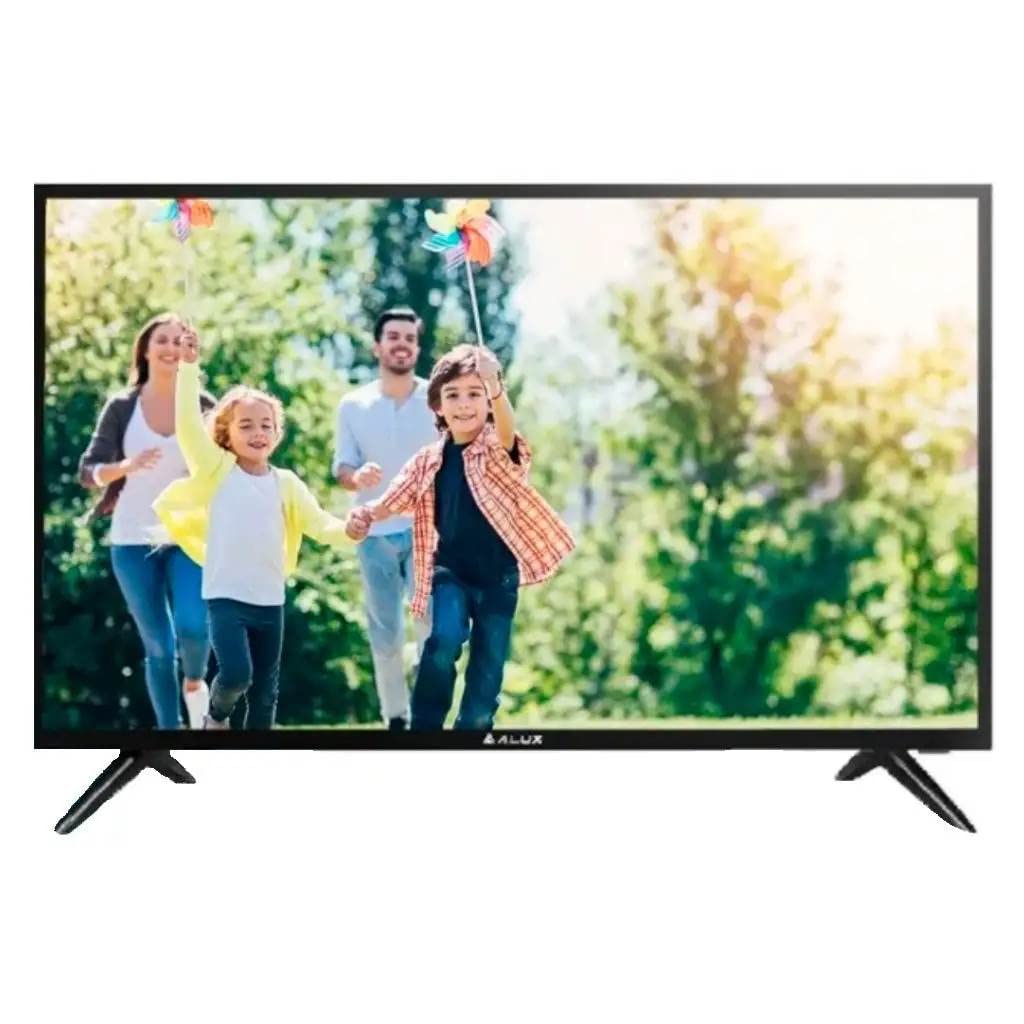
Rajah 3.1: Depan view of the ALUX 32-inch HD Smart TV.
4. Ciri-ciri Fizikal dan Sambungan
The ALUX 32-inch HD Smart TV features a sleek design with essential connectivity ports located on the rear panel for easy access.

Rajah 4.1: Sisi view of the ALUX 32-inch HD Smart TV, showing its slim profile.
4.1 Port Kesambungan
The television is equipped with the following ports:
- Input HDMI (x2): For connecting high-definition devices such as Blu-ray players, gaming consoles, or set-top boxes.
- Port USB (x3): Two USB 2.0 ports and one USB 3.0 port for connecting USB storage devices to play media files (Connect Share Movie feature).
- RCA Audio Input: For connecting older audio devices.
- Output Audio Optik: Untuk menyambung ke sistem bunyi luaran atau bar bunyi.
- Wi-Fi: Integrated wireless connectivity for Smart TV features and internet access.
5. Persediaan
5.1 Memasang Stand
- Letakkan skrin TV dengan berhati-hati pada permukaan yang lembut dan rata untuk mengelakkan calar.
- Jajarkan kepingan dirian dengan slot yang sepadan di bahagian bawah TV.
- Secure the stand pieces using the provided screws. Do not overtighten.
5.2 Kuasa Penyambung
Plug the power cable into the TV's power input, then plug the other end into a wall outlet (110 VAC 60 Hz).
5.3 Persediaan Awal
Upon first power-on, the TV will guide you through the initial setup process, including language selection, network connection (Wi-Fi), and channel scanning.
6. Operasi Asas
6.1 Hidupkan/Mati Kuasa
Tekan ke kuasa butang pada alat kawalan jauh untuk menghidupkan atau mematikan TV.
6.2 Pemilihan Input
Tekan ke Sumber or Input button on the remote control to switch between connected devices (HDMI, USB, etc.).
6.3 Volume and Channels
Gunakan Kelantangan Naik/Turun buttons to adjust the sound level. Use the Saluran Atas/Bawah buttons to change TV channels.
7. Ciri TV Pintar
7.1 Kesambungan Wi-Fi
Connect your TV to your home Wi-Fi network to access online content and smart features. Navigate to the Network Settings menu to set up your wireless connection.
7.2 Content Streaming
The ALUX Smart TV supports various internet services, allowing you to stream movies, TV shows, and music directly on your television. Access pre-installed apps or download new ones from the app store.
7.3 Connect Share Movie
Plug your USB memory stick or HDD into the TV's USB port to instantly enjoy movies, photos, or music. This feature allows you to access a wide variety of content directly on your TV.
7.4 Wide Color Enhancer
The TV incorporates an advanced image quality enhancement algorithm, Wide Color Enhancer, which radically improves the quality of any image and reveals hidden details. This technology ensures you see colors as they should be.
8. Penyelesaian masalah
If you encounter issues with your ALUX TV, refer to the following common solutions:
- Tiada Kuasa: Pastikan kabel kuasa disambungkan dengan selamat ke kedua-dua TV dan alur keluar dinding. Semak sama ada alur keluar berfungsi dengan memasang peranti lain.
- Tiada Gambar/Bunyi: Verify that the correct input source is selected. Check all cable connections (HDMI, USB, etc.) for looseness.
- Alat Kawalan Jauh Tidak Berfungsi: Periksa bateri dalam alat kawalan jauh. Pastikan tiada halangan antara alat kawalan jauh dan penderia IR TV.
- Isu Sambungan Wi-Fi: Restart your router and the TV. Re-enter your Wi-Fi password in the TV's network settings.
For more complex issues, please refer to the full troubleshooting section in the comprehensive user manual available online or contact customer support.
9. Spesifikasi
| Ciri | Spesifikasi |
|---|---|
| Saiz Skrin | 32 Inci |
| Teknologi Paparan | LED |
| Resolusi | 1366 x 768 piksel (HD) |
| Kadar Segar Semula | 60 Hz |
| Nisbah Aspek | 16:9 |
| Ketersambungan | Wi-Fi, 2 HDMI, 2 USB 2.0, 1 USB 3.0, RCA Audio Input, Optical Audio Output |
| Smart TV Services | Disokong |
| Mod Keluaran Audio | Analog, Digital |
| Kuasa Voltage | 110 VAC 60 Hz |
| Nama Model | AL32ASHD |
| Dimensi (lebih kurang) | 6 x 6.8 x 48.3 cm (Depth x Height x Width, without stand) |
10. Waranti dan Sokongan
Your ALUX 32-inch HD Smart TV comes with a standard manufacturer's warranty. For detailed information regarding warranty coverage, terms, and conditions, please refer to the warranty card included in your product packaging or visit the official ALUX webtapak.
Extended warranty options may be available through third-party providers. For example, Assurant offers 2, 3, and 4-year extended warranties for televisions in the $2000 - $2499.99 price range.
For technical support, service inquiries, or to purchase replacement parts, please contact ALUX customer service through their official channels. Keep your product model number (AL32ASHD) and serial number handy when contacting support.