
sofirn A-001
Kepala Boleh Dicas Semula Sofirn HS40amp
Model: A-001
pengenalan
The Sofirn HS40 is a versatile and powerful headlamp designed for various outdoor activities and daily tasks. Featuring a high-performance SST40 LED, it delivers up to 2000 lumens of bright light, ensuring excellent visibility. Its robust construction, IPX8 water resistance, and convenient USB-C charging make it a reliable companion in diverse environments. The magnetic tail cap and two-way clip enhance its utility, allowing it to function as both a headlamp and a handheld or clipped flashlight.

Image: Sofirn HS40 Headlamp with its adjustable headband.
Kandungan Pakej
- 1x Sofirn HS40 Headlamp
- 1x Kabel Pengecas USB-A ke USB-C
- 1x Adjustable Head Band
- 1x Two-way Clip
- 1x 3000mAh 18650 Lithium-Ion Battery (included inside the headlamp)
- 2x Cincin-O Ganti
- 1x Manual Pengguna
Persediaan
- Pemasangan Bateri: Tanggalkan penutup ekor kepalaamp. Remove the orange insulating disc from the positive end of the battery. Insert the 18650 battery with the positive (+) end facing towards the head of the lamp. Screw the tail cap back on tightly to ensure proper contact and water resistance.
- Attaching Head Band: Luncurkan kepalaamp body into the silicone mount on the adjustable head band. Ensure the headlamp duduk dengan selamat.
- Pengecasan Awal: Sebelum penggunaan pertama, cas penuh headlamp. Connect the provided USB-C cable to the charging port on the headlamp and plug the other end into a 5V/2A USB power adapter (not included). The indicator light will show red during charging and turn green when fully charged.

Image: USB-C charging port with red (charging) and green (full) indicator lights.
Arahan Operasi
The Sofirn HS40 features both Stepped Mode and Stepless Ramping for brightness control.
Operasi Asas
- Hidupkan/Matikan: Klik satu kali pada suis sisi untuk menghidupkan atau mematikan lampu.
- Change Brightness (Stepped Mode): When the light is on, press and hold the side switch to cycle through Moon, Low, Medium, High. Release the switch to select the desired brightness level.
- Mod Turbo: From ON, double-click the side switch to activate Turbo. Double-click again to return to the previous mode.
- Mod Cahaya Bulan: From OFF, press and hold the side switch for 1 second to activate Moonlight mode.
- Kunci/Buka Kunci: From OFF, 4 clicks to lock the headlamp. The main LED will flash twice to indicate it is locked. 4 clicks again to unlock. The main LED will flash once to indicate it is unlocked.
Advanced Operation (Stepless Ramping)
- Activate Ramping: From ON, triple-click the side switch to switch between Stepped Mode and Stepless Ramping.
- Adjust Brightness (Ramping): In Stepless Ramping mode, press and hold the side switch to smoothly increase or decrease the brightness. Release the switch to set the desired level.
Mod Khas (Strob, SOS, Beacon)
- From ON, triple-click the side switch to enter Strobe mode.
- While in Strobe mode, double-click to cycle through Strobe, SOS, and Beacon modes.
- Single click to turn off the light.

Image: Visual representation of different brightness levels and their approximate runtimes.
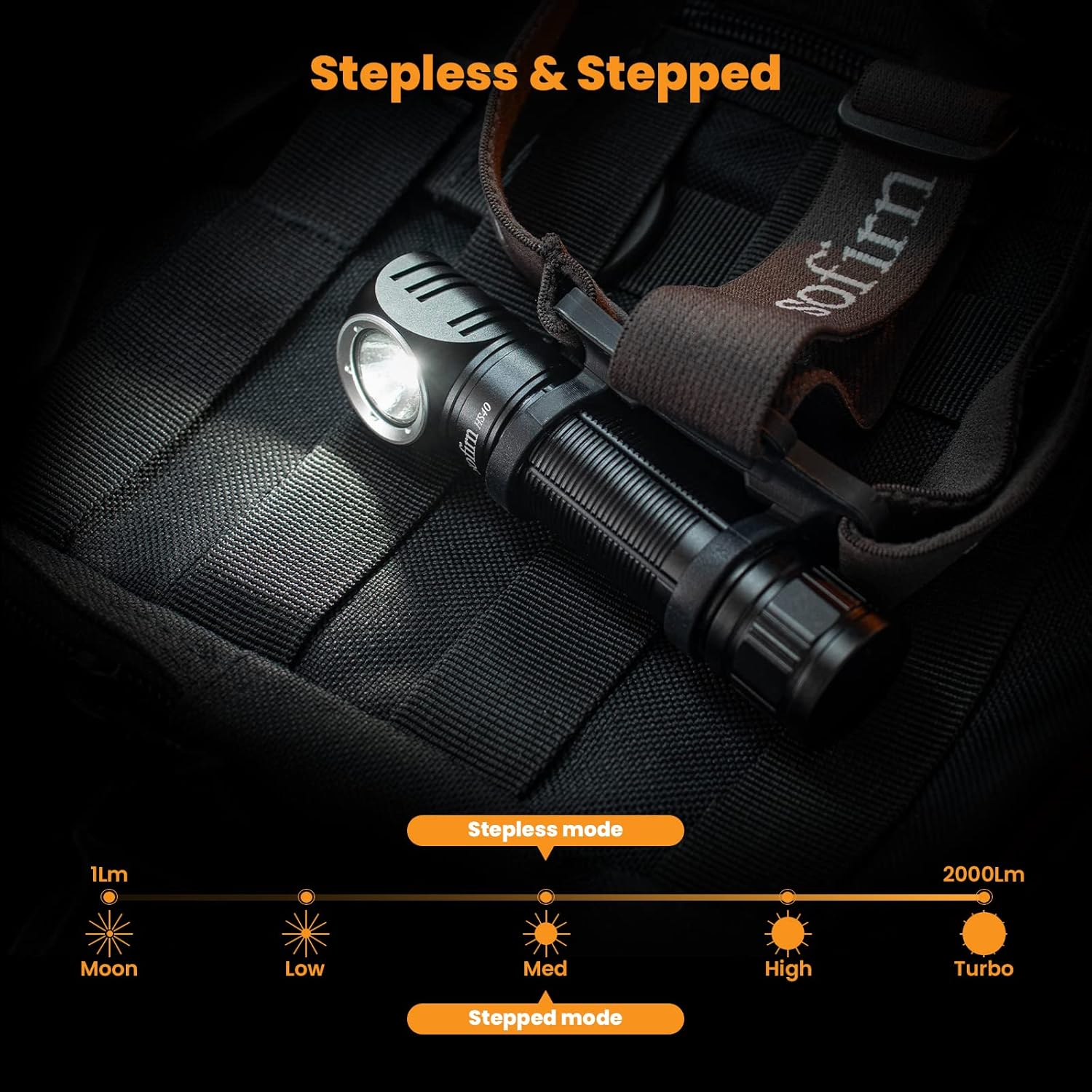
Image: Diagram showing the range of brightness from 1 lumen (Moon) to 2000 lumens (Turbo) in both stepless and stepped modes.
Penyelenggaraan
- mengecas: Recharge the battery when the indicator light flashes red, indicating low battery. Use the provided USB-C cable and a compatible 5V/2A adapter.
- Pembersihan: Bersihkan kepalaamp dengan lembut, damp kain. Jangan gunakan pembersih atau pelarut yang melelas.
- Penyelenggaraan O-ring: Periodically lubricate the O-rings with silicone grease to maintain water resistance. Replace O-rings if they appear damaged or worn.
- Tahan Air: The HS40 is IPX8 rated, meaning it is protected against continuous immersion in water up to 2 meters. Ensure the USB-C port cover is securely closed before exposing to water.

Imej: Kepalaamp is designed to be waterproof, suitable for use in wet conditions.
Menyelesaikan masalah
- Lampu tidak menyala:
- Pastikan bateri dimasukkan dengan betul dengan hujung positif (+) menghala ke kepala.
- Check if the orange insulating disc has been removed from the battery.
- Confirm the tail cap is screwed on tightly.
- kepalaamp might be in Lockout Mode. Perform 4 clicks to unlock it.
- Battery may be depleted. Charge the headlamp sepenuhnya.
- Cahaya malap atau berkelip-kelip:
- Battery charge is low. Recharge the headlamp.
- Ensure battery contacts are clean. Clean with a cotton swab if necessary.
- Pengecasan tidak berfungsi:
- Sahkan bahawa kabel USB-C disambungkan dengan betul ke kedua-dua kepalaamp dan sumber kuasa.
- Cuba kabel USB-C atau penyesuai kuasa yang lain.
- Ensure the charging port is free of debris.
Spesifikasi
| Ciri | Spesifikasi |
|---|---|
| Jenama | Sofirn |
| Model | HS40 (A-001) |
| Sumber Cahaya | SST40 LED |
| Suhu Warna | 6500 Kelvin |
| Kecerahan Maks | 2000 Lumen |
| Jarak Pancaran Maks | 175 Meter |
| Sumber Kuasa | Battery Powered (1x 18650 Lithium Ion) |
| Kapasiti Bateri | 3000mAh (included) |
| Port Pengecasan | USB Type-C (5V/2A input) |
| Tahan Air | IPX8 (up to 2 meters underwater, not for diving) |
| bahan | aluminium |
| Berat Barang | 65 Grams (headlamp only) / 2.29 ounces |
| Dimensi Produk | 4.72"D x 0.98"W x 0.98"H |
| Masa Jalan (Tinggi) | 2 jam |
| Masa Jalan (Sederhana) | 8 jam |
| Masa Jalanan (Cahaya Bulan) | 400 jam |

Image: Detailed table of modes including Moonlight, Low, Medium, High, Turbo, Strobe, SOS, and Beacon with corresponding lumens, runtimes, and beam distances.
Waranti & Sokongan
Sofirn provides responsive and helpful customer service. For any issues, concerns, or warranty claims, please feel free to contact Sofirn customer service for assistance, refund, or replacement.
Please refer to the contact information provided with your product packaging or visit the official Sofirn webtapak untuk butiran sokongan.
Ask a question about this manual
Ask about setup, troubleshooting, compatibility, parts, safety, or missing instructions. Manuals+ will review the question and use this page’s manual context to help answer it.