
1. Produk Lebihview
The Yamaha MG12X CV is a 12-input unpowered mixing console designed for professional audio applications. It features a rugged steel chassis, D-PRE discrete Class-A microphone preamplifiers, and built-in SPX digital effects with 24 programs. This mixer provides versatile channel options and pristine audio quality for various sound reinforcement and recording needs.
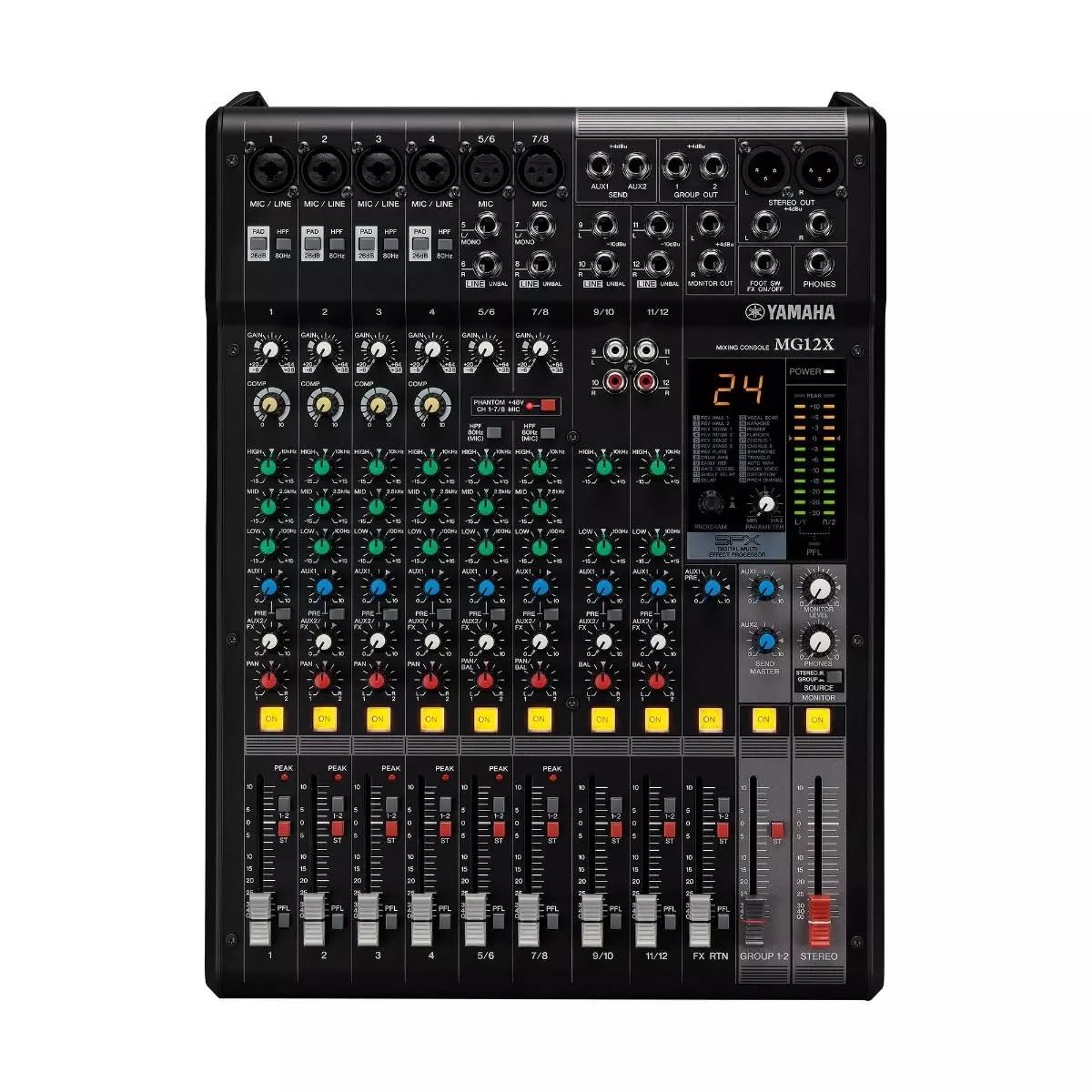
Rajah 1: Atas-bawah view of the Yamaha MG12X CV 12-Input Mixer, showing all controls and input/output jacks.
Ciri-ciri Utama:
- 12-Input, 2-Bus Plus Stereo Mixer with Effects
- Rugged, powder-coated steel chassis for superior durability
- Mikrofon Kelas-A Diskret praamps
- Kesan digital SPX terbina dalam dengan 24 program
- Kuasa hantu +48V boleh tukar
2. Panduan Persediaan
Follow these steps to set up your Yamaha MG12X CV mixer:
- Membongkar: Carefully remove the mixer from its packaging. Retain all packaging materials for future transport or storage.
- penempatan: Place the mixer on a stable, flat surface. Ensure adequate ventilation around the unit. The MG12X CV can also be rack-mounted using the optional RK-MG12 Rack Mount Kit.
- Sambungan Kuasa: Connect the supplied AC power cord to the mixer's AC IN jack on the rear panel and then to a suitable power outlet. Do not power on the unit yet.
- Sambungan Input: Connect your microphones, instruments, and other audio sources to the appropriate input jacks (XLR, 1/4" Phone, RCA) on the mixer.
- Sambungan Keluaran: Sambungkan pembesar suara berkuasa anda, amplifiers, or recording devices to the mixer's XLR or Phone output jacks.
- Fon kepala: Sambungkan fon kepala ke bicu PHONES untuk pemantauan.
- Kuasa Awal Hidup: Ensure all volume controls (GAIN, LEVEL, MASTER) are set to their minimum positions before powering on the mixer. Power on the mixer, then power on any connected amppengangkat atau pembesar suara berkuasa.

Figure 2: Rear panel of the Yamaha MG12X CV Mixer, highlighting the power input and output connections.
3. Arahan Operasi
This section provides basic operating guidelines for your MG12X CV mixer.
3.1. Gain Staging
- Laraskan DAPATKAN knob for each input channel to achieve an optimal input level. The PEAK LED should flash only occasionally.
- Untuk mikrofon kondenser, aktifkan +48V PHANTOM power switch if required.
3.2. Equalization (EQ)
- Gunakan TINGGI, PERTENGAHAN, dan RENDAH EQ knobs on each channel to shape the tone of your audio source.
3.3. Effects (SPX)
- The MG12X CV features 24 built-in SPX digital effects. Use the PROGRAM knob to select an effect.
- Laraskan FX HANTAR knob on each channel to send a desired amount of signal to the effects processor.
- The overall effect level is controlled by the KEMBALI FX level fader.
- A footswitch can be connected to the KAKI SW input for hands-free effect muting.
3.4. Mampatan
- Four channels are equipped with a single-knob compressor. Turn the COMP knob clockwise to increase the compression amount.
3.5. Output Levels
- Adjust individual channel levels using the channel faders.
- Control the overall output level with the MASTER stereo fader.
- Monitor output levels using the LED meters.
4. Ciri dan Kawalan
The Yamaha MG12X CV mixer offers a comprehensive set of features and controls for precise audio mixing.
4.1. Input Channels
Each input channel (1-12) includes:
- XLR and 1/4" TRS inputs for microphones and line-level devices.
- GAIN control for input sensitivity adjustment.
- HIGH-PASS FILTER (HPF) switch to cut unwanted low frequencies.
- 3-band EQ (HIGH, MID, LOW) for tonal shaping.
- AUX send for external effects or monitoring.
- FX send for internal digital effects.
- PAN control for stereo positioning.
- Channel ON switch.
- PEAK LED indicator.
- Channel fader for level control.
Channels 1-4 also feature a COMP (compressor) knob.
4.2. Bahagian Induk
The master section includes:
- MASTER stereo fader.
- PHONES level control.
- STEREO OUT (XLR/TRS) and MONITOR OUT (TRS) jacks.
- LED level meters.

Rajah 3: Terperinci view of the mixer's controls, including gain, EQ, and effects knobs.
5. Sambungan
The MG12X CV offers a variety of input and output connectors to integrate with your audio system.
5.1. Input Connectors
- MIC/LINE (XLR/TRS Combo Jacks): Channels 1-4 for microphones and line-level signals.
- LINE (TRS Jacks): Channels 5/6, 7/8, 9/10, 11/12 for stereo line-level signals.
- RCA Pin Jacks: Channels 9/10, 11/12 for stereo line-level signals.
5.2. Penyambung Output
- KELUAR STEREO (XLR/TRS): Main stereo output for connecting to power amppengangkat atau peranti rakaman.
- MONITOR OUT (TRS): Output for connecting to monitor speakers.
- PHONES (Stereo Phone Jack): Untuk menyambungkan fon kepala.
- AUX SEND (TRS): Output for external effects or monitor mixes.
- FX SEND (TRS): Output for sending signal to external effects processors.

Rajah 4: Sisi view of the mixer, illustrating its compact and durable construction.
6. Penyelenggaraan
Penyelenggaraan yang betul memastikan jangka hayat dan prestasi optimum pengadun anda.
- Pembersihan: Gunakan kain lembut dan kering untuk membersihkan bahagian luar pengadun. Elakkan pembersih atau pelarut yang kasar.
- Perlindungan Debu: Pastikan pengadun tertutup apabila tidak digunakan untuk mengelakkan pengumpulan habuk, terutamanya pada fader dan tombol.
- Pengudaraan: Ensure ventilation openings are clear and unobstructed to prevent overheating.
- Pengurusan Kabel: Susun kabel dengan kemas untuk mengelakkan ketegangan pada penyambung dan pemutusan sambungan secara tidak sengaja.
7. Penyelesaian masalah
If you encounter issues with your MG12X CV, refer to the following common troubleshooting tips:
- Tiada Bunyi:
- Periksa semua sambungan kuasa dan pastikan pengadun dihidupkan.
- Verify that input sources are connected correctly and active.
- Ensure channel GAIN, LEVEL faders, and MASTER fader are not at minimum.
- Periksa pembesar suara/ampsambungan dan kuasa penghawa dingin.
- Bunyi Herot:
- Reduce input GAIN if the PEAK LED is constantly lit.
- Check for proper impedance matching between sources and inputs.
- Ensure connected devices are not overdriving the mixer's inputs or outputs.
- No Effects:
- Verify that an effect program is selected.
- Check the FX SEND knob on the channel and the FX RETURN fader are turned up.
- Ensure no footswitch is muting the effects.
8. Spesifikasi
| Model | MG12X CV |
| Jenama | Yamaha |
| Saluran Input | 12 |
| Pra Mikrofonamps | Discrete Class-A D-PRE |
| Kesan terbina dalam | SPX Digital Effects (24 Programs) |
| Mampatan | 4 channels with 1-knob compressor |
| Kuasa Hantu | +48V (boleh tukar) |
| Jenis Penyambung Output | XLR, TRS |
| Sumber Kuasa | Elektrik Bertali |
| Berat Barang | 12.8 paun |
| UPC | 889025142687 |
9. Waranti dan Sokongan
The Yamaha MG12X CV comes with a Waranti pengilang 1 tahun. Yamaha Corporation of America is committed to the quality and craftsmanship of its products. The limited warranty applies only to products purchased from authorized Yamaha retailers within the fifty United States (including the District of Columbia) and used in this area.
For detailed warranty information and support, please refer to the official Yamaha website or contact an authorized Yamaha service center. Authorized retailers are equipped with sales and service support materials and training not readily available to non-authorized retailers.
10. Video Produk
Tonton produk rasmi di atasview video for the Yamaha MG Series Mixing Consoles:
Video 1: Siri Konsol Campuran Yamaha MG Berakhirview. Video ini memberikan gambaran umumview of the MG series, including key features and applications.