
1. Pengenalan
This manual provides detailed instructions for the operation and maintenance of your Jectse Bluetooth Speaker Alarm Clock. Please read this manual thoroughly before using the product to ensure proper function and longevity.
The Jectse Bluetooth Speaker Alarm Clock is a multi-functional device featuring a digital clock, dual alarm capabilities, an LED mirror display, FM radio, and Bluetooth connectivity for audio playback. It also supports music playback via a memory card.
2. Produk Lebihview
2.1. Ciri-ciri Utama
- Kesambungan Bluetooth 5.0: Wirelessly stream audio from compatible devices.
- Jam Penggera Dwi: Tetapkan dua penggera bebas untuk waktu bangun yang berbeza.
- LED Mirror Display: Clear digital time display that also functions as a mirror.
- Radio FM: Digitally tuned FM radio (87.5MHz-108MHz) for news, music, and weather.
- Main Semula Kad Memori: Supports music playback from a memory card (up to 32GB, not included).
- Bateri Boleh Dicas Semula Terbina dalam: 1600mAh lithium battery for portable use.
- Reka bentuk padat: Product dimensions are approximately 116 x 51 x 33mm (4.6 x 2 x 1.3 inches).
2.2. Kandungan Pakej
- 1 x Jectse Alarm Clock Speaker
- 1 x Kabel Pengecas USB Mikro
- 1 x Manual Pengguna (dokumen ini)
2.3. Rajah Produk
Rujuk imej di bawah untuk lebih lanjutview komponen dan kawalan peranti.
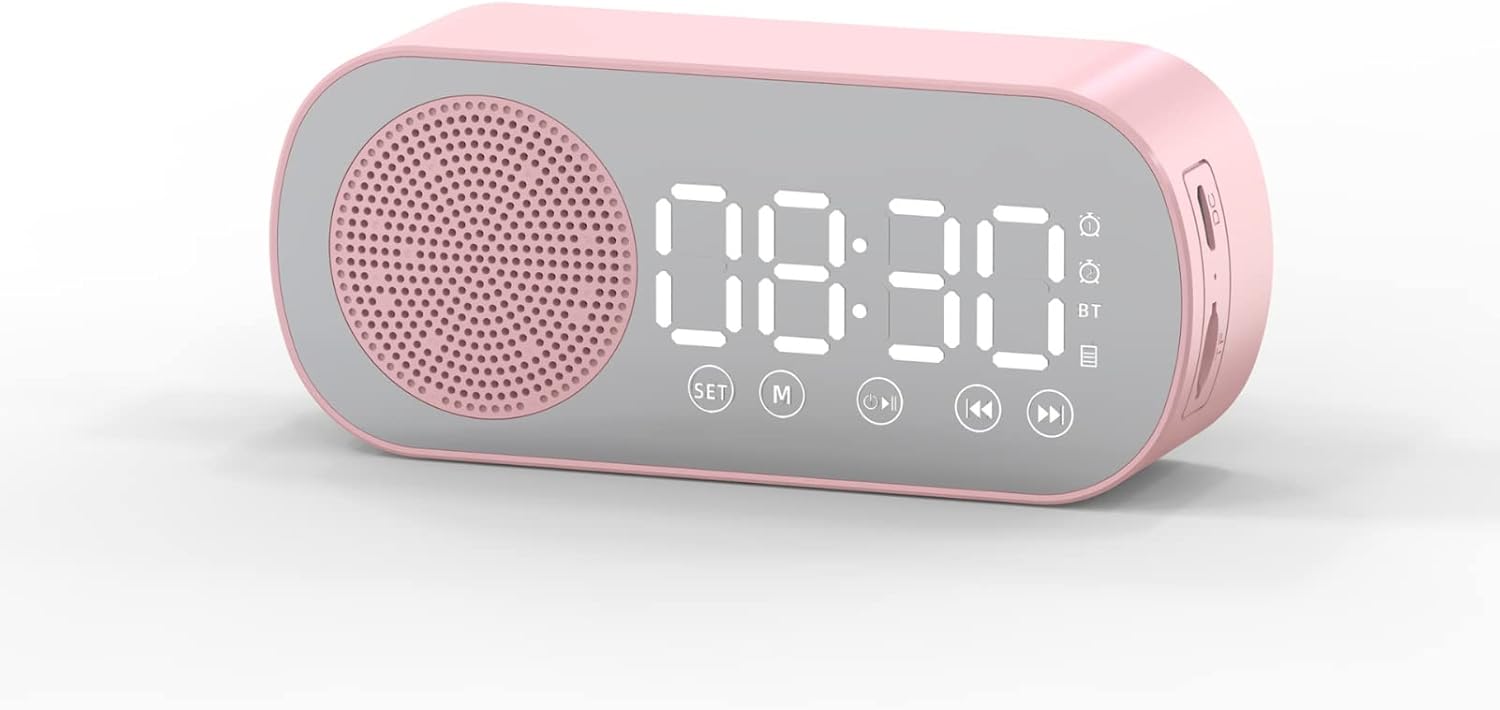
Rajah 1: Depan view of the Jectse Bluetooth Speaker Alarm Clock, showing the speaker grille, LED display, and control buttons (SET, M, Play/Pause, Previous, Next).

Rajah 2: sebelah view of the alarm clock with dimensions: 116mm (4.6in) length, 51mm (2in) height, and 33mm (1.3in) depth.
3. Persediaan
3.1. Pengecasan Awal
Before first use, fully charge the device. Connect the provided Micro USB charging cable to the charging port on the side of the alarm clock and the other end to a standard USB power adapter (not included).

Rajah 3: The alarm clock and its Micro USB charging cable.
The battery indicator on the LED display will show charging status. A full charge typically takes a few hours.
4. Arahan Operasi
4.1. Hidupkan/Mati Kuasa
Tekan dan tahan butang Power/Mode (M) butang untuk menghidupkan atau mematikan peranti.
4.2. Menetapkan Masa
- Dalam mod jam, tekan dan tahan SET butang sehingga digit jam mula berkelip.
- Gunakan Sebelumnya (◀◀) dan Next (▶▶) butang untuk melaraskan jam.
- Tekan ke SET button again to switch to minute adjustment. Use the Sebelumnya (◀◀) dan Next (▶▶) butang untuk melaraskan minit.
- Tekan ke SET button a third time to confirm and exit time setting mode.
4.3. Setting Alarms (Dual Alarm Function)
The device supports two independent alarms. Follow these steps for each alarm:

Rajah 4: The alarm clock illustrating the dual alarm feature with two distinct alarm settings.
- In clock mode, short press the SET button once to enter Alarm 1 setting mode. The alarm icon and hour digits will flash.
- Gunakan Sebelumnya (◀◀) dan Next (▶▶) butang untuk melaraskan jam.
- Tekan SET again to adjust minutes. Use Sebelumnya (◀◀) dan Next (▶▶) untuk menyesuaikan diri.
- Tekan SET a third time to select the alarm sound (e.g., buzzer, FM radio). Use Sebelumnya (◀◀) dan Next (▶▶) untuk kitaran melalui pilihan.
- Tekan SET a fourth time to confirm Alarm 1 settings.
- To set Alarm 2, repeat steps 1-5, but short press the SET button twice to enter Alarm 2 setting mode.
- To enable/disable an alarm, short press the SET button until the desired alarm icon flashes, then press the Play/Pause (▶▌▌) butang untuk menghidupkan atau mematikannya.
Note: The alarm volume is independent of the main speaker volume and may be fixed or adjustable within the alarm settings. If the alarm sound is too loud, check if there's an option to adjust it during the alarm setup process.
4.4. Mod Bluetooth
- Tekan ke Power/Mode (M) button repeatedly until "BT" appears on the display, indicating Bluetooth mode.
- On your mobile device, enable Bluetooth and search for "Jectse Speaker" or a similar device name.
- Pilih peranti untuk dipasangkan. Bunyi pengesahan akan menunjukkan pasangan yang berjaya.
- Anda kini boleh memainkan audio daripada peranti anda melalui pembesar suara. Gunakan Play/Pause (▶▌▌), Sebelumnya (◀◀), dan Next (▶▶) butang untuk mengawal main balik.
4.5. Mod Radio FM

Rajah 5: The alarm clock functioning as an FM radio on a bedside table.
- Tekan ke Power/Mode (M) butang berulang kali sehingga "FM" muncul pada paparan.
- Tekan ke Play/Pause (▶▌▌) butang untuk mengimbas dan menyimpan stesen FM yang tersedia secara automatik.
- Gunakan Sebelumnya (◀◀) dan Next (▶▶) butang untuk bertukar antara stesen yang disimpan.
- For better reception, ensure the device is not obstructed and try repositioning it.
4.6. Memory Card Playback
Insert a memory card (Micro SD card, up to 32GB, not included) into the designated slot on the device. The device will automatically switch to memory card mode and begin playing audio files. Menggunakan Play/Pause (▶▌▌), Sebelumnya (◀◀), dan Next (▶▶) butang untuk mengawal main balik.
4.7. Pelarasan Kelantangan
In any audio playback mode (Bluetooth, FM, Memory Card), press and hold the Sebelumnya (◀◀) butang untuk mengurangkan kelantangan atau Next (▶▶) butang untuk meningkatkan kelantangan.
4.8. LED Mirror Display

Rajah 6: The alarm clock's LED display also functions as a mirror.
The front panel of the device features an LED display that shows the time and other information. When not actively displaying information, the surface can be used as a mirror.

Rajah 7: The LED display showing multiple functions and indicators, including time, battery level, and Bluetooth status.
5. Penyelenggaraan
- Pembersihan: Gunakan kain lembut dan kering untuk membersihkan peranti. Jangan gunakan pembersih atau pelarut yang melelas.
- Storan: Simpan peranti di tempat yang sejuk dan kering jauh dari cahaya matahari langsung dan suhu yang melampau.
- Penjagaan Bateri: Untuk memanjangkan hayat bateri, elakkan daripada menyahcas sepenuhnya bateri dengan kerap. Cas peranti dengan kerap, walaupun tidak digunakan untuk tempoh yang lama.
- Pendedahan Air: Peranti ini tidak kalis air. Elakkan pendedahan kepada air atau kelembapan yang tinggi.
6. Penyelesaian masalah
| Masalah | Kemungkinan Punca | Penyelesaian |
|---|---|---|
| Peranti tidak dihidupkan. | Bateri lemah. | Cas peranti menggunakan kabel USB yang disediakan. |
| Tidak boleh berpasangan melalui Bluetooth. | Bluetooth not enabled on device or phone; device not in pairing mode. | Ensure the alarm clock is in Bluetooth mode ("BT" displayed) and your phone's Bluetooth is on and searching. Move devices closer. |
| Penerimaan radio FM kurang baik. | Isyarat lemah; gangguan. | Reposition the device. Avoid placing near other electronic devices that may cause interference. |
| Alarm is too loud/quiet. | Alarm volume not adjusted during setup. | Re-enter alarm setting mode and check if there is an option to adjust alarm volume. Some models may have a fixed alarm volume. |
| Paparan sukar dibaca. | Lighting conditions; display brightness setting. | Adjust ambient lighting. Check if there is a display brightness setting (refer to specific model instructions if available, not detailed in general description). |
7. Spesifikasi
| Ciri | Perincian |
|---|---|
| Model | Jectsesb81t679n01182 |
| bahan | ABS (Acrylonitrile Butadiene Styrene) |
| Saiz Produk | Approx. 116 x 51 x 33mm (4.6 x 2 x 1.3 inches) |
| Jenis Bateri | Lithium Battery (Built-in) |
| Kapasiti Bateri | 1600mAh |
| Versi Bluetooth | 5.0 |
| Main Mod | Bluetooth, Memory Card (Max 32G, not included) |
| Mod Jam | Digital Clock, Dual Alarm Clock, FM Radio |
| Kekerapan Radio FM | 87.5MHz-108MHz |
| Teknologi Ketersambungan | Bluetooth, USB |
| Berat Barang | 5.3 auns |
8. Waranti dan Sokongan
For warranty information and customer support, please refer to the documentation provided at the time of purchase or contact your retailer. Keep your purchase receipt as proof of purchase.