
pengenalan
Thank you for choosing the Edifier Hecate GT4 Gaming Earbuds. These true wireless earbuds are designed to provide a low-latency audio experience for gaming across multiple platforms, including PS5, PS4, Nintendo Switch, mobile phones, and PCs. Featuring Bluetooth 5.2 connectivity, an IP55 rating for dust and splash resistance, and customizable RGB lighting, the GT4 earbuds offer both performance and convenience. Please read this manual thoroughly to ensure proper use and optimal performance of your new earbuds.
Kandungan Pakej
Sahkan bahawa semua item yang disenaraikan di bawah terdapat dalam pakej anda:
- Edifier Hecate GT4 Gaming Earbuds (Left and Right)
- Kes Pengecasan
- Kabel Pengecas USB-C
- Pelbagai Saiz Hujung Telinga (Kecil, Sederhana, Besar)
- Manual Pengguna

Image: The Edifier Hecate GT4 earbuds, charging case, USB-C cable, and extra eartips are shown, representing the package contents.
Persediaan
1. Mengecas Fon Telinga dan Sarung
Before first use, fully charge the earbuds and charging case. Place the earbuds into the charging case. Connect the USB-C charging cable to the charging port on the case and the other end to a USB power adapter (not included) or a computer's USB port. The indicator lights on the case will show charging status.
- Masa Pengecasan: Kira-kira 1.5 jam untuk cas penuh.
- Hayat Bateri: Up to 7 hours of playback on a single charge, with an additional 21 hours provided by the charging case.
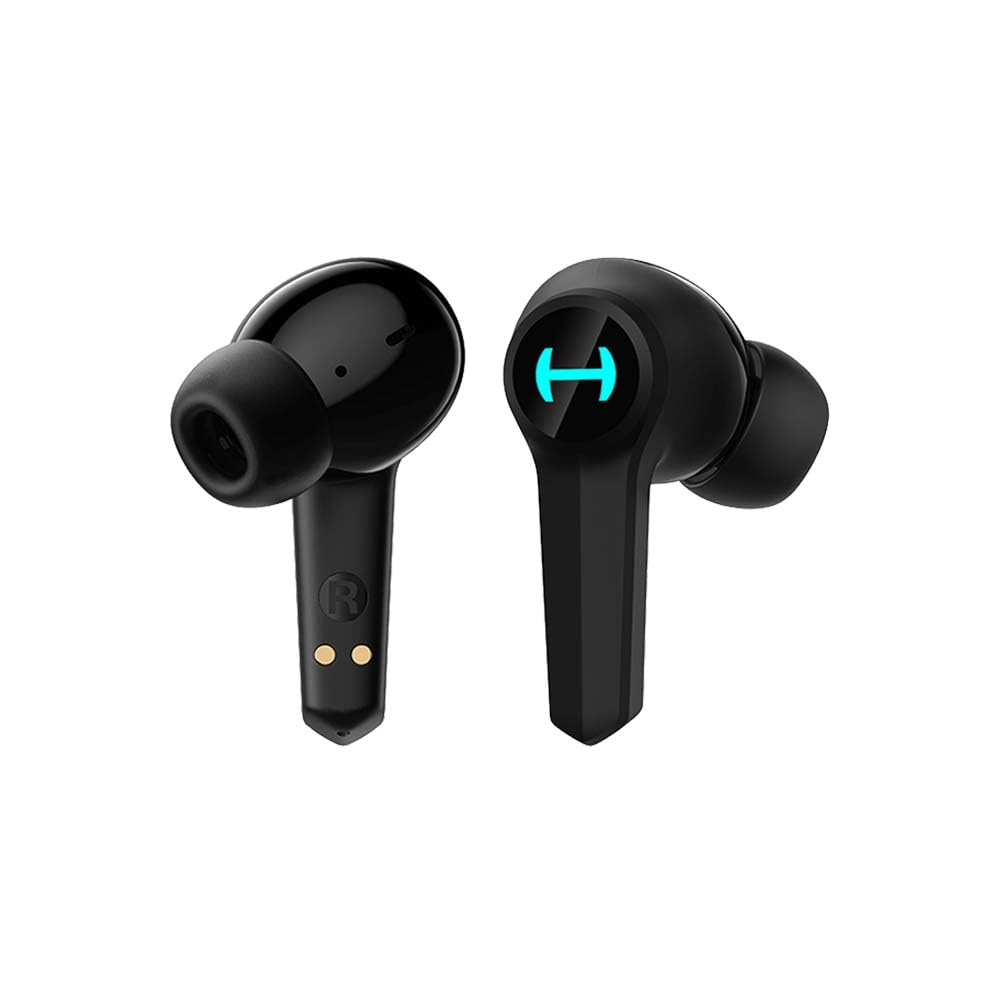
Image: The Edifier Hecate GT4 earbuds are shown inside their open charging case, with the case's RGB lights illuminated.
2. Berpasangan Bluetooth
- Pastikan fon telinga dicas.
- Buka bekas pengecas. Fon telinga akan memasuki mod berpasangan secara automatik, ditunjukkan oleh lampu berkelip.
- On your device (phone, PC, console), enable Bluetooth and search for new devices.
- Select "EDIFIER HECATE GT4" from the list of available devices to connect.
- Once connected, the earbud lights will stop flashing or show a steady light.
The earbuds support Bluetooth 5.2 for a stable and efficient connection.
Arahan Operasi
1. Hidupkan/Mati Kuasa
- Hidupkan kuasa: Buka bekas pengecas atau keluarkan fon telinga dari bekas. Ia akan dihidupkan secara automatik.
- Matikan: Letakkan fon telinga kembali ke dalam bekas pengecasan dan tutup penutupnya. Mereka akan dimatikan secara automatik.
2. Kawalan Sentuh
The Edifier Hecate GT4 earbuds feature touch-sensitive controls on each earbud. Refer to the diagram below for touch panel location.

Image: A finger is shown touching the outer surface of an earbud, indicating the smart touch control area.
| Tindakan | Earbud Kiri (L) | Earbud Kanan (R) |
|---|---|---|
| Main/Jeda | Ketik dua kali | Ketik dua kali |
| Trek Seterusnya | Ketik tiga kali | Ketik tiga kali |
| Jawab/Tamatkan Panggilan | Ketik dua kali | Ketik dua kali |
| Tolak Panggilan | Tekan lama (2s) | Tekan lama (2s) |
| Aktifkan Mod Permainan | Tekan lama (2s) | Tekan lama (2s) |
| Deactivate Game Mode | Tekan lama (2s) | Tekan lama (2s) |
Note: Volume control may need to be adjusted directly on your connected device.
3. Game Mode (45ms Low-Latency)
The Edifier Hecate GT4 features a dedicated Game Mode to reduce audio latency to as low as 45ms, providing a synchronized audio-visual experience crucial for gaming. To activate or deactivate Game Mode, long press either earbud for 2 seconds. You will hear an audio prompt indicating the mode change.

Image: An illustration depicting the low latency feature of the earbuds, highlighting the 45ms response time.
Video: Tayangan video produk rasmicasing the features of the EDIFIER HECATE GT4 Gaming Earbuds, including low latency and ergonomic design.
4. Pencahayaan RGB
The charging case and earbuds feature RGB lighting. The lighting indicates various statuses such as charging, pairing, and game mode activation. The specific patterns and colors are pre-set and provide visual feedback on the earbuds' operational status.

Image: The Edifier Hecate GT4 charging case is shown with its red RGB lighting illuminated, indicating its gaming aesthetic.
Penyelenggaraan
- Pembersihan: Use a soft, dry cloth to clean the earbuds and charging case. Do not use liquid cleaners or abrasive materials.
- Tahan Air: The earbuds have an IP55 rating, meaning they are protected against dust and low-pressure water jets. Avoid submerging them in water or exposing them to heavy rain. Dry them thoroughly if they get wet.
- Storan: Apabila tidak digunakan, simpan fon telinga dalam bekas pengecasnya untuk melindunginya dan memastikan ia dicas. Simpan di tempat yang sejuk dan kering jauh dari suhu yang melampau.

Image: An Edifier Hecate GT4 earbud is shown with water splashing around it, illustrating its water-resistant feature.
Menyelesaikan masalah
| Masalah | Kemungkinan Punca | Penyelesaian |
|---|---|---|
| Fon telinga tidak dihidupkan. | Bateri lemah. | Cas fon telinga dan bekas pengecas sepenuhnya. |
| Tidak boleh berpasangan dengan peranti. | Bluetooth not enabled, earbuds not in pairing mode, or device too far. | Ensure Bluetooth is enabled on your device. Place earbuds in case, close, then open to re-enter pairing mode. Keep devices within 10 meters. |
| Tiada bunyi atau bunyi terputus-putus. | Earbuds not properly connected, low battery, or interference. | Check Bluetooth connection. Recharge earbuds. Move away from sources of interference (e.g., Wi-Fi routers). |
| Satu fon telinga tiada bunyi. | Individual earbud connection issue. | Place both earbuds back into the charging case, close the lid, then open it again to reset the connection. Re-pair if necessary. |
| Low latency mode not working. | Game Mode not activated. | Long press either earbud for 2 seconds to activate Game Mode. Listen for the audio prompt. |
| Cannot connect to PS4/PS5/Switch. | Console limitations or specific pairing requirements. | Some consoles may require a separate Bluetooth adapter for full compatibility or specific pairing steps. Refer to your console's manual for Bluetooth audio device connection instructions. |
Spesifikasi
| Ciri | Perincian |
|---|---|
| Nombor Model | GT4-BK |
| Jenama | edifier |
| Teknologi Ketersambungan | Wayarles (Bluetooth) |
| Versi Bluetooth | 5.2 |
| Penempatan Telinga | Di Telinga |
| Jenis Pemacu Audio | Dynamic Driver (10mm Composite Diaphragm Unit) |
| Julat Kekerapan | 20Hz-20kHz |
| Latensi Rendah | 45ms (Mod Permainan) |
| Hayat Bateri (Earbud) | Sehingga 7 jam |
| Jumlah Hayat Bateri (dengan Sarung) | Up to 28 hours (7 + 21 hours) |
| Masa Pengecasan Bateri | lebih kurang 1.5 jam |
| Kaedah Kawalan | Sentuh |
| Tahap Ketahanan Air | IP55 (Tahan Habuk dan Percikan) |
| Peranti Serasi | PS5, PS4, Nintendo Switch, Phone (Android, iOS), PC |
| bahan | plastik |
| Berat Barang | 0.12 Kilogram |
Waranti dan Sokongan
Edifier products are designed and manufactured to the highest quality standards. For information regarding warranty coverage, please refer to the warranty card included in your product packaging or visit the official Edifier website. If you encounter any issues or have questions about your Edifier Hecate GT4 Gaming Earbuds, please contact Edifier customer support through their official channels for assistance.
Edifier Rasmi Webtapak: www.edifier.com