
1. Maklumat Keselamatan Penting
Please read all instructions carefully before using the Beldray Electric Lint Remover and retain them for future reference. Failure to follow these instructions may result in electric shock, fire, or serious injury.
- Jauhkan perkakas daripada kanak-kanak dan haiwan peliharaan.
- Jangan rendamkan perkakas dalam air atau sebarang cecair lain.
- Jangan gunakan perkakas dalam keadaan basah atau damp kain.
- Ensure the appliance is switched off and unplugged before cleaning or performing any maintenance.
- Do not operate the appliance if it has been dropped, damaged, or immersed in water.
- Hanya gunakan kabel pengecasan USB yang disediakan.
- Avoid pressing the shaver head too hard against fabrics to prevent damage.
2. Penerangan Produk
The Beldray Electric Lint Remover is a cordless, rechargeable device designed to effectively remove lint, fuzz, and pills from various fabrics, revitalizing your clothing and textiles. Its ergonomic design ensures comfortable handling and efficient operation.
2.1 Kandungan Pakej
- 1 x Beldray Electric Lint Remover
- 1 x Kabel Pengecas USB
- 1 x Berus Pembersih
2.2 Komponen Produk

Depan view of the Beldray Electric Lint Remover, showcasing its ergonomic design and power button.

The Beldray Electric Lint Remover, USB charging cable, and cleaning brush laid out, showing all included components.
3. Persediaan
3.1 Mengecas Peranti
- Before first use, fully charge the lint remover.
- Connect the small end of the USB charging cable to the charging port on the lint remover.
- Connect the large end of the USB charging cable to a suitable USB power adapter (not included) or a computer USB port.
- Lampu penunjuk pengecasan akan menyala semasa pengecasan.
- A full charge provides approximately 45 minutes of operating time.

The lint remover connected to a USB charging cable, indicating its cordless and rechargeable feature.
4. Arahan Operasi
4.1 Using the Lint Remover
- Ensure the lint remover is fully charged.
- Place the garment or fabric on a flat, firm surface. For delicate fabrics, test on an inconspicuous area first.
- Press the power button to turn on the device. The indicator light will illuminate.
- Gently glide the shaver head over the fabric in a circular motion, applying light pressure. Avoid pressing too hard to prevent damage to the fabric or blades.
- Teruskan sehingga semua serabut, bulu dan pil dikeluarkan.
- Tekan butang kuasa sekali lagi untuk mematikan peranti selepas digunakan.

A hand operating the lint remover on a grey knitted sweater, effectively removing fabric pills.
A hand using the lint remover on a pair of dark trousers hanging on a hanger, demonstrating its use for revitalizing clothes.
4.2 Suitable Fabric Types
The lint remover is suitable for most fabric types, including wool, cotton, fleece, acrylic, and more. Exercise caution with delicate materials like silk or lace, and always test on an inconspicuous area first.
5. Penyelenggaraan
Regular cleaning ensures optimal performance and extends the lifespan of your lint remover.
5.1 Cleaning the Lint Container
- Pastikan peranti dimatikan.
- Twist and remove the transparent lint container from the bottom of the device.
- Empty the collected lint into a waste bin.
- Reattach the lint container by twisting it back into place until secure.
5.2 Membersihkan Bilah
- Ensure the device is switched off and the lint container is removed.
- Carefully remove the metal shaver head cover by twisting it counter-clockwise.
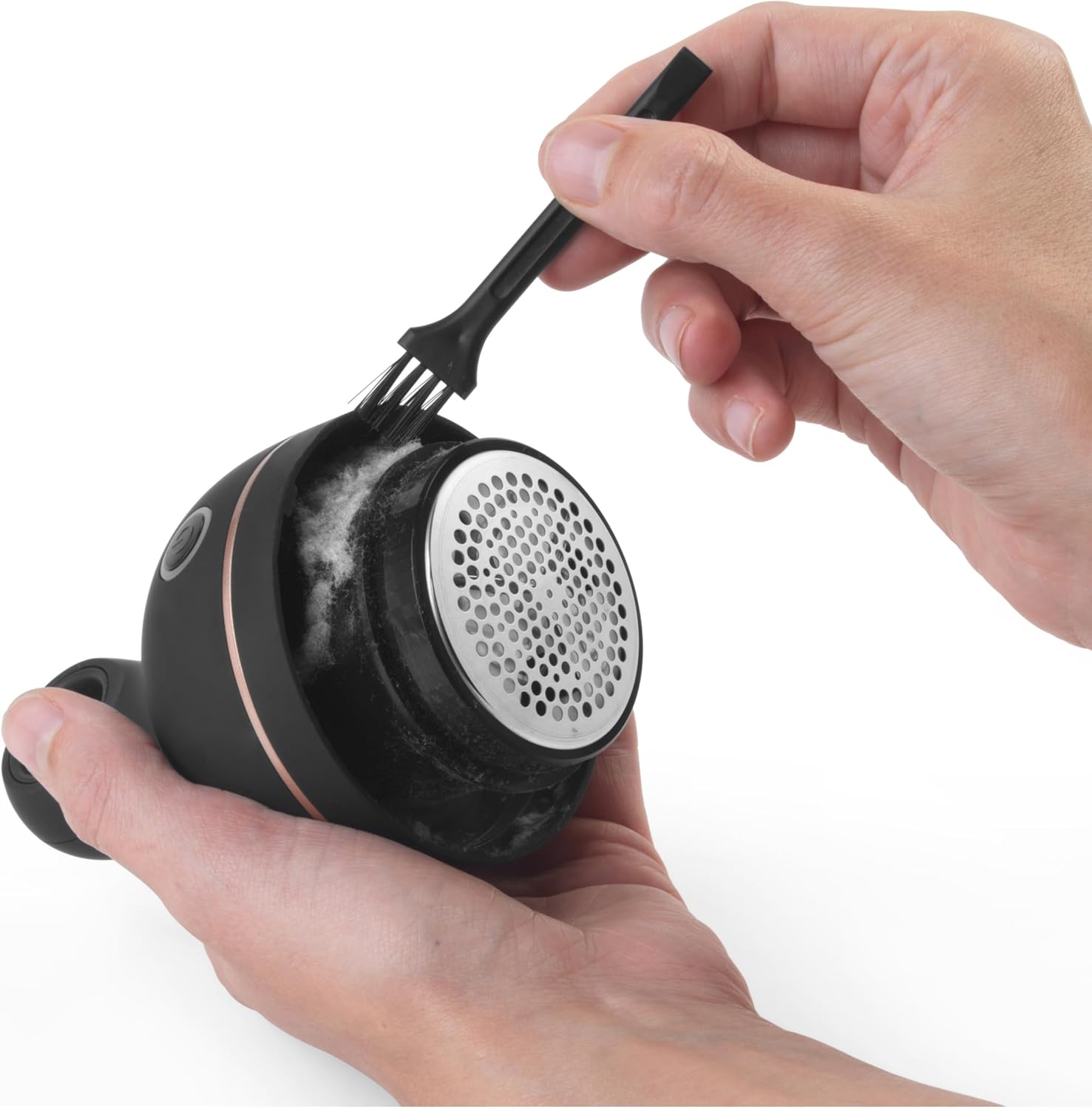
- Use the provided cleaning brush to gently remove any trapped lint or debris from the blades and the inner housing.
- Do not touch the blades directly with your fingers.
- Replace the metal shaver head cover by twisting it clockwise until it clicks into place.

A hand using the provided cleaning brush to clear lint and debris from the shaver head of the lint remover.
6. Penyelesaian masalah
If you encounter any issues with your Beldray Electric Lint Remover, please refer to the following common problems and solutions:
| Masalah | Kemungkinan Punca | Penyelesaian |
|---|---|---|
| Peranti tidak dihidupkan. | Bateri habis. | Cas peranti menggunakan kabel USB. |
| Poor lint removal performance. | Lint container is full or blades are clogged. | Empty the lint container and clean the blades with the provided brush. |
| Bunyi luar biasa semasa operasi. | Lint or debris caught in the blades. | Turn off the device, remove the shaver head cover, and carefully clean the blades. |
7. Spesifikasi
| Ciri | Perincian |
|---|---|
| Nombor Model | BEL01034EU7 |
| Dimensi Produk | 8 x 8 x 12.5 cm |
| Berat badan | 318 Gram |
| bahan | Plastik, Keluli Aloi |
| warna | Hitam |
| Mod Pengendalian | Automatik |
| Sumber Kuasa | USB Boleh dicas semula |
| Masa Operasi | Up to 45 minutes (fully charged) |
8. Waranti dan Sokongan
8.1 Maklumat Waranti
This product comes with a standard manufacturer's warranty. Please refer to the warranty card included in your product packaging or contact Beldray customer service for specific details regarding warranty coverage and terms.
8.2 Sokongan Pelanggan
For further assistance, technical support, or inquiries regarding your Beldray Electric Lint Remover, please visit the official Beldray webtapak atau hubungi bahagian perkhidmatan pelanggan mereka. Maklumat hubungan biasanya boleh didapati pada pembungkusan produk atau rasmi jenama webtapak.