
1. Pengenalan
Thank you for choosing the BONTEC Dual Monitor Desk Mount. This manual provides detailed instructions for the safe and efficient installation, operation, and maintenance of your new monitor mount. Please read this manual thoroughly before beginning installation and retain it for future reference.
This desk mount is designed to support two monitors ranging from 13 to 27 inches, with VESA mounting patterns of 75x75mm or 100x100mm. Each arm can hold up to 22 lbs (10 kg). It offers full motion adjustability, including tilt, swivel, and rotation, to optimize your viewpengalaman dan ergonomik ruang kerja.
2. Maklumat Keselamatan
- Baca semua arahan: Ensure you understand all instructions and warnings before installation.
- Kapasiti Berat: Do not exceed the maximum weight capacity of 22 lbs (10 kg) per arm. Overloading can result in serious injury or product damage.
- Saiz Monitor: This mount is suitable for monitors between 13 and 27 inches.
- Keserasian VESA: Ensure your monitors have VESA 75x75mm or 100x100mm mounting holes.
- Desk Material: Do not install on desks made of particle board (PB), medium-density fiberboard (MDF), or glass, as these materials may not provide sufficient stability.
- Pemasangan Selamat: Verify that the mount is securely fastened to the desk before attaching monitors.
- Perhimpunan: Pasang produk mengikut arahan. Pemasangan yang tidak betul boleh menyebabkan kerosakan atau kecederaan diri yang serius.
- Kanak-kanak: Jauhkan bahagian kecil daripada kanak-kanak.
3. Kandungan Pakej
Verify that all components are present and undamaged before proceeding with installation. If any parts are missing or damaged, please contact BONTEC customer support.

Gambar 3.1: Lebihview of BONTEC Dual Monitor Desk Mount components.
- Central Pole (1)
- Monitor Arms (2)
- VESA Plates (2)
- C-Clamp Pangkalan (1)
- Grommet Base (1)
- Cable Management Clips (Set)
- Hardware Kit (Screws, Washers, Allen Keys)
4. Persediaan dan Pemasangan
The BONTEC Dual Monitor Desk Mount offers two installation methods: C-Clamp and Grommet Mounting. Choose the method best suited for your desk.
4.1. Pilih Kaedah Pemasangan

Rajah 4.1: C-Clamp and Grommet Mounting Options.
- C-Clamp Pemasangan: Ideal for desks with a thickness between 0.39 inches (10mm) and 3.35 inches (85mm).
- Pemasangan Grommet: Requires a desk hole with a diameter between 0.39 inches (10mm) and 3.35 inches (85mm), and a desk thickness between 0.39 inches (10mm) and 3.15 inches (80mm).
4.2. Pasang Tapak dan Tiang
- Attach the chosen base (C-Clamp or Grommet) to the central pole.
- Securely fasten the assembled base and pole to your desk. Ensure it is stable and does not wobble.
4.3. Attach VESA Plates to Monitors

Figure 4.2: Attaching VESA Plate to Monitor.
- Carefully place your monitor face down on a soft, clean surface.
- Sejajarkan plat VESA dengan lubang pemasangan di bahagian belakang monitor anda.
- Secure the VESA plate using the provided screws. Hand screws are included for easy, tool-free attachment.
4.4. Pasangkan Monitor ke Lengan
- Slide the monitor arms onto the central pole at your desired height. Tighten the collar to secure.
- Carefully slide the VESA plate with the attached monitor onto the arm's mounting head until it clicks into place.
- Repeat for the second monitor.
4.5. Pengurusan Kabel

Figure 4.3: Integrated Cable Management.
Utilize the integrated cable management clips along the arms and the central pole to route your monitor cables neatly. This helps maintain a clean and organized workspace.
5. Pengendalian dan Pelarasan
The BONTEC Dual Monitor Desk Mount offers extensive adjustability to achieve optimal viewsudut dan kedudukan ergonomik.

Figure 5.1: Full Motion Adjustability.
5.1. Pelarasan Ketinggian
To adjust the height of the monitors, loosen the collar on the central pole, slide the arms to the desired height, and then re-tighten the collar securely. The maximum height adjustment is approximately 17 inches (430mm).
5.2. Penyesuaian Tilt

Figure 5.2: Monitor Tilt Adjustment.
The monitor can be tilted +90 degrees (up) and -90 degrees (down) to reduce glare and optimize viewing comfort. Gently push or pull the top or bottom of your monitor to achieve the desired tilt angle.
5.3. Swivel Adjustment
The monitor arms can swivel 180 degrees at the pole connection and at the monitor mounting point, allowing you to position your screens for collaborative work or individual viewing. Simply rotate the monitor or arm to the desired angle.
5.4. Rotation Adjustment

Figure 5.3: Monitor Rotation for Landscape or Portrait Viewing.
Each monitor can be rotated 360 degrees, allowing for quick and easy switching between landscape and portrait orientations without removing the monitor.
6. Penyelenggaraan
- Pembersihan: Bersihkan dudukan dengan kain lembut,amp kain. Elakkan pembersih atau pelarut yang melelas.
- Pemeriksaan Berkala: Periksa semua skru dan sambungan secara berkala untuk memastikan ia kekal ketat dan selamat. Ketatkan semula jika perlu.
- Pelinciran: No lubrication is required for the moving parts.
7. Penyelesaian masalah
| Masalah | Kemungkinan Punca | Penyelesaian |
|---|---|---|
| Monitors are not stable or wobble. | Mount not securely fastened to desk; VESA screws loose; monitor weight exceeds capacity. | Pastikan C-clamp or grommet base is tightened. Check VESA screws on monitors. Verify monitor weight is within 22 lbs (10 kg) per arm. |
| Difficulty adjusting monitor position (too stiff). | Sendi terlalu ketat. | Loosen the adjustment screws on the arm joints slightly using the provided Allen keys. |
| Monitor sags or tilts downwards. | Tilt mechanism is loose. | Tighten the tilt adjustment screw located on the VESA plate connection point. |
| Cannot install mount on desk. | Desk thickness or material incompatible. | Check desk thickness against specifications (C-clamp: 0.39-3.35 inches; Grommet: 0.39-3.15 inches). Ensure desk is not made of PB, MDF, or glass. |
8. Spesifikasi
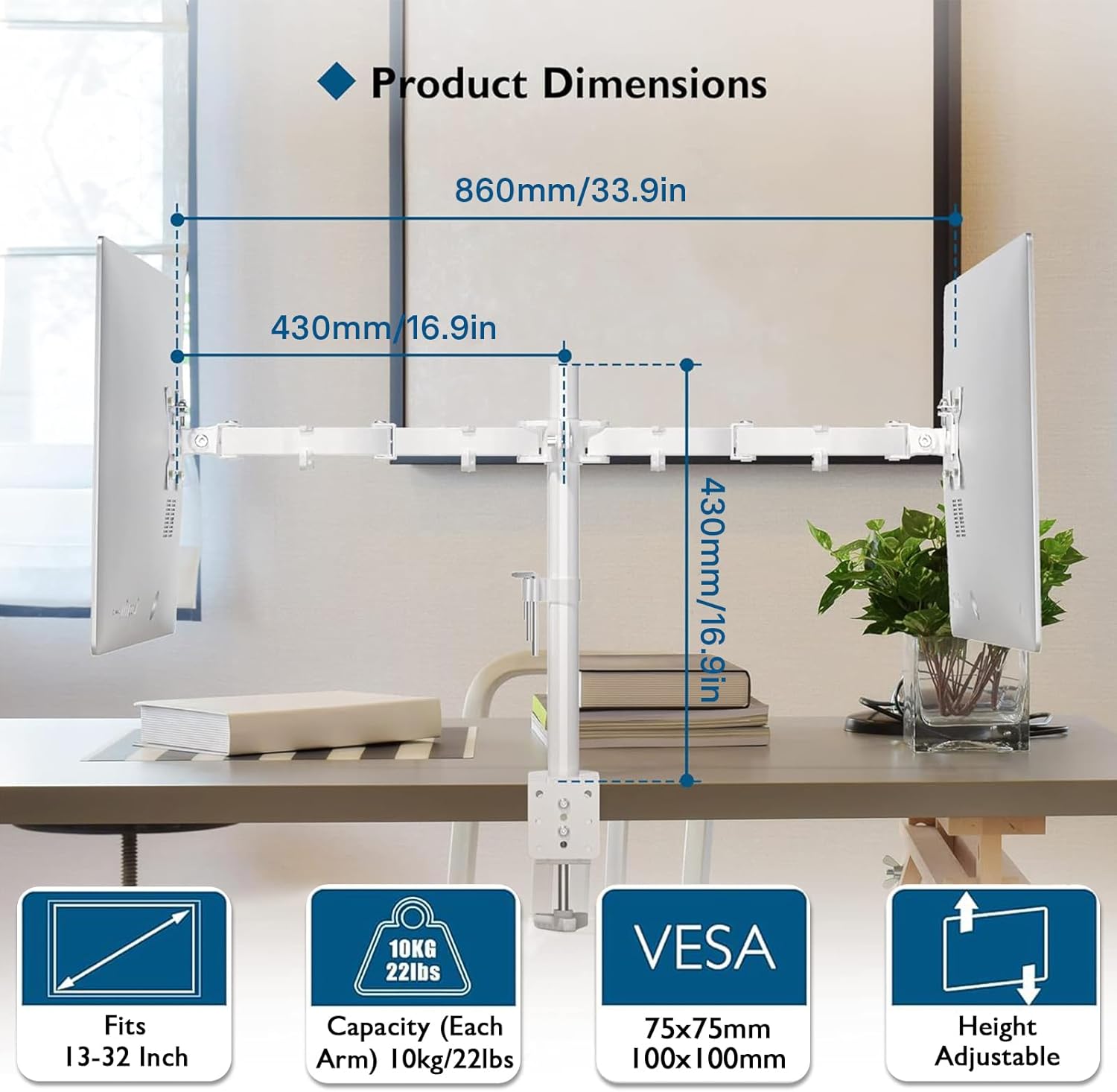
Figure 8.1: Product Dimensions and Key Specifications.
- model: MDM002-WH
- Bahan: Keluli Aloi
- warna: putih
- Keserasian Saiz Skrin: 13 - 27 inci
- Weight Capacity (Each Arm): 22 paun (10 kg)
- Keserasian VESA: 75x75mm, 100x100mm
- Julat Miring: +90° hingga -90°
- Julat Pusing: 180°
- Putaran: 360°
- Maximum Arm Extension: 17 inci (430mm)
- C-Clamp Ketebalan Meja: 0.39 - 3.35 inci (10 - 85mm)
- Grommet Desk Thickness: 0.39 - 3.15 inci (10 - 80mm)
- Diameter Lubang Grommet: 0.39 - 3.35 inci (10 - 85mm)
- Dimensi Produk: 33.86 x 16.93 x 0.02 inches (860 x 430 x 0.5 mm) (approximate, as per image)
- Berat Barang: 5.5 paun (2.5 kg)
9. Waranti dan Sokongan
BONTEC products are manufactured with high-quality materials and undergo strict quality control. This product is covered by a limited warranty against manufacturing defects. For detailed warranty information, please refer to the warranty card included with your purchase or visit the official BONTEC webtapak.
If you encounter any issues during installation or operation, or if you have any questions, please do not hesitate to contact BONTEC customer support. Our team is available to assist you.
Hubungan Sokongan Pelanggan:
Webtapak: www.bontec.com (Cthample URL, please refer to actual product documentation for correct contact information)
Email: support@bontec.com (Examp(e-mel)