
pengenalan
This manual provides detailed instructions for the GEEZER G100 Wireless Keyboard and Mouse Combo. Please read this manual thoroughly before use to ensure proper setup, operation, and maintenance of your new peripheral set. This combo offers a full-size keyboard with a comfortable palm rest and a silent optical mouse, connecting wirelessly via a single 2.4GHz USB nano receiver.

Figure 1: GEEZER G100 Wireless Keyboard and Mouse Combo (Milk Tea Color)
Kandungan Pakej
- 1 x GEEZER G100 Wireless Keyboard
- 1 x GEEZER Wireless Optical Mouse
- 1 x Penerima Nano USB (disimpan di dalam tetikus)
- 1 x Manual Arahan (dokumen ini)
- Note: Batteries are not included. The keyboard requires 1x AAA battery, and the mouse requires 1x AA battery.
Persediaan
1. Pasang Bateri
- Untuk Tetikus: Open the battery cover on the underside of the mouse. Insert one AA battery, ensuring correct polarity. Close the battery cover.
- Untuk Papan Kekunci: Open the battery compartment on the underside of the keyboard. Insert one AAA battery, ensuring correct polarity. Close the battery cover.
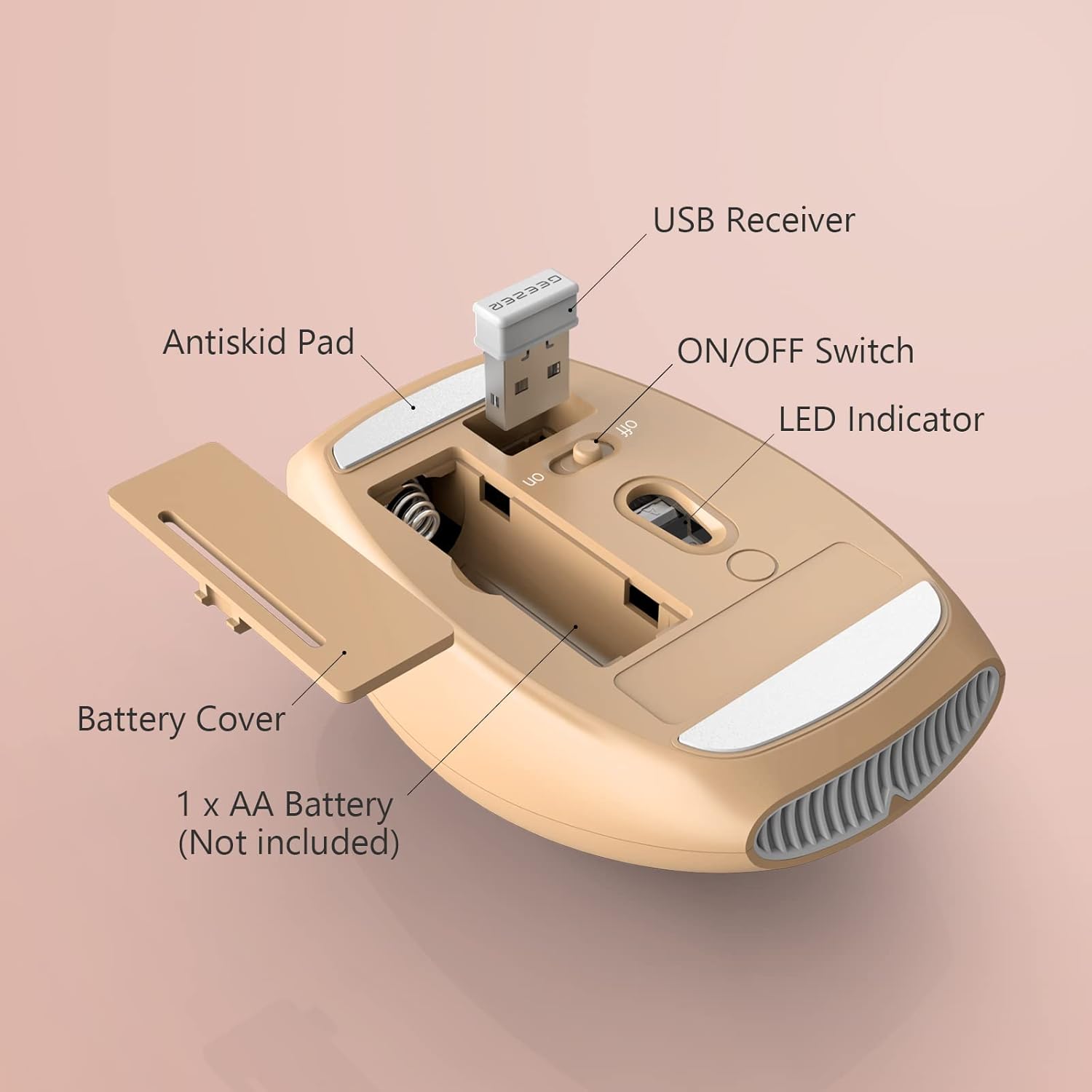
Figure 2: Mouse battery compartment and USB receiver location.

Figure 3: Keyboard battery compartment and foldable stands.
2. Connect the USB Nano Receiver
- Locate the USB nano receiver, which is typically stored in the battery compartment of the mouse for safekeeping.
- Plug the USB nano receiver into an available USB port on your computer (PC, Laptop, Desktop, Chromebook, Mac, Smart TV, etc.).
- The system should automatically detect and install the necessary drivers. No additional software installation is required.

Figure 4: USB Nano Receiver in use.
3. Hidupkan kuasa
- Hidupkan tetikus menggunakan suis ON/OFF yang terletak di bahagian bawahnya.
- Turn on the keyboard using the ON/OFF switch located on its underside.
Your keyboard and mouse should now be ready for use. The working range is up to 10m/33ft.
Arahan Operasi
Ciri Papan Kekunci
- Reka Letak Saiz Penuh: The keyboard features a 106-key full-size layout, including a numeric keypad for efficient data entry.
- Palm Rest: An integrated comfortable wrist rest is designed to reduce wrist fatigue during prolonged typing.
- Kunci Senyap: The keys are designed for less noise, providing a quieter typing experience.
- Penyangga boleh lipat: Adjustable foldable stands on the underside allow you to set the keyboard at a comfortable typing angle.
- Function (Fn) Keys: Utilize the Fn key in combination with F1-F12 keys for various multimedia and system shortcuts. Refer to the keycap legends for specific functions (e.g., volume control, media playback).

Figure 5: Keyboard Fn Shortcut Keys.
Ciri Tetikus
- Reka bentuk optik: Provides precise cursor control with a DPI of 1200.
- Klik Senyap: The mouse buttons are designed for completely mute clicks, ideal for quiet environments.
- Comfortable Hand-feeling: Smooth surfaces and ergonomic shape ensure comfortable use.
Penyelenggaraan
- Pembersihan: Use a soft, dry cloth to clean the surfaces of the keyboard and mouse. For keys, a small brush can be used to remove dust and debris. Avoid using harsh chemicals or abrasive materials.
- Penggantian Bateri: Replace batteries when performance degrades. Ensure correct battery type (1x AAA for keyboard, 1x AA for mouse) and polarity.
- Storan: When not in use for extended periods, turn off both the keyboard and mouse using their respective ON/OFF switches to conserve battery life. Store the USB nano receiver in the mouse's battery compartment to prevent loss.
Menyelesaikan masalah
- Tiada Maklum Balas daripada Papan Kekunci/Tetikus:
- Pastikan bateri dipasang dengan betul dan tidak habis. Gantikan jika perlu.
- Verify both the keyboard and mouse are switched ON.
- Check that the USB nano receiver is securely plugged into a working USB port on your computer. Try a different USB port if available.
- Ensure the devices are within the 10m/33ft operating range of the receiver.
- Mulakan semula komputer anda.
- Sambungan Terlambat atau Terputus-putus:
- Move the keyboard and mouse closer to the USB nano receiver.
- Remove any large metal objects or electronic devices that might interfere with the 2.4GHz wireless signal.
- Ensure no other 2.4GHz wireless devices are causing interference.
- Fungsi Tidur Automatik:
- If the keyboard or mouse enters sleep mode after a minute of inactivity, simply click the mouse or press any key on the keyboard to wake it up. This is a power-saving feature.
Spesifikasi
| Model Produk | G100 |
| Dimensi Papan Kekunci | 436 x 182 x 24 mm (17.17 x 7.17 x 0.94 inci) |
| Berat Papan Kekunci | 545g ± 5g (1.2 lbs) |
| Keyboard Key Quantity | 106 keys (Full-size) |
| Dimensi Tetikus | 103 x 69 x 35 mm (4.06 x 2.72 x 1.38 inci) |
| Berat Tikus | 75g ± 5g (0.17 lbs) |
| Mouse Button Quantity | 3 kunci |
| Teknologi Ketersambungan | 2.4G Wayarles |
| Sistem yang Serasi | Windows XP/X/Win 7/8/10/2000/ME Vista, iOS OS, etc. |
| Julat Operasi | Sehingga 10 meter (33 kaki) |

Figure 6: Keyboard and Mouse Dimensions.
Waranti dan Sokongan
For after-sales service and quality assurance, if you encounter any problems during use, please contact GEEZER via Amazon email. We commit to responding within 12 hours and providing satisfactory solutions.
Untuk bantuan lanjut, sila layari GEEZER Store on Amazon.


