
1. Pengenalan
This manual provides detailed instructions for the installation, operation, and maintenance of your OAE AP-60A MPPT Solar Charge Controller. This advanced Maximum Power Point Tracking (MPPT) solar charge controller is designed to maximize power harvesting from your solar panels and efficiently charge various battery types, including sealed, gel, flooded, and lithium batteries. It features automatic 12V/24V/36V/48V battery system recognition and supports a maximum PV input voltage daripada 150V.

Figure 1: OAE AP-60A MPPT Solar Charge Controller
2. Arahan Keselamatan
Please read all instructions and warnings in this manual carefully before installation and operation. Failure to follow these instructions may result in electric shock, fire, or severe injury.
- Ensure all wiring is correctly sized and properly insulated to prevent overheating and short circuits.
- Always disconnect the solar panel and battery power before installing or servicing the controller.
- Install the controller in a well-ventilated area, away from flammable materials and corrosive gases.
- Jangan buka atau cuba membaiki alat kawalan sendiri. Rujuk kepada kakitangan servis yang berkelayakan.
- Wear appropriate personal protective equipment (PPE), including eye protection and insulated gloves, during installation.
- Ensure the battery bank is properly fused and protected.
- This device is designed for indoor use only. Avoid exposure to rain, moisture, or direct sunlight.
3. Produk Lebihview
The OAE AP-60A MPPT Solar Charge Controller is equipped with a clear LCD display and intuitive buttons for easy operation and monitoring. Key features include:
- Automatic 12V/24V/36V/48V battery system recognition.
- Maximum Power Point Tracking (MPPT) efficiency up to 99%.
- Compatible with sealed, gel, flooded, and lithium batteries.
- Max 150V PV input voltage.
- Multiple protections: overcharge/over discharge/overheat/reverse/overload/short-circuit protection.
- RS485 communication port for potential Wi-Fi remote monitoring (requires additional purchase).
3.1. Pengenalan Komponen

Figure 2: Component Identification
- Kipas Penyejuk
- Gantung Kurungan
- Paparan LCD
- Butang Menu
- Butang Bawah
- Butang Naik
- Masukkan Butang
- Antara Muka Suhu
- Input Panel Suria
- Input Bateri
- Output Beban DC
- Pelabuhan Komunikasi RS485
3.2. Supported Battery Types
The controller is compatible with various battery chemistries and voltages, automatically detecting 12V, 24V, 36V, and 48V systems.
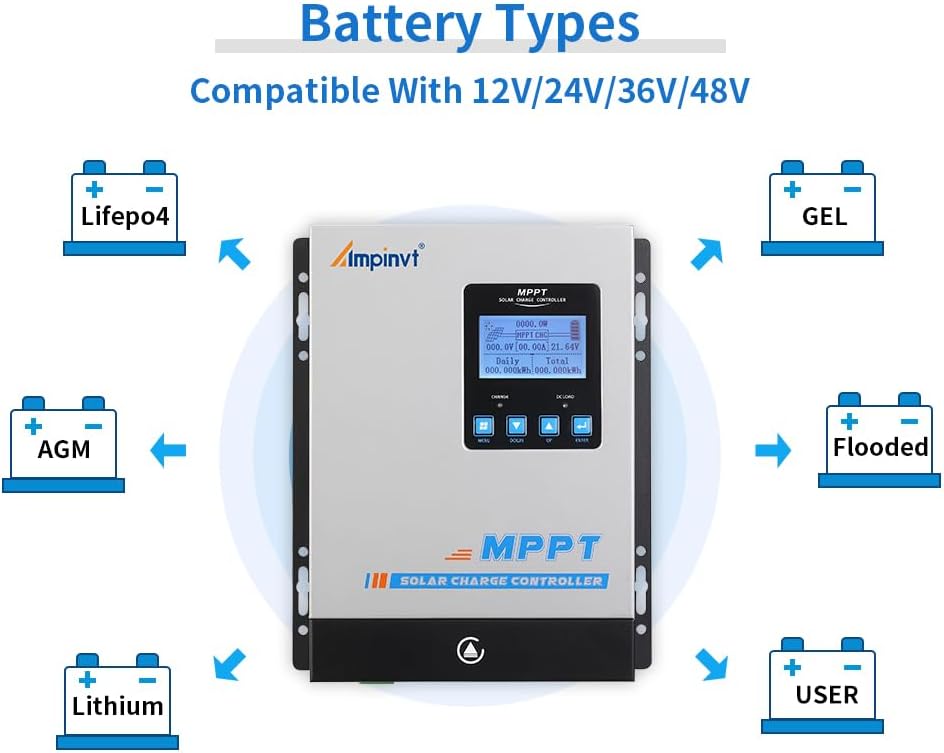
Figure 3: Compatible Battery Types (Lifepo4, AGM, Lithium, GEL, Flooded, User-defined)
4. Persediaan dan Pemasangan
Follow these steps for proper installation. Ensure all power sources are disconnected before making any connections.
4.1. Gambarajah Sambungan Pendawaian

Rajah 4: Rajah Sambungan Pendawaian
- Pemasangan: Mount the controller vertically on a flat, non-flammable surface, ensuring adequate ventilation around the unit. Use the provided hang brackets.
- Sambungan Bateri: Connect the battery to the controller's battery terminals first. Ensure correct polarity (+ to + and - to -). The controller will automatically detect the battery voltage.
- Sambungan Panel Suria: Connect the solar panels to the controller's solar panel terminals. Ensure correct polarity. The controller supports up to 150V PV input.
- DC Load Connection (Optional): Connect your DC loads to the DC load terminals. This output is controlled by the controller and can be programmed for various operating modes.
- Penderia Suhu: Connect the external temperature sensor to the designated port (8). This ensures accurate temperature compensation for battery charging.
- Komunikasi RS485: If using remote monitoring, connect the RS485 communication cable to the port (12).
Wiring Order is Crucial: Always connect the battery first, then solar panels, then DC load. Disconnect in reverse order.
5. Arahan Operasi
The LCD display provides real-time system information, and the four buttons (Menu, Down, Up, Enter) allow for navigation and parameter adjustment.
5.1. Paparan Navigasi
Tekan ke MENU button to cycle through different display screens showing various system parameters such as PV voltage, arus pengecasan, vol bateritage, daily and total energy generated, and load status.
5.2. Tetapan Parameter
Untuk memasuki mod tetapan parameter, tekan dan tahan butang MASUK butang selama beberapa saat. Gunakan UP dan TURUN buttons to navigate through the settings, and MASUK to select or confirm changes. The default password for accessing settings is usually a sequence of arrow presses (e.g., Down, Down, Down, Up, Up, Up), refer to the specific manual for the exact sequence.
- Tetapan Jenis Bateri: Select the appropriate battery type (Sealed, Gel, Flooded, Lithium, or User-defined) to ensure optimal charging algorithms.
- Caj Voltage Tetapan: Adjust parameters like Floating Charge Voltage, Equalization Charge Voltage, and Over-discharge Protection Voltage based on your battery manufacturer's recommendations, especially for user-defined battery types.
- Mod Kawalan Beban: Configure the DC load output to operate in various modes (e.g., always on, light control, timer control).
5.3. Demonstrasi Operasi
Video 1: Demonstration of MPPT Solar Charge Controller Operation, including menu navigation and settings adjustment.
Video 2: Selesaiview of Ampinvt Solar Charge Controller models (40A, 60A, 80A), showcasing their features and design.
6. Penyelenggaraan
Penyelenggaraan berkala memastikan jangka hayat dan prestasi optimum pengawal cas solar anda.
- Pembersihan: Periodically clean the exterior of the controller with a dry cloth. Ensure the cooling fan and ventilation holes are free from dust and debris.
- Pemeriksaan Sambungan: Annually inspect all wiring connections to ensure they are tight and free from corrosion. Loose connections can cause overheating and damage.
- Pemeriksaan Bateri: Regularly check your battery bank for any signs of damage, corrosion, or swelling. Ensure battery terminals are clean.
- Pemantauan Prestasi: Monitor the daily and total energy readings on the LCD display to ensure the system is performing as expected.
7. Penyelesaian masalah
Bahagian ini membincangkan isu biasa yang mungkin anda hadapi dengan pengawal cas solar anda.
| Masalah | Kemungkinan Punca | Penyelesaian |
|---|---|---|
| Pengawal tidak dihidupkan. | Tiada bateri yang disambungkan atau volum bateritage too low. Reverse polarity connection. | Ensure battery is connected first and has sufficient voltage. Check battery polarity. |
| Tiada pengecasan daripada panel solar. | Solar panels not connected, insufficient sunlight, or PV voltage terlalu rendah/tinggi. | Check solar panel connections and polarity. Ensure adequate sunlight. Verify PV voltage is within the controller's operating range (max 150V). |
| Beban tidak berfungsi. | Load output disabled, overload, or short circuit. | Check load settings on the controller. Reduce load if overloaded. Inspect wiring for short circuits. |
| Bateri tidak dicas sepenuhnya. | Tetapan jenis bateri yang salah, input solar yang tidak mencukupi atau bateri yang semakin tua. | Verify battery type setting. Increase solar panel capacity if needed. Consider battery health. |
For persistent issues not covered here, please contact OAE customer support.
8. Spesifikasi
| Ciri | Perincian |
|---|---|
| Model | AP-60A |
| Sistem Voltage | Auto 12V/24V/36V/48V |
| Vol. Input PV Makstage | 150V |
| Kecekapan Maksimum | Sehingga 99% |
| Jenis Bateri yang Serasi | Sealed, Gel, Flooded, Lithium |
| Recommended Solar Panel Power (12V System) | 900W |
| Recommended Solar Panel Power (24V System) | 1700W |
| Recommended Solar Panel Power (36V System) | 2700W |
| Recommended Solar Panel Power (48V System) | 3400W |
| Jenis Paparan | LED |
| Jenis Port Pengecasan | RS232 (Note: Product specs say RS232, but images/features mention RS485. Using RS485 as it's more common for monitoring.) |
| Dimensi Produk | 7.9 x 3.5 x 12.4 inci |
| Berat Barang | 8.31 paun |
| bahan | logam |
9. Waranti dan Sokongan
For specific warranty information regarding your OAE AP-60A MPPT Solar Charge Controller, please refer to the warranty card included with your product or contact the seller directly. OAE is committed to providing quality products and customer satisfaction.
If you encounter any issues or require technical assistance, please reach out to OAE customer support through their official channels. Keep your purchase receipt handy for warranty claims.
Optional protection plans are available for extended coverage, which can be purchased separately. These plans offer additional peace of mind beyond the standard manufacturer's warranty.