
1. Pengenalan
This manual provides essential instructions for the safe and efficient use of your mDesign Metal Curved Desk Lamp, Model 18875MDHS. Please read this manual thoroughly before assembly and operation, and retain it for future reference. This lamp is designed for indoor use only and is suitable for various settings such as home offices, bedrooms, and living rooms.
Maklumat Keselamatan Penting
- Always disconnect the power supply before cleaning or replacing the light bulb.
- Jangan gunakan l iniamp with a dimmer switch unless specifically rated for it.
- Pastikan lamp diletakkan di atas permukaan yang stabil dan rata untuk mengelakkannya daripada terbalik.
- Elakkan daripada mendedahkan lamp kepada kelembapan atau suhu yang melampau.
- Gunakan hanya jenis mentol dan wat yang ditentukantage untuk mengelakkan terlalu panas dan kerosakan.
- Keep the power cord away from heat sources, sharp edges, and wet areas.
2. Kandungan Pakej
Please check the package carefully to ensure all components are present and undamaged. If any parts are missing or damaged, do not proceed with assembly and contact customer support.
- Lamp Base with Power Cord and In-line Switch
- Lamp lengan
- Lamp teduh
- Mounting Hardware (if applicable for assembly)

Rajah 2.1: Berakhirview of the mDesign Metal Curved Desk Lamp. This image shows the assembled lamp, which consists of a base, a curved arm, and a conical shade.
3. Persediaan dan Pemasangan
Follow these steps to assemble your desk lamp:
- Buka Pembungkusan Komponen: Carefully remove all parts from the packaging. Place them on a clean, flat, and stable surface.
- Kumpul Lamp Base and Arm: Lampirkan lamp lengan ke lamp base. Ensure it is securely tightened to prevent wobbling. (Note: Some models may have pre-assembled bases and arms. If you encounter loose wiring, ensure connections are secure before proceeding, or contact support.)
- Lampirkan Lamp teduh: Selamatkan lamp teduh ke bahagian atas lamp lengan.
- Pasang Mentol Lampu:
- Pastikan lamp telah dicabut daripada soket kuasa.
- Screw a compatible light bulb into the lamp socket. Refer to the specifications section for bulb type and maximum wattage.
- Letakkan Lamp: Letakkan lamp on your desired surface, ensuring it is stable and the power cord can reach an outlet without being strained or obstructed.

Rajah 3.1: This image illustrates the bulb requirements for the lamp. It clearly states "USES TYPE G BULBS MAXIMUM 40W".
4. Arahan Operasi
Operating your mDesign Desk Lamp adalah mudah:
- Sambungan Kuasa: Palamkan lamp's power cord into a standard electrical outlet.
- Menghidupkan/Mematikan: Locate the in-line switch on the power cord. Press the switch to turn the lamp HIDUP atau MATI.
- Melaraskan Lamp Ketua: Lamp head is designed to swivel, allowing you to direct the light as needed. Gently adjust the shade to your desired angle.
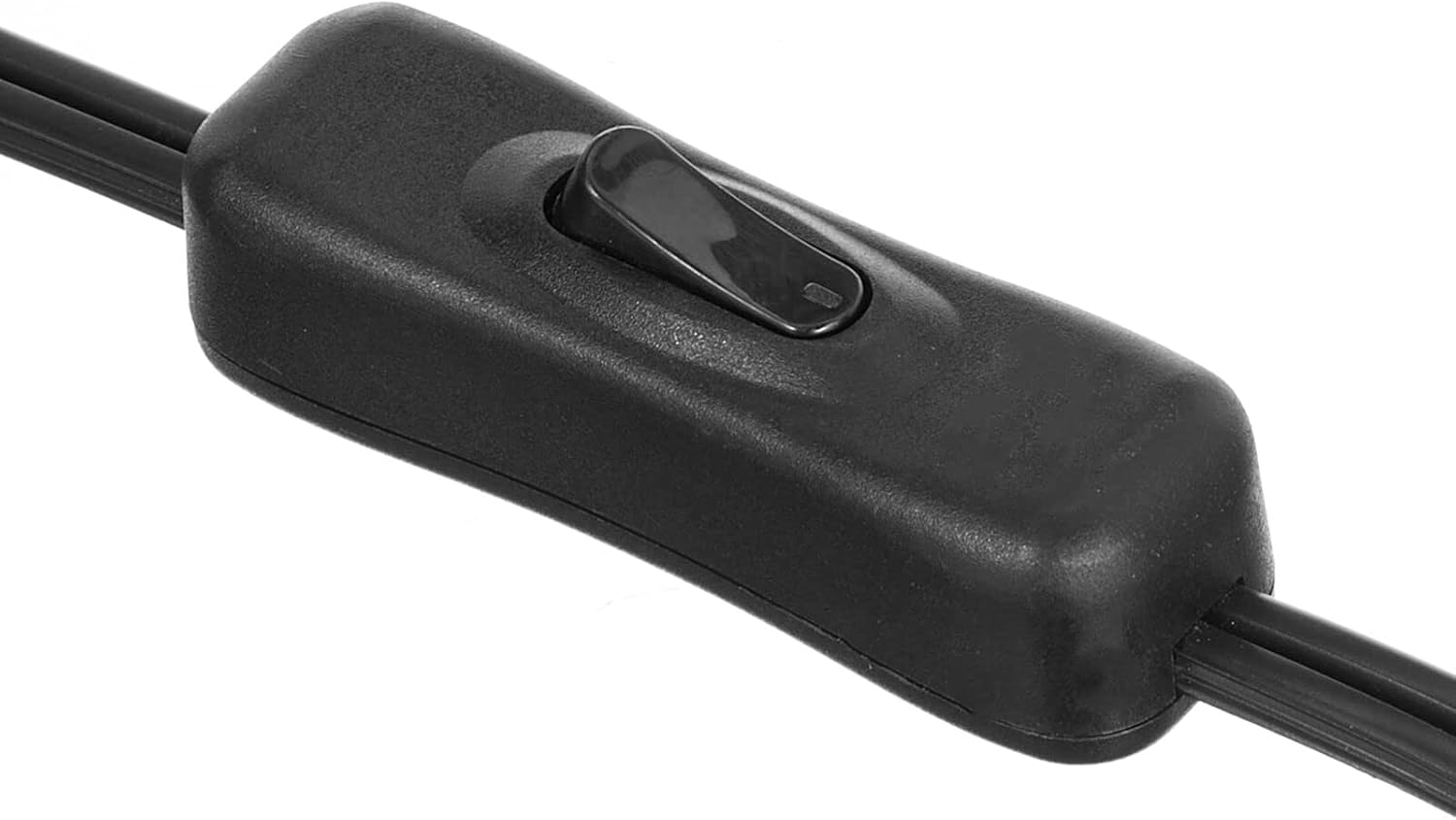
Rajah 4.1: This image displays a close-up of the black in-line switch located on the power cord, used to turn the lamp hidup dan mati.

Rajah 4.2: This image demonstrates the adjustable nature of the lamp head, showing it swiveling to different positions to direct light.
5. Penyelenggaraan
Pembersihan
- Sentiasa cabut plag lamp sebelum membersihkan.
- Lap lamp's surface with a soft, dry cloth.
- Do not use abrasive cleaners, solvents, or polishing agents as they may damage the finish.
Penggantian Mentol
- Pastikan lamp is unplugged and the bulb has cooled completely before attempting to replace it.
- Tanggalkan mentol lama dari soket dengan berhati-hati.
- Screw in a new bulb of the correct type (E26 base, Type G) and wattage (maximum 40W).
6. Penyelesaian masalah
Jika anda menghadapi masalah dengan l andaamp, rujuk panduan penyelesaian masalah berikut:
| Masalah | Kemungkinan Punca | Penyelesaian |
|---|---|---|
| Lamp tidak menyala. |
|
|
| Cahaya berkelip-kelip. |
|
|
| Lamp adalah tidak stabil. |
|
|
7. Spesifikasi
| Ciri | Perincian |
|---|---|
| Nombor Model | 18875MDHS |
| Jenama | mDesign |
| Dimensi (L x W x H) | 7 x 11 x 21 inci (17.8 x 27.9 x 53.3 cm) |
| Berat Barang | 2.2 paun (1 kg) |
| bahan | Keluli Aloi, Logam |
| Jenis Selesai | Digilap |
| warna | White/Soft Brass |
| Pangkalan Mentol | E26 |
| Max Wattage | 40 watt |
| Jenis Mentol Disyorkan | Jenis G |
| Sumber Kuasa | Elektrik Bertali |
| Kaedah Kawalan | Suis Dalam Talian |
| Ciri Khas | L boleh larasamp kepala |
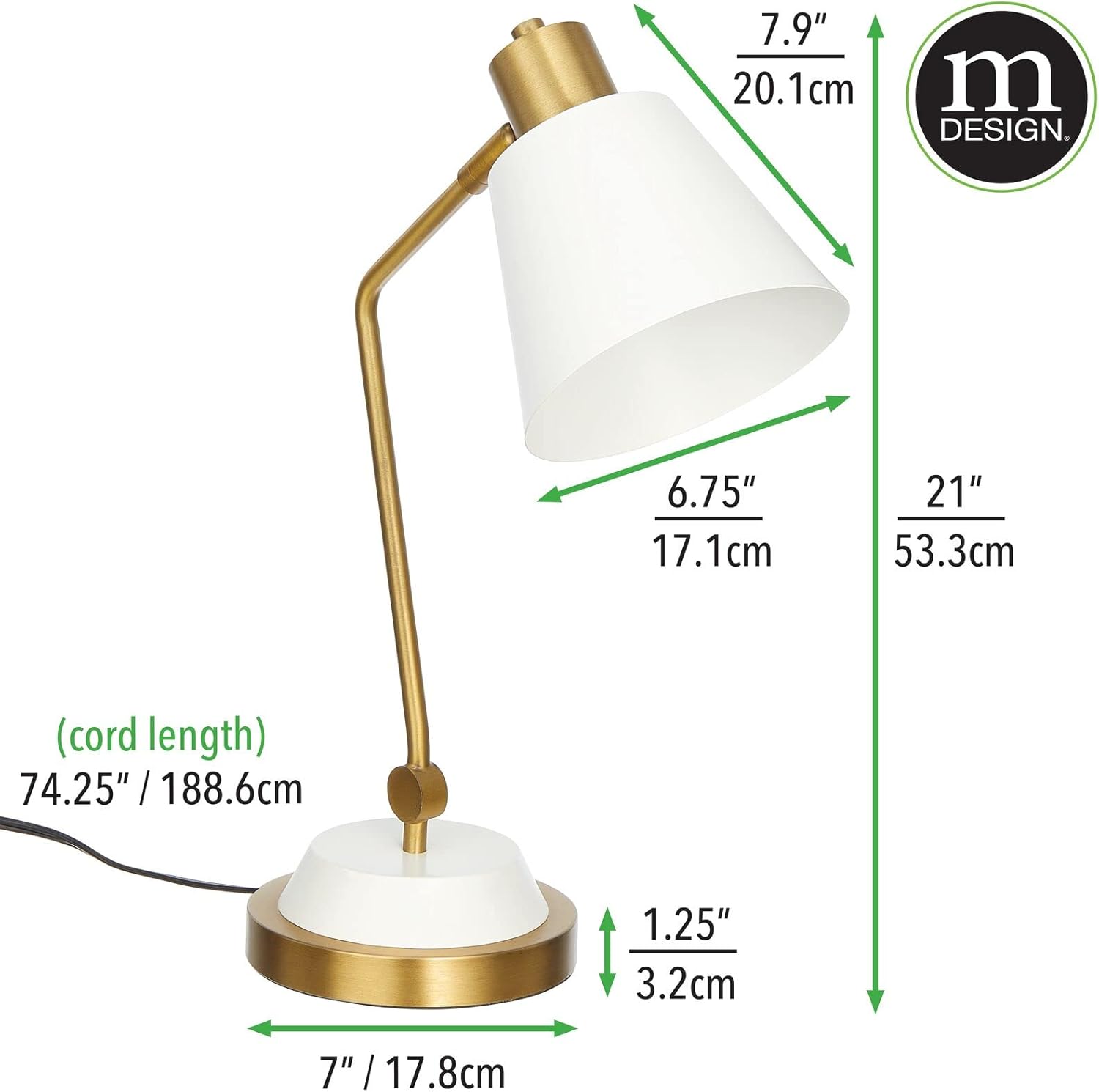
Rajah 7.1: This image provides detailed measurements of the lamp, including height, width, depth, and cord length in both inches and centimeters.
8. Maklumat Waranti
Specific warranty details for the mDesign Metal Curved Desk Lamp (Model 18875MDHS) are not provided in this manual. For information regarding warranty coverage, terms, and conditions, please refer to the product packaging or contact mDesign customer support directly.
9. Sokongan Pelanggan
If you have any questions, require assistance with assembly, operation, or troubleshooting beyond the scope of this manual, please contact mDesign customer support. Contact information can typically be found on the product packaging or on the official mDesign webtapak.
For more information about mDesign products, visit: mDesign Store on Amazon