
pengenalan
This manual provides detailed instructions for the setup, operation, and maintenance of your Acogedor Bluetooth 5.0 Receiver Wireless Audio Adapter. Please read this manual thoroughly before using the product to ensure proper function and to prevent damage.

Image: The Acogedor Bluetooth 5.0 Receiver, highlighting its NFC capability.
Maklumat Keselamatan
- Jangan dedahkan peranti kepada air atau lembapan.
- Elakkan suhu yang melampau.
- Do not disassemble the device. This will void the warranty.
- Use only the provided or recommended power adapter (DC 5V).
- Jauhkan daripada kanak-kanak.
Kandungan Pakej
Sahkan bahawa semua item terdapat dalam pakej:
- Acogedor Bluetooth 5.0 Receiver
- Kabel Audio 3.5mm
- Kabel Audio RCA
- Kabel Kuasa USB
- Manual Pengguna (dokumen ini)
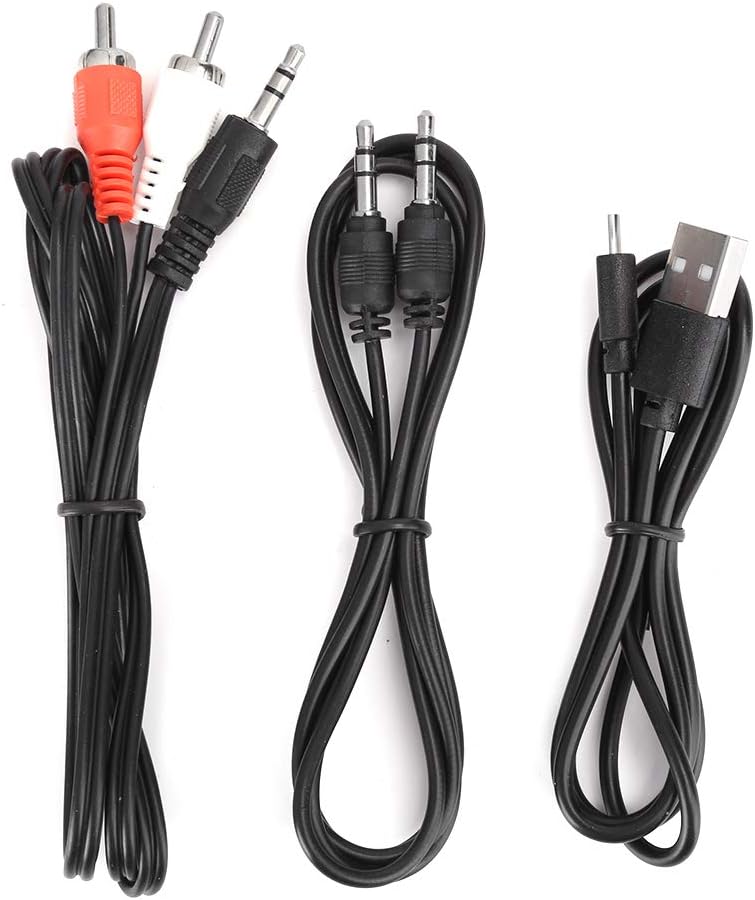
Image: The various audio and power cables included with the receiver.
Produk Selesaiview
Familiarize yourself with the ports and controls of the Acogedor Bluetooth 5.0 Receiver.

Image: Rear panel with power input, USB port, RCA audio output, and 3.5mm AUX output.

Image: Top panel with playback control buttons (Previous, Play/Pause, Next).
- Input DC 5V: Power connection port (Micro USB).
- Port USB: Untuk main balik cakera U.
- Audio Keluar (RCA): Red and white RCA jacks for audio output to amppenghidup atau pembesar suara.
- AUX Keluar: 3.5mm jack for audio output to speakers or headphones.
- Butang Kawalan: Trek sebelumnya, Main/Jeda, Trek seterusnya.
- Kawasan NFC: For near-field pairing with compatible devices.
Persediaan
1. Sambungan Kuasa
- Connect the provided USB power cable to the Input DC 5V port pada penerima.
- Plug the other end of the USB cable into a 5V USB power adapter (not included) or a USB port on your audio equipment.
- The indicator light on the receiver will illuminate, indicating it is powered on.
2. Sambungan Output Audio
Choose one of the following methods to connect the receiver to your audio system:
- Menggunakan Kabel RCA: Connect one end of the RCA audio cable to the Audio Out (RCA) ports (red to red, white to white) on the receiver. Connect the other end to the corresponding RCA input ports on your amppembesar atau pembesar suara aktif.
- Menggunakan Kabel AUX 3.5mm: Sambungkan satu hujung kabel audio 3.5mm ke AUX Keluar port on the receiver. Connect the other end to the 3.5mm AUX input port on your speaker, headphones, or amplebih hidup.

Image: The receiver connected to an external speaker and a smartphone, demonstrating a typical setup.
3. Berpasangan Bluetooth
The receiver will automatically enter pairing mode when powered on. The indicator light will flash.
- NFC Pairing (Recommended for NFC-enabled devices):
- Ensure NFC is enabled on your smartphone or other NFC-enabled device.
- Tap your NFC-enabled device gently against the Kawasan NFC on the top of the receiver.
- Confirm the pairing request on your device. The receiver will connect automatically.

Image: A smartphone being used to initiate NFC pairing with the receiver.
- Pemasangan Bluetooth Manual:
- Pada telefon pintar atau peranti berdaya Bluetooth anda, pergi ke tetapan Bluetooth.
- Cari untuk available devices. The receiver will appear as "Acogedor Bluetooth Receiver" or similar.
- Select the receiver from the list to connect.
- Once connected, the indicator light will become solid blue.
Arahan Operasi
Main balik Audio Bluetooth
- Ensure the receiver is powered on and successfully paired with your device.
- Start playing audio on your paired device. The sound will be transmitted wirelessly to the receiver and output through your connected speakers.
- Gunakan Butang Kawalan on the receiver or your paired device to manage playback:
- Main/Jeda: Tekan butang tengah.
- Lagu Seterusnya: Tekan butang kanan.
- Trek Sebelumnya: Tekan butang kiri.
U Main Balik Cakera
The receiver supports playing audio files terus daripada pemacu denyar USB.
- Masukkan pemacu kilat USB yang mengandungi audio files ke dalam Port USB pada penerima.
- The receiver will automatically detect the U disk and begin playing audio.
- Gunakan Butang Kawalan to navigate tracks.

Image: The receiver demonstrating connections for both Bluetooth audio from a smartphone and direct playback from a USB flash drive.
Penyelenggaraan
- Bersihkan peranti dengan kain lembut dan kering. Jangan gunakan pembersih cecair atau aerosol.
- Pastikan port bebas daripada habuk dan serpihan.
- Store the receiver in a cool, dry place when not in use.
Menyelesaikan masalah
| Masalah | Kemungkinan Punca | Penyelesaian |
|---|---|---|
| Tiada lampu penunjuk kuasa. | Power cable not connected or faulty power source. | Ensure the USB power cable is securely connected to both the receiver and a working 5V power source. Try a different USB port or adapter. |
| Tidak boleh berpasangan melalui Bluetooth. | Receiver not in pairing mode; Bluetooth disabled on source device; too many paired devices. | Ensure the receiver is powered on and the indicator light is flashing (pairing mode). Enable Bluetooth on your source device. Forget previous pairings on your device and try again. Move closer to the receiver. |
| Tiada keluaran bunyi. | Incorrect audio cable connection; volume too low; wrong input selected on amppenguat / pembesar suara. | Verify audio cables are correctly connected to the Audio Keluar ports on the receiver and the correct input on your speaker/amplifier. Increase volume on both the source device and the connected audio system. Ensure the correct input source is selected on your amppenguat / pembesar suara. |
| U Disk playback not working. | U disk not inserted correctly; unsupported file format; U disk corrupted. | Ensure the U disk is fully inserted into the Port USB. Check if audio files are in a supported format (e.g., MP3). Try a different U disk. |
Spesifikasi
| Ciri | Perincian |
|---|---|
| Model | Acogedordebyv7h1rw1035 |
| Versi Bluetooth | 5.0 |
| Teknologi Ketersambungan | Auxiliary, Bluetooth, NFC, RCA, USB |
| Mod Keluaran Audio | Stereo |
| Jenis Penyambung | Bicu 3.5mm, RCA, USB |
| Peranti Serasi | Smartphone, Speaker, Amplebih hidup |
| Input Kuasa | DC 5V (via Micro USB) |
| Dimensi Produk | 6.3 x 5.12 x 1.57 inci |
| Berat Barang | 5.3 auns (0.15 Kilogram) |
| Julat Tanpa Wayar | Up to 15 meters / 49.2 feet (barrier-free) |

Image: Key features of the receiver including Bluetooth reception, signal transmission range, USB playback, and decoding chip.
Waranti dan Sokongan
Acogedor products are designed for reliability and performance. For any questions, technical support, or warranty claims, please contact Acogedor customer service through the retailer where the product was purchased.
Sila simpan bukti pembelian anda untuk tujuan waranti.