
1. Pengenalan
Thank you for choosing the SPYCLOPS SPY-MNBLT2WIP5 5.0-Megapixel Outdoor Fixed Lens Mini Bullet IP PoE Camera. This camera is designed for reliable outdoor surveillance, offering high-resolution video, Power over Ethernet (PoE) for simplified installation, and robust weather resistance. This manual provides essential information for the proper installation, configuration, and maintenance of your camera to ensure optimal performance and longevity.
2. Kandungan Pakej
Please inspect the package contents carefully. If any items are missing or damaged, contact your dealer immediately.
- SPYCLOPS SPY-MNBLT2WIP5 IP PoE Camera
- Mounting Hardware (screws, wall anchors, hex key)
- Antena Wi-Fi
- Manual Pengguna (dokumen ini)
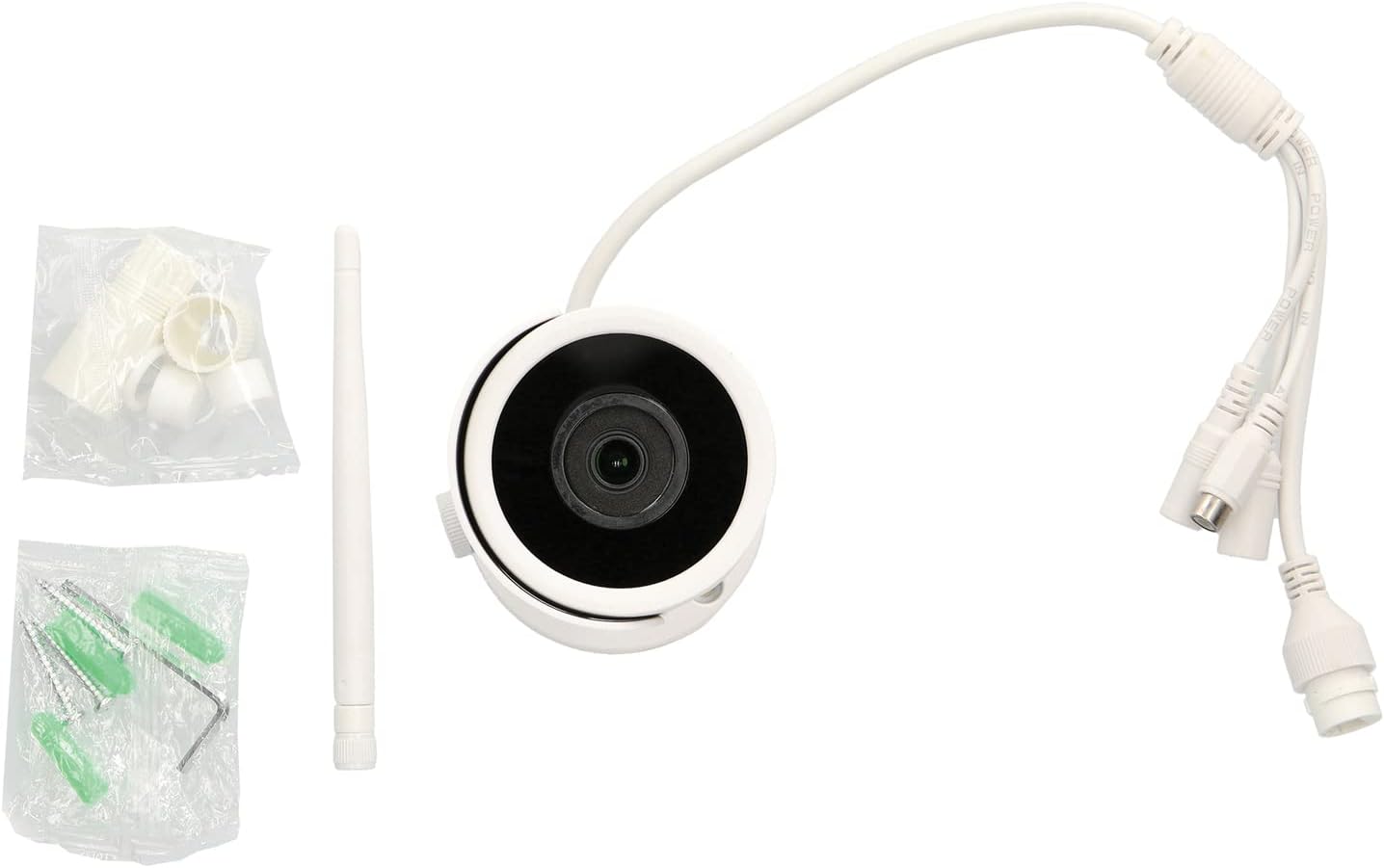
Image: SPY-MNBLT2WIP5 camera, Wi-Fi antenna, and mounting hardware.
3. Produk Lebihview
Familiarize yourself with the components of your SPYCLOPS camera.
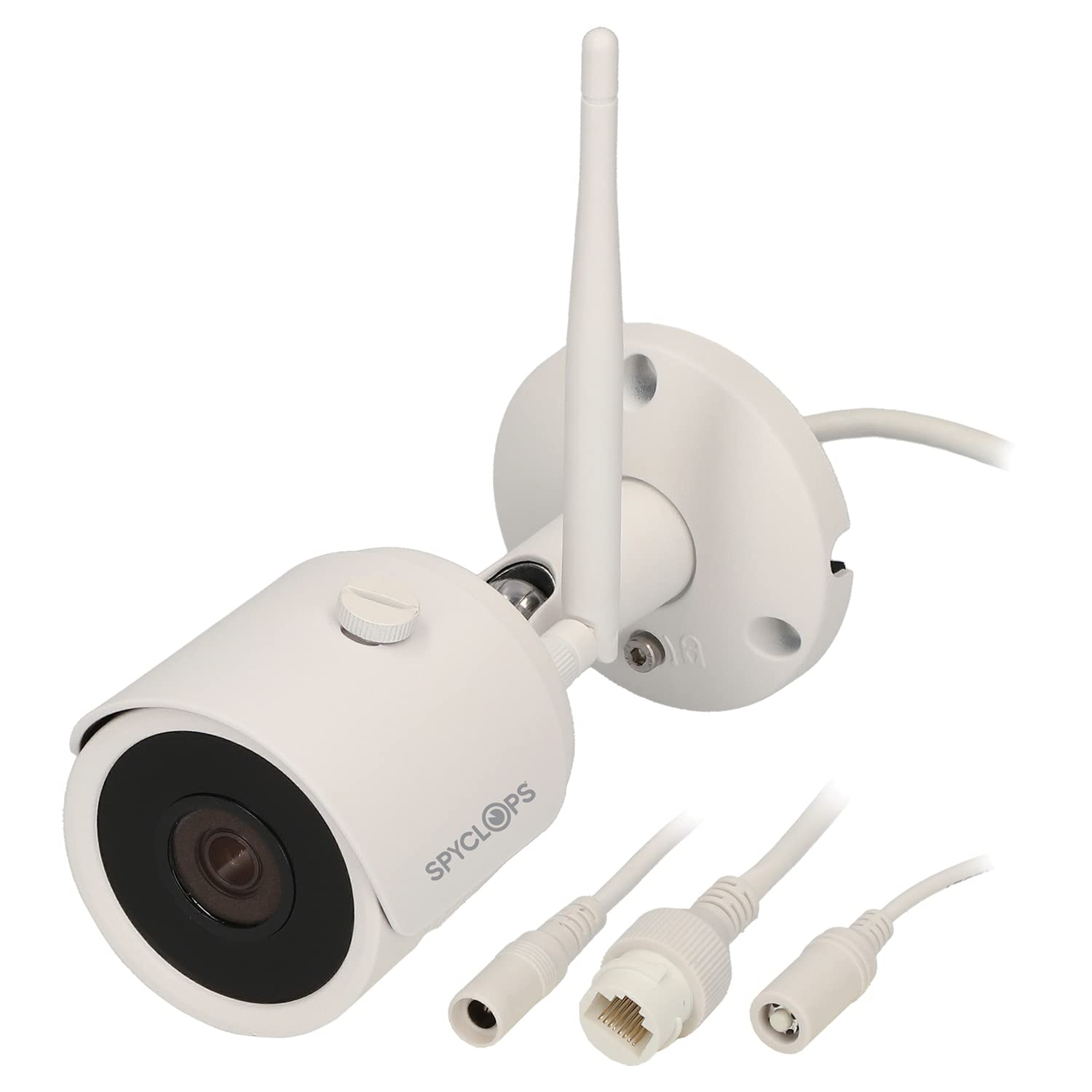
Imej: Depan dan sisi view of the SPY-MNBLT2WIP5 camera, highlighting the lens, antenna, and adjustable mounting arm.
- Kanta Kamera: 2.8 mm fixed lens for wide-angle viewing.
- LED IR: Infrared illuminators for night vision up to 82 feet.
- Antena Wi-Fi: Untuk sambungan rangkaian wayarles.
- Pangkalan Pemasangan: Secure attachment point for wall or ceiling installation.
- Kelenjar Kabel: Melindungi sambungan kabel daripada elemen persekitaran.

Imej: Bawah view of the camera's mounting base, showing the cable routing channel and mounting holes.
The camera features a robust, weather-resistant (IP67) housing suitable for outdoor environments. The integrated cable gland ensures secure and protected connections.
4. Persediaan dan Pemasangan
4.1 Memilih Lokasi
Select a suitable outdoor location that provides the desired field of view, is within Wi-Fi range (if using wireless), and allows for secure mounting. Ensure the camera is positioned to avoid direct sunlight into the lens, which can cause glare.
4.2 Memasang Kamera
- Sediakan Permukaan: Use the mounting base as a template to mark the drill holes on the wall or ceiling.
- Lubang gerudi: Drill pilot holes at the marked locations. Insert wall anchors if mounting on drywall or masonry.
- Kabel Laluan: Pass the necessary cables (Ethernet/PoE, optional power) through the cable gland opening in the mounting base.
- Selamatkan Pangkalan: Pasangkan tapak pelekap dengan kukuh pada permukaan menggunakan skru yang disediakan.
- Laraskan Sudut Kamera: Loosen the adjustment screw on the camera arm, position the camera for the desired view, and then tighten the screw to lock it in place.
4.3 Pendawaian dan Kuasa
The SPY-MNBLT2WIP5 camera supports Power over Ethernet (PoE), simplifying installation by delivering both power and data through a single Ethernet cable.
- Sambungan PoE: Connect an Ethernet cable from a PoE-enabled switch or NVR to the camera's Ethernet port. This will provide both power and network connectivity.
- Kuasa DC pilihan: If PoE is not available, connect a 12V DC power adapter (not included) to the camera's power input port.
- Antena Wi-Fi: Screw the provided Wi-Fi antenna onto the camera's antenna port if you intend to use wireless connectivity.
4.4 Konfigurasi Rangkaian
After physical installation and power-up, the camera will obtain an IP address via DHCP (if available on your network). You can use a network discovery tool provided by SPYCLOPS or your NVR/VMS software to find the camera's IP address and begin configuration.
5. Arahan Operasi
5.1 Mengakses Kamera
The camera can be accessed via a web browser or through a compatible Network Video Recorder (NVR) or Video Management Software (VMS).
- Web pelayar: Buka a web browser (e.g., Chrome, Firefox) and enter the camera's IP address in the address bar. You will be prompted to enter the default username and password (refer to your camera's specific documentation for default credentials).
- NVR/VMS: Follow the instructions provided with your NVR or VMS to add and configure the IP camera. The camera supports ONVIF for broad compatibility.
5.2 Tetapan Asas
Once logged in, you can configure various settings:
- Tetapan Video: Adjust resolution (up to 5MP), frame rate (20 FPS at 5MP, 25 FPS at 4MP, 30 FPS at 1080p), and compression format (H.264, H.264+, H.265, H.265+).
- Tetapan Rangkaian: Configure static IP address, DNS, and port forwarding if necessary.
- Pengesanan Pergerakan: Set up motion detection zones, sensitivity, and recording schedules.
- Pengurusan pengguna: Change default passwords and create additional user accounts with different access levels.
5.3 Penglihatan Malam
The camera automatically switches to night vision mode in low-light conditions, utilizing its IR LEDs to provide clear black and white images up to 82 feet. Ensure no obstructions are blocking the IR LEDs for optimal performance.
6. Penyelenggaraan
6.1 Pembersihan
Regularly clean the camera lens and housing to ensure clear image quality and proper operation. Use a soft, damp kain. Elakkan pembersih atau pelarut yang kasar yang boleh merosakkan kanta atau kemasan.
6.2 Kemas Kini Perisian Tegar
Check the SPYCLOPS website periodically for firmware updates. Firmware updates can improve performance, add new features, and address security vulnerabilities. Follow the instructions provided with the firmware update package carefully.
6.3 Sambungan Kabel
Periodically inspect all cable connections for signs of wear, corrosion, or damage, especially in outdoor environments. Ensure the cable gland is tightly sealed to prevent water ingress.
7. Penyelesaian masalah
Bahagian ini membincangkan isu-isu biasa yang mungkin anda hadapi dengan kamera anda.
- Tiada Kuasa/Tiada Imej:
- Verify the Ethernet cable is securely connected to both the camera and the PoE switch/NVR.
- Ensure the PoE switch/NVR is powered on and providing PoE.
- If using a DC power adapter, ensure it is correctly connected and the power outlet is functional.
- Isu Ketersambungan Rangkaian:
- Check if the camera's IP address is correct and not conflicting with other devices on the network.
- Ensure the network cable is not damaged.
- If using Wi-Fi, verify the camera is within range of your wireless router and the Wi-Fi credentials are correct.
- Kualiti Imej Lemah:
- Clean the camera lens for dirt or smudges.
- Check video resolution settings in the camera's web antara muka.
- Ensure there is adequate lighting in the scene, or that night vision is functioning correctly in low light.
- Penglihatan Malam Tidak Berfungsi:
- Ensure there are no obstructions blocking the IR LEDs.
- Verify that the camera's IR settings are enabled in the web antara muka.
For further assistance, please contact SPYCLOPS technical support.
8. Spesifikasi
| Ciri | Spesifikasi |
|---|---|
| Nama Model | SPY-MNBLT2WIP5 |
| Resolusi Pegun Berkesan | 5.0 Megapiksel |
| Teknologi Penderia Foto | CMOS |
| Lensa | Lensa Tetap 2.8 mm |
| Bidang View | 109° |
| Resolusi Tangkapan Video | 5MP @ 20 FPS, 4MP @ 25 FPS, 1080p @ 30 FPS |
| Pemampatan Video | H.264, H.264+, H.265, H.265+ |
| Julat Penglihatan Malam | Sehingga 82 kaki |
| Protokol Ketersambungan | Wi-Fi, IP (PoE) |
| Sumber Kuasa | PoE (Kuasa ke atas Ethernet) atau 12V DC (penyesuai tidak disertakan) |
| Penilaian Perlindungan Antarabangsa | IP67 (Kalis air) |
| Jenis Pemasangan | Lekap di dinding |
| Penggunaan Dalaman/Luar | Luar |
| Dimensi (L x W x H) | 6.89 x 4.25 x 3.07 inci |
| Berat Barang | 15.6 auns |
9. Maklumat Keselamatan
- Baca semua arahan dengan teliti sebelum pemasangan dan penggunaan.
- Ensure all power connections are secure and meet the camera's specifications.
- Do not attempt to disassemble or modify the camera. This will void the warranty and could cause damage.
- Avoid pointing the camera directly at strong light sources for extended periods, as this may damage the image sensor.
- Gunakan hanya aksesori dan bekalan kuasa yang diluluskan.
- Jauhkan kamera daripada medan magnet yang kuat.
10. Waranti dan Sokongan
SPYCLOPS products are designed for reliability and performance. This product is covered by a manufacturer's warranty. For specific warranty terms and conditions, please refer to the warranty card included with your product or visit the official SPYCLOPS webtapak.
For technical support, troubleshooting assistance, or service inquiries, please contact SPYCLOPS customer support through their official webtapak atau maklumat hubungan yang diberikan bersama dokumentasi pembelian anda.