
SPYCLOPS SPY-MNBLT3WIP8
Spyclops SPY-MNBLT3WIP8 4K 8.0-Megapixel Outdoor Fixed Lens Mini Bullet IP PoE Camera
Model: SPY-MNBLT3WIP8
pengenalan
This manual provides comprehensive instructions for the installation, operation, and maintenance of your Spyclops SPY-MNBLT3WIP8 4K 8.0-Megapixel Outdoor Fixed Lens Mini Bullet IP PoE Camera. Please read this manual thoroughly before using the product to ensure proper functionality and safety.
Maklumat Keselamatan
Patuhi langkah berjaga-jaga keselamatan berikut untuk mengelakkan kerosakan pada produk atau kecederaan pada diri anda:
- Ensure the power source meets the camera's requirements (PoE).
- Jangan cuba membuka atau mengubah suai kamera.
- Install the camera in a secure location to prevent unauthorized access or tampering.
- Avoid pointing the camera directly at strong light sources for extended periods.
- Gunakan hanya aksesori yang diluluskan pengilang.
Kandungan Pakej
Sahkan bahawa semua item terdapat dalam pakej:
- Spyclops SPY-MNBLT3WIP8 Camera
- Mounting Hardware (screws, wall anchors, hex key)
- Kit Penyambung Kalis Air
- Manual Arahan

Produk Selesaiview
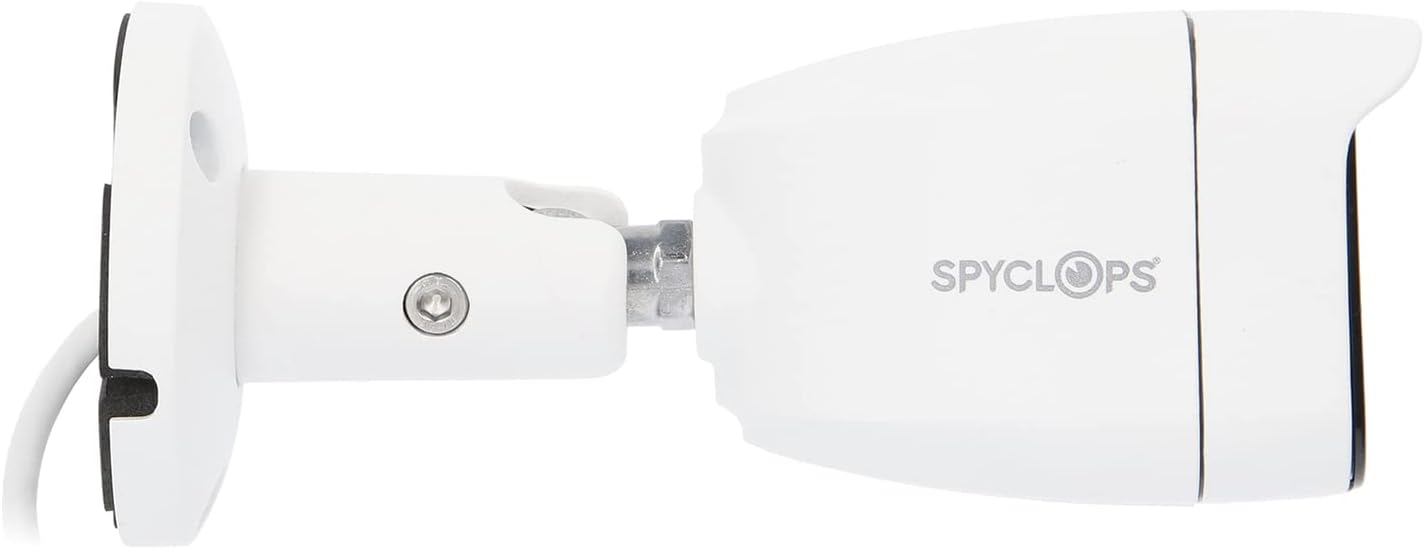
The Spyclops SPY-MNBLT3WIP8 is a 4K 8.0-Megapixel Outdoor Fixed Lens Mini Bullet IP PoE Camera designed for robust surveillance. It features an advanced CMOS sensor for high-resolution video capture and supports both color night vision in low light and black and white in total darkness using smart IR LEDs. The camera includes a built-in microphone for audio recording and utilizes H.265+ video compression to optimize storage and bandwidth.


Persediaan
1. Pemasangan Fizikal
- Pilih Lokasi Pemasangan: Pilih lokasi luar yang menyediakan yang diingini viewing angle and is within reach of your network cable. The camera is water-resistant (IP67).
- Lekapkan Kamera:
- Gunakan templat pelekap yang disertakan (jika disediakan) untuk menandakan lubang gerudi.
- Drill pilot holes and insert wall anchors if mounting on drywall or masonry.
- Secure the camera's base to the surface using the provided screws.
- Adjust the camera's angle and orientation using the adjustable arm and hex key.
- Sambungkan Kabel Rangkaian: Connect an Ethernet cable from your PoE switch or NVR to the camera's RJ45 port. Ensure the connection is secure and use the waterproof connector kit for outdoor installations to protect the connection from moisture.
2. Konfigurasi Rangkaian
The camera is designed to work with IP/PoE systems. It will typically obtain an IP address automatically via DHCP from your network. For initial setup and advanced configuration, you will need to access the camera's web interface or use compatible NVR software.
- Temui Kamera: Use a network scanner tool or your NVR's discovery function to find the camera's IP address on your network.
- Akses Web Antara muka: Buka a web browser and enter the camera's IP address. Log in using the default credentials (refer to specific documentation or contact support if unknown).
- Konfigurasi Awal: Change default passwords, set time zones, and configure network settings as required.
Arahan Operasi
1. Hidup View dan Rakaman
Setelah dikonfigurasikan, anda boleh view the live feed and manage recordings through your NVR or the camera's web antara muka.
- Pemantauan Langsung: Access the live video stream to monitor the surveillance area in real-time.
- Mod Rakaman: Configure continuous recording, motion-detection recording, or scheduled recording based on your security needs.
- Main balik: Review dirakam footage using the NVR or software interface.
2. Ciri Lanjutan
- Resolusi 4K: The 8.0-megapixel CMOS sensor provides high-definition 4K video, capturing detailed images.
- Penglihatan Malam Warna: In low-light conditions, the camera can utilize ambient light to provide color video.
- LED IR Pintar: In total darkness, the camera automatically switches to black and white mode, using smart IR LEDs to illuminate the scene without overexposure.
- Rakaman Audio: The built-in microphone captures audio within the camera's vicinity.
- Mampatan H.265+: This advanced video compression technology reduces file sizes and bandwidth usage while maintaining video quality.
Penyelenggaraan
- Pembersihan: Bersihkan kanta dan perumah kamera secara berkala dengan lembut, damp kain. Jangan gunakan pembersih atau pelarut yang melelas.
- Kemas kini Firmware: Semak pengeluar website for available firmware updates to ensure optimal performance and security. Follow the provided instructions carefully when updating firmware.
- Pemeriksaan Kabel: Periksa dengan kerap semua kabel dan sambungan untuk tanda haus atau kerosakan, terutamanya untuk pemasangan luar.
Menyelesaikan masalah
| Masalah | Kemungkinan Punca | Penyelesaian |
|---|---|---|
| Tiada suapan video | No power (PoE), network cable disconnected, incorrect IP address. | Verify PoE connection, check network cable, ensure correct IP configuration. |
| Kualiti imej yang lemah | Dirty lens, environmental factors, low bandwidth. | Clean the lens, ensure adequate lighting, check network bandwidth. |
| Penglihatan malam tidak berfungsi | IR LEDs obstructed, camera settings. | Clear any obstructions, check night vision settings in the camera's interface. |
| Tidak boleh akses web antara muka | Incorrect IP address, network issue, firewall blocking access. | Confirm IP address, check network connectivity, temporarily disable firewall for testing. |
Spesifikasi
| Ciri | Perincian |
|---|---|
| Nama Model | SPY-MNBLT3WIP8 |
| Resolusi Pegun Berkesan | 8.0 Megapixels (4K) |
| Penderia Imej | CMOS |
| Lensa | Kanta tetap 2.8 mm |
| Pemampatan Video | H.265 + |
| Protokol Ketersambungan | Wi-Fi |
| Sumber Kuasa | AC DC |
| Penggunaan Dalaman/Luar | Luar |
| Penilaian Perlindungan Antarabangsa | IP67 (Kalis air) |
| Ciri Khas | Color Night Vision, Smart IR LEDs, Built-in Microphone |
| Dimensi (L x W x H) | 8.27 x 6.3 x 3.54 inci |
| Berat Barang | 1.29 paun |
| warna | putih |
Waranti dan Sokongan
For warranty information, technical support, or service inquiries, please refer to the official Spyclops webtapak atau hubungi bahagian perkhidmatan pelanggan mereka. Simpan resit pembelian anda sebagai bukti pembelian.
Pengeluar: METRA-ETHEREAL
Nombor Model: SPY-MNBLT3WIP8
Ask a question about this manual
Ask about setup, troubleshooting, compatibility, parts, safety, or missing instructions. Manuals+ will review the question and use this page’s manual context to help answer it.