
1. Pengenalan
Terima kasih kerana membeliasing the Miuscall-C SS1021US Soundbar. This manual provides detailed instructions for setting up, operating, and maintaining your soundbar to ensure an optimal audio experience. Please read this manual thoroughly before use and retain it for future reference.
2. Produk Lebihview
2.1 Kandungan Pakej
- Miuscall-C SS1021US Soundbar Unit
- Alat Kawalan Jauh
- Penyesuai Kuasa
- Kabel HDMI (ARC).
- Kabel Digital Optik
- Kabel AUX
- Manual Pengguna
2.2 Ciri-ciri Bar Bunyi
The Miuscall-C SS1021US Soundbar features a slim and compact design, measuring approximately 410mm (width) x 60mm (height) x 55mm (depth). It incorporates two speaker units and one subwoofer port to deliver a powerful bass reflex effect, enhancing your television and PC audio experience.

Image: The Miuscall-C SS1021US Soundbar shown with its included remote control, highlighting its sleek design.

Image: An internal diagram illustrating the soundbar's two speaker units and bass tube, designed for high-quality sound.
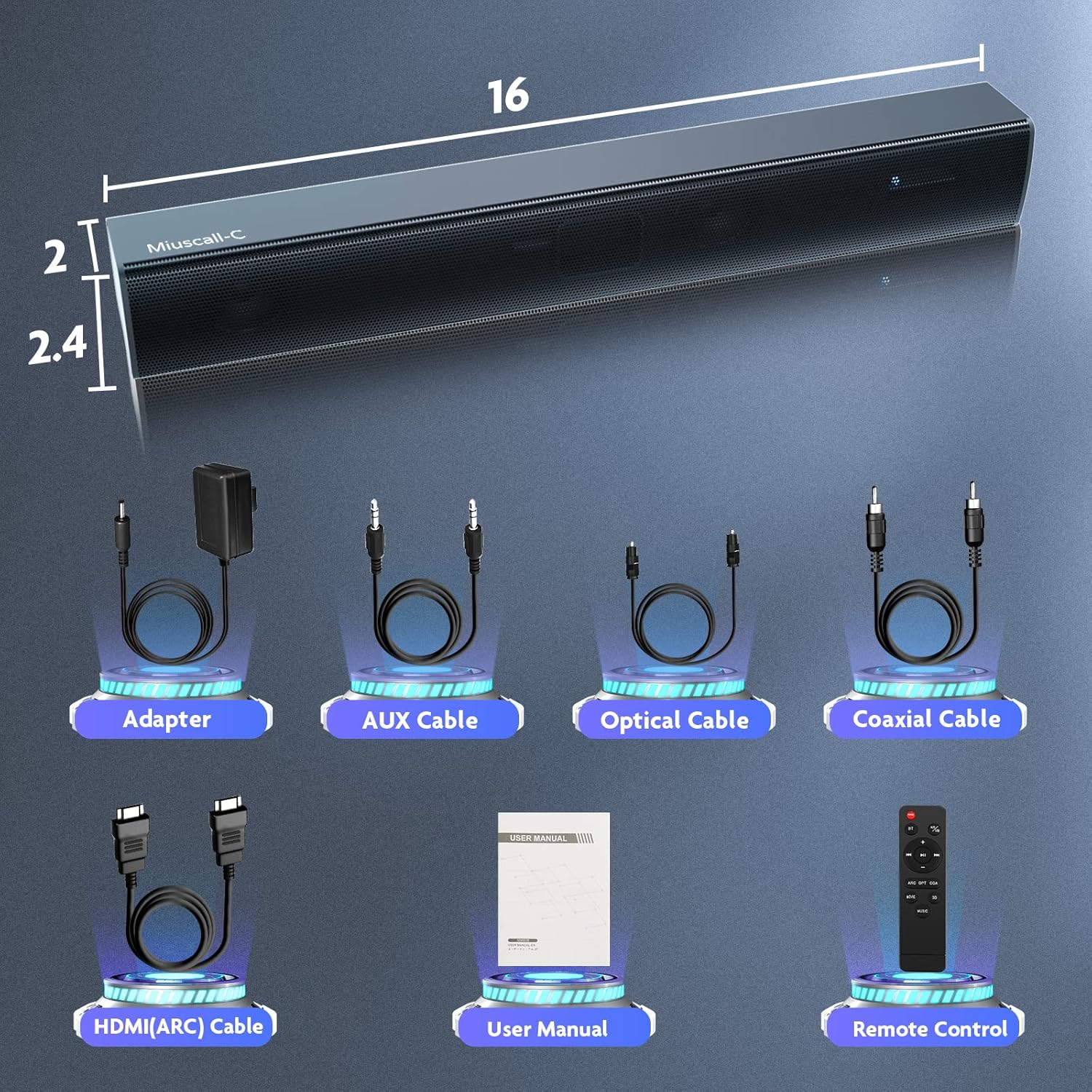
Image: A visual representation of the soundbar's dimensions and all accessories included in the package, such as cables and power adapter.
3. Persediaan
3.1 Penempatan
Place the soundbar on a stable, flat surface in front of your television or PC monitor. Ensure there are no obstructions in front of the speakers for optimal sound projection. The soundbar can also be wall-mounted using appropriate hardware (not included).
3.2 Menyambung ke Kuasa
- Connect the power adapter to the DC IN port on the back of the soundbar.
- Palamkan penyesuai kuasa ke salur keluar dinding.
3.3 Sambungan Audio
The soundbar supports multiple audio input options. Choose the connection method that best suits your device.
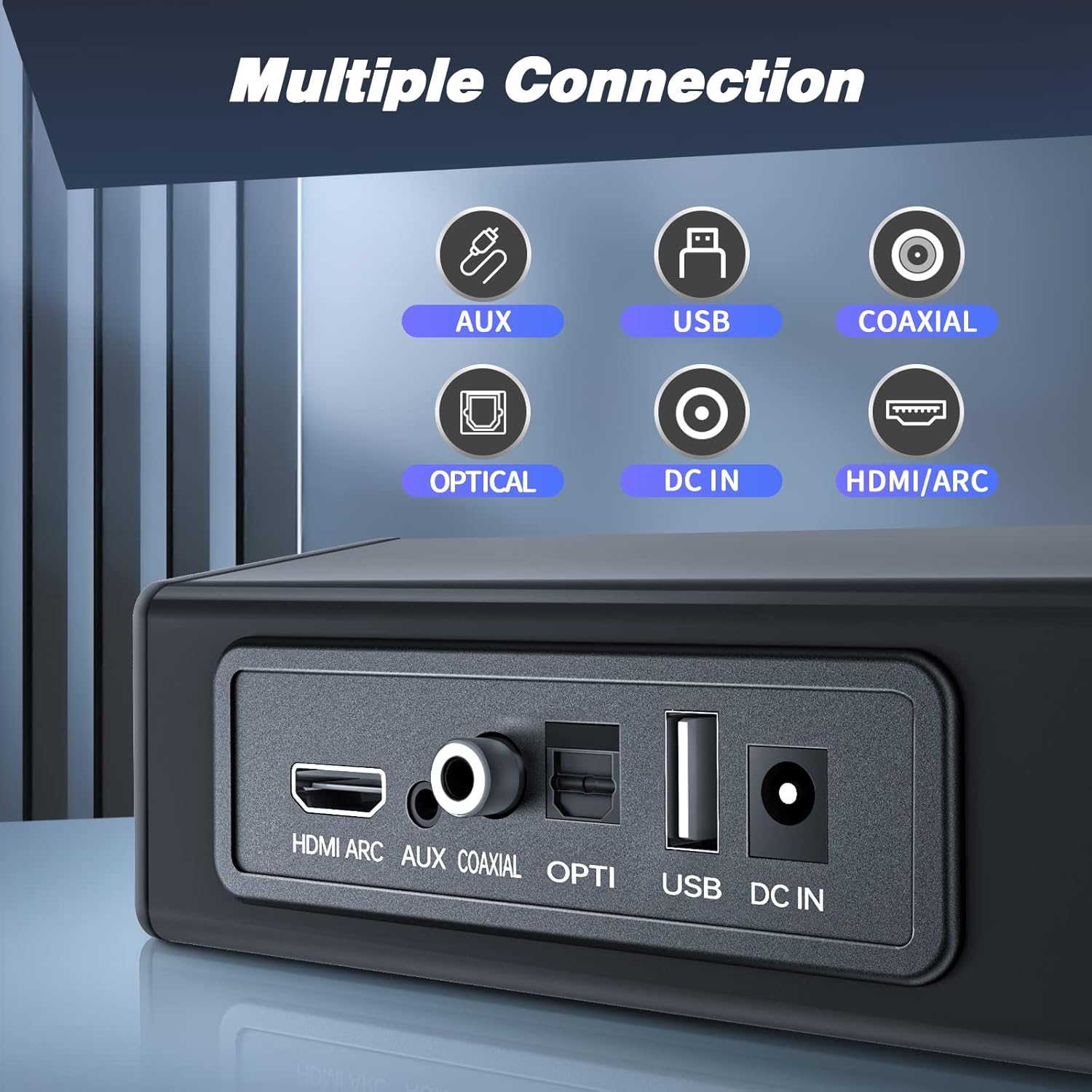
Imej: Dari dekat view of the soundbar's rear panel, showing the HDMI ARC, AUX, Coaxial, Optical, USB, and DC IN ports.
3.3.1 HDMI ARC Connection (Recommended for TVs)
For ARC-compatible televisions, this connection allows for synchronized power on/off and volume control using a single HDMI cable.
- Connect one end of the supplied HDMI (ARC) cable to the HDMI ARC port on the soundbar.
- Connect the other end to the HDMI ARC port on your television.
- Ensure your TV's audio output settings are configured to use the HDMI ARC port.

Image: The Miuscall-C Soundbar positioned below a television, illustrating a typical home entertainment setup.
3.3.2 Sambungan Optik
- Connect one end of the optical digital cable to the OPTICAL port on the soundbar.
- Connect the other end to the optical digital output port on your TV or other audio source.
3.3.3 Sambungan AUX
- Connect one end of the AUX cable to the AUX port on the soundbar.
- Connect the other end to the 3.5mm audio output jack on your device (e.g., PC, smartphone).
3.3.4 Coaxial Connection
- Connect one end of a coaxial cable (not always included) to the COAXIAL port on the soundbar.
- Connect the other end to the coaxial digital output port on your TV or other audio source.
3.3.5 Sambungan USB
The USB port is primarily for playing audio files terus dari peranti storan USB.
- Masukkan pemacu kilat USB yang mengandungi audio files ke dalam port USB pada bar bunyi.
4. Arahan Operasi
4.1 Hidupkan/Mati Kuasa
Tekan ke KUASA button on the remote control or the soundbar to turn the unit on or off. If connected via HDMI ARC, the soundbar may power on/off automatically with your TV.
4.2 Pemilihan Input
Tekan ke INPUT button on the remote control or the soundbar to cycle through available input sources: HDMI ARC, OPTICAL, AUX, COAXIAL, USB, and Bluetooth.
4.3 Kawalan Kelantangan
Gunakan VOL+ dan vol- buttons on the remote control or the soundbar to adjust the volume. Press the HILANGKAN butang untuk menyenyapkan audio buat sementara waktu.
4.4 Berpasangan Bluetooth

Image: An illustration depicting a smartphone wirelessly connected to the Miuscall-C Soundbar via Bluetooth 5.0.
- Select Bluetooth input mode on the soundbar. The indicator light will flash.
- Enable Bluetooth on your mobile device (e.g., smartphone, tablet, PC).
- Cari untuk "Miuscall-C SS1021US" in the list of available devices and select it to pair.
- Once paired, the indicator light will stop flashing, and you can play audio from your device through the soundbar.
4.5 Mod Bunyi
The soundbar features DSP technology with three optimized sound modes for different content types.

Image: A graphic illustrating the three distinct sound modes (Movie, Music, 3D) available on the Miuscall-C Soundbar, powered by DSP technology.
- Mod Filem: Meningkatkan kejelasan dialog dan julat dinamik untuk filem.
- Mod Muzik: Optimizes audio for a balanced and rich musical experience.
- Mod 3D: Creates an immersive, spatial audio effect.
Press the corresponding button on the remote control (e.g., FILEM, MUZIK, 3D) to switch between these modes.
5. Penyelenggaraan
5.1 Pembersihan
- Sentiasa putuskan sambungan penyesuai kuasa sebelum membersihkan.
- Use a soft, dry cloth to wipe the surface of the soundbar.
- Do not use liquid cleaners, abrasive cleaners, or solvents, as they may damage the finish.
5.2 Penyimpanan
Jika menyimpan bar bunyi untuk tempoh yang lama, putuskan sambungannya daripada kuasa dan simpannya di tempat yang sejuk dan kering jauh daripada cahaya matahari langsung dan suhu yang melampau.
6. Penyelesaian masalah
Jika anda menghadapi masalah dengan bar bunyi anda, rujuk masalah dan penyelesaian biasa berikut:
- Tiada Kuasa:
Pastikan penyesuai kuasa disambungkan dengan selamat ke kedua-dua bar bunyi dan salur keluar kuasa yang berfungsi. - Tiada Bunyi:
Check that the soundbar is powered on and not muted. Verify the correct input source is selected. Ensure all audio cables are securely connected. Adjust the volume on both the soundbar and your connected device (TV, PC). For HDMI ARC, confirm your TV's audio output is set to ARC. - Kualiti Bunyi Lemah:
Check cable connections for looseness or damage. Try a different audio source or cable. Ensure the soundbar is not placed in an enclosed space that might muffle sound. - Alat Kawalan Jauh Tidak Berfungsi:
Ensure there are no obstructions between the remote and the soundbar. Replace the remote control batteries if necessary. - Isu Berpasangan Bluetooth:
Pastikan bar bunyi berada dalam mod gandingan Bluetooth. Matikan dan hidupkan Bluetooth pada peranti anda. Cuba nyahgandingkan dan gandingan semula peranti. Alihkan peranti anda lebih dekat ke bar bunyi.
Jika masalah berterusan selepas mencuba penyelesaian ini, sila hubungi sokongan pelanggan.
7. Spesifikasi
| Ciri | Spesifikasi |
|---|---|
| Jenama | Miuscall-C |
| Nombor Model | SS1021US |
| Jenis Pembesar Suara | Bar bunyi |
| Teknologi Ketersambungan | AUX, USB, Bluetooth, Optical, Coaxial, HDMI ARC |
| Penggunaan yang Disyorkan | Television, PC |
| Kaedah Kawalan | Jauh |
| Kuasa Output Maksimum Pembesar Suara | 50 Watt |
| Dimensi Produk (L x W x H) | 5 cm x 41 cm x 5 cm |
| Sumber Kuasa | Kord Kuasa |
| Bateri Diperlukan | No (for soundbar unit) |
| Jenis Pemasangan | Wall Mount (hardware not included) |
8. Waranti dan Sokongan
The Miuscall-C SS1021US Soundbar comes with a standard manufacturer's warranty. For specific warranty terms and conditions, please refer to the warranty card included in your package or contact Miuscall-C customer support.
For technical assistance, troubleshooting, or any product-related inquiries, please contact our customer support team through the contact information provided on the product packaging or our official webtapak.