
AOLION WGXB004005
AOLION Stereo Headset Adapter User Manual
Model: WGXB004005
pengenalan
The AOLION Stereo Headset Adapter is designed to enhance your gaming experience on Xbox One controllers. This adapter allows you to connect most wired stereo gaming headsets with a 3.5mm audio jack (CTIA plug standard) directly to your Xbox controller, providing convenient control over game sound and voice chat.
Kandungan Pakej
- 1 × AOLION Stereo Headset Adapter
- 1 × Manual Pengguna
Produk Selesaiview
The adapter features intuitive controls for managing your audio experience during gameplay.

Rajah 1: Depan view of the headset adapter showing control buttons.
- Game Balance Button: Adjusts the balance towards game audio.
- Chat Balance Button: Adjusts the balance towards voice chat audio.
- Butang Redam Mikrofon: Menghidupkan/mematikan mikrofon.
- Butang Naik Kelantangan: Increases overall volume.
- Butang Kurang Kelantangan: Decreases overall volume.
- Bicu Audio 3.5mm: For connecting your stereo gaming headset.
- Penyambung USB: For connecting to the Xbox controller.
Keserasian
This headset adapter is compatible with a wide range of Xbox One controllers and stereo gaming headsets:
- Xbox Controllers: Xbox One, Xbox One S, Xbox One X, Xbox Elite Wireless Controller Series 1, Xbox Elite Wireless Controller Series 2, Xbox Series S, and Xbox Series X Controllers.
- Alat dengar: Most wired stereo gaming headsets featuring a 3.5mm audio jack (using the CTIA plug standard).

Figure 2: The adapter is compatible with multiple Xbox controller models.

Figure 3: The adapter supports standard 3.5mm CTIA headsets.
Persediaan
Setting up your AOLION Stereo Headset Adapter is a simple plug-and-play process.
- Connect the Adapter to the Controller: Align the USB connector of the headset adapter with the expansion port at the bottom of your Xbox controller. Gently push until it clicks securely into place.
- Sambungkan Alat Dengar Anda: Plug your wired stereo gaming headset's 3.5mm audio jack into the corresponding port on the bottom of the headset adapter.
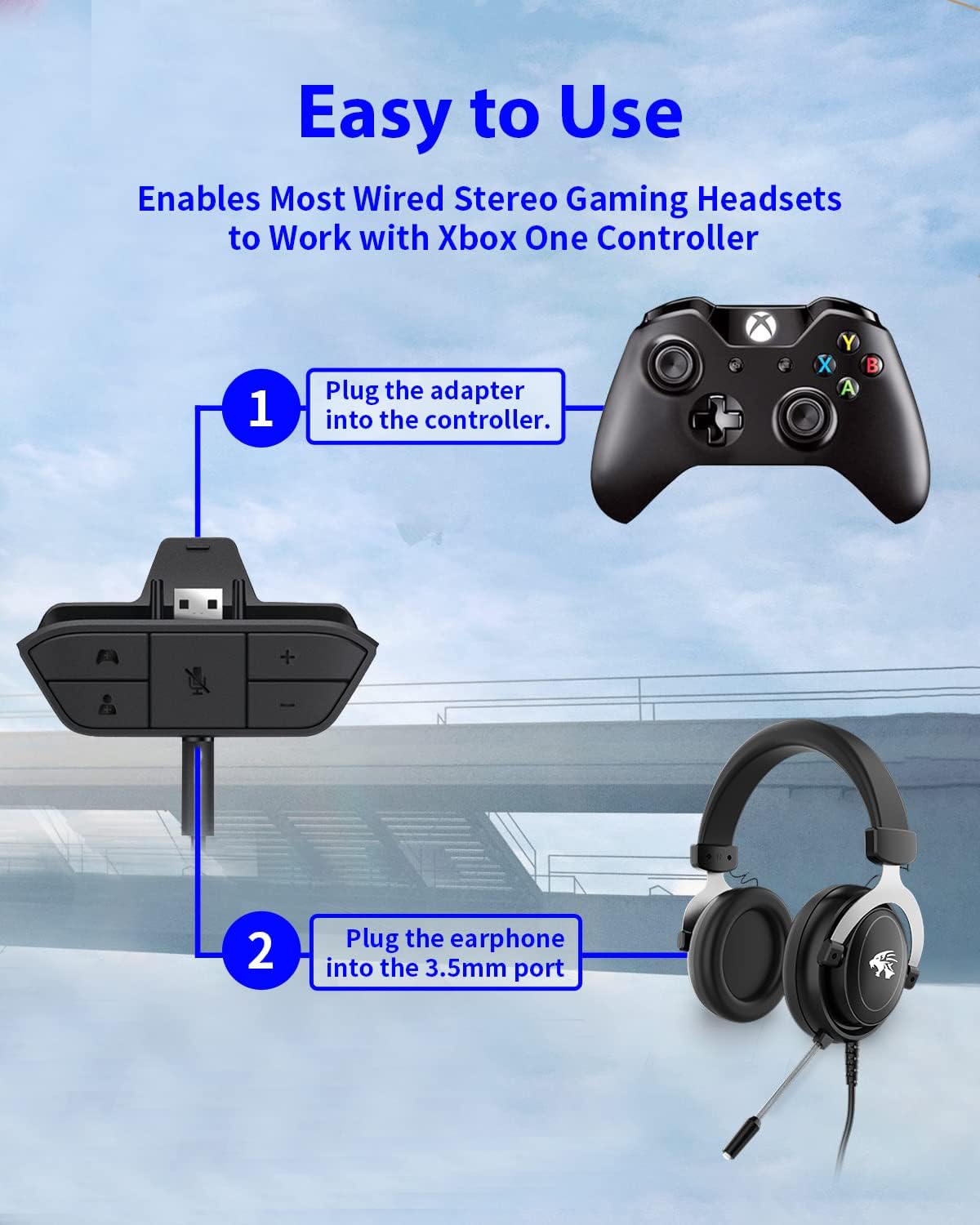
Figure 4: Step-by-step connection guide for the headset adapter.
Video 1: Demonstration of connecting the headset adapter to an Xbox controller.
Nota Penting: For optimal performance and to resolve potential audio issues, it is recommended to update your Xbox controller's firmware after connecting the adapter. This can typically be done through your Xbox console's settings (Settings > Devices & connections > Accessories > Select your controller > ... > Controller settings > Update firmware).
Arahan Operasi
Once connected, use the buttons on the adapter to control your audio:
- Kelantangan Naik/Turun (+/-): Press the '+' button to increase the overall volume of both game and chat audio. Press the '-' button to decrease it.
- Microphone Mute (Microphone Icon): Press this button to mute or unmute your microphone. An indicator light (if present) or on-screen notification may confirm the mute status.
- Game/Chat Balance (Controller Icon / Person Icon):
- Tekan ke Ikon Pengawal button to increase game audio volume and decrease chat audio volume.
- Tekan ke Ikon Orang button to increase chat audio volume and decrease game audio volume.
Rajah 5: Terperinci view of the adapter's control buttons.
Penyelenggaraan
To ensure the longevity and optimal performance of your headset adapter, follow these simple maintenance guidelines:
- Pastikan penyesuai bersih dan bebas daripada habuk dan serpihan. Gunakan kain lembut dan kering untuk pembersihan.
- Elakkan mendedahkan penyesuai kepada suhu, kelembapan atau cahaya matahari langsung yang melampau.
- Jangan cuba membuka atau membaiki penyesuai sendiri, kerana ini akan membatalkan jaminan.
- Simpan penyesuai di tempat yang selamat apabila tidak digunakan untuk mengelakkan kerosakan fizikal.
Menyelesaikan masalah
If you encounter issues with your AOLION Stereo Headset Adapter, please refer to the following common solutions:
| Masalah | Kemungkinan Punca / Penyelesaian |
|---|---|
| No audio or poor audio quality (buzzing, peaking) |
|
| Mikrofon tidak berfungsi |
|
| Game/Chat balance not working |
|
Jika masalah berterusan selepas mencuba langkah ini, sila hubungi sokongan pelanggan.
Spesifikasi
| Ciri | Perincian |
|---|---|
| Nombor Model | WGXB004005 |
| Jenama | AOLION |
| Dimensi Produk (L x W x H) | 3.15 x 1.57 x 0.79 inci (8 x 4 x 2 cm) |
| warna | Hitam |
| Jenis Penyambung | Auxiliary (3.5mm CTIA standard) |
| Peranti Serasi | Xbox One, One S, One X, Elite 1, Elite 2, Series S, Series X Controllers; 3.5mm CTIA Stereo Headsets |
Waranti dan Sokongan
AOLION stands behind the quality of its products. This Stereo Headset Adapter comes with:
- Jaminan Wang Dikembalikan 60 Hari: If you are not entirely satisfied with your purchase within 60 days, you may be eligible for a full refund.
- Waranti 24 Bulan: We provide a 24-month warranty against manufacturing defects from the date of purchase.
For any questions, concerns, or warranty claims, please contact us through Amazon. We are committed to responding to your inquiries within 12 hours to ensure your complete satisfaction.
Ask a question about this manual
Ask about setup, troubleshooting, compatibility, parts, safety, or missing instructions. Manuals+ will review the question and use this page’s manual context to help answer it.