
1. Pengenalan
This manual provides essential information for the proper use and maintenance of your new replacement remote control. This remote is designed as a direct replacement for specific ONKYO models, offering full functionality without the need for complex setup procedures.
Ciri-ciri Utama:
- Direct replacement for ONKYO TXDS595, 24140447, RC447M remote controls.
- No setup code required; ready to use upon battery installation.
- Replicates all functions of the original remote control.
2. Persediaan
2.1. Pemasangan Bateri
Your replacement remote control requires two AAA batteries (not included). Follow these steps to install them:
- Cari petak bateri di belakang alat kawalan jauh.
- Press down on the latch and slide the battery cover downwards to open.
- Masukkan dua bateri AAA, pastikan terminal positif (+) dan negatif (-) sejajar dengan tanda di dalam petak.
- Luncurkan penutup bateri ke tempat semula sehingga ia berbunyi dengan selamat.
Once batteries are installed, the remote is ready for immediate use with compatible ONKYO devices. No programming or code entry is necessary.
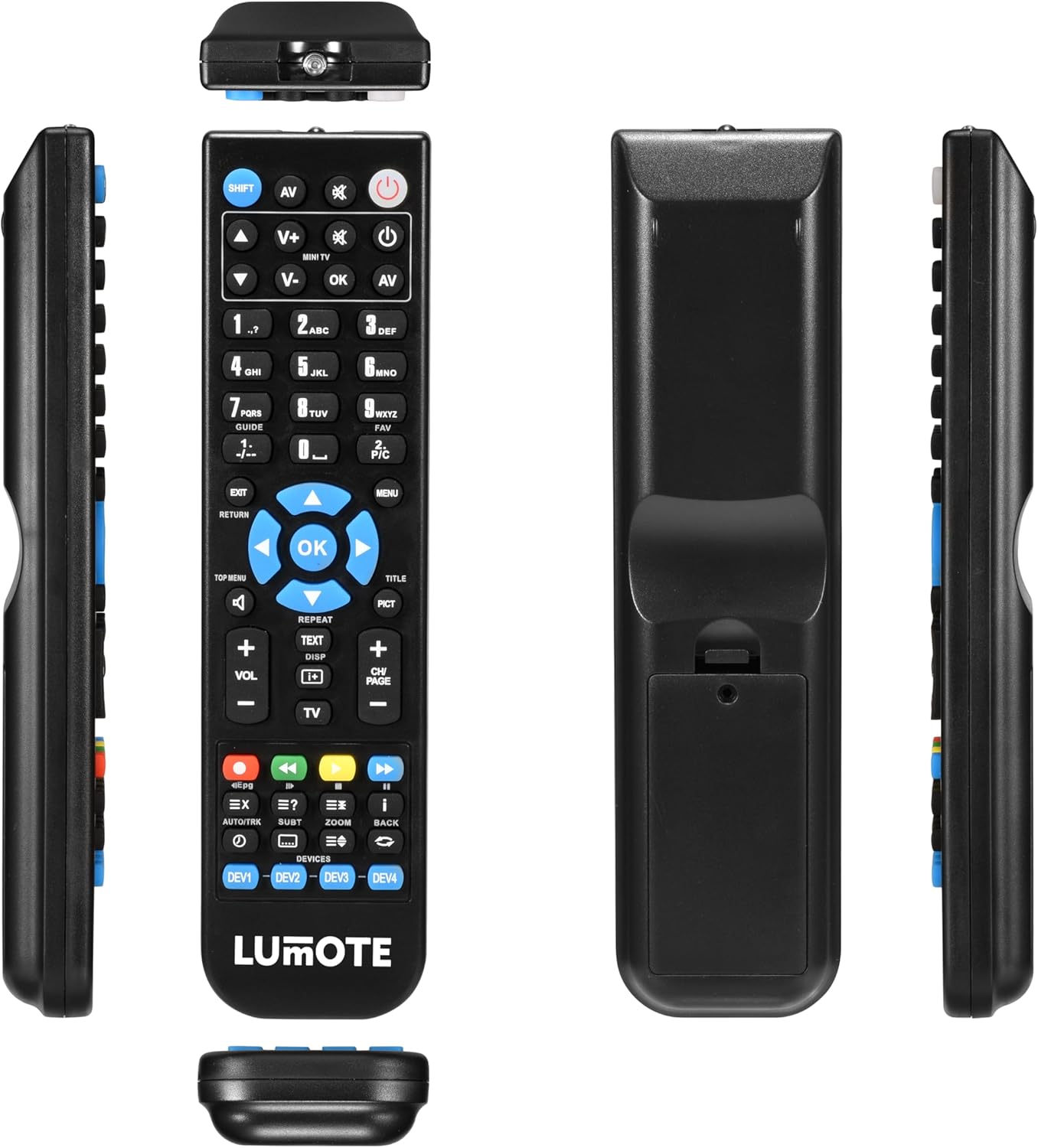
Rajah 2.1: Pelbagai views of the remote control, illustrating the battery compartment on the back.
3. Arahan Operasi
This remote control is designed to replicate the functions of your original ONKYO remote. Point the remote directly at your ONKYO receiver (TXDS595, 24140447, RC447M) for optimal performance.

Rajah 3.1: Depan view alat kawalan jauh dengan susun atur butang.
3.1. Fungsi Asas
- Butang Kuasa (Ⓘ): Located at the top right, press to turn your ONKYO receiver on or off.
- Volume Control (VOL+ / VOL-): Located below the directional pad, use these buttons to increase or decrease the audio volume.
- Input Selector (AV, SHIFT): Use the 'AV' button to cycle through audio/video inputs. The 'SHIFT' button may be used in conjunction with other buttons for secondary functions, if applicable to your original remote's design.
- Directional Pad and OK Button: The central circular pad with arrow keys (up, down, left, right) and an 'OK' button in the center is used for navigating menus and confirming selections on your receiver's display.
- Butang Menu: Accesses the main menu of your ONKYO receiver.
- Return/Exit Buttons: Used to go back to the previous screen or exit a menu.
Refer to your ONKYO receiver's original manual for specific functions and menu navigation details, as this remote replicates those commands.
4. Penyelenggaraan
4.1. Penggantian Bateri
Replace batteries when the remote's response becomes sluggish or stops working. Always replace both batteries at the same time with new AAA batteries. Do not mix old and new batteries, or different types of batteries.
4.2. Pembersihan
Untuk membersihkan alat kawalan jauh, lap dengan kain lembut dan kering. Untuk kotoran degil, lap sedikitampen kain dengan air. Jangan gunakan pembersih yang melelas, pelarut atau alkohol, kerana ini boleh merosakkan permukaan alat kawalan jauh atau komponen dalaman.
4.3. Penyimpanan
Store the remote control in a cool, dry place away from direct sunlight and extreme temperatures. If the remote will not be used for an extended period, it is advisable to remove the batteries to prevent leakage and potential damage.
5. Penyelesaian masalah
If you experience issues with your replacement remote control, please refer to the following common solutions:
- Jauh tidak bertindak balas:
- Periksa sama ada bateri dimasukkan dengan betul dengan polariti yang betul (+/-).
- Gantikan bateri lama dengan yang baru.
- Ensure there are no obstructions between the remote and your ONKYO receiver.
- Make sure you are within the effective operating range and pointing the remote directly at the receiver's IR sensor.
- Certain functions not working:
- This remote is a direct replacement and does not require setup codes. If a specific function is not working, verify that the corresponding button on the remote is clean and not stuck.
- Confirm that your ONKYO receiver model (TXDS595, 24140447, RC447M) is listed as compatible.
- Note that some ONKYO receiver models, like the TXDS595, may have specific power-on sequences. If the remote turns off but not on, this behavior might be consistent with the original unit's design or a known characteristic for certain older models, as reported by some users. The remote is designed to replicate the original's functions as closely as possible.
- Kerja jarak jauh berfungsi secara berselang-seli:
- Ini selalunya menunjukkan kuasa bateri rendah. Gantikan bateri.
- Ensure no strong light sources (like direct sunlight or bright fluorescent lights) are interfering with the receiver's IR sensor.
6. Spesifikasi
| Nombor Model | RC447M |
| Peranti Serasi | ONKYO TXDS595, ONKYO 24140447, ONKYO RC447M |
| Jenama | Generik |
| Ciri Khas | Ergonomik |
| Bilangan Maks Peranti yang Disokong | 1 |
| warna | Standard v1 |
7. Waranti dan Sokongan
7.1. Jaminan Produk
This replacement remote control comes with a Jaminan 12 bulan from the date of purchase. This guarantee covers manufacturing defects and ensures the remote functions as described. Please retain your proof of purchase for warranty claims.
7.2. Sokongan Pelanggan
For any questions, concerns, or issues not covered in this manual, please contact the seller or retailer from whom you purchased this product. They will be able to provide further assistance and support regarding your replacement remote control.