
1. Pengenalan
Thank you for choosing the LEICKE DJ Roxxx Portable Bluetooth Speaker. This manual provides essential information for setting up, operating, and maintaining your speaker. Please read it carefully before use to ensure optimal performance and longevity of your device.
2. Arahan Keselamatan
- Jangan dedahkan pembesar suara kepada suhu yang melampau, cahaya matahari langsung atau kelembapan yang tinggi.
- Elakkan daripada menjatuhkan atau menundukkan pembesar suara kepada impak yang kuat.
- Jangan buka atau cuba membaiki pembesar suara sendiri. Ini akan membatalkan jaminan.
- Keep the speaker away from water and liquids. While splashproof, it is not waterproof and should not be submerged.
- Gunakan hanya kabel pengecasan yang disediakan atau setara yang diperakui.
3. Kandungan Pakej
Sila semak pakej untuk item berikut:
- LEICKE DJ Roxxx Portable Bluetooth Speaker
- Kabel Pengecas USB
- Auxiliary Audio Cable (3.5mm Stereo Plug)
- Carabiner
- Manual Arahan
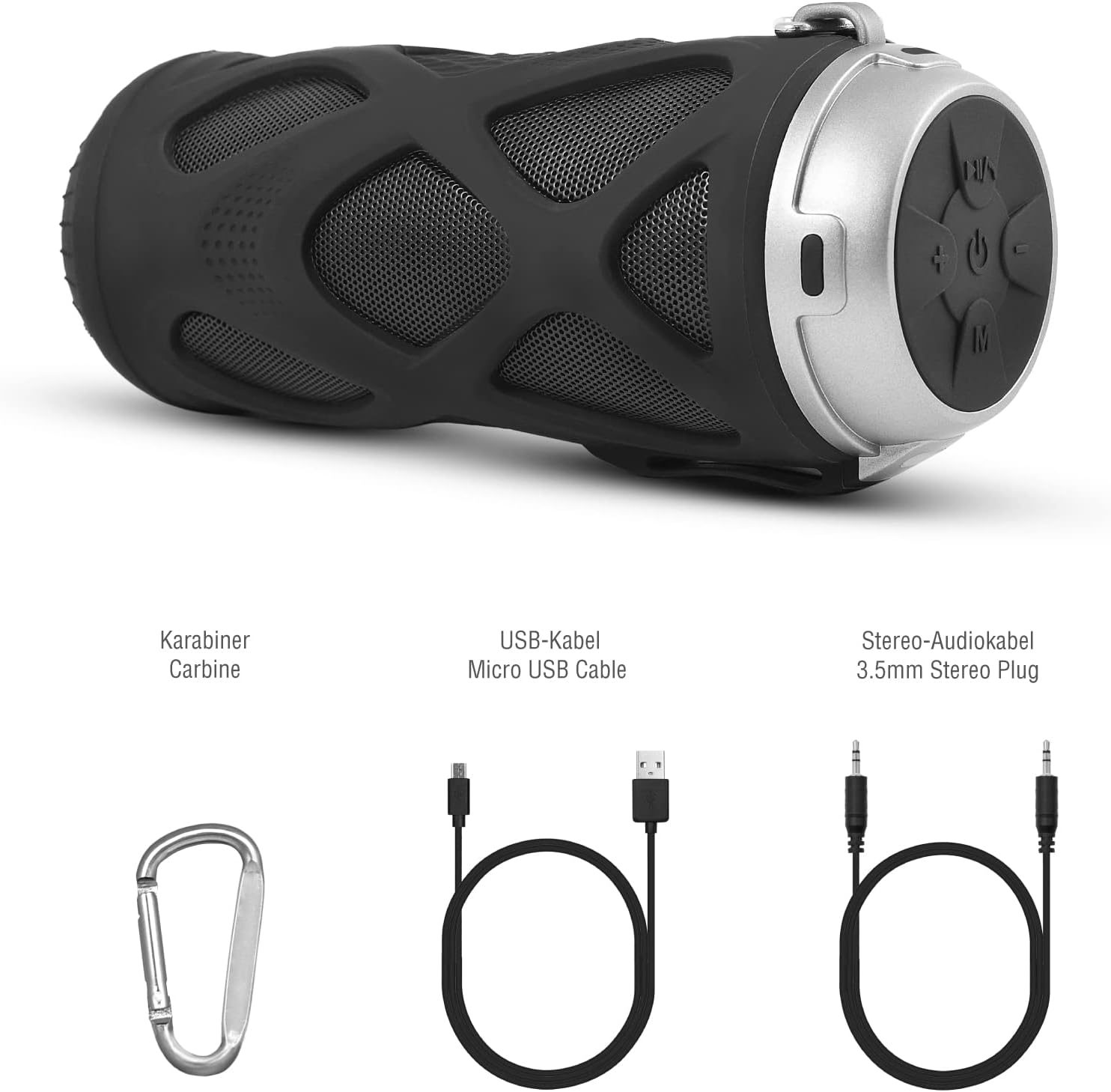
Rajah 3.1: Termasuk Aksesori
4. Produk Lebihview
4.1 Panel Kawalan

Rajah 4.1: Susun atur Panel Kawalan
- Butang Hidup/Mati: Menghidupkan atau mematikan pembesar suara.
- Play/Pause/Call/Voice Assistant Button: Controls music playback, answers/ends calls, and activates voice assistant (Siri/Google Assistant).
- Butang Kelantangan Kurang / Trek Sebelumnya: Mengurangkan kelantangan atau melangkau ke trek sebelumnya.
- Butang Naikkan Kelantangan / Trek Seterusnya: Meningkatkan kelantangan atau melangkau ke trek seterusnya.
- Butang Mod: Switches between Bluetooth, MicroSD/TF, Aux, and FM Radio modes.
4.2 Pelabuhan dan Penunjuk
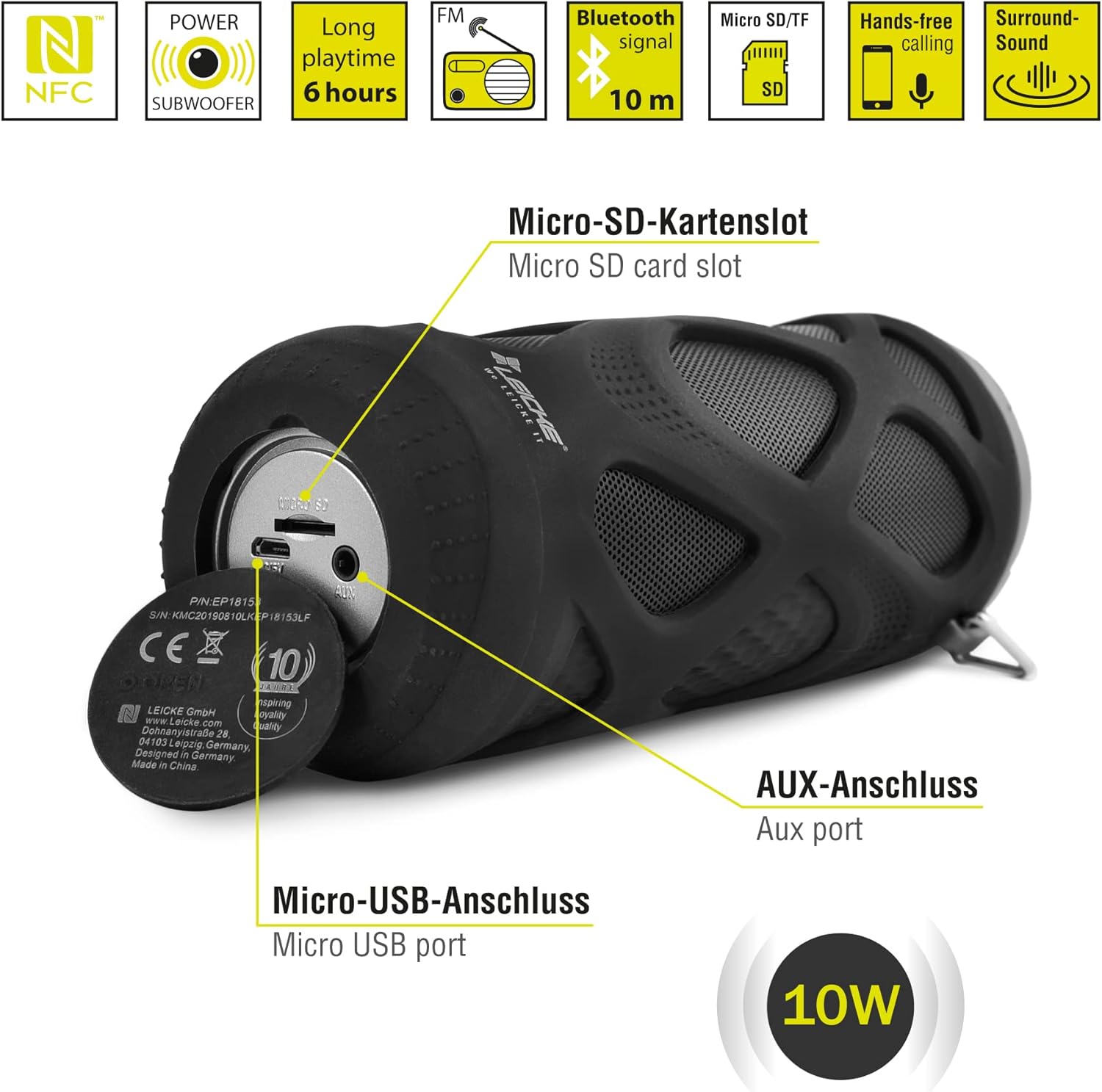
Rajah 4.2: Pelabuhan Berakhirview
- Micro SD/TF Card Slot: Insert a Micro SD or TF card for MP3 playback.
- Pelabuhan AUX: Connect external audio devices using the 3.5mm auxiliary cable.
- Port USB Mikro: Digunakan untuk mengecas pembesar suara.
- Penunjuk LED: (Typically near the charging port or control panel) Indicates power status, charging status, and Bluetooth pairing status.
5. Persediaan dan Operasi
5.1 Mengecas Speaker
- Connect the Micro USB end of the charging cable to the speaker's Micro USB port.
- Sambungkan hujung USB-A kepada penyesuai kuasa USB (tidak disertakan) atau port USB komputer.
- The LED indicator will typically show red while charging and turn off or change color when fully charged.
- Cas penuh mengambil masa kira-kira 2-3 jam dan menyediakan sehingga 6 jam masa bermain.
5.2 Menghidupkan/Mematikan
- Untuk Menghidupkan: Tekan dan tahan butang Butang hidup/mati for a few seconds until you hear an audible prompt and the LED indicator lights up.
- Untuk Mematikan: Tekan dan tahan butang Butang hidup/mati again for a few seconds until you hear an audible prompt and the LED indicator turns off.
5.3 Berpasangan Bluetooth
- Ensure the speaker is powered on and in Bluetooth mode (the LED indicator will typically flash blue). If not, press the Butang mod untuk beralih ke mod Bluetooth.
- Pada telefon pintar, tablet anda atau peranti berdaya Bluetooth lain, pergi ke tetapan Bluetooth.
- Cari untuk available devices and select "LEICKE DJ Roxxx" from the list.
- Once paired, the LED indicator will stop flashing and remain solid blue, and you will hear a confirmation sound.
- Pembesar suara akan menyambung semula secara automatik ke peranti pasangan terakhir apabila dihidupkan, jika peranti berada dalam julat dan Bluetooth didayakan.
5.4 MicroSD/TF Card Playback
- Insert a Micro SD or TF card (pre-loaded with MP3 audio files) into the Micro SD/TF card slot.
- The speaker will automatically switch to MicroSD/TF mode and begin playing music. If not, press the Butang mod to select MicroSD/TF mode.
- Gunakan Main/Jeda, Jilid Naik / Laluan Seterusnya, dan Turunkan Volume / Laluan Sebelumnya butang untuk mengawal main balik.
5.5 Input AUX
- Connect one end of the 3.5mm auxiliary cable to the speaker's AUX port.
- Connect the other end to the headphone jack of your audio device (e.g., MP3 player, laptop).
- The speaker will automatically switch to AUX mode. If not, press the Butang mod untuk memilih mod AUX.
- Volume can be controlled via the speaker or your connected device. Track control must be done from the connected device.
5.6 Operasi Radio FM
- Tekan ke Butang mod berulang kali sehingga anda memasuki mod Radio FM.
- Dalam mod FM, tekan butang Butang Main/Jeda once to automatically scan and save available FM stations. The speaker will then play the first saved station.
- Gunakan Jilid Naik / Laluan Seterusnya dan Turunkan Volume / Laluan Sebelumnya butang untuk bertukar antara stesen yang disimpan.
5.7 Fungsi Stereo Wayarles Sejati (TWS).
The LEICKE DJ Roxxx speaker supports TWS pairing, allowing you to connect two DJ Roxxx speakers for a stereo sound experience (20W total output).

Rajah 5.1: Pasangan Stereo Tanpa Wayar Sejati (TWS)
- Ensure both DJ Roxxx speakers are powered on and in Bluetooth pairing mode (LED flashing blue).
- Pada salah satu pembesar suara, tekan dan tahan Butang mod for a few seconds until you hear a pairing tone. The speakers will attempt to connect to each other.
- Once successfully paired, you will hear a confirmation sound, and the LED indicator on one speaker will flash blue (master), while the other will be solid blue (slave).
- Now, connect your device to the master speaker via Bluetooth as described in section 5.3. Both speakers will play audio in stereo.
6. Arahan Operasi
6.1 Main balik Muzik
- Main/Jeda: Tekan ke Butang Main/Jeda sekali.
- Lagu Seterusnya: Tekan dan tahan butang Butang Naik Kelantangan / Trek Seterusnya.
- Trek Sebelumnya: Tekan dan tahan butang Butang Turun Kelantangan / Trek Sebelumnya.
- Kelantangan: Tekan ke Butang Naik Kelantangan / Trek Seterusnya secara ringkas.
- Perlahankan suara: Tekan ke Butang Turun Kelantangan / Trek Sebelumnya secara ringkas.
6.2 Panggilan Bebas Tangan
- Jawab Panggilan: Apabila panggilan masuk, tekan butang Butang Main/Jeda/Panggil sekali.
- Tamatkan Panggilan: Semasa panggilan, tekan Butang Main/Jeda/Panggil sekali.
- Tolak Panggilan: Apabila panggilan masuk, tekan dan tahan Butang Main/Jeda/Panggil selama 2 saat.
- Dail Semula Nombor Terakhir: In standby mode, double-press the Butang Main/Jeda/Panggil.
6.3 Pengaktifan Pembantu Suara
- With one click, you can activate Siri (iOS) or Google Assistant (Android) on your connected smartphone. Press the Play/Pause/Call/Voice Assistant button sekali untuk mengaktifkan.
7. Penyelenggaraan
7.1 Pembersihan
- Wipe the speaker with a soft, dry, or slightly damp kain.
- Jangan gunakan pembersih yang melelas, alkohol atau pelarut kimia, kerana ini boleh merosakkan permukaan.
- Ensure all ports are dry before charging or connecting other devices.
7.2 Penyimpanan
- Simpan pembesar suara di tempat yang sejuk dan kering jauh dari cahaya matahari langsung dan suhu yang melampau.
- If storing for an extended period, charge the battery to about 50% every few months to maintain battery health.
7.3 Tahan Air
The LEICKE DJ Roxxx speaker is designed to be splashproof, offering protection against light rain or splashes. It is bukan kalis air and should not be submerged in water or exposed to heavy rain. Ensure the port cover is securely closed to maintain splash resistance.

Rajah 7.1: Splashproof Design for Outdoor Use
8. Penyelesaian masalah
| Masalah | Kemungkinan Punca | Penyelesaian |
|---|---|---|
| Speaker tidak dihidupkan. | Bateri lemah. | Cas pembesar suara selama sekurang-kurangnya 30 minit. |
| Tidak boleh berpasangan melalui Bluetooth. | Pembesar suara tidak dalam mod berpasangan; Bluetooth peranti dimatikan; terlalu jauh dari peranti. | Ensure speaker is in Bluetooth mode (flashing blue LED). Turn on Bluetooth on your device. Move speaker closer to device (within 10m). Forget previous pairings on your device and try again. |
| Tiada bunyi. | Volume too low; incorrect mode; device not playing. | Increase speaker and device volume. Ensure correct mode (Bluetooth, AUX, MicroSD). Check if audio is playing on your source device. |
| Penerimaan radio FM yang lemah. | Isyarat lemah; gangguan. | Move the speaker to a different location. Re-scan for stations. |
| Kad MicroSD tidak dikenali. | Card not inserted correctly; unsupported format; corrupted files. | Masukkan semula kad. Pastikan files adalah dalam format MP3. Cuba kad MicroSD yang lain. |
9. Spesifikasi
| Nama Model | DJ Roxxx |
| Nombor Model | B09P4Z5MN5 |
| Jenama | LEICKE |
| Teknologi Ketersambungan | Bluetooth |
| Teknologi Komunikasi Tanpa Wayar | Bluetooth |
| Jenis Pembesar Suara | Pembesar Suara Bluetooth Mudah Alih |
| Kuasa Output Pembesar Suara Maksimum | 10 Watt |
| Kaedah Kawalan | Butang Taktil |
| Ciri Khas | Integrated Microphone, Portable Wireless, MicroSD/TF Player, Aux Input, FM Radio, Hands-Free Calling, Voice Assistant Support, TWS Function, Splashproof |
| Sumber Kuasa | Kabel Elektrik (Bateri Boleh Dicas Semula) |
| Dimensi Produk (L x W x H) | 7 x 7 x 18 cm |
| Berat Barang | 400 gram |
| Penggunaan yang Disyorkan | Untuk telefon pintar atau tablet |
| Peranti Serasi | Komputer riba, telefon pintar |
| Adakah Kalis Air | False (Splashproof only) |
10. Waranti dan Sokongan
LEICKE products come with a standard manufacturer's warranty. For detailed warranty information, please refer to the warranty card included in your package or visit the official LEICKE webtapak.
If you encounter any issues or have questions regarding your LEICKE DJ Roxxx speaker, please contact LEICKE customer support:
- Pengeluar: LEICKE
- Penjual: LEICKE - Leipzig (as per Amazon listing)
- Sokongan: Refer to the official LEICKE website or contact information provided with your purchase for the most up-to-date support channels.