
Elgin M4.1
Elgin Rebel True Wireless Earbuds M4.1 Instruction Manual
Model: M4.1 | Brand: Elgin
pengenalan
This manual provides instructions for the proper use and maintenance of your Elgin Rebel True Wireless Earbuds. These earbuds are designed to offer both audio playback and hearing protection in noisy environments.
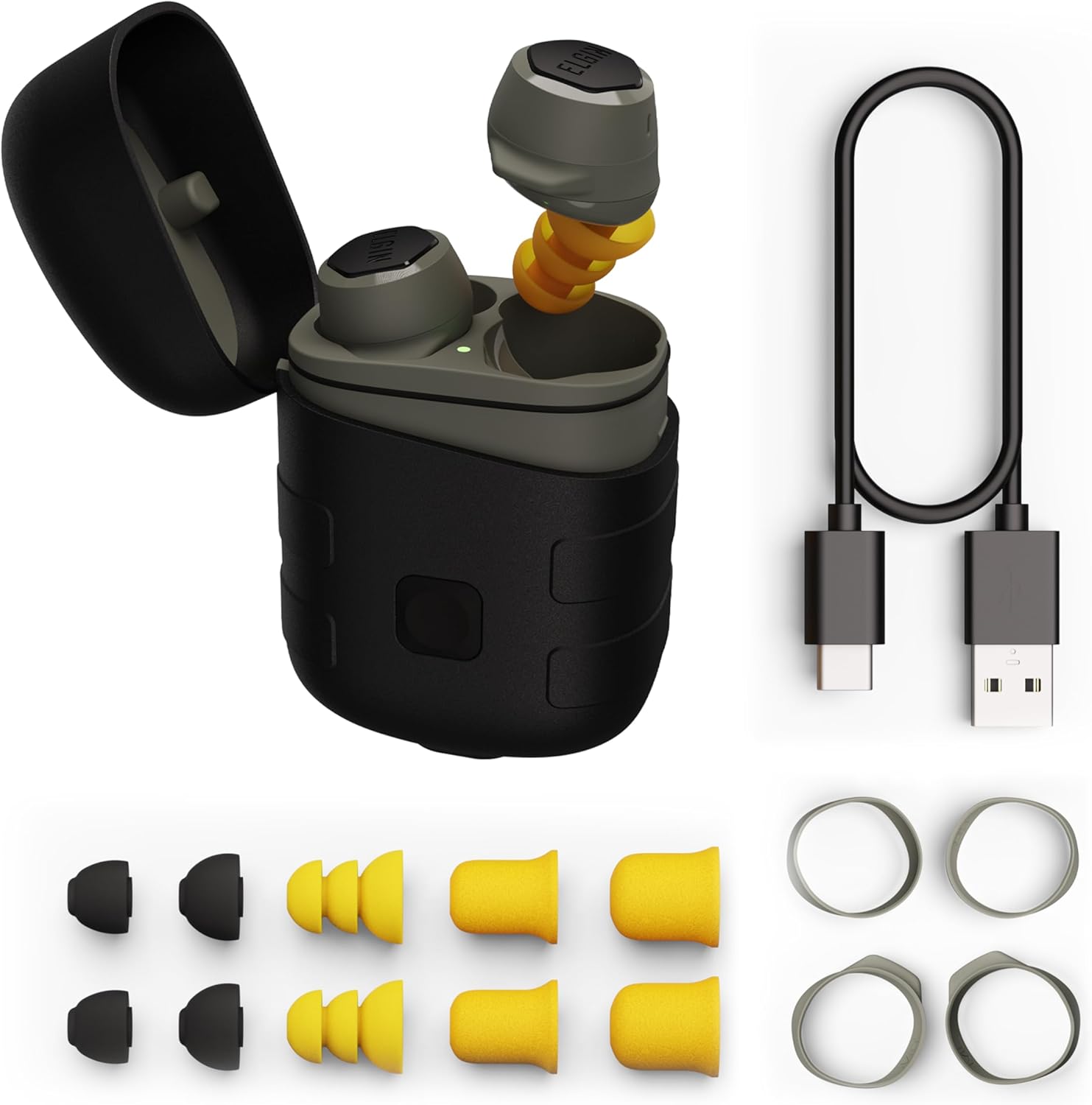
Image: Elgin Rebel True Wireless Earbuds, charging case, ear tips, ear hooks, and charging cable.
Ciri-ciri utama termasuk:
- OSHA Compliant Hearing Protection: ANSI-certified Noise Reduction Rating (NRR) of 25 decibels.
- Kesambungan Bluetooth 5.1: For wireless audio and calls.
- Jangka Hayat Bateri: Up to 12 hours of continuous playback, with an additional 50 hours from the charging case.
- Lampu suluh LED bersepadu: Built into the charging case with three brightness levels.
- Rintangan Air dan Habuk IP65: Protection against dust, sweat, and rain.
Apa yang Termasuk
Sahkan bahawa semua item terdapat dalam pakej anda:
- Elgin Rebel True Wireless Earbuds (Left and Right)
- Wireless Charging Case with Integrated LED Flashlight
- Kabel Pengecas USB-C
- Pelbagai Saiz Petua Telinga:
- 4 pairs of Noise Isolating Silicone Earplug Ear Tips
- 2 pairs of High-Density Foam Earplug Ear Tips
- 2 pairs of Comfort Ear Tips
- 3 pairs of Earhooks (Small, Medium, Large)
- Manual Pengguna (Dokumen ini)

Image: Contents of the Elgin Rebel Earbuds package.
Bermula (Persediaan)
1. Mengecas Fon Telinga dan Sarung
Sebelum penggunaan pertama, cas sepenuhnya fon telinga dan bekas pengecas.
- Letakkan fon telinga ke dalam slot masing-masing dalam bekas pengecas. Pastikan ia diletakkan dengan betul.
- Sambungkan kabel pengecas USB-C ke port pengecasan pada sarung dan hujung satu lagi ke sumber kuasa USB (cth, penyesuai dinding, port USB komputer).
- The LED indicator on the case will show charging status. A full charge typically takes approximately 2 hours.
The earbuds provide up to 12 hours of audio playback on a single charge. The charging case holds enough power for up to 50 hours of additional playtime.

Image: Earbuds in charging case.
2. Selecting and Installing Ear Tips and Ear Hooks
Proper fit is crucial for both sound quality and effective noise reduction. Experiment with the included ear tips and ear hooks to find the most comfortable and secure fit.
- Petua Telinga: Choose from silicone or foam tips. Foam tips generally offer superior noise isolation. Gently compress foam tips before inserting them into your ear canal for a better seal.
- Cangkuk Telinga: Attach the ear hooks to the earbuds for added stability, especially during physical activity. Select the size that best fits your ear's contours.
3. Berpasangan dengan Peranti Anda
Fon telinga menggunakan Bluetooth 5.1 untuk sambungan wayarles.
- Buka bekas pengecas. Fon telinga akan memasuki mod berpasangan secara automatik, ditunjukkan oleh LED berkelip pada fon telinga.
- Pada peranti anda (telefon pintar, tablet, dll.), pergi ke tetapan Bluetooth.
- Select "Elgin Rebel" from the list of available devices.
- Once connected, the LED on the earbuds will stop flashing.
The earbuds have a wireless range of up to 50 feet.

Image: Bluetooth pairing screen on a smartphone.
Operasi
1. Hidupkan/Mati Kuasa
- Hidupkan kuasa: Open the charging case, and the earbuds will automatically power on and attempt to connect to the last paired device.
- Matikan: Letakkan fon telinga kembali ke dalam bekas pengecasan dan tutup penutupnya. Mereka akan dimatikan secara automatik dan mula mengecas.
2. Kawalan Sentuh
The earbuds feature touch-sensitive controls for various functions. Specific actions may vary slightly depending on your device and operating system.
| Tindakan | Fungsi |
|---|---|
| Ketik Tunggal (Earbud Kiri/Kanan) | Play/Pause Audio, Answer/End Call |
| Dwiketik (Earbud Kanan) | Trek Seterusnya |
| Dwiketik (Earbud Kiri) | Trek Sebelumnya |
| Ketik Tiga Kali (Earbud Kiri/Kanan) | Aktifkan Pembantu Suara (Siri, Pembantu Google) |
| Tekan dan Tahan (Fon Telinga Kiri/Kanan) | Tolak Panggilan |
Nota: Kawalan kelantangan biasanya diuruskan terus daripada peranti anda yang disambungkan.
3. Using the Integrated LED Flashlight
The charging case includes a built-in LED flashlight.
- To activate the flashlight, locate the button on the charging case.
- Press the button to cycle through three brightness levels.
- Press and hold the button to turn the flashlight off.

Image: Integrated LED flashlight on the charging case.
4. Membuat dan Menerima Panggilan
The earbuds feature a noise-isolating microphone for clear communication.
- Jawab Panggilan: Ketik sekali sama ada fon telinga.
- Tamatkan Panggilan: Ketik sekali sama ada fon telinga.
- Tolak Panggilan: Tekan dan tahan salah satu fon telinga.
5. Main balik Audio
Once paired, audio from your device will stream to the earbuds. Custom-tuned speaker drivers are designed to provide clear sound for music, podcasts, and audiobooks.
Penyelenggaraan
1. Pembersihan
Pembersihan berkala membantu mengekalkan prestasi dan kebersihan.
- Lap fon telinga dan bekas pengecas dengan kain lembut, kering dan tidak berbulu.
- Remove ear tips and clean them separately with mild soap and water if necessary. Ensure they are completely dry before reattaching.
- Jangan gunakan pembersih atau pelarut yang melelas.
2. Penyimpanan
Apabila tidak digunakan, simpan fon telinga dalam bekas pengecasnya untuk melindunginya dan memastikan ia dicas.
3. Rintangan Air dan Debu (IP65)
The Elgin Rebel earbuds are rated IP65, meaning they are protected against dust ingress and low-pressure water jets from any direction. This makes them suitable for use in environments with dust, sweat, and light rain.
- Jangan tenggelamkan fon telinga dalam air.
- Ensure the charging port cover (if applicable) is securely closed to maintain water resistance.
Image: Elgin Rebel charging case demonstrating IP65 water resistance.
Menyelesaikan masalah
If you encounter issues with your Elgin Rebel earbuds, refer to the following common problems and solutions:
| Masalah | Penyelesaian yang Mungkin |
|---|---|
| Fon telinga tidak berpasangan atau bersambung |
|
| Tiada suara atau kelantangan rendah |
|
| Fon telinga tidak dicas |
|
| Satu fon telinga tiada bunyi |
|
Spesifikasi
| Ciri | Perincian |
|---|---|
| Nama Model | Rebel (M4.1) |
| Penilaian Pengurangan Bunyi (NRR) | 25 dB |
| Versi Bluetooth | 5.1 |
| Julat Bluetooth | Sehingga 50 kaki |
| Hayat Bateri Earbud | Sehingga 12 jam |
| Hayat Bateri Kes Mengecas | Up to 50 hours (additional playtime) |
| Masa Mengecas | lebih kurang 2 jam |
| Tahap Ketahanan Air | IP65 (Tahan Habuk dan Air) |
| Respons Kekerapan | 20000 Hz |
| Sensitiviti | 101 dB |
| Impedans | 32 Ohm |
| Jenis Kawalan | Touch, Media Control, Voice Control, Call Control |
| bahan | Plastik, Silikon |
| Berat Barang | 3 Ounces (earbuds) |
| Dimensi Produk | 2.75 x 1.88 x 1.25 inci (bekas pengecas) |
| UPC | 850032813105 |
Maklumat Waranti
The Elgin Rebel True Wireless Earbuds are backed by a Waranti pengilang selama 1 tahun dari tarikh pembelian. Waranti ini melindungi kecacatan pada bahan dan mutu kerja di bawah penggunaan biasa.
Waranti tidak meliputi:
- Kerosakan yang disebabkan oleh salah guna, penyalahgunaan, kemalangan atau pengabaian.
- Haus dan lusuh biasa.
- Pembaikan atau pengubahsuaian yang tidak dibenarkan.
Sila simpan bukti pembelian anda untuk tuntutan waranti.
Sokongan Pelanggan
For further assistance, technical support, or warranty inquiries, please contact Elgin customer service. Refer to the contact information provided with your product packaging or visit the official Elgin webtapak.