
pengenalan
This manual provides instructions for the safe and efficient operation of your EverBrite 1500 Lumen LED Work Light. Please read this manual thoroughly before use and retain it for future reference. This portable, rechargeable work light is designed for various applications, including automotive repair, job site lighting, and outdoor activities.
Maklumat Keselamatan Penting
- Do not look directly into the LED light when it is on. The intense brightness can cause temporary vision impairment.
- Keep the work light out of reach of children.
- Do not attempt to disassemble, modify, or repair the light. Refer all servicing to qualified personnel.
- Use only the provided USB cable for charging. Using unauthorized chargers may damage the battery or the device.
- Avoid exposing the light to extreme temperatures, direct sunlight for prolonged periods, or open flames.
- Ensure the charging port cover is securely closed when operating the light in humid or wet environments to maintain its waterproof rating.
Produk Selesaiview
Komponen
The EverBrite 1500 Lumen LED Work Light features a durable aluminum housing, an adjustable bracket, and a built-in rechargeable battery. Familiarize yourself with the key components:
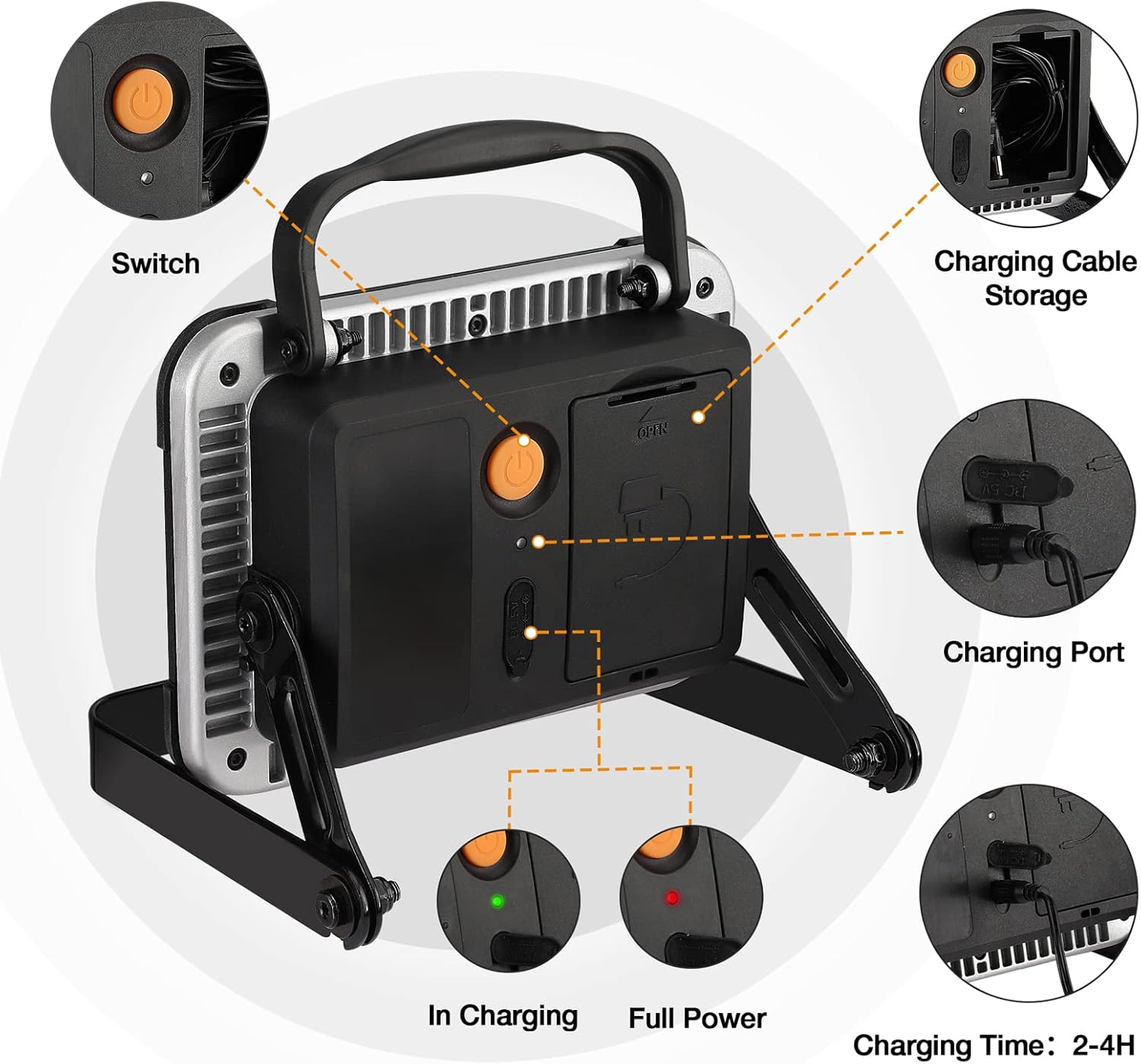
This image highlights key components: the power switch, charging port, charging cable storage compartment, and battery status indicators.
Dimensi
Understanding the product's dimensions can assist in placement and storage:

This image illustrates the physical dimensions of the work light, including its length, width, and height for reference.
Persediaan
Pengecasan Awal
Before using your EverBrite work light for the first time, ensure it is fully charged. This optimizes battery performance and lifespan.
- Locate the charging port cover on the back of the unit and open it.
- Sambungkan kabel pengecas USB yang disediakan ke port pengecasan.
- Plug the other end of the USB cable into a suitable USB power source (e.g., wall adapter, computer USB port).
- The charging indicator light will illuminate during charging. Once fully charged, the indicator may change color or turn off, depending on the model.

Satu jarak dekat view of the charging port with the USB cable connected, demonstrating how to charge the device.
Melaraskan Kurungan
The integrated adjustable bracket allows you to position the light at various angles for optimal illumination.
- Grasp the work light and the bracket.
- Gently loosen the side knobs on the bracket (if applicable) or apply slight pressure to adjust the angle.
- Position the light to your desired angle.
- Tighten the side knobs (if applicable) to secure the light in place.
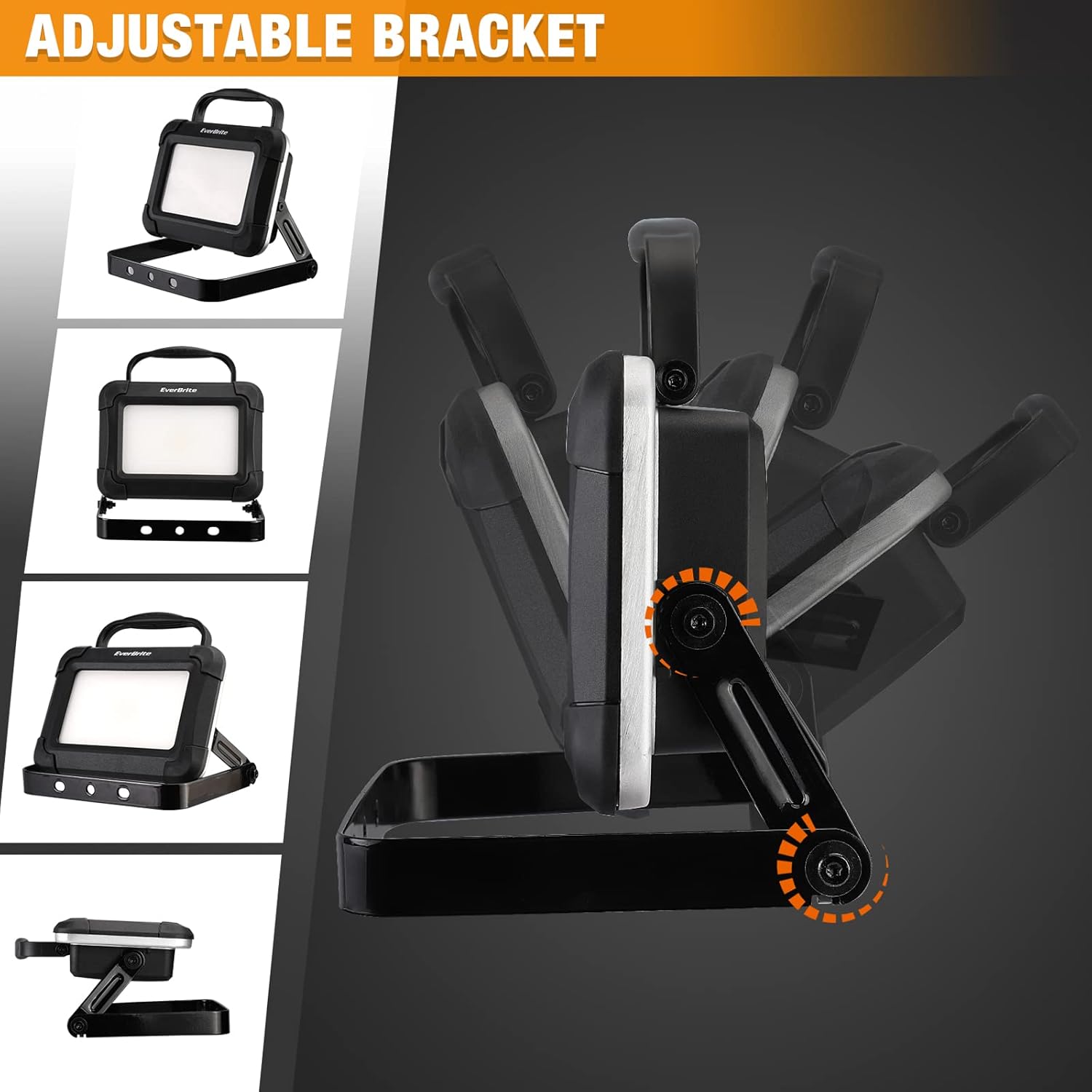
This image shows the work light's adjustable bracket, demonstrating its range of motion for directing light.
Pilihan Pemasangan
The work light can be used freestanding or mounted to various surfaces.
- Berdiri bebas: Place the light on any stable, flat surface using its adjustable bracket.
- Dipasang: The bracket includes holes that can be used to mount the light to a wall or other structure. Ensure appropriate fasteners are used for the mounting surface and that the light is securely attached.

Various mounting configurations are shown, including placing the light on a surface, hanging it, or attaching it to a wall.
Arahan Operasi
Kuasa Hidup/Mati dan Pemilihan Mod
The work light features a simple one-button operation for power and brightness modes.
- Cari suis kuasa di bahagian belakang unit.
- Press the power switch once to turn the light on to its mod kecerahan tinggi (1500 Lumens).
- Press the power switch a second time to switch to low brightness mode.
- Press the power switch a third time to turn the light off.

This image illustrates the powerful 1500 Lumen output of the EverBrite work light.
Penunjuk Status Bateri
The LED indicators on the back of the unit provide information about the battery's charge status:
- A lampu hijau indicates that the unit is currently charging.
- A lampu merah indicates that the battery is low and requires recharging.
Penyelenggaraan
Pembersihan
To maintain the appearance and functionality of your work light:
- Lap bahagian luar lampu dengan kain lembut,amp kain.
- Jangan gunakan pembersih yang kasar, pelarut atau bahan kimia yang keras, kerana ini boleh merosakkan kemasan atau komponen dalaman.
Penyimpanan
Proper storage helps prolong the life of your work light and its battery:
- Store the work light in a cool, dry place away from direct sunlight and extreme temperatures.
- For long-term storage, ensure the battery is partially charged (around 50%) and recharge it every 3-6 months to prevent deep discharge and maintain battery health.
Penyimpanan Kabel
The work light features a convenient integrated compartment for storing the USB charging cable.

An image showing the open cable storage compartment on the back of the work light, with the USB cable neatly stored inside.
To use, open the compartment cover, retrieve the cable, and after charging, neatly coil the cable and place it back into the compartment, ensuring the cover is securely closed.
Menyelesaikan masalah
If you encounter issues with your EverBrite work light, refer to the following common problems and solutions:
- Lampu tidak menyala:
- Ensure the battery is charged. Connect the light to a power source and check if the charging indicator illuminates.
- Press the power switch firmly.
- Cahaya tidak mengecas:
- Verify the USB cable is securely connected to both the light and the power source.
- Try using a different USB cable or a different USB power adapter to rule out faulty accessories.
- Pastikan port pengecasan bersih dan bebas daripada serpihan.
- Kecerahan berkurangan atau masa operasi yang singkat:
- The battery may be low. Fully recharge the unit.
- Battery performance can decrease over time with repeated charging cycles.
Spesifikasi
| Ciri | Perincian |
|---|---|
| Jenama | EverBrite |
| Model | Lampu Kerja LED 1500 Lumen |
| Output Cahaya | 1500 Lumen (Maksimum) |
| Jenis Sumber Cahaya | LED |
| Sumber Kuasa | Battery Powered (Internal Rechargeable) |
| Bateri Termasuk | Ya (Dalaman) |
| bahan | aluminium |
| bentuk | segi empat tepat |
| Jenis Pemasangan | Pemasangan Kurungan |
| Berat Barang | 2.49 paun |
| Dimensi Pakej | 8.11 x 6.61 x 3.66 inci |
Waranti dan Sokongan
Maklumat Waranti
This EverBrite product is covered by a limited warranty. For specific warranty terms and conditions, including duration and coverage details, please refer to any documentation included with your purchase. Retain your proof of purchase for warranty claims.
Sokongan Pelanggan
For technical assistance, troubleshooting guidance beyond this manual, or to inquire about warranty claims, please contact EverBrite customer support. You can typically find contact details on the official EverBrite webtapak atau melalui peruncit tempat produk itu dibeli.
Lawati EverBrite Store untuk mendapatkan maklumat lanjut dan sumber sokongan.