
1. Pengenalan
Thank you for choosing the UNIWEIGH Digital Pocket Scale P-200. This precision instrument is designed for accurate weighing of small items, offering a maximum capacity of 200 grams with a readability of 0.01 grams. Its compact and durable design makes it ideal for various applications, including measuring jewelry, coins, spices, and other small objects. Please read this manual carefully to ensure proper use and maintenance of your scale.
2. Produk Lebihview
The UNIWEIGH P-200 Digital Pocket Scale features a robust design with multiple functions to enhance your weighing experience.
Ciri-ciri Utama:
- Reka Bentuk Mudah Alih: Rubberized, shock-resistant clamshell design for durability and easy transport.
- Ketepatan Tinggi: Accurate readings from 0.03g to 200g with 0.01g readability.
- Pelbagai Mod Timbang: Supports g, oz, ozt, dwt, ct, gn.
- Fungsi Tare: Easily zero out the weight of containers.
- Paparan LCD dengan lampu latar: Clear and easy-to-read display in all lighting conditions.
- Matikan Auto: Conserves battery life with a 180-second automatic shut-off.
- Overload & Low Battery Indication: Provides alerts for optimal performance.
- Easy Calibration: Includes a 50g calibration weight for user calibration.
Komponen Produk:
The scale comes with the main unit, a protective flip case, a 50g calibration weight, and two AAA batteries.

Image: The UNIWEIGH Digital Pocket Scale P-200, shown open with its stainless steel weighing platform, LCD display, control buttons, and a 50g calibration weight. Two AAA batteries are also visible.

Image: A collage highlighting the scale's features: a protective flip case, magnetic design for secure closure, an easy-to-clean stainless steel platform, a clear LCD display, and user-friendly control buttons.
Video: An official product video demonstrating the UNIWEIGH Digital Pocket Scale, showcasing ciri dan kemudahan penggunaannya.
3. Persediaan
3.1 Pemasangan Bateri
- Open the battery compartment located on the underside of the scale.
- Masukkan dua bateri AAA, pastikan kekutuban (+/-) betul.
- Tutup penutup petak bateri dengan selamat.
3.2 Penggunaan Awal
- Place the scale on a flat, stable, and vibration-free surface.
- Press the 'ON/OFF' button to turn on the scale. The LCD display will light up and show '0.00g' when ready for use.
4. Arahan Operasi
4.1 Penimbangan Barang
- Ensure the scale is turned on and displays '0.00g'.
- Gently place the item(s) to be weighed onto the center of the stainless steel platform.
- Baca berat yang dipaparkan pada skrin LCD.
4.2 Fungsi Tara
The Tare function allows you to subtract the weight of a container, so you only measure the net weight of the contents.
- Letakkan bekas kosong di atas platform penimbang.
- Tekan butang 'TARE'. Paparan akan ditetapkan semula kepada '0.00g'.
- Add the items you wish to weigh into the container. The display will show only the weight of the items.
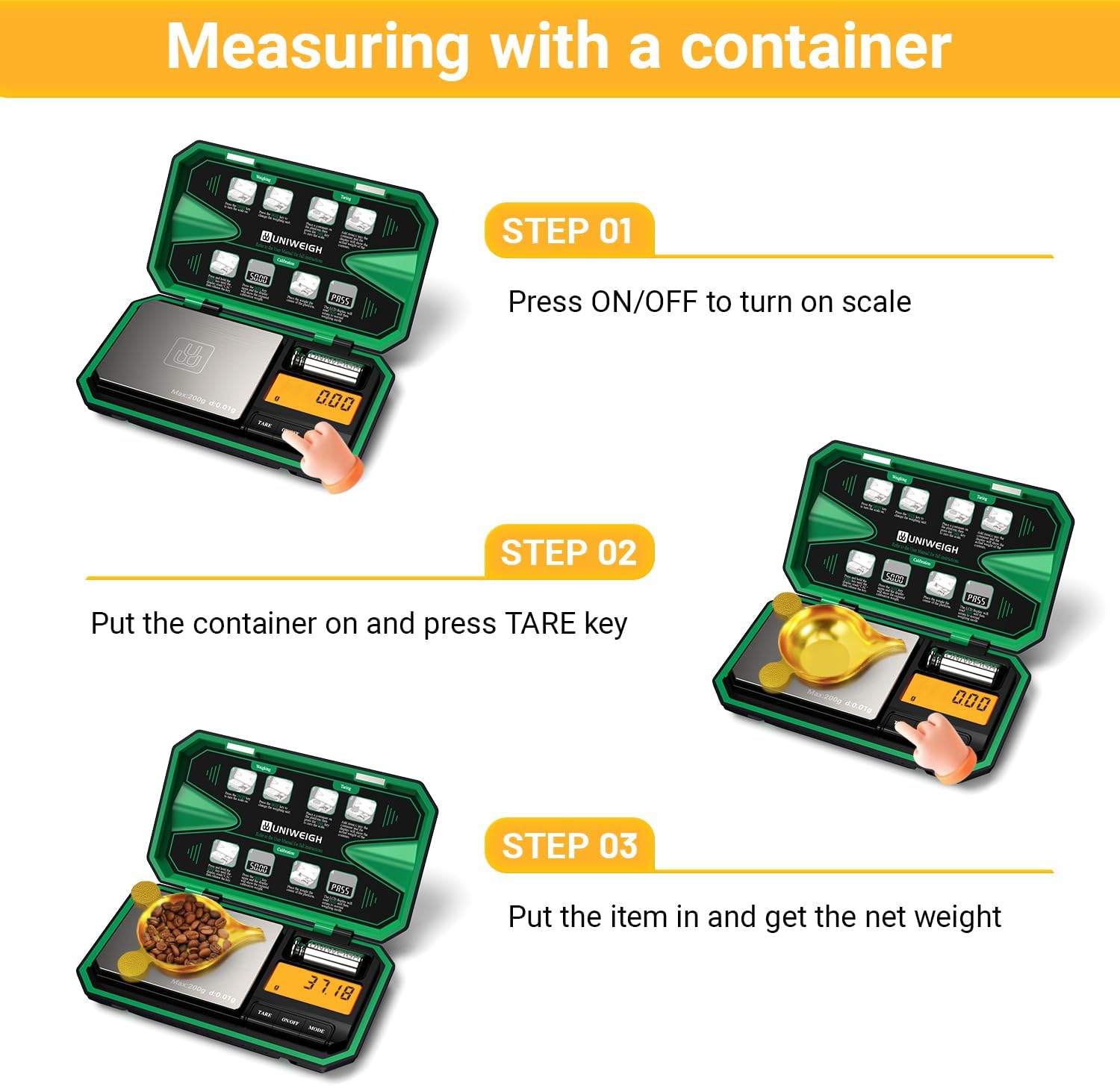
Image: A visual guide demonstrating the three steps for measuring with a container: 1. Turn on the scale, 2. Place the container and press TARE, 3. Add items to get the net weight.
4.3 Penukaran Unit
The scale supports 6 different weighing units.
- With the scale on, press the 'MODE' button repeatedly to cycle through the available units: g (grams), oz (ounces), ozt (troy ounces), dwt (pennyweights), ct (carats), gn (grains).
- Select the desired unit before weighing or convert the displayed weight after weighing.

Image: The scale's LCD display cycling through various measurement units, including grams, ounces, troy ounces, pennyweights, carats, and grains, illustrating the unit conversion feature.
4.4 Penentukuran
Calibration ensures the accuracy of your scale. It is recommended to calibrate periodically or if you suspect inaccurate readings.
- Turn the scale ON and wait until '0.00g' is displayed.
- Press and HOLD the 'MODE' button until 'CAL' is displayed, then release the button.
- Press the 'MODE' button again. The display will show the required calibration weight (e.g., '50.00g').
- Place the included 50g calibration weight gently onto the center of the platform.
- The display will show 'PASS' and then return to normal weighing mode, indicating successful calibration.
Video: A demonstration of the digital milligram scale, including its calibration process and use for precise measurements.
5. Penyelenggaraan
5.1 Pembersihan
- Wipe the stainless steel platform with a soft, damp kain. Jangan gunakan pembersih yang kasar atau rendam kerak di dalam air.
- Keep the scale clean and dry to ensure accurate readings and prolong its lifespan.
5.2 Penyimpanan
- Store the scale in its protective clamshell case when not in use to prevent damage.
- Avoid storing the scale in extreme temperatures, high humidity, or areas with strong vibrations.
- Tanggalkan bateri jika penimbang tidak akan digunakan untuk tempoh yang lama bagi mengelakkan kebocoran.
6. Penyelesaian masalah
If you encounter any issues with your UNIWEIGH Digital Pocket Scale, please refer to the following common problems and solutions:
| Masalah | Kemungkinan Punca | Penyelesaian |
|---|---|---|
| Display shows 'O-Ld' | Lebihan beban | Remove the item immediately. The weight exceeds the maximum capacity (200g). |
| Paparan menunjukkan 'Lo' | Bateri Rendah | Ganti bateri AAA. |
| Bacaan tidak tepat | Needs calibration, unstable surface, or external interference. | Perform calibration (Section 4.4). Ensure the scale is on a stable, flat surface. Avoid drafts or vibrations. |
| Skala tidak dihidupkan | No batteries, incorrect battery installation, or faulty batteries. | Check battery installation and polarity. Replace batteries if necessary. |
7. Spesifikasi
- Jenama: UNIWEIGH
- Nombor Model: P-200
- kapasiti: 200 Gram
- Kebolehbacaan: 0.01 Gram
- Unit Penimbang: g, oz, ozt, dwt, ct, gn
- Jenis Paparan: LCD bercahaya belakang
- Kuasa: 2 x Bateri AAA (termasuk)
- Bahan: Acrylonitrile Butadiene Styrene, Rubber, Stainless Steel
- Dimensi Produk: 5.71 x 3.43 x 0.94 inci
- Berat Barang: 225 Gram (lebih kurang 7.9 auns)
- Ciri Khas: Auto Shut Off, Tare Function, Precision Balanced, Portable, Easy Calibration
8. Waranti dan Sokongan
UNIWEIGH is committed to providing quality products and customer satisfaction. If you encounter any problems with your Digital Pocket Scale P-200, please contact our customer support team. We are dedicated to providing timely solutions and assistance.
For support, please refer to the contact information provided with your product packaging or visit the official UNIWEIGH webtapak.