
1. Pengenalan
Thank you for choosing the Keychron V1 Wired Custom Mechanical Keyboard. This keyboard features a 75% layout, QMK/VIA programmability, and hot-swappable Keychron K Pro Red switches, offering a highly customizable and comfortable typing experience. It is compatible with Mac, Windows, and Linux operating systems.
2. Kandungan Pakej
Sebelum anda memulakan, sila pastikan semua item terdapat dalam pakej anda:
- 1 x Fully Assembled Keychron V1 Keyboard
- 1 x Kabel Jenis-C ke Jenis-C
- 1 x Penyesuai Jenis-A ke Jenis-C
- 1 x Penarik Suis
- 1 x Penarik Papan Kekunci
- 1 x Pemutar skru
- 1 x Kunci Hex
- Additional Keycaps for Windows/macOS

Image: Contents of the Keychron V1 package.
3. Persediaan
Follow these steps to set up your Keychron V1 keyboard:
- Sambungkan Papan Kekunci: Use the provided USB Type-C to Type-C cable (or Type-A to Type-C adapter) to connect the keyboard to your computer.
- Select Operating System: Locate the system toggle switch on the side of the keyboard. Slide it to the appropriate position for your operating system (Mac or Windows).

Image: System toggle switch for Mac and Windows compatibility.

Image: USB-C cable connection.
The keyboard is designed with an ergonomic angle for comfortable typing. You can adjust the feet on the underside of the keyboard to find your preferred typing angle.

Image: Adjustable feet for ergonomic angle.
4. Mengendalikan Papan Kekunci
The Keychron V1 offers extensive customization and features for an enhanced user experience.
4.1 Kebolehprograman QMK/VIA
The keyboard supports QMK and VIA software, allowing you to remap keys, create macros, and customize lighting effects. Download the VIA software from the official Keychron website for full customization. The open-source firmware provides endless possibilities for keyboard layouts and shortcuts.

Image: VIA software interface for customization.
4.2 Hot-swappable Switches
The Keychron V1 comes with pre-lubed Keychron K Pro Red linear switches, offering a smooth and responsive typing feel. The hot-swappable sockets allow you to easily change switches with almost all 3-pin and 5-pin MX mechanical switches on the market (e.g., Cherry, Gateron, Kailh, Panda) without soldering.
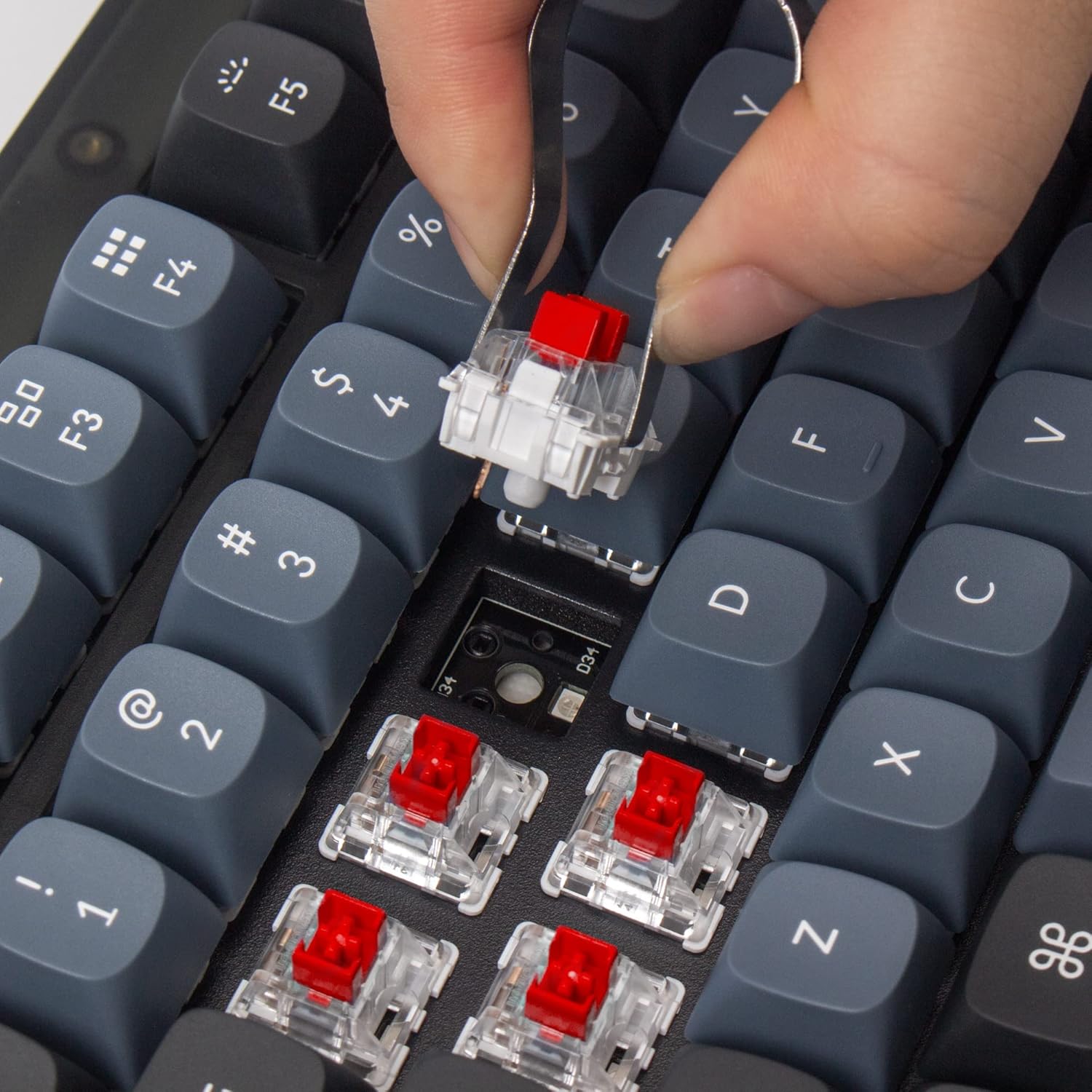
Image: Removing a hot-swappable switch.
4.3 Double-shot PBT Keycaps
The keyboard features durable OSA profile double-shot PBT keycaps. These keycaps provide a comfortable feel and excellent oil resistance for long-term use.

Image: Double-shot PBT keycaps.
4.4 Lampu latar RGB
The V1 includes south-facing RGB backlighting, designed to better illuminate the keyboard from the typist’s angle and prevent interference when using Cherry-profile keycaps. Various lighting effects can be customized via the VIA software.

Image: RGB backlighting on switches.
4.5 Produk Selesaiview Video
Video: Penggunaview highlighting the features and benefits of the Keychron V1 keyboard, including its customizable RGB lighting and mechanical key switches.
5. Penyelenggaraan
Penyelenggaraan yang betul memastikan ketahanan dan prestasi papan kekunci anda.
5.1 Pembersihan
Regularly clean your keyboard using a soft brush or compressed air to remove dust and debris from between the keycaps. For deeper cleaning, keycaps can be removed using the provided keycap puller.
5.2 Penggantian Suis dan Kap Kekunci
Thanks to the hot-swappable design, switches can be easily replaced without soldering. Use the switch puller to gently remove switches. Similarly, keycaps can be removed with the keycap puller for replacement or cleaning.

Imej: Meletup view of Keychron V1 components for easy assembly/disassembly.
6. Penyelesaian masalah
If you encounter issues with your Keychron V1 keyboard, refer to the following common solutions:
- VIA Perisian Tidak Mengesan Papan Kekunci: If the VIA software does not detect your keyboard, you may need to manually load the appropriate .json file for the Keychron V1. Refer to the Keychron website for detailed instructions on loading firmware and keymap files.
- USB Cable Connectivity Issues: Ensure the USB-C cable is securely connected to both the keyboard and your computer. Try using a different USB port or cable to rule out cable or port malfunctions.
- Incorrect Key Layout: Verify that the operating system toggle switch on the side of the keyboard is set to the correct position (Mac or Windows) for your system.
7. Spesifikasi
| Jenama | Keychron |
| Nombor Model | V1-A1 |
| Teknologi Ketersambungan | USB-C (Berwayar) |
| Susun atur papan kekunci | 75% Reka Letak (82 Kekunci) |
| Jenis Suis | Keychron K Pro Red (Linear) |
| Bahan Kekunci | PBT dua pukulan (OSA Profile) |
| Pencahayaan latar | RGB (Menghadap ke Selatan) |
| Kebolehprograman | Sokongan QMK/VIA |
| Sistem Operasi yang Serasi | macOS, Windows, Linux |
| Dimensi Produk | 12.93"L x 5.85"W x 1.02"H |
8. Waranti dan Sokongan
Untuk maklumat jaminan, sokongan teknikal atau bantuan lanjut, sila lawati laman web rasmi Keychron. website or contact Keychron customer service directly. Keep your purchase receipt for warranty claims.