
pengenalan
Thank you for choosing the Mcdodo MC-7050 20W PD GoPower MagSafe 5000mAh Power Bank. This portable charger is designed to provide convenient and efficient power to your devices, featuring both wired USB-C Power Delivery and MagSafe-compatible wireless charging. Please read this manual carefully before use to ensure proper operation and to maximize the lifespan of your device.
Maklumat Keselamatan
- Jangan dedahkan bank kuasa kepada suhu yang melampau, cahaya matahari langsung atau api.
- Elakkan daripada menjatuhkan, menjejaskan atau membuka peranti.
- Jauhkan daripada air dan cecair lain.
- Jangan gunakan jika bank kuasa rosak atau bengkak.
- Jauhkan daripada kanak-kanak.
- Gunakan hanya kabel pengecasan dan penyesuai yang diperakui.
- Lupuskan bank kuasa secara bertanggungjawab mengikut peraturan tempatan.
Kandungan Pakej
Sila semak pakej untuk item berikut:
- Mcdodo MC-7050 20W PD GoPower MagSafe 5000mAh Power Bank
- Kabel Pengecasan USB-C ke USB-C
- Manual Pengguna
Produk Selesaiview
Familiarize yourself with the components of your Mcdodo MC-7050 Power Bank:

Image: Mcdodo MC-7050 Power Bank shown with its integrated kickstand extended, displaying the MagSafe charging area on the front. This view highlights the compact design and the stand feature for convenient use.
- MagSafe Wireless Charging Area: Central circular area for magnetic wireless charging.
- Butang Kuasa: Mengaktifkan bank kuasa dan memeriksa tahap bateri.
- Penunjuk LED: Paparkan baki kapasiti bateri.
- Port USB-C: Used for both charging the power bank and charging other devices.
- Kickstand Bersepadu: Allows the power bank to stand upright, useful for viewing content while charging wirelessly.

Imej: Bersudut view of the Mcdodo MC-7050 Power Bank, clearly showing the USB-C input/output port on the side and the power button located near the top edge. The kickstand is also visible in this perspective.
Persediaan
Pengecasan Awal Bank Kuasa
- Sambungkan kabel USB-C yang disediakan ke port USB-C pada power bank.
- Connect the other end of the USB-C cable to a compatible USB power adapter (not included). For optimal charging speed, use a Power Delivery (PD) compatible adapter.
- The LED indicators will illuminate to show the charging status. All LEDs will be solid when fully charged.
- Adalah disyorkan untuk mengecas penuh bank kuasa sebelum penggunaan pertamanya.
Arahan Operasi
Menyemak Tahap Bateri
Press the power button once to check the remaining battery capacity. The LED indicators will light up to show the current charge level.
Wired Charging (USB-C Output)
- Connect your device's charging cable to the USB-C port on the power bank.
- Sambungkan hujung kabel yang lain ke peranti anda.
- Bank kuasa akan mula mengecas peranti anda secara automatik. Jika tidak, tekan butang kuasa sekali.
Pengecasan Wayarles (Serasi MagSafe)
- Ensure your device is compatible with MagSafe or Qi wireless charging.
- Align your MagSafe-compatible device (e.g., iPhone 12 series or newer) with the circular MagSafe charging area on the power bank. The magnets will help align it correctly.
- The power bank will automatically begin wireless charging. If not, press the power button once.
- The integrated kickstand can be used to prop up your phone while wirelessly charging.
Penyelenggaraan
- Pembersihan: Gunakan kain lembut dan kering untuk membersihkan permukaan bank kuasa. Jangan gunakan bahan kimia yang keras atau bahan yang melelas.
- Storan: Simpan bank kuasa di tempat yang sejuk dan kering jauh dari cahaya matahari langsung dan suhu yang melampau.
- Kesihatan Bateri: Untuk mengekalkan kesihatan bateri, cas dan nyahcas sepenuhnya power bank sekurang-kurangnya sekali setiap tiga bulan jika tidak digunakan secara tetap.
Menyelesaikan masalah
- Bank kuasa tidak dicas:
- Pastikan kabel pengecasan disambungkan dengan selamat ke bank kuasa dan penyesuai kuasa.
- Cuba kabel USB-C atau penyesuai kuasa yang lain.
- Sahkan penyesuai kuasa berfungsi dengan betul.
- Peranti tidak dicas dari power bank:
- Pastikan bank kuasa mempunyai cas yang mencukupi.
- Press the power button to activate charging.
- Cuba kabel pengecasan lain untuk peranti anda.
- Ensure your device is properly aligned for wireless charging.
- Keluarkan sebarang sarung telefon tebal yang mungkin mengganggu pengecasan wayarles.
- Pengecasan perlahan:
- Ensure you are using a fast-charging compatible cable and adapter for both the power bank and your device.
- Some devices may limit charging speed when using wireless charging.
Spesifikasi
| Ciri | Spesifikasi |
|---|---|
| Nama Model | MC-7050 |
| Kapasiti Bateri | 5000 mAh |
| Jenis Penyambung | USB Jenis-C |
| Ciri-ciri Utama | Fast Charging, Wireless Charging (MagSafe compatible) |
| Output Kuasa | Penghantaran Kuasa 20W (PD) |
| Sumber Kuasa | Dikuasakan Bateri |
| Bilangan Pelabuhan | 1 (USB-C for input/output, plus wireless charging) |
| Model Telefon yang Serasi | Compatible with all phones (wired), MagSafe compatible phones (wireless) |
| Kebolehgunaan semula | Boleh dicas semula |
| Berat Produk | 0.18 Kilogram |
| Dimensi Produk (L x W x H) | 10.7 cm x 6.7 cm x 1.7 cm |
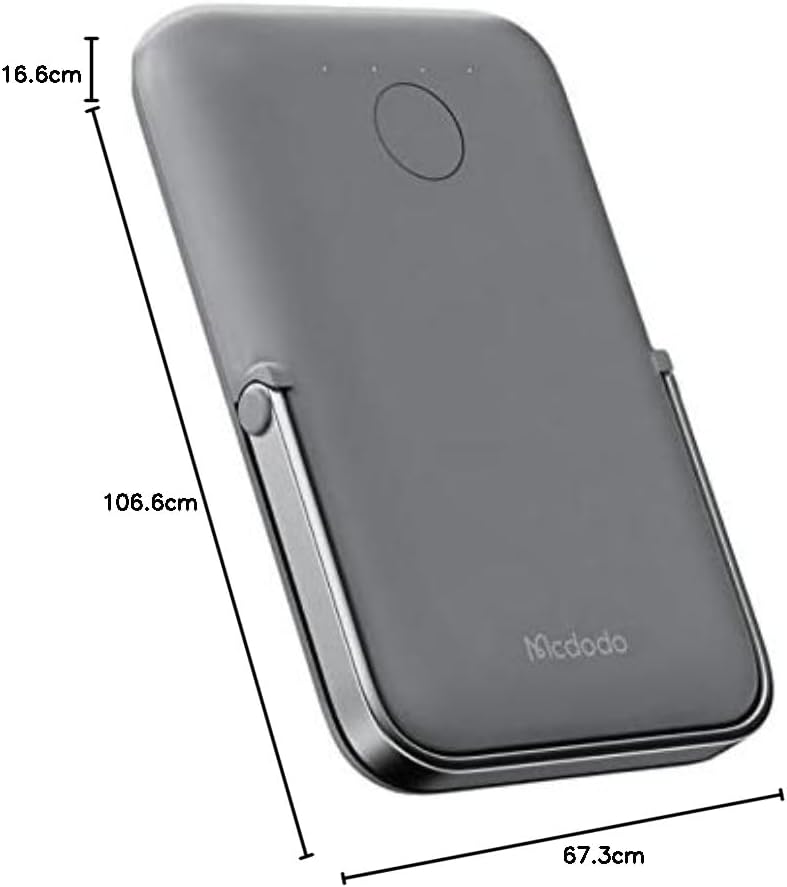
Imej: Atas ke bawah view of the Mcdodo MC-7050 Power Bank illustrating its compact dimensions, approximately 10.7 cm in length, 6.7 cm in width, and 1.7 cm in thickness.
Waranti dan Sokongan
For warranty information and technical support, please refer to the warranty card included in your product packaging or visit the official Mcdodo webtapak. Simpan resit pembelian anda sebagai bukti pembelian.
Mcdodo Official Webtapak: www.mcdodo.com