
1. Pengenalan
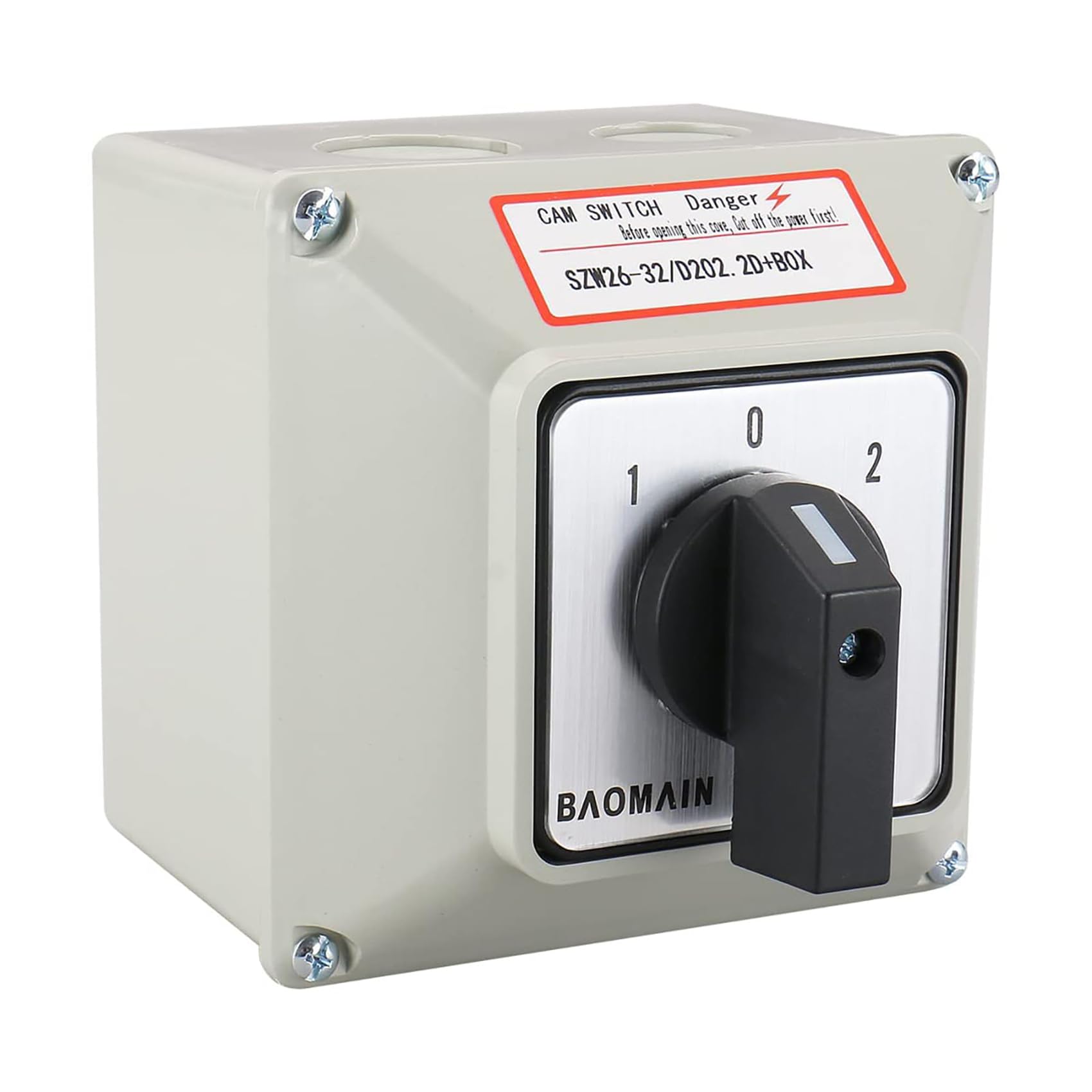
This manual provides instructions for the installation, operation, and maintenance of the BAOMAIN 32A 2-Phase 3-Position Cam Rotary Changeover Switch. This switch is designed for electrical wiring in power switch applications, including start-up, reversing, and speed control for squirrel cage type asynchronous motors, and can also be used for control circuit conversions. It features a durable plastic external material, 3 positions (1-0-2), and 8 screw terminals.
Rajah 1.1: Secara keseluruhan view of the BAOMAIN 32A 2-Phase 3-Position Cam Rotary Changeover Switch.
2. Maklumat Keselamatan
- Bahaya Elektrik: Installation and maintenance should only be performed by qualified personnel. Ensure power is disconnected before any work is done on the switch.
- Pendawaian yang betul: Follow all local and national electrical codes. Incorrect wiring can lead to equipment damage, injury, or fire.
- Perlindungan lebihan arus: Ensure appropriate overcurrent protection devices are installed upstream of the switch.
- Keadaan Persekitaran: Do not expose the switch to conditions beyond its specified operating environment (e.g., excessive moisture, extreme temperatures).
- Pemasangan selamat: Ensure the switch is securely mounted to prevent accidental dislodgement.
3. Ciri-ciri Produk
- Three switch positions: 1-0-2 (Maintained action type)
- Two rotors with 8 terminal skru
- Penilaian Semasa: 30 Amp
- Vol Operasitage: 660 Volt
- Material: Metal, Plastic (with plastic external enclosure)
- Penilaian Perlindungan Antarabangsa: IP65
4. Kandungan Pakej
Pakej termasuk item berikut:
- 1 x BAOMAIN Changeover Switch with Enclosure
- Mounting Screws and Accessories (as shown in Figure 4.1)

Rajah 4.1: Komponen dan aksesori yang disertakan.
5. Dimensi
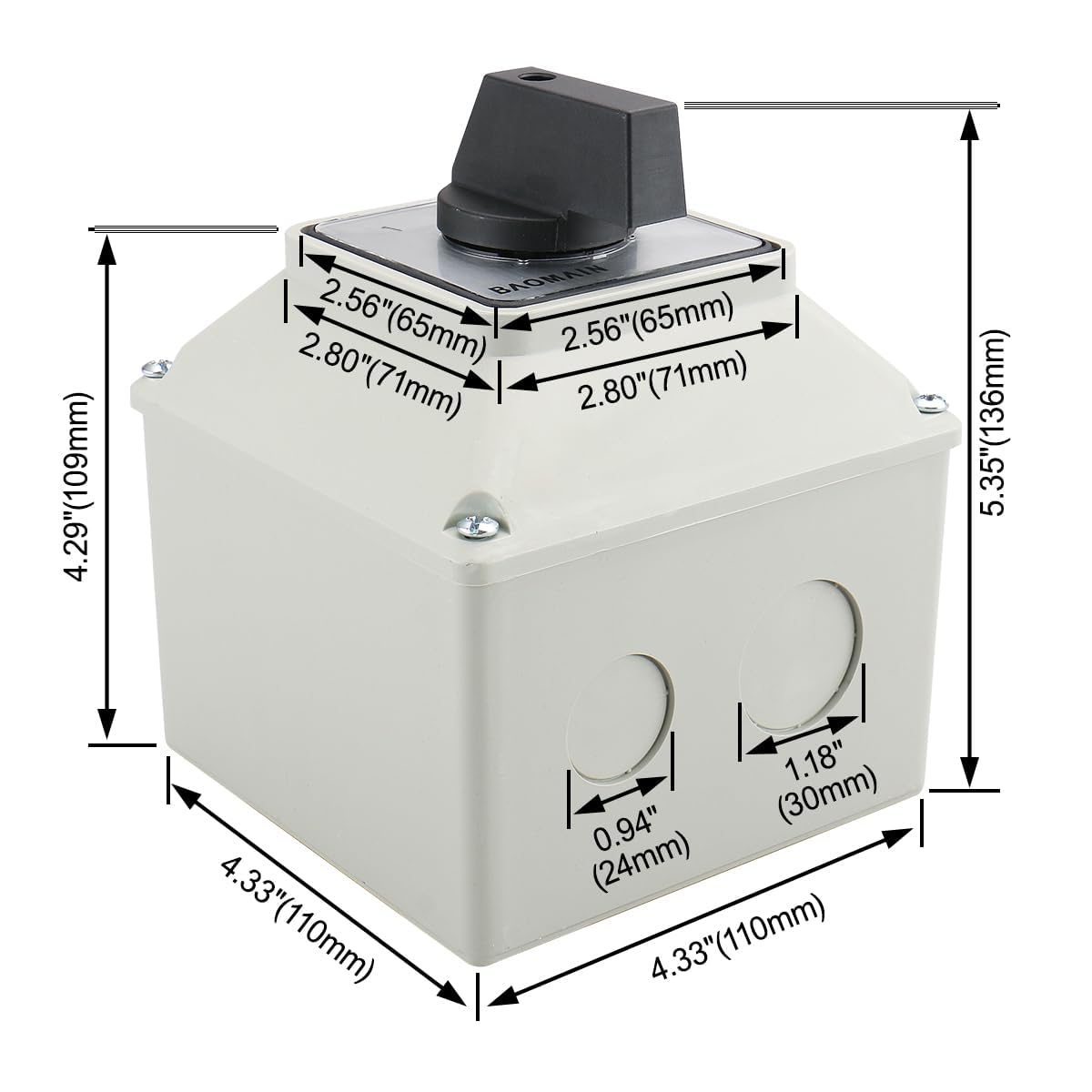
Refer to Figure 5.1 for the physical dimensions of the changeover switch with its enclosure.
Rajah 5.1: Dimensi produk.
6. Pemasangan
- Putuskan Kuasa: Before beginning installation, ensure all power to the circuit is completely disconnected at the main breaker or fuse box. Verify with a voltage penguji.
- Pasang Kandang: Select a suitable, secure location for mounting the switch enclosure. Use the provided mounting screws and hardware to firmly attach the enclosure to a stable surface.
- Sediakan Pendawaian: Route the necessary electrical wires into the enclosure through the designated entry points. Ensure proper wire gauge for the 30 Amp penilaian semasa.
- Sambungkan Terminal: Refer to the wiring diagram in Section 7. Connect the wires to the appropriate screw terminals (1-8) according to your application's requirements. Ensure all connections are tight and secure.
- Kandang Selamat: Once wiring is complete and verified, securely close the enclosure to maintain its IP65 rating.
- Pulihkan Kuasa: Carefully restore power to the circuit and test the switch operation.
7. Wiring Diagram and Operation
The BAOMAIN changeover switch features three positions (1-0-2) and 8 terminals. The diagram below illustrates the terminal connections for each position.

Figure 7.1: Terminal connection diagram for 3 positions.
Jawatan Operasi:
- Position 0 (OFF): In this central position, all terminals are disconnected. This is the neutral or off state.
- Kedudukan 1: When the rotary handle is turned to position '1', terminals 1-2 and 5-6 are connected and active.
- Kedudukan 2: When the rotary handle is turned to position '2', terminals 3-4 and 7-8 are connected and active.
Nota: Only use two wires when connecting or working with the switch, as indicated in the diagram.
8. Penyelenggaraan
- Pemeriksaan Berkala: Periodically inspect the switch for any signs of physical damage, wear, or loose connections.
- Pembersihan: Keep the switch and enclosure clean and free from dust and debris. Use a dry, soft cloth for cleaning. Do not use abrasive cleaners or solvents.
- Keketatan Terminal: Over time, terminal screws may loosen. Periodically check and tighten all terminal connections to ensure good electrical contact.
- Integriti Lampiran: Ensure the enclosure remains sealed to maintain its IP65 rating, protecting against dust and water ingress.
9. Penyelesaian masalah
- Tiada Kuasa untuk Memuatkan:
- Check the main power supply to the switch.
- Ensure the switch is in the correct operating position (1 or 2).
- Verify all terminal connections are secure and properly wired according to the diagram.
- Check for tripped circuit breakers or blown fuses upstream.
- Switch Feels Stiff or Loose:
- A stiff switch might indicate internal debris or damage. Do not force it.
- A loose switch handle may indicate internal component wear or damage.
- If either occurs, discontinue use and inspect the switch. Replacement may be necessary.
- Terlalu panas:
- Overheating can be caused by loose connections, excessive current, or an undersized switch for the load.
- Immediately disconnect power and investigate the cause. Ensure the load current does not exceed the switch's 30 Amp penilaian.
10. Spesifikasi
| Spesifikasi | Nilai |
|---|---|
| Nombor Model | SZW26-32/D202.2D |
| Jenama | BAOMAIN |
| Mod Operasi | 1-0-2 (Maintained) |
| Penilaian Semasa | 30 Amps |
| Vol Operasitage | 660 Volt |
| Bilangan Jawatan | 3 |
| Bilangan Terminal | 8 (Screw Type) |
| Jenis Kenalan | Biasa Terbuka |
| Jenis Suis | Rotary |
| bahan | Logam, Plastik |
| Bahan Kenalan | Perak |
| Penilaian Perlindungan Antarabangsa | IP65 |
| Dimensi Produk (L x W x H) | 11 x 11 x 13 cm |
| Berat badan | 508 g |
11. Waranti dan Sokongan
Warranty information for this product is not available in the provided data. For specific warranty details or technical support, please refer to the product packaging or contact BAOMAIN customer service directly through their official channels.