
FOREVER SB-315
Manual Pengguna Jam Tangan Pintar FOREVER SB-315 Fitband
Model: SB-315
1. Pengenalan
The FOREVER SB-315 Fitband Smartwatch is a versatile activity tracker designed to help you monitor your fitness and stay connected. Featuring a heart rate sensor, step counter, distance tracker, and sleep monitor, it provides comprehensive insights into your daily activity. Its discreet and lightweight design, coupled with a long-lasting battery, ensures maximum comfort and convenience.
This manual provides detailed instructions on how to set up, operate, and maintain your SB-315 smartwatch to ensure optimal performance and longevity.

Rajah 1.1: Depan view of the FOREVER SB-315 Fitband Smartwatch.
2. Persediaan
2.1 Membuka Kotak dan Caj Permulaan
Carefully remove all components from the packaging. The box should contain the SB-315 smartwatch and its charging cable. Before first use, fully charge the device.
- Connect the charging cable to the charging contacts on the back of the smartwatch.
- Palamkan hujung USB kabel ke dalam penyesuai kuasa USB standard (tidak disertakan) atau port USB komputer.
- Paparan jam tangan akan menunjukkan status pengecasan. Cas penuh biasanya mengambil masa 2-3 jam.
- The 155 mAh battery provides up to 10 days of standby time on a single charge.

Figure 2.1: The SB-315 Smartwatch and its retail packaging.
2.2 Pemasangan Apl dan Berpasangan
To unlock the full potential of your SB-315 smartwatch, you need to install the companion application on your smartphone and pair the devices via Bluetooth.
- Muat turun Apl: Cari untuk the "Forever Smart" or "Forever Fit" app (refer to the packaging or quick start guide for the exact app name) on the Apple App Store (for iOS 10.0 and above) or Google Play Store (for Android 5.0 and above).
- Dayakan Bluetooth: Pastikan Bluetooth didayakan pada telefon pintar anda.
- Buka Apl: Launch the installed application on your smartphone.
- Pasangkan Peranti: Follow the in-app instructions to add a new device. Select "SB-315" from the list of available devices. The app will guide you through the pairing process.
- Berikan Kebenaran: Benarkan kebenaran yang diperlukan (cth., pemberitahuan, lokasi, data kesihatan) agar aplikasi berfungsi dengan betul.
Sebaik sahaja berjaya dipasangkan, jam tangan akan menyegerakkan masa dan data dengan telefon pintar anda.
3. Mengendalikan Jam Pintar Anda
3.1 Navigasi Asas
The SB-315 features a bright 0.96-inch (or 1.3-inch, depending on specific model variant) display. Navigate through menus by swiping across the screen and tapping to select options.
- Leret ke atas/bawah: Scroll through different functions and menus.
- Leret Kiri/Kanan: Access quick views like daily activity, heart rate, or notifications.
- Ketik: Select an option or enter a sub-menu.
- Press Side Button (if applicable): Kembali ke skrin utama atau hidupkan/matikan kuasa.
3.2 Fungsi Teras
The SB-315 is equipped with several features to help you monitor your health and fitness.
- Pemantauan Denyut Jantung: The integrated heart rate sensor continuously monitors your heart rate. View data masa nyata pada jam tangan atau arah aliran terperinci dalam apl.
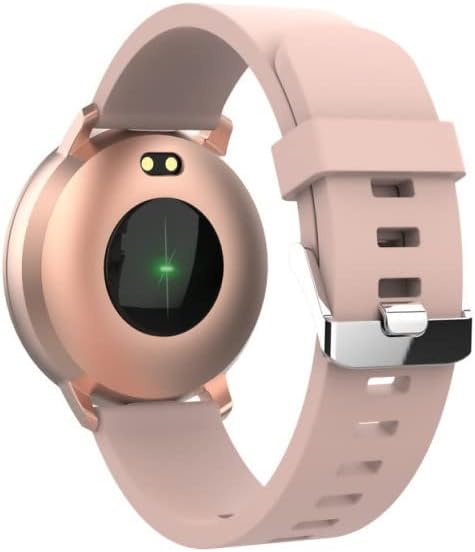
Rajah 3.1: Belakang view of the SB-315, highlighting the heart rate sensor.
- Penjejakan Aktiviti: Tracks steps taken, distance covered, and calories burned throughout the day.
- Pemantauan Tidur: Automatically monitors your sleep patterns, including deep sleep, light sleep, and awake times. Access detailed sleep analysis in the companion app.
- Mod Sukan: Select from various sports modes such as running, cycling, climbing, and walking to track specific workout data.
- Peringatan Penghidratan: Set reminders to ensure you drink enough water throughout the day.
3.3 Ciri Pintar
- Pemberitahuan: Receive instant notifications for incoming calls, SMS messages, and alerts from social media applications directly on your wrist.
- Kawalan Kamera Jauh: Use your smartwatch as a remote shutter for your smartphone's camera.
- Kawalan Muzik: Kawal main balik muzik pada telefon pintar anda (main, jeda, langkau trek) terus dari jam tangan.
- Penyesuaian Wajah Jam: Personalize your watch by choosing from various watch faces available through the companion app.
- Jam loceng: Set silent vibrating alarms to wake you up or remind you of important events.
4. Penyelenggaraan
4.1 Pembersihan dan Penjagaan
To ensure the longevity and proper functioning of your SB-315 smartwatch, follow these cleaning and care guidelines:
- Pembersihan: Kerap mengelap skrin jam tangan dan tali dengan lembut, damp, lint-free cloth. Avoid using harsh chemicals, abrasive cleaners, or solvents.
- Pengeringan: Ensure the watch is completely dry before charging or wearing, especially after exposure to water.
- Penjagaan Tali: If the strap is removable, clean it separately. Allow it to air dry completely before reattaching.
4.2 Rintangan Air (IP67)
The SB-315 smartwatch is rated IP67, meaning it is protected from dust and can withstand immersion in water up to 1 meter for up to 30 minutes. While it is water-resistant, it is not waterproof for prolonged submersion or high-pressure water activities.
- Do not wear the watch while showering with hot water, in saunas, or steam rooms.
- Elakkan menekan butang di bawah air.
- If the watch gets wet, wipe it dry thoroughly before charging.
4.3 Penjagaan Bateri
Untuk memaksimumkan hayat bateri dan prestasi:
- Cas jam tangan sepenuhnya sebelum penggunaan pertama.
- Elakkan daripada mengalirkan bateri sepenuhnya dengan kerap.
- Simpan jam tangan di tempat yang sejuk dan kering apabila tidak digunakan untuk tempoh yang lama.
- Gunakan hanya kabel pengecasan yang disediakan.
5. Penyelesaian masalah
If you encounter issues with your SB-315 smartwatch, refer to the following common problems and solutions:
| Masalah | Kemungkinan Punca | Penyelesaian |
|---|---|---|
| Jam tangan tidak dihidupkan | Bateri lemah; peranti beku | Charge the watch for at least 30 minutes. If still unresponsive, try a soft reset (refer to app or manufacturer's weblaman web untuk arahan khusus). |
| Tidak boleh berpasangan dengan telefon pintar | Bluetooth off; app not running; watch not discoverable; interference | Ensure Bluetooth is on for both devices. Restart both the watch and phone. Make sure the app is open and searching. Forget previous pairings on phone. |
| Pemberitahuan tidak diterima | App permissions not granted; notification settings off; app not running in background | Check app permissions in phone settings. Verify notification settings within the companion app. Ensure the app is running in the background. |
| Inaccurate heart rate/step count | Improper fit; sensor obstruction; software glitch | Ensure the watch is worn snugly on the wrist, about one finger's width above the wrist bone. Clean the sensor on the back of the watch. Restart the watch. |
| Hayat bateri pendek | Frequent use of features; high brightness; constant notifications | Reduce screen brightness. Limit continuous heart rate monitoring. Turn off unnecessary notifications. Ensure background app refresh is optimized. |
If the problem persists, please contact FOREVER customer support for further assistance.
6. Spesifikasi
Key technical specifications for the FOREVER SB-315 Fitband Smartwatch:
| Ciri | Perincian |
|---|---|
| Nama Model | SB-315 |
| Jenama | SELAMANYA |
| warna | Merah jambu |
| Teknologi Ketersambungan | Bluetooth 5.0 |
| Saiz Paparan | 0.96" (or 1.3", depending on specific model variant) - 240 x 240 pixels |
| Kapasiti Bateri | 155 mAh Litium-polimer |
| Masa Siap Sedia Maks | Sehingga 10 hari |
| Penilaian Ketahanan Air | IP67 |
| Peranti Serasi | Smartphones (iOS ≥ 10.0, Android ≥ 5.0) |
| Ciri Khas | Heart Rate Monitor, Sleep Monitor, Notification, Alarm Clock, Activity Tracker, Remote Camera/Music Control |
| Berat Bersih | 57g |
7. Waranti dan Sokongan
For warranty information, please refer to the warranty card included in your product packaging or contact your point of purchase. Warranty terms and conditions may vary by region and retailer.
For technical support, troubleshooting assistance beyond this manual, or inquiries about spare parts, please visit the official FOREVER weblaman web atau hubungi jabatan khidmat pelanggan mereka. Butiran perhubungan biasanya terdapat pada halaman pengilang webtapak atau pembungkusan produk.
Manufacturer: TelForceOne
Ask a question about this manual
Ask about setup, troubleshooting, compatibility, parts, safety, or missing instructions. Manuals+ will review the question and use this page’s manual context to help answer it.