
Pipishell PILFK1
Manual Arahan Pemasangan Dinding TV Gerak Penuh Pipishell
Model: PILFK1 | Brand: Pipishell
pengenalan
Thank you for choosing the Pipishell Full Motion TV Wall Mount. This manual provides detailed instructions for safe installation, operation, and maintenance of your TV mount. Designed for most 37-75 inch TVs weighing up to 132lbs, this mount offers full motion adjustment for optimal viewing.
Maklumat Keselamatan Penting
Please read all instructions carefully before installation. Failure to do so may result in personal injury or property damage. Keep this manual for future reference.
- Kapasiti Berat: Jangan melebihi kapasiti berat maksimum 132 lbs (60 kg).
- Keserasian Saiz TV: Suitable for TVs between 37 and 75 inches.
- Keserasian VESA: Compatible with VESA mounting patterns from 200x100mm to 600x400mm. Verify your TV's VESA pattern before installation.
- Jenis Dinding: This mount is designed for installation on 12" or 16" wood studs, solid concrete, or brick walls. JANGAN pasang di dinding kering sahaja.
- Ensure all screws are tightened securely but do not overtighten.
- Sentiasa gunakan pencari stud untuk mencari stud kayu dengan tepat.
Apa yang ada dalam Kotak
Pakej termasuk komponen berikut:
- Pemasangan Pemasangan Dinding TV
- Templat Pemasangan
- Manual Arahan
- Standard Mounting Hardware (various TV bolts, lag screws, washers, spacers, wall anchors)
- Tahap Kecil
- Pengikat Kabel
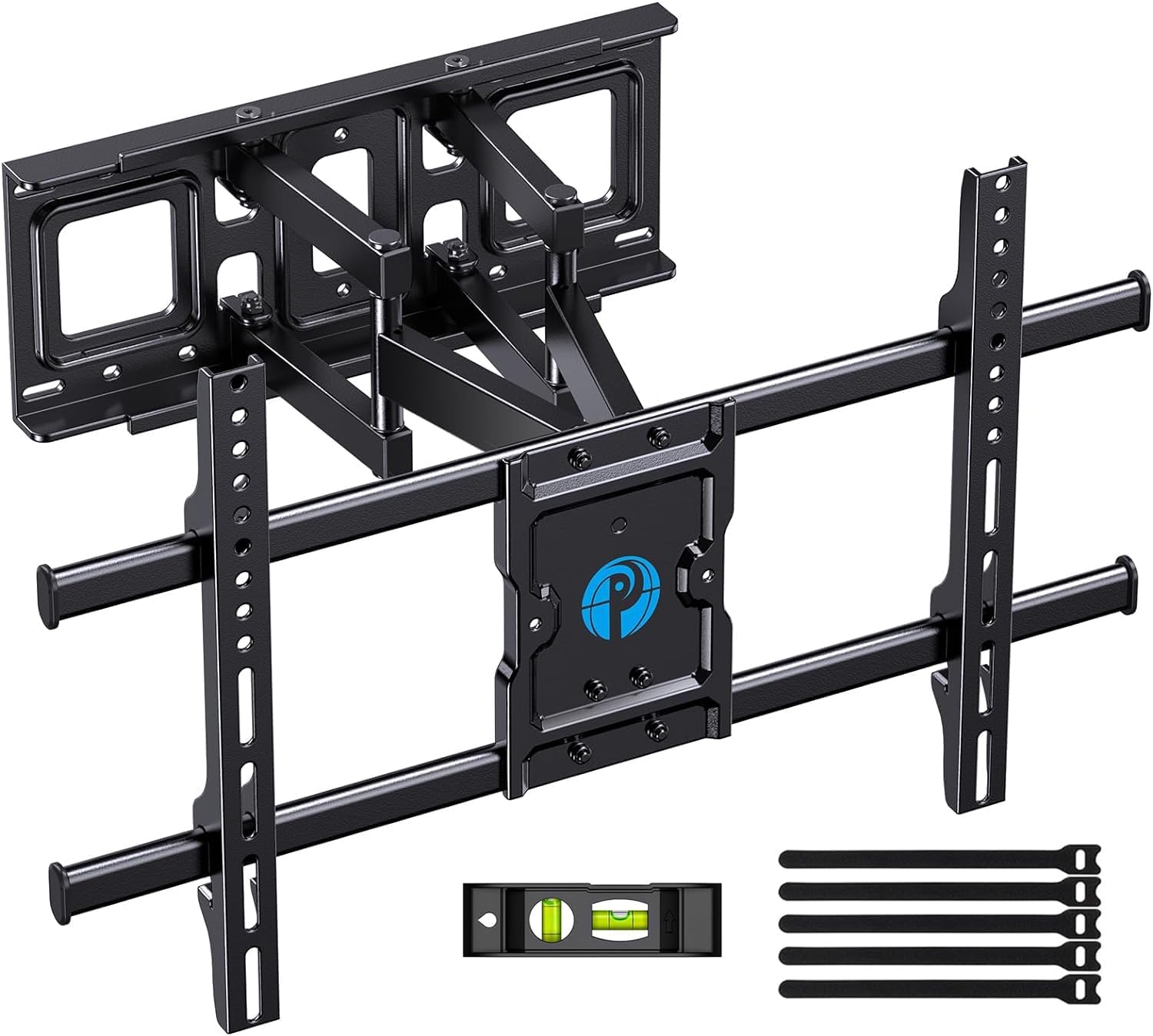
Image: All components included in the Pipishell TV Wall Mount package.
Spesifikasi
| Spesifikasi | Nilai |
|---|---|
| Dimensi Produk | 23.62 x 0.79 x 15.75 inci |
| Berat Barang | 10.56 paun |
| Saiz Serasi Maksimum | 75 Inci |
| Saiz Serasi Minimum | 37 Inci |
| Kapasiti Beban Maksimum | 132 paun (60 kg) |
| Keserasian VESA | 200x100mm hingga 600x400mm |
| Jenis Pergerakan | Swivel, Tilt, Extension |
| bahan | Keluli Aloi |
| warna | Hitam |
| Nombor Model | PILFK1 |
Persediaan dan Pemasangan
The installation process is designed to be straightforward. Always ensure you have the necessary tools and verify your wall construction before drilling.
1. Sahkan Keserasian TV
Before starting, ensure your TV's size, weight, and VESA pattern are compatible with the mount. The mount supports VESA patterns from 200x100mm to 600x400mm.

Image: How to measure your TV's VESA pattern.
2. Choose Wall Type and Location
Identify your wall type (wood studs, concrete, or brick). Use a stud finder for wood studs. The mount fits 12" and 16" wood studs. Do not install into drywall alone.

Image: Compatible wall types for installation.
3. Pasangkan Pendakap TV pada TV
Select the appropriate TV bolts and spacers from the provided hardware kit based on your TV's specifications. Secure the vertical brackets to the back of your TV.

Image: TV mount attached to a TV, highlighting its 132 lbs max load capacity.
4. Secure Wall Plate to Wall
Use the provided drilling template to mark the pilot holes on your wall. Drill the holes and secure the wall plate using the appropriate lag screws and wall anchors for your wall type. Use the included level to ensure the mount is perfectly horizontal.

Image: Using the drilling template to mark the right location on the wall.
5. Gantungkan TV pada Plat Dinding
Carefully lift the TV with the attached brackets and hook them onto the wall plate. Ensure the TV is securely seated on the mount. Tighten any safety screws to prevent accidental dislodgement.
Pengendalian dan Pelarasan
The Pipishell Full Motion TV Wall Mount offers versatile adjustments to achieve your ideal viewsudut ing.
- Pelarasan Kecondongan: Tilt your TV +5°/-15° to reduce glare and optimize viewdari ketinggian yang berbeza.
- Pelarasan Pusing: Swivel the TV +/-45° (maximum swivel angle depends on TV size) to direct the screen towards your seating area.
- Pelanjutan/Penarikan Balik: Extend the TV up to 14.84 inches from the wall for flexible viewing or collapse it to 3 inches to save space.
- Pelarasan Tahap: Fine-tune the TV's level by +/-3° after installation for a perfectly straight display.

Image: Demonstrating the mount's extension (up to 14.84 inches) and tilt range (+5°/-15°).

Image: The mount allows for a +/-45° swivel for optimum viewing from anywhere in the room.
Penyelenggaraan
To ensure the longevity and safe operation of your TV mount, follow these maintenance tips:
- Pemeriksaan biasa: Periksa semua skru dan sambungan secara berkala untuk memastikan ia kekal ketat dan selamat.
- Pembersihan: Lap dudukan dengan kain lembut dan kering untuk menghilangkan habuk. Elakkan menggunakan pembersih atau pelarut yang kasar.
- Pelinciran: If the articulating arms become stiff, apply a small amount of silicone-based lubricant to the moving joints.
Menyelesaikan masalah
If you encounter any issues with your Pipishell TV Wall Mount, try the following solutions:
- TV Tidak Aras: Use the level adjustment feature (+/-3°) to correct the TV's horizontal alignment.
- Gunung Terasa Longgar: Re-check all lag screws and TV bolts to ensure they are securely tightened into the wall studs/anchors and the TV.
- Kesukaran Menyesuaikan: Ensure no cables are snagged or obstructing movement. Apply lubricant to joints if stiffness persists.
- TV Ports Blocked: If the mount blocks TV ports, use the provided spacers or adjust the TV's position on the vertical brackets if possible.
Waranti dan Sokongan
Pipishell guarantees the quality of this TV mount to be free of defects in materials and workmanship. For any questions, assistance, or warranty claims, please contact our US-based product support team.
Anda juga boleh merujuk kepada pegawai Panduan Pengguna (PDF) untuk maklumat tambahan.