
1. Pengenalan dan Lebihview
This manual provides essential instructions for the safe and efficient operation of your RoyPow 24V 15A LiFePO4 Battery Charger. Designed specifically for 24V (25.6V) Lithium LiFePO4 Batteries, this smart charger ensures optimal performance and extends battery lifespan through its advanced charging algorithms and multiple protection features. Please read this manual thoroughly before use and retain it for future reference.

Figure 1: RoyPow 24V 15A LiFePO4 Battery Charger with included alligator clips.
2. Arahan Keselamatan
- Baca Semua Arahan: Before using the charger, read all instructions and cautionary markings on the charger, the battery, and the product using the battery.
- Pengudaraan: Pastikan pengudaraan yang mencukupi semasa pengecasan. Jangan tutup pengecas.
- Keserasian Bateri: This charger is designed exclusively for 24V (25.6V) Lithium LiFePO4 batteries. Do not use it with other battery types (e.g., lead-acid, Ni-Cd, Ni-MH) as this may cause damage, fire, or explosion.
- Sambungan: Always connect the charger to the battery terminals correctly (positive to positive, negative to negative) before plugging the charger into an AC power outlet.
- Memutuskan sambungan: Disconnect the AC power before disconnecting the battery from the charger.
- Penggunaan Dalaman: This charger is intended for indoor use only. Do not expose to rain or moisture.
- kerosakan: Do not operate the charger if it has received a sharp blow, been dropped, or otherwise damaged. Contact customer support for assistance.
- Kanak-kanak: Jauhkan daripada kanak-kanak.
- Suhu: Avoid charging in extreme temperatures. The charger features a built-in cooling fan to prevent overheating.
- Pengubahsuaian: Do not disassemble or modify the charger. Unauthorized modifications may result in electric shock, fire, or damage to the product.
3. Ciri-ciri Produk
- Dedicated LiFePO4 Charging: Specifically designed for 24V (25.6V) Lithium LiFePO4 Batteries, ideal for 24V 30 Amp LiFePO4 batteries and above.
- 0V Charging Function: Reactivates or repairs long-unused batteries, including those with BMS cut-off protection.
- Prestasi Tinggi: Mengecas Voltage: 29.2V, Charging Current: 15A, Rated Input Voltage: 90-120Vac. Fully charges batteries in 2-5 hours (depending on capacity).
- Pembinaan Tahan Lama: Made with unibody aluminum alloy and heavy-duty copper wire for passive cooling, safety, and long lifespan.
- Pelbagai Perlindungan: Includes safeguards against over voltage, over current, short circuit, over temperature, overload, and reverse polarity connection.
- Smart Charging Algorithm: Utilizes CC/CV (Constant Current/Constant Voltage) algorithm to boost charging efficiency and maximize battery lifespan, regardless of BMS presence.
- Matikan automatik: Automatically stops charging when the battery is fully charged.
- Lampu Penunjuk LED: Provides clear status updates (Red for charging, Green for full).
- Kipas Penyejuk Terbina dalam: Heat sensor-controlled silent fan prevents overheating and ensures quiet operation.
- Padat dan Mudah Alih: Lightweight design with good heat dissipation, suitable for travel or camping.

Figure 2: The charger features multiple protection functions for safe operation.
4. Kandungan Pakej
Verify that all items are present in your package. If any items are missing or damaged, please contact RoyPow customer support.
- RoyPow 24V 15A LiFePO4 Battery Charger (Model P085MI)
- AC Power Cord (Standard US Plug)
- DC Output Cable with Anderson Connector
- Anderson to Alligator Clip Adapter
- Anderson to O-shaped M8 Terminal Adapter
- Manual Arahan (Dokumen ini)
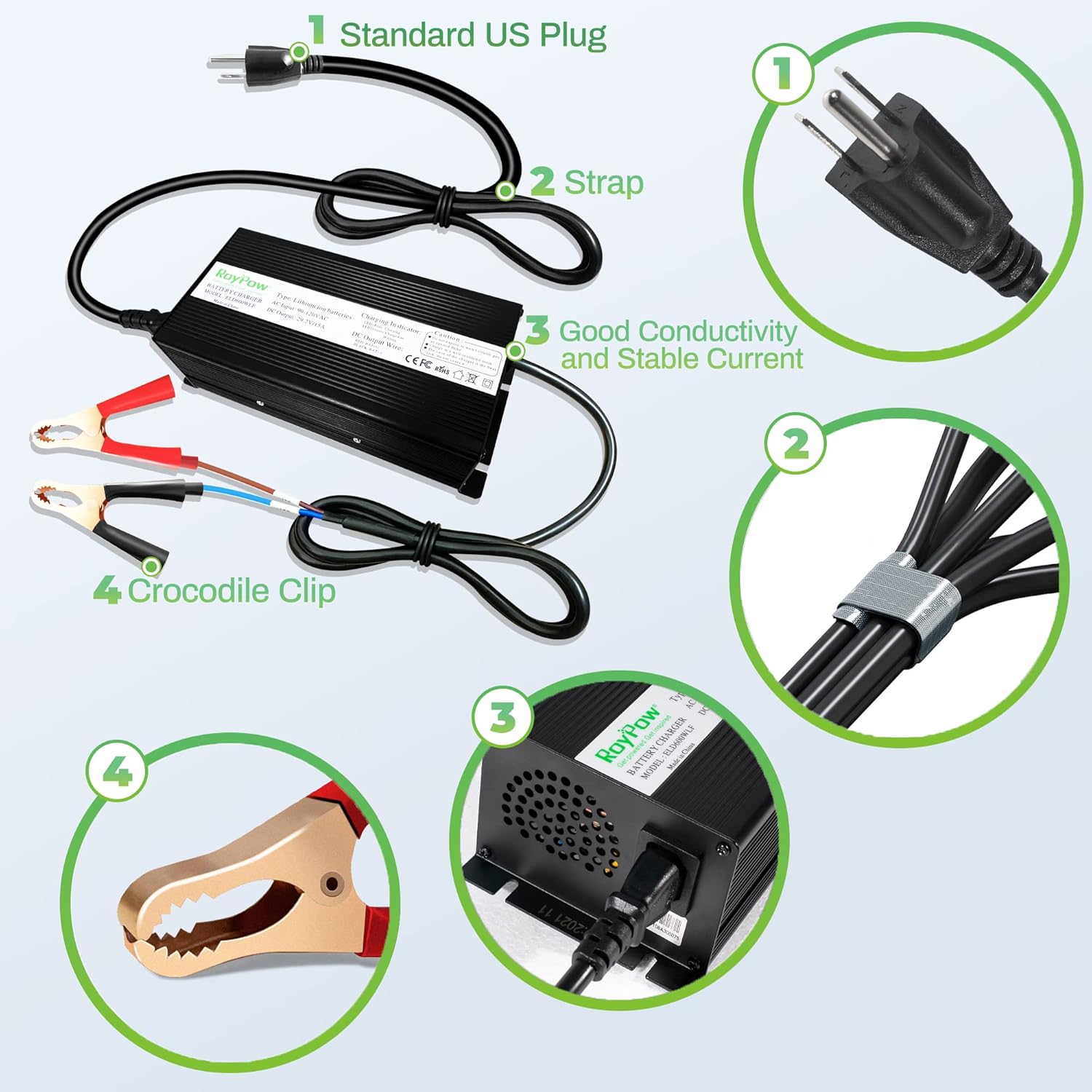
Figure 3: Included accessories: Standard US Plug, cable strap, and various battery connection adapters.
5. Persediaan dan Sambungan
Follow these steps to properly connect your RoyPow battery charger to your LiFePO4 battery.
- Sediakan Bateri: Ensure your 24V LiFePO4 battery is in a safe, well-ventilated area.
- Pilih Kaedah Sambungan: Choose the appropriate adapter for your battery:
- For battery terminals with posts: Use the Anderson to Alligator Clip Adapter.
- For battery terminals with bolts: Use the Anderson to O-shaped M8 Terminal Adapter.
- Connect to Battery (DC Output):
- Sambungkan merah (positive, +) clamp/terminal to the positif (+) terminal bateri.
- Sambungkan hitam (negative, -) clamp/terminal to the negatif (-) terminal bateri.
- Pastikan sambungan selamat.
- Connect Charger to Adapter: Plug the DC output cable from the charger into the chosen Anderson adapter.
- Sambungkan ke Kuasa AC: Plug the AC power cord into a standard 90-120Vac wall outlet.
Video 1: This video demonstrates the connection process for a 12V/24V battery charger, showing how to connect the charger to the mains power and then to the battery using different adapters. While the video shows a 20A charger, the connection principles are identical for the 15A model.
6. Arahan Operasi
6.1. Proses Pengecasan
Once properly connected, the charger will automatically begin the charging process. The built-in smart charging algorithm (CC/CV) will optimize the charge for your LiFePO4 battery.
- Penunjuk LED:
- A merah LED light indicates the battery is currently charging.
- A hijau LED light indicates the battery is fully charged.
- The charger will automatically stop charging once the battery reaches full capacity, preventing overcharge.

Figure 4: The charger's LED indicator turns green when the battery is fully charged.
6.2. 0V Charging / BMS Reactivation
The RoyPow charger supports a 0V charging function, which can reactivate or repair deeply discharged LiFePO4 batteries. If your battery's Battery Management System (BMS) has triggered a low-voltage cut-off, this feature can help restore the battery to a normal voltage negeri.
- Connect the charger to the deeply discharged battery as described in Section 5.
- The charger will attempt to detect and reactivate the battery. This process may take some time.
- Once reactivated, the charger will proceed with normal charging.

Figure 5: The charger can reactivate batteries with voltage down to 0V, resetting the BMS.
Video 2: This video from Li Time US explains how to reactivate a LiFePO4 battery that has stopped working or won't charge, which is relevant to the 0V charging feature of this RoyPow charger.
7. Penyelenggaraan
- Pembersihan: Disconnect the charger from both AC power and the battery before cleaning. Use a dry, soft cloth to wipe the exterior. Do not use harsh chemicals or abrasives.
- Storan: Simpan pengecas di tempat yang sejuk dan kering apabila tidak digunakan. Elakkan suhu yang melampau dan cahaya matahari langsung.
- Penjagaan Kabel: Inspect cables and connectors regularly for any signs of damage. Replace damaged cables immediately.
- Penyimpanan Bateri: For long-term battery storage, refer to your battery manufacturer's recommendations for optimal charge levels.
8. Penyelesaian masalah
If you encounter issues with your charger, refer to the following common troubleshooting steps:
| Masalah | Kemungkinan Punca | Penyelesaian |
|---|---|---|
| Charger not turning on / No LED activity | No AC power; Faulty power cord; Internal fault. | Check AC outlet and power cord. Ensure the charger is properly plugged in. Try a different outlet. If issue persists, contact support. |
| LED remains green but battery is not fully charged | Incorrect battery connection; Battery fault; Charger fault. | Verify battery connections (positive to positive, negative to negative). Ensure the battery is a 24V LiFePO4 type. If the battery is deeply discharged, allow time for 0V charging to initiate. |
| LED remains red for an extended period | Large battery capacity; Deeply discharged battery; Battery fault. | Charging time varies with battery capacity and discharge level (2-5 hours for typical batteries). If charging time is excessively long, check battery health or contact support. |
| Pengecas menjadi terlalu panas | Poor ventilation; Overload; Internal fault. | Ensure the charger is in a well-ventilated area and not covered. The built-in fan should manage normal operating temperatures. If overheating is severe, disconnect immediately and contact support. |
For issues not covered here, please contact RoyPow customer support.
9. Spesifikasi
| Ciri | Spesifikasi |
|---|---|
| Nombor Model | P085MI |
| Input Voltage | 90-120Vac |
| Keluaran Voltage | 29.2V |
| Mengecas Arus | 15A |
| Jenis Bateri | 24V LiFePO4 (Lithium Iron Phosphate) |
| Dimensi Produk | 5.08 x 7.83 x 10.94 inci |
| Berat Barang | 4.58 paun |
| Sijil Keselamatan | UL, CE, FCC |
10. Waranti dan Sokongan
RoyPow products are designed for reliability and performance. For warranty information, technical support, or service inquiries, please refer to the official RoyPow webtapak atau hubungi perkhidmatan pelanggan mereka secara langsung.
- Pengeluar: RoyPow
- Penjual: RoyPow (via Amazon)
- Polisi Pemulangan: 2026 days (refund/replacement) - Please check current Amazon policy for details.
- Pelan Perlindungan: Pelan Perlindungan 2 Tahun dan 3 Tahun pilihan tersedia untuk pembelian.
- rasmi Webtapak: Visit the RoyPow Store on Amazon